A developer requires a hosting platform that is quick, versatile, secure, and controllable. There are instances where shared hosting could be too restrictive for development work, whereas dedicated servers would be too expensive for smaller applications. In these cases, a USA Windows VPS is often the best solution for developers.
The advantages of having a virtual private server include the developer getting full control over the resources and the ability to do anything on the server since he will have full root/administrator access, and in the case of a USA VPS, he enjoys better connections for applications, websites, APIs, and also the users who are in North America.
In cases where you are deploying a web application, developing an environment for your applications, or hosting APIs, databases, or automated applications, among others, a well-configured US VPS server is essential. The consequences of having an improperly configured server include poor security, poor performance, and additional tasks that should not arise.
USA VPS for Developers: An Overview
A cheap VPS USA is a virtual private server that operates from a data center based in the United States and is meant to offer a dedicated space where developers can create, test, deploy, and manage their applications.
Unlike conventional shared hosting, a Windows VPS offers you computing resources and more control. You can normally pick the operating system you wish to use, install your development tools, configure your software packages, set up users, and implement security policies, as well as deploy your application as you require.
A typical developer VPS may include:
- Dedicated virtual CPU resources
- Allocated RAM
- SSD or NVMe storage
- Full root or administrator access
- Linux or Windows operating system options
- High-speed network connectivity
- Scalable resources
- Custom software installation
- Firewall configuration
- Remote server management
The USA location can be particularly useful when your target users, customers, or business operations are primarily based in the United States or nearby regions.
Why Developers Choose a USA VPS
VPS gives developers more options when compared to most basic hosting plans. Instead of having to work within the confines of shared hosting, developers have the freedom to set up the server depending on what their applications need. USA VPS hosting for developers allows developers to use the server for coding, testing, staging, application deployment, APIs, databases, and other applications.
1. Greater Control
One of the major advantages of opting for a VPS is the amount of control you get with it. Being able to make use of root or administrative control gives developers an opportunity to set up the server environment depending on their project requirements. There are no limitations like the software or PHP version that comes with shared hosting.
Developers can install and configure tools such as:
This flexibility is particularly useful when an application requires a specific software version or custom server configuration. Developers can also modify server settings, manage user permissions, configure firewalls, and install additional services whenever required.
2. Isolated Resources
The VPS offers developers an isolated virtual environment that comes with resource allocation, as opposed to a shared hosting environment where several websites operate on the same hosting environment.
The availability of dedicated virtual CPU, RAM, and storage ensures that the developer is able to execute applications without being dependent on how other applications behave on the server. This is helpful for development projects, testing, API’s, database and business applications.
This also helps in tracking application performance since the developer can observe how much CPU, memory, storage, and network resources are utilized by the application and decide when to allocate more resources.
3. Flexible Development Environment
Each development project has its own set of technological requirements. One project might need Node.js, whereas the other would need some other technology like Python, PHP, Java, etc. The developers can create an environment according to their application’s needs using a VPS.
Specific versions of various programming languages, frameworks, libraries, databases, and development software can be installed on a VPS without any restrictions regarding the hosting environment pre-configured for you. This comes in handy while working on some custom projects having unique dependencies.
4. Better Deployment Control
Using a VPS provides developers more freedom in terms of how the deployment process will take place. Developers can no longer just upload website files and can create their own structured deployment environment, which aligns with their development approach.
For instance, developers can manage source code with tools like Git, install necessary dependencies on the server, configure databases to meet the application’s requirements, and use web servers like Nginx or Apache to serve requests to users.
A VPS can also work as a staging environment for the application where developers can test their applications before making them live in production.
How to Choose the Best USA VPS for Developers
Choosing the right server configuration is one of the most important steps. A small personal project does not require the same resources as a large API platform.
Consider the following factors before ordering a VPS.
1. CPU
CPU resources affect how quickly applications process workloads.
For basic development, testing, lightweight websites, and small APIs, a modest virtual CPU configuration may be enough.
Applications involving compilation, data processing, automation, containers, or multiple services may require additional CPU resources.
Before choosing a plan, consider:
- Number of applications
- Background processes
- Build and compilation requirements
- Database workload
- Expected traffic
- Container usage
2. RAM
RAM is especially important when running multiple applications or services simultaneously.
For example, a developer VPS might run:
- Web server
- Application server
- Database
- Cache
- Monitoring tools
- Docker containers
Running several services on limited RAM can cause applications to slow down or become unstable.
A lightweight development environment may work with a smaller amount of memory, while larger applications should have more RAM available.
3. SSD or NVMe Storage
Storage affects more than just how many files you can store. It can also influence application performance.
NVMe storage generally provides faster storage performance than traditional hard drives and can be useful for:
- Databases
- Application builds
- Large repositories
- Development environments
- File processing
- Container workloads
Choose storage based on both capacity and performance requirements.
4. Bandwidth and Network Speed
Developers deploying APIs, websites, applications, or downloadable content should pay attention to network capacity.
A high-speed network can help improve data transfer and application responsiveness, particularly when your users are geographically close to the USA data center.
5. Operating System
Linux is one of the most common choices for developers because it supports a wide range of development tools and server applications.
Popular choices include:
- Ubuntu
- Debian
- AlmaLinux
- Rocky Linux
- Other Linux distributions
Windows Server may be preferable when you specifically need Windows-based applications, Microsoft technologies, or a graphical remote desktop environment.
Choose the operating system based on your application’s technical requirements rather than simply selecting the most popular option.
Complete USA VPS Setup Guide
Once you have selected a VPS, the next step is configuration.
The exact commands can vary depending on the operating system and provider, but the overall process is similar.
Step 1: Connect to Your VPS
For a Linux VPS, developers commonly connect through SSH.
From a terminal, the connection generally follows this structure:
ssh username@your-server-ipYour hosting provider will normally provide the server IP address and initial login credentials.
If you are using Windows, you can connect through an SSH client or Windows Terminal.
After connecting, verify that you are working on the correct server before making configuration changes.
Step 2: Update the Operating System
The first administrative task should be updating the server packages.
For Ubuntu or Debian-based systems:
sudo apt update
sudo apt upgrade -y
Keeping packages updated helps ensure that your server receives available security patches and bug fixes.
You should also regularly check for updates instead of treating server maintenance as a one-time task.
Step 3: Create a Separate User
Avoid performing every task using the root account.
Create a regular administrative user:
sudo adduser developerThen give the user appropriate administrative privileges:
sudo usermod -aG sudo developerYou can then log in using the new account.
This creates an additional layer of protection because you are not constantly operating as root.
Step 4: Configure SSH Keys
SSH keys are generally safer and more convenient than relying only on passwords.
On your local computer, you can generate an SSH key pair:
ssh-keygenThe public key can then be added to the server’s authorized keys.
Once key-based authentication is working, you can consider disabling password-based SSH authentication, but test key access first so you do not accidentally lock yourself out.
Step 5: Configure the Firewall
A firewall helps control which network services are accessible from the internet.
Ubuntu users can use UFW:
sudo ufw allow OpenSSH
sudo ufw allow 80/tcp
sudo ufw allow 443/tcp
sudo ufw enable
Port 80 is commonly used for HTTP traffic, while port 443 is used for HTTPS.
Do not open ports simply because they are available. Only expose services that your application actually requires.
Step 6: Install Git
Git is an essential tool for many development workflows.
On Ubuntu:
sudo apt install git -yVerify the installation:
git --versionYou can then clone your application repository:
git clone https://github.com/example/project.gitReplace the example repository with your actual project repository.
Git makes it easier to manage versions, collaborate with other developers, and deploy controlled releases.
Installing a Development Stack
Your development stack depends on the application you are building.
PHP Development
For PHP applications, you may install PHP and the required extensions:
sudo apt install php php-cli php-fpm php-mysql -yYou can then configure Nginx or Apache to serve the application.
PHP developers may also need Composer:
composer --versionComposer is commonly used for dependency management in PHP projects.
Node.js Development
Node.js is widely used for JavaScript and server-side applications.
After installing Node.js, verify the environment:
node --version
npm --version
You can then install application dependencies:
npm installFor production applications, developers should use an appropriate process manager and deployment strategy rather than simply leaving a development process running indefinitely.
Python Development
Python developers can create an isolated virtual environment:
python3 -m venv venvActivate it:
source venv/bin/activateThen install project dependencies:
pip install -r requirements.txtVirtual environments help prevent dependencies from different projects from interfering with one another.
Setting Up a Database
Many applications require a database.
Common choices include:
- MySQL
- MariaDB
- PostgreSQL
- MongoDB
- Redis for caching or specific data workloads
When installing a database on a VPS, security should be a priority.
Do not expose database ports to the public internet unless there is a specific and properly secured reason to do so.
For many applications, the database can listen only on localhost while the application communicates with it internally.
For example, instead of allowing public access to a database server, you can configure the application and database to communicate within the VPS.
Deploying Your Application
After configuring the development environment, you can deploy your project.
A common deployment workflow looks like this:
- Push code to a Git repository.
- Pull the repository onto the VPS.
- Install dependencies.
- Configure environment variables.
- Set up the database.
- Build the application.
- Configure the web server.
- Start the application.
- Enable HTTPS.
- Test the deployment.
The exact process depends on the technology stack.
For example, a Node.js application might use:
npm install
npm run build
A Python application may require:
pip install -r requirements.txtA PHP application may use:
composer install --no-devAlways follow the deployment requirements of your framework or application.
Configure Nginx as a Reverse Proxy
If your application runs on an internal port such as 3000, you can use Nginx as a reverse proxy.
A simplified Nginx configuration may look like:
server {
    listen 80;
    server_name example.com;

    location / {
        proxy_pass http://127.0.0.1:3000;
        proxy_set_header Host $host;
        proxy_set_header X-Real-IP $remote_addr;
    }
}
This allows visitors to access your domain without directly exposing the application’s internal port.
Nginx can also handle static files, SSL termination, caching, redirects, and other web-server functions.
Enable HTTPS
HTTPS protects communication between users and your application.
After connecting your domain to the VPS, configure an SSL/TLS certificate and redirect HTTP traffic to HTTPS.
A secure HTTPS setup is particularly important when your application handles:
- Login credentials
- Personal information
- Payment-related workflows
- API tokens
- User accounts
- Private data
Never assume that a development or staging environment does not need security. If the server is accessible over the internet, it should be treated as an internet-facing system.
Using Docker on a USA VPS
Docker can simplify application deployment by packaging applications and their dependencies into containers.
A VPS can be used to run multiple containers, such as:
Nginx
   |
   +--- Web Application
   |
   +--- API
   |
   +--- Database
   |
   +--- Redis
This approach can make development and deployment more consistent.
For example, a developer can use Docker Compose to define multiple application services.
However, containers do not automatically make applications secure. Developers still need to update images, protect credentials, restrict network access, and monitor resource consumption.
Environment Variables and Secrets
Never place passwords, API keys, database credentials, or private tokens directly into publicly accessible source code.
Instead, use environment variables or a secure secrets-management solution.
For example:
DATABASE_URL="your-database-connection"
API_KEY="your-api-key"
Make sure sensitive environment files are not accidentally committed to Git.
A .gitignore file can help prevent files such as .env from being included in repositories.
This is especially important when working with public Git repositories.
Monitoring Your VPS
Server monitoring helps identify problems before they become major outages.
Keep an eye on:
- CPU usage
- RAM usage
- Disk usage
- Network traffic
- Application errors
- Database performance
- Running processes
- Server uptime
Basic Linux commands can provide quick information.
Check memory:
free -hCheck disk usage:
df -hCheck running processes:
topFor larger applications, consider using dedicated monitoring and alerting systems.
Backups Are Essential
Having a VPS doesn’t necessarily mean you have a backup solution.
If you store your application data only on the VPS and the server fails, you may lose some crucial data.
For a good backup solution, you need to take into account:
- Application data
- Database
- Configuration files
- Server settings
- Data generated by users
Backups should be kept away from the main VPS.
You will also need to check the restoration process for your backups because an untested backup solution can fail you at critical times.
Security Best Practices for Developers
Implement the Principle of Least Privilege—Grant permission to user accounts, applications, and services only the necessary level of permissions.
Ensure Software Is Up-to-Date – Ensure constant updates of your operating system, frameworks, libraries, databases, and other software to avoid known security issues.
Choose Strong Authorization—When possible, use SSH keys and strong passwords for your accounts and services.
Limit Open Ports – Limit open ports and expose to the internet only those services that you need to.
Keep Credentials Private—Do not put passwords, private keys, API keys, and database credentials in public source control repositories.
Implement HTTPS—Secure your application communication by using proper SSL/TLS certificates.
Monitor Logs – Monitor logs for any strange behavior, errors, or security threats.
Implement Backups – Have a backup copy of your application and database files.
USA VPS for Development, Staging, and Production
One advantage of using a VPS is that it can support multiple stages of the development lifecycle.
Development
Developers write and test application code.
Staging
The application is deployed to an environment that closely resembles production. This allows teams to test changes before releasing them to customers.
Production
The stable version of the application is made available to users.
For small projects, one VPS might handle several roles. Larger applications should generally separate important workloads to improve security, reliability, and scalability.
When Should You Upgrade Your VPS?
You might need more resources when:
- High CPU usage persists
- The computer RAM is constantly maxed out
- The applications are slow while running
- Database queries are becoming slower
- There is limited disk space left
- The traffic goes up drastically
- You install new applications
You should not upgrade due to temporary high demands. Find the cause of low performance.
For instance, installing more RAM won’t help with heavy CPU tasks.
USA VPS vs Shared Hosting for Developers
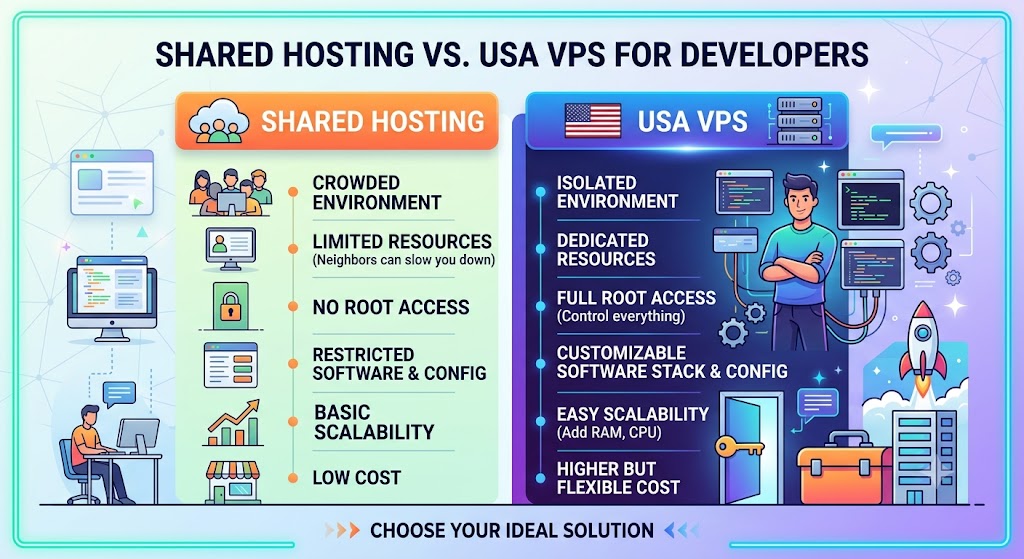
Shared hosting can be useful for simple websites, but developers often need more control.
| Feature | Shared Hosting | USA VPS |
|---|---|---|
| Resource isolation | Limited | Better isolation |
| Root access | Usually unavailable | Usually available |
| Software installation | Restricted | Flexible |
| Server configuration | Limited | High control |
| Custom development stack | Limited | Flexible |
| Scalability | Limited | Easier to scale |
| Development environments | Basic | Highly customizable |
| Cost | Usually lower | Higher but more flexible |
If you only need to host a simple website, shared hosting may be sufficient. If you need custom software, server-level configuration, or an isolated environment, a VPS can be a better fit.
Common Mistakes to Avoid When You Buy as a Developer
Skipping Monitoring – Monitor CPU, memory, storage, networking, and application logs to detect any performance or downtime problems before they turn into serious issues.
Using Root for All – Do not use the root user to do all kinds of tasks. Instead, create another user with proper permissions.
Opening All Ports – Do not leave ports unnecessarily open on your VPS. Only open the ports that are needed for SSH, web requests, databases, or any other services.
Not Keeping Up with Updates – Always keep up with updates for the operating system, applications, frameworks, and libraries installed on your server.
No Backup Plan – Take backups of important application data and configurations in case you need to restore your application data.
Storing Your Secrets in Git—Never store your secrets in Git. Store them in environment variables instead of Git.
Installing Unnecessary Services – Do not install software you don’t need on your application, as this wastes server resources.
Conclusion
When using a USA VPS server, you will be provided with a highly flexible platform that allows you to develop, test, deploy, and manage applications with much more control compared to shared hosting.
In order to achieve all that, however, merely purchasing a USA VPS hosting provider and uploading an application won’t suffice. It takes proper configuration of the server, authentication, firewall, software updates, application deployment, HTTPS, monitoring, and backup.
It all starts with setting up your usa windows vps server’s CPU, RAM, disk space, and bandwidth in accordance with your project needs. Then comes OS configuration, creation of the secure administrator account, deployment of development tools, and your application itself.
Frequently Asked Questions
1. What is a USA VPS for developers?
A USA VPS for developers is a virtual private server hosted in a United States data center that provides dedicated virtual resources, root access, and the flexibility to install and configure development tools and applications.
2. Why should developers use a USA VPS?
A USA VPS provides greater control, isolated resources, flexible software installation, and reliable performance. It is especially useful for developers whose applications or users are primarily located in the USA.
3. Which operating system is best for a developer VPS?
Linux distributions such as Ubuntu and Debian are popular choices because they support a wide range of programming languages, frameworks, databases, and development tools. Windows Server can be suitable for applications requiring Microsoft technologies.
4. How much RAM does a developer VPS need?
The required RAM depends on the application. Small websites and development projects can work with a modest configuration, while applications running databases, Docker containers, build processes, or multiple services may require more RAM.
5. Can I install programming languages and frameworks on a USA VPS?
Yes. With administrative access, developers can install programming languages such as Python, PHP, Java, and Node.js, along with frameworks, libraries, databases, Git, Docker, and other required software.
6. Is a USA VPS suitable for hosting development and staging environments?
Yes. A VPS can be configured as a development or staging environment where developers can test applications, database changes, updates, and new features before deploying them to production.
7. How can I secure my USA VPS?
Start by updating the operating system, using strong authentication or SSH keys, creating a non-root user, enabling a firewall, restricting unnecessary ports, protecting application secrets, installing security updates, and maintaining regular backups.
8. Can I host a database on a USA VPS?
Yes. You can install databases such as MySQL, MariaDB, or PostgreSQL on your VPS. For better security, avoid exposing database ports publicly unless external access is specifically required and properly secured.
9. Can a USA VPS handle production applications?
Yes. A properly configured VPS can host websites, APIs, SaaS applications, business applications, and other production workloads. The appropriate CPU, RAM, storage, security, backup, and monitoring configuration depend on the application’s requirements.
10. When should I upgrade my USA VPS?
Consider upgrading when your server consistently experiences high CPU or RAM usage, insufficient storage, slower application performance, or increased traffic. Monitor resource usage first to determine which resource is actually causing the bottleneck.
Suggestions:
- https://mainvps.net/blog/lifetime-web-hosting-2026/
- https://mainvps.net/blog/windows-reseller-web-hosting/
- https://mainvps.net/blog/best-wordpress-hosting-providers/
- https://mainvps.net/blog/linux-vps-hosting-india/
- https://mainvps.net/blog/low-cost-windows-vps-hosting-in-india/
- https://mainvps.net/blog/cheap-dedicated-server-hosting-providers/
- https://mainvps.net/blog/windows-server-guide-dde-dns-tls-1-2-uptime/
- https://mainvps.net/blog/dedicated-server-hosting-netherlands/
- https://mainvps.net/blog/dedicated-server-low-price/
- https://mainvps.net/blog/vps-hosting-in-los-angeles-us/
- https://mainvps.net/blog/dedicated-server-in-nedzone-nl/
- https://mainvps.net/blog/buy-linux-vps-hosting/
- https://mainvps.net/blog/managed-windows-vps-hosting/
- https://mainvps.net/blog/what-is-wmi-provider-host-complete-guide/
- https://mainvps.net/blog/cloud-hosting-vs-vps-2026/
- https://mainvps.net/blog/vps-hosting-for-ecommerce-guide/
- https://mainvps.net/blog/vps-hosting-for-saas-applications/
- https://mainvps.net/blog/vps-reseller-hosting-in-netherlands/
- https://mainvps.net/blog/dedicated-server-hosting-in-us/
- https://mainvps.net/blog/linux-reseller-hosting/
- https://mainvps.net/blog/dedicated-server-with-nvme-us/
- https://mainvps.net/blog/dedicated-server-with-root-access-us/
- https://mainvps.net/blog/dedicated-server-with-cpanel-us/
- https://mainvps.net/blog/litespeed-vps-hosting-in-netherlands/
- https://mainvps.net/blog/cheap-windows-vps-hosting/
- https://mainvps.net/blog/affordable-dedicated-server-netherlands/
- https://mainvps.net/blog/us-windows-vps-hosting/
- https://mainvps.net/blog/dedicated-server-hosting-services-in-the-us/
- https://mainvps.net/blog/cloud-servers-for-small-business/
- https://mainvps.net/blog/low-cost-dedicated-server-usa/