Selecting US based dedicated server hosting is one of the most important and far-reaching IT infrastructure choices that a company can make. It impacts site speed, security, regulatory compliance, and profitability. However, there are plenty of competitors making similar promises about “blazing-fast” performance, “99.99%” uptime, and “enterprise-class security,” so it’s tough to distinguish reality from marketing.
This guide takes a close look at everything you need to know about Dedicated Server Hosting Services in the US: what it is and what sets it apart from all other forms of hosting; why it matters to go with US-based infrastructure; what to expect when assessing hardware and service providers; how much all this costs; typical use cases in various industries; a step-by-step purchase process; and common buyer concerns.
What Is US Dedicated Server Hosting?
A dedicated server refers to a single computer hardware machine that is entirely reserved by an organization. No other entity shares its processor resources, memory, storage space, and networking capabilities. In the case of a USA dedicated server provider, the user is leasing a physical machine that resides in a data center and is hooked to power, cooling, and networking infrastructure, but all this is only meant for use by him/her.
This is in stark contrast to cloud computing, whereby the user’s “server” is actually just a virtual portion of a bigger physical server farm and can even be charged per second.
Key characteristics include:
- Exclusive hardware access. Every core, every gigabyte of RAM, every bit of storage I/O bandwidth belongs to you alone.
- Root/administrator control. You can install any operating system, kernel configuration, or software stack your application requires.
- Custom hardware selection. Choose your processor family, RAM capacity, storage type (NVMe, SSD, HDD), and RAID configuration to match your workload.
- Physical isolation. Because no other tenant touches your hardware, the security surface is fundamentally smaller than in multi-tenant environments.
- Consistent, predictable performance. No “noisy neighbor” effect where another customer’s traffic spike degrades your application’s response time.
Dedicated Hosting vs. Shared, VPS, and Cloud Hosting
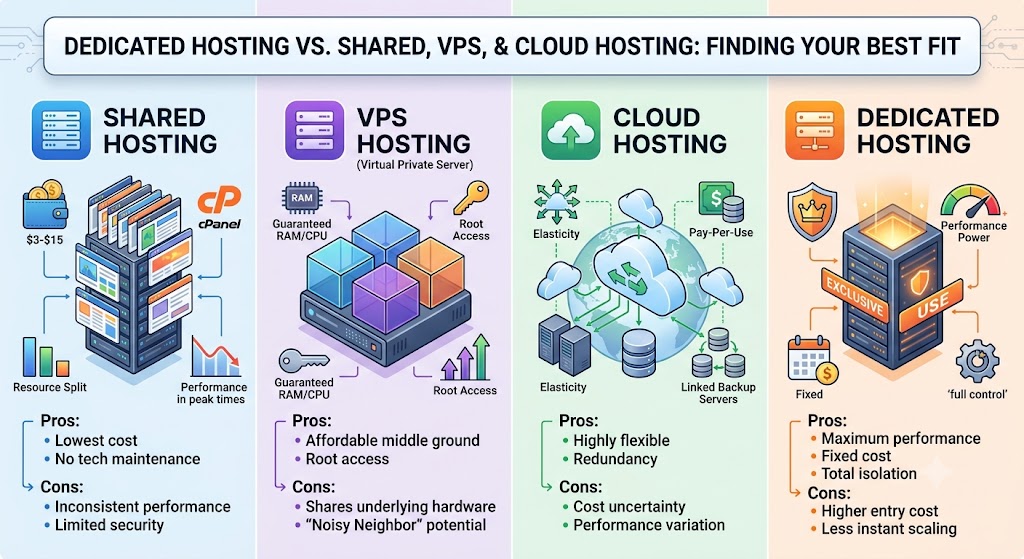
It helps to see dedicated hosting services USA next to the alternatives side by side, not just in theory, but in terms of real performance, cost, and control trade-offs.
Shared Hosting
Shared hosting puts hundreds (sometimes thousands) of websites on one physical server, splitting CPU, RAM, and bandwidth among all of them. It’s the cheapest entry point into web hosting, often $3–$15/month.
Pros:
- Lowest cost, ideal for tight budgets
- No technical maintenance; the host manages everything
- Simple control panel setup (usually cPanel or similar)
Cons:
- Performance is inconsistent; an increase in traffic on some other website can slow down your website
- Your security level depends on the weakest link among the tenants on that server; a hacked website from the neighbors can sometimes create weaknesses in the whole shared environment
- Lack of customization; you cannot configure a custom software stack on the server
- Not suitable for any purpose except for small websites like blogs or brochure-type websites
VPS (Virtual Private Server) Hosting
VPS hosting slices one physical machine into multiple virtual servers using a hypervisor. Each VPS gets its own allocated resources and operating system instance, with root access to configure it as needed.
Pros:
- Guaranteed resource allocation (RAM, CPU cores) unlike shared hosting
- Root/admin access for custom software installs and configuration
- More affordable than dedicated hosting while offering more control than shared
- Good middle ground for growing sites not yet ready for full dedicated infrastructure
Cons:
- Continues to share the same underlying physical hardware as other VPS hosts on that machine
- Performance may be impacted by how aggressively the provider oversells that hardware, as some providers pack too many VPS hosts onto one machine based on its physical capabilities
- The noisy neighbor problem is lessened but not entirely gone, especially with regards to disk I/O and networking
- Scaling past a certain point will ultimately mean moving off shared hardware
Cloud Hosting
Cloud hosting distributes your workload across a pool of virtualized, often geographically distributed servers, dynamically allocating resources as needed.
Pros:
- Highly flexible elasticity computation in real time according to demand
- Pay-per-use pricing may be effective in case of unpredictable and spiky traffic loads
- Inherent redundancy and geographical diversification enhance robustness against local failures
- It is easy to set up additional infrastructure for testing/staging/disaster recovery purposes
Cons:
- There is uncertainty in cost due to unpredictable and escalating costs of sustained high utilization, especially of data transfer out and API calls.
- There will be performance variation since the physical hardware assigned to you is not within your control or knowledge.
- It is difficult to predict the cost because of complex pricing formulas.
- When it comes to big and steady workloads, cloud becomes more costly than dedicated hardware in the long run.
Dedicated Hosting
US Dedicated Server Provider trades some of that cloud elasticity for consistency, raw performance, and full control. You know exactly what hardware you’re running on, and it doesn’t change unless you deliberately change it.
Pros:
- Maximum possible performance without any resource contention from other customers
- Total control of the hardware and software, even kernel-level customization
- Fixed cost pricing per month independent of usage in your allocated bandwidth
- Best possible security and compliance stance because of physical isolation
- Usually offers the best value for money versus cloud compute
Cons:
- Less elastic scaling up typically means provisioning new hardware, not an instant resize
- Higher entry cost than shared or VPS hosting
- You (or your managed provider) are responsible for hardware-level reliability, though most providers offer redundancy options and rapid hardware replacement
Quick Comparison
| Factor | Shared | VPS | Cloud | Dedicated |
|---|---|---|---|---|
| Resource isolation | None | Partial | Partial/Variable | Full |
| Performance predictability | Low | Medium | Medium | High |
| Cost at small scale | Lowest | Low | Variable | Higher |
| Cost at large, steady scale | N/A | Moderate | Often highest | Often lowest |
| Scalability speed | N/A | Fast | Fastest | Slower (hardware-bound) |
| Control/customization | Minimal | High | High | Full |
| Best for | Small blogs, brochure sites | Growing sites, mid-size apps | Spiky/unpredictable traffic | High-traffic, compliance-heavy, performance-critical workloads |
Why US-Based Data Centers Matter
Location is not a minor detail it materially changes outcomes for performance, compliance, and business risk.
Latency to North American Users
It has to be transported, and this takes time due to the limitations imposed by the speed of light through fiber-optic cables. Servers that are housed in the US, such as Ashburn, Virginia, or Dallas, Texas, will provide US users with faster speeds than those located in Europe or Asia because the distance between these points is smaller and data transmission time will take less time.
Reduced latency translates into faster loading times, improved application response time, and, in terms of e-commerce, measurable increases in conversion rates. This is because every hundred milliseconds increase in loading times affects conversion rates adversely. Several studies conducted on major e-commerce websites show that each second increase in loading times results in decreases in conversion rates by several percentage points. The cart abandonment rates increase as the perceived responsiveness of the website decreases. In terms of real-time applications such as live chat, online games, and video conferencing, as well as financial trading platforms, reduced latency is not a matter of good UX but an essential feature of the product itself.
Regulatory Alignment
Providers located in the US would have more recent HIPAA, PCI-DSS, and SOC 2 certifications that are applicable to American legal standards, since such providers are designed to meet US standards and not general international ones. The choice of an American provider should be considered in case you work with healthcare records, payment transactions, and/or government applications.
This question also plays an important role in the procurement process. Enterprise clients and healthcare providers usually conduct vendor assessments before entering into a contract, and the first question to be answered would be “Where does the infrastructure reside? Does it have compliance certificates for US standards?” By making the choice of a provider with existing compliance certificates, you avoid future infrastructure reconfiguration and loss of a major client because of its legal or security team.
Data Sovereignty and Legal Clarity
Having data kept within the jurisdiction of the USA eliminates the need for complex legal arrangements around the cross-border data transfer agreement. This is especially important for contracts with corporate clients or governmental institutions that may require certain conditions in terms of data location as an irrevocable clause of the contract.
International data transfer also implies the use of additional legal mechanisms, longer procurement processes, and even being disqualified for a government or defense-oriented contract due to the data residency requirement. Even outside the context of governmental contracts, the majority of corporate customers include the clause about the physical location of data as a matter of routine risk management.
Hosting on a USA dedicated server from a provider in the USA eliminates all possible legal troubles and streamlines your sales process.
Support Availability in Your Time Zone
A failure at 2 am means one thing if your support team is sleeping somewhere else on the other side of the globe, but quite another thing if the support team is based out of the US and on duty round the clock. Infrastructure issues do not take a holiday during office hours, and the time lag between “We noticed immediately and started addressing the problem” and “We found out eight hours later because nobody had yet woken up” could spell all the difference between a glitch and a serious problem.
Support teams based in the US, also operating in your time zone, not only will have better linguistic and cultural understanding but will be able to escalate your issue faster within internal engineering teams and also have a good understanding of the business and regulatory environment of US clients.
Better Peering and Backbone Connectivity
Main data centers in America Ashburn, Dallas, Chicago, Los Angeles, and New York are located at heavy internet exchange points with good peering, which usually implies more reliable routing and less multi-hop delay. These centers operate some of the most densely connected interconnection points worldwide, where large ISPs, CDNs, and cloud providers exchange traffic directly without using several other networks to route the traffic through.
Effectively, this means that your data will travel to the consumer in a straighter line, resulting in fewer network hops and hence fewer points of possible congestion and failures between your server and customers. Moreover, it will result in more reliable redundancy: if there is any failure or congestion on one network path, good peering data centers usually have additional paths to choose from, while remote data centers might not have it. The backbone capability of data centers is an important factor of reliability, which should be considered by any business with latency-critical applications.
Managed vs. Unmanaged vs. Hybrid Management
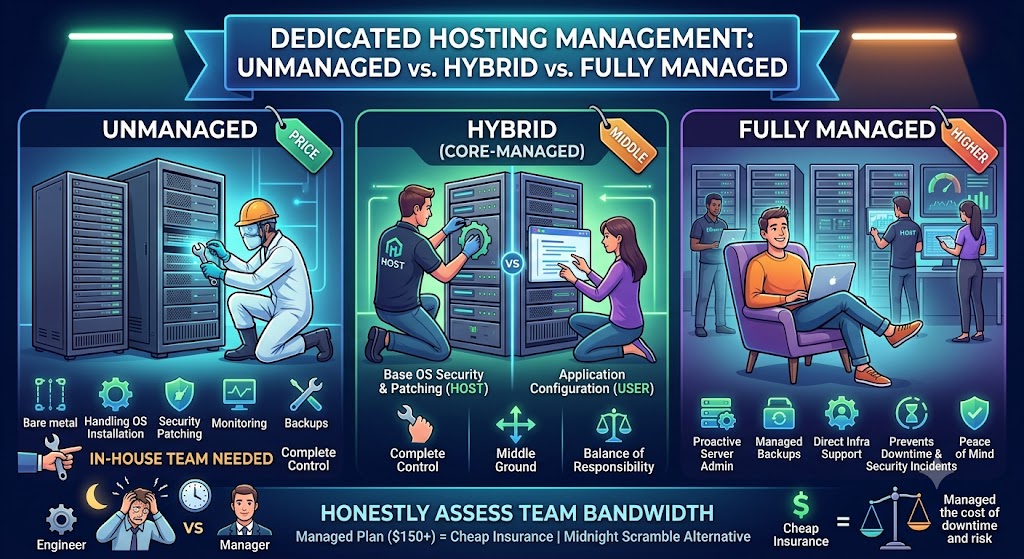
Unmanaged dedicated hosting gives you bare metal and nothing else. You handle OS installation, security patching, monitoring, backups, and troubleshooting. This suits organizations with an in-house DevOps or sysadmin team that wants complete control and doesn’t want to pay for services it won’t use.
Fully managed dedicated hosting includes proactive server administration, patching, monitoring, backup management, control panel configuration, and support staff who can log in and resolve infrastructure issues directly, not just answer tickets. It costs more, but for teams without dedicated infrastructure staff, it often prevents costly downtime and security incidents that would otherwise eat far more than the management fee.
Hybrid/core-managed plans cover baseline OS security and patching while leaving application-level configuration in your hands a middle ground that suits many small-to-mid-sized technical teams.
When deciding, honestly assess your team’s bandwidth. A managed plan that costs $150 more per month is cheap insurance if the alternative is your one engineer scrambling to patch a security vulnerability at midnight.
Hardware Deep Dive: What Actually Affects Performance
Not all “dedicated server” listings are equal; the underlying specs matter enormously, and two servers marketed with similar language can perform very differently in practice.
CPU
The current AMD EPYC (Genoa or newer) and Intel Xeon Scalable (Sapphire Rapids or newer) processors provide superior performance-per-core ratios as well as better power efficiency than their predecessors that are currently being sold at a reduced price by some low-end providers. The number of cores is important when dealing with parallel processing loads web servers that serve multiple requests simultaneously, containers, or CI/CD pipelines. Single-thread performance is important when working with latency-sensitive software, databases, real-time processing or any other software where request latency should be minimized.
It may be helpful to actually inquire from the service providers about the exact CPU model number and not the marketing name such as “standard,” “performance,” or “enterprise.” It is possible that two service providers market an “enterprise grade” machine, but one of them uses a processor five years old and another one uses modern processors, and even though they may have similar core numbers, the difference in their performance may be quite significant due to the increase in instructions per clock cycle between the different generations of chips. Another factor that should be considered when choosing a CPU is its clock speed; the more cores a processor has, the slower its clock speed will be.
RAM
While capacity is one thing, the speed of the RAM and ECC is another. The ECC memory will identify and correct any error in data corruption prior to crashes or any silent failures that might occur, and this is vital in case of applications like databases or finances wherein bit flipping may lead to data corruption in a subtle manner. While non-ECC memory will be found in budget-class servers due to lower costs, in cases where transaction or financial operations take place, ECC becomes almost mandatory.
The speed of RAM (measured in MHz, e.g., DDR4-3200 versus DDR5-4800) will also make a difference in terms of performance, particularly in cases when a lot of RAM is needed, such as in-memory caches, big sets of databases, or any activity that requires transferring a lot of data with the help of memory. In addition to speed, think about how flexible your configuration is when it comes to RAM expansion – if all DIMMs have been used at the time of buying the server, then you will not have any options of adding any more RAM other than buying an entirely new one.
Storage
The read/write speed and latency are significantly better in NVMe SSDs compared to SATA SSDs, which again are light years ahead of the traditional spinning hard drives. And this is no small difference; NVMe drives connect directly through the PCIe bus rather than using SATA and therefore provide multiple times greater throughput and much lower latency, resulting in fast database querying, faster file serving, and overall improved performance.
HDD being offered as the default option on the part of your provider should be taken as a warning sign for how up-to-date the infrastructure of your cloud provider really is. In addition to drive type, make sure to inquire about the endurance of those drives (especially for write-intensive tasks, such as logging or transactional databases), and also whether you are getting local or network-attached storage.
RAID Configuration
For protection against the failure of a drive in a server, either RAID 1 or RAID 10 can be employed as both have the ability to mirror or stripe data between the multiple drives such that in case of failure of one drive, the server does not go down and data is not lost. In any scenario, RAID is recommended to ensure data redundancy as disk drives and even solid-state drives may fail. In case of failure of the drives in RAID-less configurations, downtime or loss of data will occur.
RAID 1 involves the creation of redundancy through the replication of data in two drives. On the other hand, RAID 10 uses both mirroring and striping of data in four or more drives and thus offers both redundancy and improved performance. RAID 10 is usually chosen by companies because of its better performance, though it costs more due to the use of extra drives. Whether you opt for either configuration, ensure that the service provider takes proactive care of the drives in terms of their health and that there is fast replacement of a failed drive.
Network Port Speed
Port speeds of 1Gbps are common, while port speeds of 10Gbps are becoming more common and will be crucial if you’re using video streaming services, distributing large files, or dealing with a high volume of API requests. The reality is quite different – while a port speed of 1Gbps will limit your throughput to about 125MBps, the latter is going to increase it ten times, and it will be crucial if you’re distributing large media files, handling a lot of API requests, or running applications with multiple high-speed connections.
Even if you do not experience problems with traffic limitations via the 1Gbps port now, you may need to discuss upgrading to better port speeds with a provider in the future.
Bandwidth Allocation
Be clear on whether you are being charged per GB transferred (metered) or whether you have a flat rate up to the port speed. If you are being metered, you will get a huge bill at those times when you experience traffic spikes – such as a marketing viral moment, an attack, or just a period of rapid growth that catches you by surprise.
Plans with unmetered bandwidth, which is limited only by the speed of the port, are far more predictable from the budgeting standpoint and are preferable for applications that require a high amount of bandwidth, such as streaming or file sharing. If you are trying to compare two plans, be aware of all details; some providers may advertise “unmetered” bandwidth, while applying throttling of fair use after a certain number of GB is transferred, which works almost like a soft cap without charging you any extra fees.
Security and Compliance Considerations
Because you control the entire stack on a dedicated server, security is both more powerful and more your responsibility than on managed cloud platforms.
DDoS protection should be included by default, not a paid add-on. Volumetric attacks are common enough now that providers without built-in mitigation should be considered a liability.
Firewall and network segmentation. Look for providers offering hardware or software firewalls, private VLANs, and the ability to isolate multi-server environments from the public internet where appropriate.
Compliance certifications. For healthcare, verify current HIPAA compliance documentation. For payment processing, confirm PCI-DSS compliance. For enterprise vendors, SOC 2 Type II reports are increasingly requested during procurement. Ask for actual audit documentation, not just a badge on a marketing page.
Patch management. Whether managed by you or your provider, a clear patching cadence for the OS and any pre-installed software is essential unpatched systems are the single most common vector for server compromise.
Backup strategy. Confirm whether backups are included, how frequently they run, where they’re stored (ideally geographically separate from the primary server), and how quickly you can restore from one during an incident.
How to Evaluate a Provider: A Complete Checklist
Run every provider you’re considering through this list:
- Does the provider operate data centers in locations that minimize latency to your actual user base?
- Are current-generation CPUs and NVMe storage standard, not a premium upsell?
- Is the uptime SLA written explicitly, with stated compensation for missed targets?
- Is DDoS protection included by default?
- Are compliance certifications (HIPAA, PCI-DSS, SOC 2) documented and current?
- Is pricing fully transparent, including renewal rates after any promotional period?
- What is the guaranteed support response time, and is support staffed 24/7 with real infrastructure engineers?
- How easy is it to scale, upgrade RAM, storage, or move to a larger server without a painful migration?
- Does the provider offer a trial period, money-back guarantee, or pre-sales technical consultation?
- What backup and disaster recovery options are included versus billed separately?
Pricing Breakdown by Tier
Pricing for dedicated server hosting services in the US varies significantly by hardware tier and management level. As a general market guide:
Entry-level unmanaged servers — modest CPU, 16–32GB RAM, SSD storage typically start around $70–$140/month. Good for small-to-medium business websites, development/staging environments, and lightweight applications.
Mid-tier configurations — modern EPYC/Xeon processors, 64–128GB RAM, NVMe storage generally run $150–$400/month. This tier suits growing e-commerce sites, SaaS applications, and mid-size databases.
High-performance and managed enterprise servers — high RAM capacity, redundant RAID storage, advanced security, fully managed support often range from $400 to $1,000+/month, scaling with specification and support level.
GPU-equipped dedicated servers for AI/ML training or inference carry a substantial premium on top of standard rates, reflecting current GPU hardware costs, but can still be more cost-effective than cloud GPU instances for sustained, long-running workloads.
Always ask about setup fees, IP address allocation costs, backup storage add-ons, and critically what the price becomes after any first-term promotional discount expires.
Industry-Specific Use Cases
E-commerce. Dedicated servers eliminate the noisy-neighbor risk during high-traffic events like Black Friday, ensuring checkout flows stay fast when it matters most for revenue.
SaaS platforms. Predictable, resource-intensive application workloads benefit from guaranteed CPU and RAM allocations that a shared or oversold VPS environment can’t reliably provide.
Media and streaming. High-bandwidth, sustained-traffic applications benefit enormously from unmetered or high-cap bandwidth options that dedicated hosting typically offers more affordably than cloud egress pricing.
Databases and data warehousing. Storage I/O performance directly impacts query speed; NVMe-backed dedicated servers with ECC RAM are frequently the best price-to-performance option for large, active databases.
Gaming servers. Low, consistent latency and full control over network configuration make dedicated servers the standard for competitive multiplayer game hosting.
Regulated industries — healthcare, finance, legal, and government contracting where physical data isolation and documented compliance are non-negotiable.
AI/ML workloads. GPU-equipped dedicated servers offer sustained training and inference performance without unpredictable cloud GPU pricing or availability constraints.
Migration: Moving to a Dedicated Server Without Downtime
Migrating an existing site or application to a new High Performance Dedicated Server US doesn’t have to mean downtime if you plan it correctly:
- Provision and configure the new server fully — OS, software stack, security settings before touching your live environment.
- Migrate a copy of your data and application to the new server and test thoroughly in isolation.
- Lower your DNS TTL (time to live) a few days in advance so that when you do cut over, the DNS change propagates quickly.
- Run both environments in parallel briefly if possible, syncing any new data written to the old server.
- Cut over during low-traffic hours and monitor closely for the first 24–48 hours.
- Keep the old server active for a short grace period as a rollback option before fully decommissioning it.
A provider with a strong migration support team can significantly de-risk this process ask about migration assistance before you sign a contract, not after.
Common Mistakes Buyers Make
Chasing the lowest advertised price without reading the renewal terms many “cheap” plans double or triple in price after the first term.
Ignoring data center location, which can quietly cost more in lost conversions from latency than it saves in monthly hosting fees.
Skipping the SLA entirely, treating marketing uptime claims as guarantees when they aren’t contractually binding.
Underestimating in-house technical capacity, choosing unmanaged hosting to save money and then absorbing much higher costs in downtime or security incidents.
Failing to plan for growth, locking into a configuration that can’t scale without a disruptive migration six months later.
Not verifying compliance documentation, assuming a marketing badge is equivalent to an actual, current audit report.
Step-by-Step Buying Process
- Estimate your actual resource needs based on current traffic, database size, and expected growth over the next 12–24 months.
- Decide managed, unmanaged, or hybrid based on your team’s technical capacity and risk tolerance.
- Shortlist providers with US data centers matching your primary audience’s geography.
- Compare hardware specifications line by line don’t rely on marketing tiers alone; ask for exact CPU model, RAM type, and storage configuration.
- Verify SLA terms and compliance certifications in writing.
- Ask directly for renewal pricing, not just promotional first-term rates.
- Test pre-sales support responsiveness as a proxy for what post-sale support will actually look like.
- Plan your migration timeline and confirm what migration assistance, if any, the provider includes.
- Start with a shorter initial term if possible, to validate performance before committing to a longer contract.
Final Thoughts
The use of dedicated server hosting in the USA continues to be the benchmark for businesses that require guaranteed performance, compliance, and minimal latency when it comes to accessing their services in North America. The issue is not necessarily about choosing the perfect dedicated server hosting company; it is about selecting the right one based on specifications that match the unique requirements of your application.
Be sure to research the actual specs and put down everything you find in writing regarding the SLAs and compliance information, and always inquire about renewal costs. Make the right decision, and you will have your infrastructure working for you.
FAQs
1. What is dedicated server hosting?
Dedicated server hosting is when you lease out an entire physical server to use exclusively yourself without having any sharing of CPU, RAM, or storage with other customers like in case of shared and VPS hosting.
2. Why choose a US-based dedicated server over an international one?
You have reduced latency for the US audience, easy HIPAA/PCI-DSS/SOC 2 compliance, data sovereignty inside the US jurisdiction, and support teams working in your time zone.
3. What’s the difference between managed and unmanaged dedicated hosting?
In unmanaged dedicated hosting, you get the raw server itself. In managed hosting, your server gets managed as well.
4. How much does dedicated server hosting cost in the US?
The minimum price point for entry-level dedicated server hosting is $70–$140/month, while mid-level configurations cost around $150–$400/month. Enterprise/fully managed servers start at $400/month and go up to $1,000+/month and more.
5. Is dedicated hosting better than cloud hosting?
It all comes down to how intense your traffic will be. Dedicated servers are usually cheaper and faster when you have a stable and consistent load.
6. Do I need a dedicated server for a small business website?
Not always. If your traffic is modest and you’re not handling sensitive data or heavy transaction volume, VPS or shared hosting may be sufficient. Dedicated hosting makes sense once performance, security, or compliance needs outgrow shared infrastructure.
7. What hardware specs should I look for?
Recent CPU (Intel Xeon Scalable or AMD EPYC series), NVMe SSD, ECC memory, RAID configuration, minimum of 1Gbps network port and 10Gbps is better.
8. Is DDoS protection included with dedicated hosting?
It should be provided, but many hosting services do not include this feature in their pricing packages. Make sure you know that beforehand.
9. How long does it take to set up a dedicated server?
Depending on the service provider and hardware arrangement, it takes from the same day to one day or more to have the server ready.
10. What happens if the physical server hardware fails?
The hardware providers should have spares and be able to either replace the faulty parts or relocate your server to another hardware. It is advisable to inquire about such an option prior to signing up, especially if you are not utilizing redundant servers.
Suggestions:
- https://mainvps.net/blog/lifetime-web-hosting-2026/
- https://mainvps.net/blog/windows-reseller-web-hosting/
- https://mainvps.net/blog/best-wordpress-hosting-providers/
- https://mainvps.net/blog/linux-vps-hosting-india/
- https://mainvps.net/blog/low-cost-windows-vps-hosting-in-india/
- https://mainvps.net/blog/cheap-dedicated-server-hosting-providers/
- https://mainvps.net/blog/windows-server-guide-dde-dns-tls-1-2-uptime/
- https://mainvps.net/blog/dedicated-server-hosting-netherlands/
- https://mainvps.net/blog/dedicated-server-low-price/
- https://mainvps.net/blog/vps-hosting-in-los-angeles-us/
- https://mainvps.net/blog/dedicated-server-in-nedzone-nl/
- https://mainvps.net/blog/buy-linux-vps-hosting/
- https://mainvps.net/blog/managed-windows-vps-hosting/
- https://mainvps.net/blog/what-is-wmi-provider-host-complete-guide/
- https://mainvps.net/blog/cloud-hosting-vs-vps-2026/
- https://mainvps.net/blog/vps-hosting-for-ecommerce-guide/
- https://mainvps.net/blog/vps-hosting-for-saas-applications/
- https://mainvps.net/blog/vps-reseller-hosting-in-netherlands/
- https://mainvps.net/blog/dedicated-server-hosting-in-us/
- https://mainvps.net/blog/linux-reseller-hosting/
- https://mainvps.net/blog/dedicated-server-with-nvme-us/
- https://mainvps.net/blog/dedicated-server-with-root-access-us/
- https://mainvps.net/blog/dedicated-server-with-cpanel-us/
- https://mainvps.net/blog/litespeed-vps-hosting-in-netherlands/
- https://mainvps.net/blog/cheap-windows-vps-hosting/