For those working with applications running on the Windows operating system, websites built using ASP.NET technology, remote desktop sessions, or specific software such as QuickBooks, MS SQL Server, and others, it is clear that shared hosting won’t be sufficient. Instead, you will have to go for dedicated resources and control, which can be provided by a US Windows VPS hosting based in the datacenter that is near your target audience.
What Is US Windows VPS Hosting?
A Virtual Private Server (VPS) is a simulated partition of a physical server that acts like your very own computer. While in shared hosting, several hundred sites have to compete for the same finite resources such as CPU, memory, and bandwidth in a VPS, you have dedicated and guaranteed resources which will not be affected by any other user of the physical server.
By adding the term “Windows VPS Server USA,” you mean that the virtual server runs the Windows operating system, specifically the Windows Server operating system (2019, 2022, or newer versions). This is critical in the case that your applications require the .NET Framework, Internet Information Services (IIS), MSSQL, MS Access, Classic ASP, or any Windows native application that does not exist on Linux.
If you add “US” to the above specification, you imply that the physical server resides in a data center that is situated inside the U.S., mostly in cities such as New York, Los Angeles, Chicago, Dallas, or Ashburn, Virginia.
Why the “US” Location Actually Matters
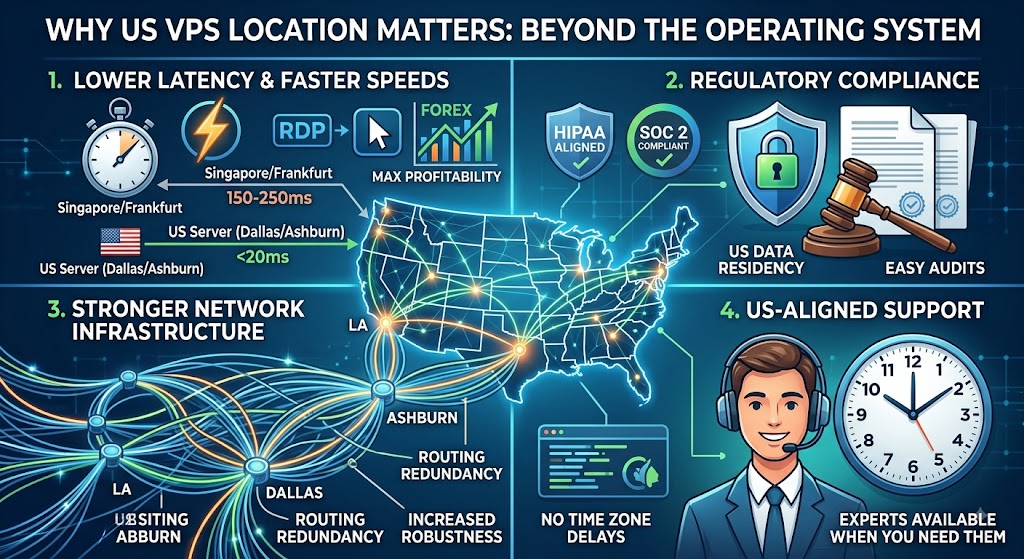
A lot of buyers focus entirely on the “Windows” part of the equation and treat server location as an afterthought. That’s a mistake. Here’s why choosing a US-based data center specifically makes a measurable difference:
1. Lower Latency for US-Based Traffic
Latency is calculated in milliseconds; however, this issue adds up quickly for every aspect of web page loading, every database request, and even RDP keystrokes. For example, a server located in Singapore or Frankfurt would incur an additional 150-250 ms of latency for a Chicago-based user when compared to servers located in Dallas or Ashburn that would be able to respond in less than 20 ms. While these numbers alone may appear insignificant, this issue accumulates as dozens of requests are made during a page load; in addition, high latency becomes particularly painful for RDP operations, which involve transmission of keystrokes and mouse movements in real time via the connection with significant delays. In the context of forex trading platforms, where execution speed has direct bearing on profitability, this issue becomes truly problematic.
2. Better Compliance Alignment
The regulatory environment and industry standards such as HIPAA for medical data, SOC 2 for service providers, and numerous state-specific laws related to data protection either demand or clearly suggest the storing of confidential information inside US territory. When not explicitly required by legislation, numerous business-to-business agreements, insurance policies, and enterprise customers insist on US data residency as an essential part of their deal. Storing your data inside a US VPS is much easier to discuss; all you need is to mention the particular US state and the data center there instead of dealing with complicated cross-border data transfer regulations.
3. Stronger Network Infrastructure
Hubs in the US for data centers such as the Data Center Alley in Ashburn, Virginia, as well as Dallas, Chicago, and Los Angeles, exist at the convergence point for some of the most fiber-rich internet network exchanges in the world. The result of such density is that the traffic coming from your VPS usually has a number of redundant routes to its destination and is not dependent upon just one network carrier or path. In effect, this implies fewer chances of being affected by routing issues, increased robustness in case of any network path getting congested or experiencing downtime, and better throughput in general.
4. Time Zone-Aligned Support
The fact that you have a server outage or that your software is giving out error messages is only the beginning in assessing the worth of your support service. Time becomes a crucial factor when there is an available expert that you can actually get hold of to help solve your problem. With a support group that works around the United States’ business hours (or even 24/7 coverage with a support group from the United States itself), the problem that you may encounter at 2:00 pm Eastern Time does not need to wait for some time zone eight hours away from yours to wake up.
Who Actually Needs a US Windows VPS?
Windows VPS hosting isn’t a one-size-fits-all product. It tends to be the right fit for these specific use cases:
- ASP.NET and .NET Core developers who need full IIS control, custom application pools, and the ability to install specific .NET runtime versions.
- Businesses running MS SQL Server for line-of-business applications, CRMs, or reporting tools that require native Windows compatibility.
- Remote Desktop (RDP) users who want a persistent, always-on Windows desktop accessible from anywhere, popular among forex traders, remote teams, and software testers.
- QuickBooks and accounting firms hosting multi-user QuickBooks Desktop environments for remote bookkeeping teams.
- Forex and algorithmic traders running MetaTrader 4/5 Expert Advisors that need 24/7 uptime with low latency to US-based brokers.
- Software vendors needing an isolated Windows environment to test builds across different OS versions without maintaining physical hardware.
- Small businesses migrating from an aging in-office Windows server that’s becoming a maintenance burden and a single point of failure.
If you recognize your situation in any of the above, a US Windows VPS is very likely a better fit than shared hosting, a Linux VPS, or a full dedicated server (which is usually overkill and overpriced for small-to-mid workloads).
Key Features to Look For
Not all buy Windows VPS USA plans are created equal. Before you commit to a provider, check that the plan includes the following:
1. Full Administrator (Root-Level) Access
Having full admin privileges means you’re not bound to submit support tickets whenever you need to install a service, open a port or change any registry settings. You must have the ability to install your own software, set up firewall and IIS bindings, create local user accounts, set up task scheduling, and restart the server on your timetable and not theirs. Watch out for any “managed” services that limit these kinds of access under the pretext of “security.” If any company offers you full admin access, it’s a good idea to test the service early on by logging in and seeing whether you can install software and alter firewall rules.
2. SSD or NVMe Storage
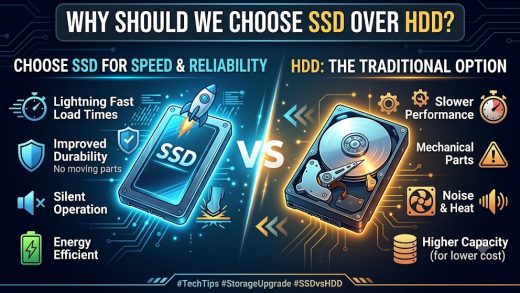
The speed of your disk will have a direct impact on the speed at which your programs perform the reads and writes to disk, and will generally be the limiting factor for your applications on VPS offerings where you lack sufficient power. While conventional spinning HDDswill allow you a few hundred reads and writes per second, SSDs will allow many times more than that; NVMe disks, which communicate directly over the newer PCIe bus instead of the older SATA bus, take this a step further and deliver speeds 5–10x faster compared to regular SSDs. Applications that rely heavily on disk reads/writes, such as MS SQL Server, and any application that frequently reads/writes small amounts (like session storage, logging, indexing) will show the delay caused by that difference. Remember to specify the type of storage used clearly.
3. Guaranteed (Not Burstable) Resources
The “burstable” or “shared” model means that a service provider can offer you the exact same physical CPU cores and RAM at the same time to many other customers on the assumption that not all will reach their maximum usage level. That’s all good and dandy, but what happens if they do and your VPS becomes slow without your permission? “Guaranteed” or “dedicated” resources mean that your contract guarantees that the CPU cores and RAM that are offered to you are yours alone. Don’t hesitate to ask the provider before signing: “Are CPU and RAM guaranteed, or can they be scaled back when there is contention?”
4. Licensing Included
Licensing for Windows Server via official Microsoft channels adds an important recurring fee in addition to the usual price of the server, which is often ignored when comparing providers’ prices. Good US Windows VPS providers reach a licensing agreement with Microsoft and include that fee in their monthly price plans, giving you what you pay for. When comparing different providers, make sure that you understand whether they provide Windows Server OS licensing and which particular version (2019, 2022, etc.). Some providers do not include the latest version or even the Datacenter edition.
5. RDP Access with Multiple User Support
As is, Windows Server usually limits you to two concurrent Remote Desktop Connections before requiring Remote Desktop Services (RDS), which would require Client Access Licenses (CALs) in order to be able to have more concurrent connections. In case you work in an environment where there will be several people that need to be connected to the same server at the same time (as is often the case with QuickBooks bookkeeping teams, testing teams, or trading desks), make sure you find out about the inclusion of RDS CALs, the number of those licenses, and what it costs to increase them.
6. DDoS Protection
VPS Windows instances that use open RDP ports or trading/business applications available on the web face frequent automated login and DDoS attacks shortly after being deployed. Network-edge DDoS mitigation blocks the attack traffic before it even gets to your server, so you don’t have any disruptions in the midst of it. Consider services that provide mitigation by default (rather than something you need to configure yourself separately), as well as the attack sizes the network of this provider can withstand, which can vary greatly.
7. Snapshot and Backup Options
Snapshots allow you to take a picture of your whole server in its current state, enabling a rollback in case anything breaks as a result of a Windows update, installation of new software, or any other change. Backups are used for much worse-case scenarios when the hardware fails, gets infected with ransomware, or is deleted accidentally; these are copies of your data which are stored somewhere separate from the live server. These two are not interchangeable, and you need to have both: snapshots on demand for protection against changes, and regular scheduled backups (preferably automatic) with a decent retention period (of seven, fourteen, or thirty days). Make sure you understand in writing where backups are stored (on the same physical servers or truly off-site), how often backups happen, and especially how you can restore from these backups.
8. Scalability Without Downtime
As your business requirements evolve, you cannot afford to have a VPS that does not allow you to scale up and eventually has to be migrated to a different machine and thus has to undergo a whole process of migration including switching to a new server, IP, DNS, and all the configurations and applications associated with it, which will also involve downtime. Find out the kind of upgrading services offered by your potential provider. Ideally, it should be able to offer upgrades to the existing machine in a live environment without the need to rebuild your entire setup.
Choosing the Right Plan: A Practical Framework
Instead of guessing at specs, work backward from your actual workload:
| Use Case | Recommended Starting Specs |
|---|---|
| Basic RDP / remote desktop for one user | 2 vCPU, 4 GB RAM, 60 GB SSD |
| ASP.NET website with moderate traffic | 2–4 vCPU, 8 GB RAM, 100 GB SSD |
| MS SQL Server database workload | 4 vCPU, 16 GB RAM, 200 GB SSD/NVMe |
| Forex trading (MT4/MT5, multiple EAs) | 2–4 vCPU, 8 GB RAM, low-latency network |
| Multi-user QuickBooks hosting | 4 vCPU, 16 GB RAM, 150+ GB SSD |
| Software testing/dev sandbox | 4 vCPU, 8–16 GB RAM, snapshot support |
These are starting points, not hard rules; always leave headroom, since a VPS running consistently near 90% CPU or RAM utilization is a warning sign you’ve outgrown the plan.
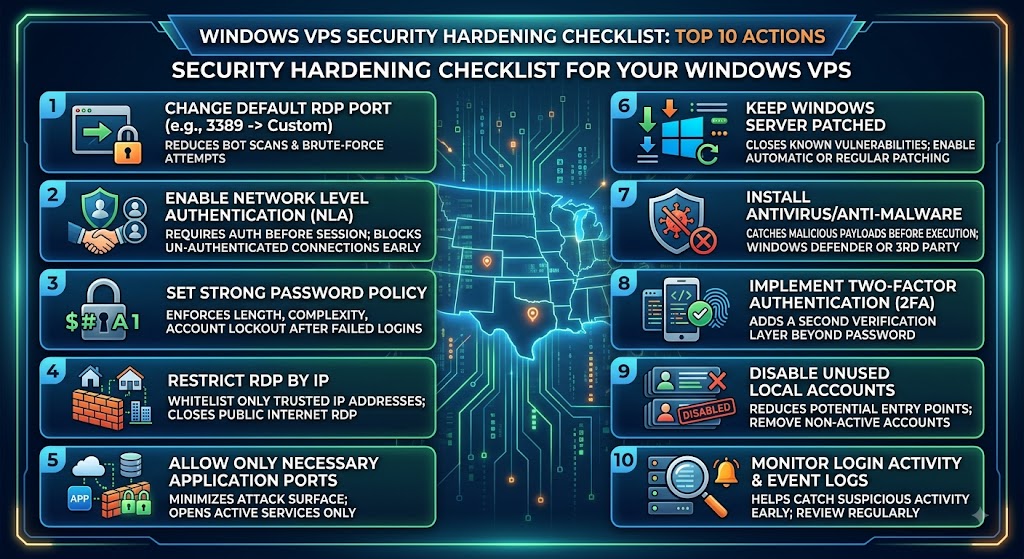
Security Hardening Checklist for Your Windows VPS
| # | Action | Details | Why It Matters |
|---|---|---|---|
| 1 | Change the default RDP port | Move from port 3389 to a custom port | Reduces automated bot scans and brute-force attempts targeting the default port |
| 2 | Enable Network Level Authentication (NLA) | Require authentication before a full RDP session is established | Blocks unauthenticated connection attempts at the handshake stage |
| 3 | Set up a strong password policy | Enforce minimum length, complexity, and account lockout after failed attempts | Prevents brute-force logins from succeeding |
| 4 | Restrict RDP access by IP | Whitelist only your office/home IP addresses via Windows Firewall | Closes RDP off to the entire internet, leaving it open only to trusted sources |
| 5 | Enable Windows Firewall rules per application | Allow only the ports/services you actually use | Minimizes the attack surface by closing unused ports |
| 6 | Keep Windows Server patched | Enable automatic updates or patch on a regular schedule | Closes known vulnerabilities before they can be exploited |
| 7 | Install and configure antivirus/anti-malware | Use Windows Defender or a third-party endpoint solution | Catches malicious payloads before they execute |
| 8 | Enable two-factor authentication (2FA) where possible | Use RDP gateway solutions or third-party 2FA tools. | Adds a second verification layer beyond just a password |
| 9 | Disable unused local accounts | Remove or disable default/guest accounts not in active use | Reduces the number of potential entry points |
| 10 | Monitor login activity and event logs | Review Windows Event Viewer regularly or set up alerting. | Helps catch suspicious accounts |
US Windows VPS vs. Alternatives
Vs. Shared Hosting: Shared hosting is cheaper but offers no dedicated resources, no admin access, and typically no Windows environment at all. It’s fine for a static brochure website; it’s the wrong choice for anything requiring custom software or databases.
Vs. Linux VPS: Linux VPS plans are often cheaper and lighter on resource usage, but they simply can’t run Windows-only software. If your stack doesn’t strictly require Windows, a Linux VPS may save you money, but don’t force a Windows workload onto Linux through compatibility layers; it rarely ends well for production use.
Vs. Dedicated Servers: A dedicated server gives you an entire physical machine, which means more raw power and complete isolation but at a much higher price point and with less flexibility to scale down. Most small and mid-sized businesses are better served by a VPS until they hit a genuine capacity ceiling.
Vs. Cloud VPS (AWS/Azure-style): Major cloud platforms offer Windows instances too, with excellent scalability, but pricing can be unpredictable and complex, and the interfaces have a steeper learning curve. A traditional US Cheap Windows VPS Hosting provider often offers simpler, flat-rate pricing that’s easier to budget for.
Common Mistakes to Avoid
- Choosing the cheapest plan without checking resource allocation. A rock-bottom price often means oversold, shared resources that throttle under load.
- Ignoring the data center location. Some providers advertise “US hosting” broadly without specifying the actual city always confirm the data center location and, if possible, run a ping/traceroute test before committing.
- Skipping backups. Assuming your provider automatically backs up your data is a common and costly mistake confirm backup frequency and retention policy in writing.
- Underestimating RAM needs for SQL Server. Database workloads are memory-hungry; skimping on RAM here is one of the most frequent causes of poor performance.
- Not testing support responsiveness before committing to an annual plan. Send a pre-sales technical question and see how quickly and knowledgeably they respond; it’s a strong signal of what to expect later.
Final Thoughts
Hosting in a US-based Windows VPS is at the sweet spot of being able to use the familiarity and compatibility of Windows in terms of software usage, together with dedicated performance, low latency for US-based customers, and complete control of the virtual environment without the costs associated with a dedicated server.
It boils down to ensuring that your needs are matched with the appropriate specifications, making sure the data center is located in the United States and having good network connectivity and, most importantly, picking a vendor that is transparent about resource management, backup, and response time to support requests.
FAQs
1. Is a US Windows VPS more expensive than a Linux VPS?
Generally yes, because Windows Server licensing costs are baked into the price. Expect to pay a premium over an equivalent Linux plan, though the gap has narrowed as competition among providers has increased.
2. Can I install any software I want?
With full administrator access, yes, as long as it’s compatible with the Windows Server version installed and complies with the provider’s acceptable use policy.
3. How fast can I get set up?
Most reputable providers provision a Windows VPS within minutes to a few hours after payment, since the process is automated.
4. Do I need technical expertise to manage a Windows VPS?
Basic Windows administration knowledge helps, but the environment is far more familiar to most business users than a Linux command line, since it uses the same Remote Desktop interface as a standard Windows PC.
5. Can I upgrade my plan later without losing data?
With most providers, yes, resource upgrades (CPU, RAM, storage) can typically be applied to your existing instance without a full migration, though it’s worth confirming this before signing up.
6. Which Windows Server version should I choose?
Windows Server 2022 is the current standard for most new deployments, offering better security features and longer support life than 2019. Choose 2019 only if a specific legacy application requires it.
7. How many users can access the VPS at once via RDP?
By default, Windows Server supports a limited number of concurrent RDP sessions. If multiple people need simultaneous access, you’ll need Remote Desktop Services (RDS) with additional Client Access Licenses (CALs). Confirm this with your provider upfront.
8. Is my data safe on a US Windows VPS?
Data safety depends on the provider’s infrastructure, backup practices, and the security measures you configure yourself (firewall rules, patching, strong passwords). Choosing a provider with DDoS protection, redundant infrastructure, and regular backups significantly reduces risk.
9. Can I host multiple websites or applications on one VPS?
Yes, as long as your plan has sufficient CPU, RAM, and storage. IIS supports multiple sites and application pools on a single server, making it practical to consolidate several smaller projects onto one VPS.
10. What happens if I exceed my allocated resources?
This depends on the provider some throttle performance, others send alerts and offer an easy upgrade path, and a few may suspend the service. Always ask about overage policies before committing to a plan.
Suggestions:
- https://mainvps.net/blog/lifetime-web-hosting-2026/
- https://mainvps.net/blog/windows-reseller-web-hosting/
- https://mainvps.net/blog/best-wordpress-hosting-providers/
- https://mainvps.net/blog/linux-vps-hosting-india/
- https://mainvps.net/blog/low-cost-windows-vps-hosting-in-india/
- https://mainvps.net/blog/cheap-dedicated-server-hosting-providers/
- https://mainvps.net/blog/windows-server-guide-dde-dns-tls-1-2-uptime/
- https://mainvps.net/blog/dedicated-server-hosting-netherlands/
- https://mainvps.net/blog/dedicated-server-low-price/
- https://mainvps.net/blog/vps-hosting-in-los-angeles-us/
- https://mainvps.net/blog/dedicated-server-in-nedzone-nl/
- https://mainvps.net/blog/buy-linux-vps-hosting/
- https://mainvps.net/blog/managed-windows-vps-hosting/
- https://mainvps.net/blog/what-is-wmi-provider-host-complete-guide/
- https://mainvps.net/blog/cloud-hosting-vs-vps-2026/
- https://mainvps.net/blog/vps-hosting-for-ecommerce-guide/
- https://mainvps.net/blog/vps-hosting-for-saas-applications/
- https://mainvps.net/blog/vps-reseller-hosting-in-netherlands/
- https://mainvps.net/blog/dedicated-server-hosting-in-us/
- https://mainvps.net/blog/linux-reseller-hosting/
- https://mainvps.net/blog/dedicated-server-with-nvme-us/
- https://mainvps.net/blog/dedicated-server-with-root-access-us/
- https://mainvps.net/blog/dedicated-server-with-cpanel-us/
- https://mainvps.net/blog/litespeed-vps-hosting-in-netherlands/
- https://mainvps.net/blog/cheap-windows-vps-hosting/