

Virtualization is now an essential component of modern IT infrastructure. If you are a developer, system administrator, student, or business owner, running Linux in a virtual environment gives you flexibility, better resource management, and a cost-effective means to manage multiple operating systems on a single physical machine.
However, picking the right Best Linux distribution for virtual environments can make a big difference in performance, security, stability, and resource consumption.
If you’re looking for the best Linux distribution to run in a virtual environment, it really depends on what you need, the hardware resources you have available, and what workload you want to run.
What Is a Linux Virtual Environment?
The best Linux for virtualization is a virtualized computing setup that allows you to run a Linux operating system inside a virtual machine (VM) without installing it directly on your physical computer.
A virtualization platform such as VMware, VirtualBox, KVM, or Proxmox creates a virtual machine with dedicated virtual CPU, RAM, storage, and networking resources.
You can use Linux virtual machines for:
- Software development and application testing.
- Hosting websites and web applications.
- Learning Linux commands and server administration.
- Running databases and development environments.
- Testing different operating systems.
- Managing cloud and VPS infrastructure.
A virtual environment also helps isolate workloads, making it easier to test applications without affecting the host operating system.
What Are the Best Linux Distributions for Running in a Virtual Environment?
Several Linux distributions work well in virtual environments. However, some are better suited for server workloads, while others are designed for development, testing, or lightweight computing.
Let’s explore the top options.
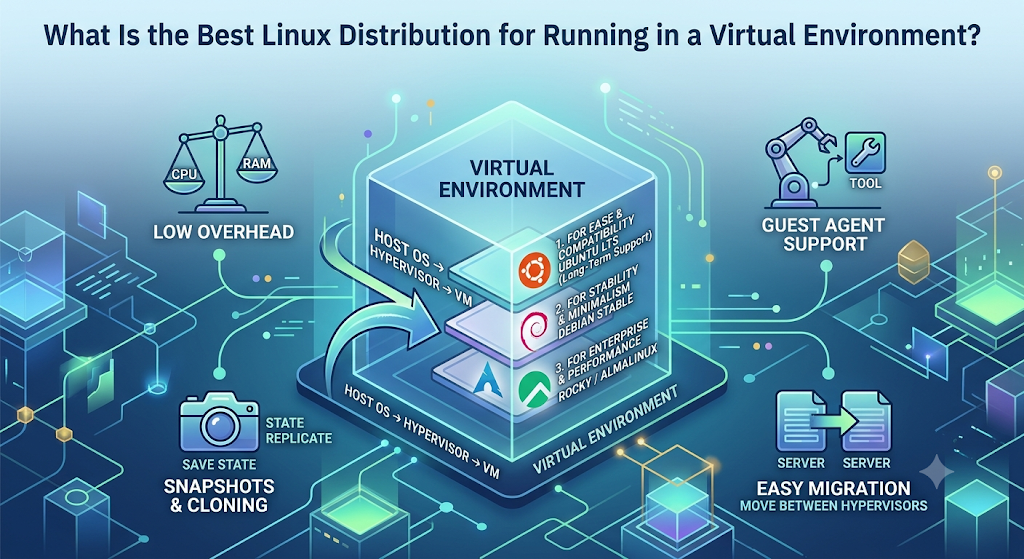
1. Ubuntu Server
Ubuntu Server is one of the most popular Best Linux server distribution
distributions for virtual environments. It offers a user-friendly experience, extensive documentation, and a large software ecosystem.
Ubuntu Server is particularly useful for developers and businesses that need a reliable environment for hosting applications, websites, and databases.
Key Features:
- Long-term support (LTS) releases.
- Extensive software package availability.
- Strong community support.
- Easy server configuration and management.
- Compatibility with major virtualization platforms.
- Regular security updates.
Best Use Cases:
Ubuntu Server is an excellent choice for web hosting, application development, cloud deployments, Docker containers, and testing environments.
2. Debian
Debian is famous for its stability, reliability and low resource consumption. It’s an excellent choice for users who want a reliable Linux OS for virtual environment inside a virtual machine.
Debian is conservative in releasing software, making it a good choice for production servers and virtual environments that are expected to be running for a long time.
Key Features:
- High system stability.
- Lightweight installation options.
- Large software repository.
- Strong security practices.
- Excellent server compatibility.
- Flexible configuration options.
Best Use Cases:
Debian is ideal for production servers, database hosting, web applications, networking services, and users who prioritize stability over having the newest software versions.
3. Rocky Linux
Rocky Linux is a Linux distribution targeted at enterprise stability and long-term server workloads.
That’s particularly useful for business owners and system admins who require an environment that plays nicely with the Enterprise Linux ecosystem.
Key Features:
- Enterprise-oriented architecture.
- Long-term maintenance approach.
- Strong security features.
- RPM package management.
- Compatibility with many enterprise applications.
- Suitable for server virtualization.
Best Use Cases:
Rocky Linux works well for enterprise applications, web hosting, database servers, development environments, and production workloads.
4. AlmaLinux
AlmaLinux is another great enterprise Linux distribution for virtual environments. It offers a stable platform for companies needing dependable server infrastructure.
Its Enterprise Linux compatibility makes it a solid choice for hosting providers and organizations running multiple virtual machines.
Key Features:
- Enterprise Linux compatibility.
- Stable server environment.
- Open-source development.
- RPM and DNF package management.
- Security updates and maintenance.
- Support for modern virtualization technologies.
Best Use Cases:
AlmaLinux is suitable for VPS hosting, enterprise applications, web servers, database environments, and server testing.
5. Fedora Server
Fedora Server is a modern Linux distribution with access to newer technologies and software packages.
It’s a good option for developers and IT pros who want to try out recent Linux features in virtual machines.
Key Features:
- Access to modern Linux technologies.
- Updated software packages.
- Strong security capabilities.
- SELinux security support.
- Excellent developer tools.
- Compatibility with KVM virtualization.
Best Use Cases:
Fedora Server is useful for development, testing new technologies, containerization, and experimenting with modern server applications.
6. openSUSE Leap
openSUSE Leap is a stable Linux distribution designed for professional and enterprise environments.
It provides powerful system administration tools and a reliable operating system for virtual machines.
Key Features:
- Stable software releases.
- YaST system administration tool.
- Advanced configuration options.
- Strong package management.
- Btrfs filesystem support.
- Enterprise-oriented functionality.
Best Use Cases:
openSUSE Leap is suitable for server administration, development, testing, and enterprise workloads.
7. Alpine Linux
Alpine Linux is a lightweight Linux OS that is meant to be simple and secure while being efficient in terms of how much resource power it needs from the user.
Alpine Linux has a small installation footprint and low resource requirements, making it suitable for lightweight virtual machines. Actual CPU and memory consumption depends on the applications and workloads running inside each VM.
Key Features:
- Very small installation size.
- Low memory consumption.
- Security-focused design.
- Lightweight package management.
- Fast boot times.
- Excellent container support.
Best Use Cases:
Alpine Linux is ideal for lightweight virtual machines, container environments, testing, and resource-constrained systems.
Linux Distribution Comparison for Virtual Environments
Choosing the Best Linux Distribution for Virtual Environments becomes easier when you compare their major characteristics.
| Linux Distribution | Main Advantage | Best For |
| Ubuntu Server | Easy to use | Web hosting and development |
| Debian | High stability | Production servers |
| Rocky Linux | Enterprise compatibility | Business workloads |
| AlmaLinux | Enterprise-focused reliability | VPS hosting |
| Fedora Server | Modern technologies | Development and testing |
| openSUSE Leap | Administration tools | Enterprise environments |
| Alpine Linux | Lightweight design | Low-resource VMs |
How to Choose the Best Linux Distribution for Your Virtual Machine
Before selecting the best Linux distribution for virtual machines, consider the following factors.
1. Performance and Resource Consumption
VMS draw their resources from the physical host system. Selecting a distribution that will fit your CPU, RAM, and storage space is thus vital.
Such lightweight distributions are able to run on less-than-ideal hardware; for example, Alpine Linux and a minimal installation of Debian are outstanding options.
For heavier workloads, the best-suited ones would be Ubuntu Server, Rocky Linux, and AlmaLinux distributions.
2. Stability and Reliability
It is important to keep system reliability at the forefront when planning to deploy applications or provide services.
You can choose to go with Debian, Rocky Linux, AlmaLinux, or Ubuntu LTS for long-term use in server environments.
3. Security Features
Security is important when running virtual machines, especially if they host websites, databases, or business applications.
Look for distributions that provide:
- Regular security updates.
- Firewall configuration tools.
- Access control mechanisms.
- SELinux or AppArmor support.
- Secure package management.
4. Software Compatibility
Make sure that your Linux distribution supports all of the software and applications you wish to use.
For instance, Ubuntu has a large application support base, while Rocky Linux and AlmaLinux are intended for Enterprise Linux-driven applications.
5. Virtualization Platform Compatibility
Check whether your selected Linux distribution works with your virtualization platform.
Popular virtualization platforms include:
- VMware Workstation.
- Oracle VirtualBox.
- KVM/QEMU.
- Proxmox VE.
- Microsoft Hyper-V.
Most major Linux distributions support these environments, although drivers and integration tools may differ.
Recommended Virtual Machine Resource Requirements
The resources required depend on the best Linux distribution for virtual environments and your workload. The following table provides general starting points rather than fixed minimum requirements.
| Linux Distribution | RAM | CPU Cores | Storage |
| Ubuntu Server | 2 GB | 2 | 20 GB |
| Debian | 1–2 GB | 1–2 | 10–20 GB |
| Rocky Linux | 2 GB | 2 | 20 GB |
| AlmaLinux | 2 GB | 2 | 20 GB |
| Fedora Server | 2–4 GB | 2 | 20 GB |
| openSUSE Leap | 2–4 GB | 2 | 20 GB |
| Alpine Linux | 512 MB–1 GB | 1 | 2–10 GB |
Actual requirements vary based on installed packages, desktop environments, applications, and workload.
Linux Virtual Machines vs Linux Containers: What’s the Difference?
Linux virtual machines and containers both provide isolated environments, but they work differently.
A virtual machine runs a complete guest operating system with its own kernel, while containers share the host operating system’s kernel.
| Feature | Virtual Machines | Containers |
| Operating System | Complete guest OS | Shares host kernel |
| Resource Usage | Generally higher | Generally lower |
| Isolation | Hardware-level virtualization | OS-level isolation |
| Startup Time | Usually slower | Usually faster |
| Flexibility | Can run different guest OS kernels | Requires compatible host kernel |
| Examples | KVM, VMware, VirtualBox | Docker, Podman |
If you need complete operating system isolation, virtual machines are a good option. If you want lightweight application deployment, containers may be more suitable.
Why Is Linux a Good Choice for Virtualization?
Linux is widely used in virtualization because of its flexibility, performance, and open-source ecosystem.
Some important advantages include:
1. Cost-Effective Infrastructure: Most Linux distributions are available without licensing fees, helping reduce operating system costs.
2. Better Resource Management: Lightweight Linux installations can operate efficiently with limited CPU and memory resources.
3. Flexible Configuration: Users can customize Linux systems according to specific application and server requirements.
4. Strong Security Options: Linux provides security mechanisms, permission management, firewall tools, and regular updates.
5. Wide Virtualization Support: Linux works with popular virtualization technologies such as KVM, QEMU, VMware, and VirtualBox.
Why Choose VPS Hosting for Linux Virtual Environments?
If you need a Linux environment for development, testing, website hosting, or business applications, a Virtual Private Server (VPS) can be a practical solution.
Unlike running virtual machines only on your personal computer, VPS hosting allows you to access virtual server resources through the internet.
With a VPS, you can benefit from:
- Dedicated virtual CPU and RAM allocations.
- Root access for server configuration.
- Flexible operating system selection.
- Remote server management.
- Scalable hosting resources.
- Support for websites, databases, and applications.
MainVPS provides VPS hosting solutions for users who need flexible virtual server infrastructure for different workloads. Choosing a suitable Linux distribution and server configuration can help you build an environment that matches your technical requirements.
Popular Virtualization Software for Running Linux Distributions
It is vital to select the appropriate Best Linux Distribution for Virtual Environments, but it is equally important to choose the appropriate virtualization software. Virtualization software permits users to run and control virtual machines on their physical computer/server.
Here are some popular platforms you can use.
1. VMware Workstation
VMware Workstation is an acclaimed desktop virtualization tool that allows its users to use various operating systems on a single device. This solution is handy for developing virtual machines and configuring and managing them with great ease.
It works well for developers, IT professionals, and people who desire to experiment with Linux distributions on their devices.
Main Benefits:
- Supports multiple Linux distributions.
- Provides virtual networking options.
- Allows snapshot creation and restoration.
- Offers configurable CPU and memory resources.
- Useful for software testing and development.
2. Oracle VirtualBox
Oracle VirtualBox is a widely used virtualization platform that allows users to install and run different operating systems inside virtual machines.
It is particularly useful for beginners who want to learn Linux or experiment with different distributions.
Main Benefits:
- Supports Windows, Linux, and other guest operating systems.
- Provides configurable virtual hardware.
- Supports snapshots.
- Offers shared folders and clipboard integration.
- Suitable for personal learning and testing.
3. KVM and QEMU
KVM (Kernel-based Virtual Machine) is a Linux virtualization technology that turns the Linux kernel into a hypervisor. QEMU works with KVM to provide hardware emulation and virtualization capabilities.
This combination is widely used for Linux server virtualization and cloud infrastructure.
Main Benefits:
- Strong Linux integration.
- Hardware-assisted virtualization.
- Flexible virtual machine configuration.
- Suitable for server workloads.
- Supports multiple guest operating systems.
4. Proxmox VE
Proxmox VE is an open-source virtualization management platform based on Debian Linux. It supports both KVM-based virtual machines and LXC containers.
It is particularly useful for managing multiple virtual machines from a centralized web interface.
Main Benefits:
- Centralized virtual machine management.
- Supports KVM and LXC.
- Backup and restoration capabilities.
- Web-based management interface.
- Useful for private cloud and server infrastructure.
Best Linux Distribution Based on Different Use Cases
Not every Linux distribution is suitable for every virtualization requirement. Your selection should depend on what you plan to accomplish with the virtual machine.
| Requirement | Recommended Distribution |
| Beginners and Linux learning | Ubuntu |
| Production server workloads | Debian |
| Enterprise applications | Rocky Linux |
| VPS hosting environments | AlmaLinux |
| Latest development technologies | Fedora Server |
| Lightweight virtual machines | Alpine Linux |
| Professional system administration | openSUSE Leap |
| Software testing | Ubuntu or Fedora |
For example, if you are setting up a virtual machine for website hosting, Ubuntu Server, Debian, or AlmaLinux can be suitable choices. However, if your goal is to create lightweight testing environments, Alpine Linux may be more appropriate.
How to Install a Linux Distribution in a Virtual Machine
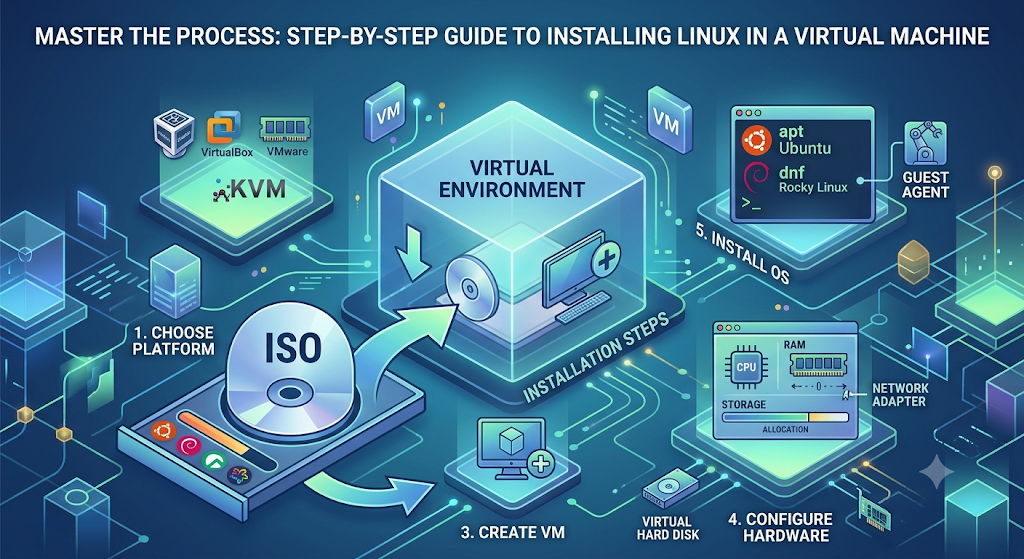
Installing Linux in a virtual environment is relatively simple. Most popular virtualization platforms provide installation wizards that guide you through the process.
Follow these general steps to create your first Linux virtual machine.
Step 1: Choose a Virtualization Platform
First, select a virtualization platform such as VMware Workstation, VirtualBox, or KVM. Make sure your computer supports hardware virtualization and that it is enabled in the BIOS or UEFI settings.
Step 2: Download the Linux ISO File
Visit the official website of your preferred Linux distribution and download its ISO installation file.
For example, you can choose Ubuntu Server, Debian, Rocky Linux, or AlmaLinux based on your requirements.
Step 3: Create a New Virtual Machine
Open your virtualization software and create a new virtual machine. Provide a suitable name and select the downloaded Linux ISO file as the installation media.
Step 4: Configure Virtual Hardware
Allocate the required resources to your virtual machine, including:
- Virtual CPU cores.
- RAM allocation.
- Virtual hard disk capacity.
- Network adapter.
- Installation media.
Avoid allocating more resources than your physical computer can comfortably provide.
Step 5: Install the Linux Operating System
Start the virtual machine and follow the installation instructions. Configure the username, password, disk partitioning, network settings, and other required options.
Step 6: Update and Configure Linux
After installation, update the operating system and install the required software packages.
For Ubuntu or Debian, you can use:
sudo apt update
sudo apt upgrade -y
For Rocky Linux or AlmaLinux:
sudo dnf update -y
Once the installation and configuration are complete, your Linux virtual machine will be ready to use.
Common Mistakes to Avoid When Choosing a Linux Distribution for Virtualization
Selecting an unsuitable Linux distribution or incorrectly configuring virtual machine resources can affect performance and stability.
Here are some common mistakes to avoid.
1. Allocating Insufficient RAM: Running applications with insufficient memory can slow down your virtual machine. Always consider the requirements of your operating system and applications.
2. Ignoring Software Compatibility: Some applications are designed for specific Linux distributions. Check software dependencies before choosing an operating system.
3. Choosing a Heavy Distribution for Small Workloads: A desktop-focused distribution may consume more resources than necessary when you only need a command-line server.
4. Skipping Security Updates: Outdated packages can introduce security vulnerabilities. Regularly update your Linux virtual machines.
5. Ignoring Backup and Snapshots: Always maintain backups of important virtual machine data. Snapshots can also help restore a VM to an earlier state during testing.
6. Incorrect Network Configuration: Improper network settings can prevent virtual machines from accessing the internet or communicating with other systems.
Tips to Improve Linux Virtual Machine Performance
After installing your preferred Linux distribution, you can make several adjustments to improve its performance.
- Use SSD or NVMe Storage: Faster storage can improve boot times and application responsiveness.
- Install Only Required Packages: Avoid unnecessary applications and background services.
- Enable Hardware Virtualization: Make sure Intel VT-x or AMD-V is enabled where supported.
- Configure Virtual CPU Resources: Allocate an appropriate number of CPU cores based on your workload.
- Use Lightweight Desktop Environments: If you need a graphical interface, consider lightweight options to reduce memory consumption.
- Monitor System Resources: Use tools such as top, htop, and free to monitor CPU and memory usage.
- Keep the System Updated: Regular updates help maintain security, compatibility, and stability.
Final Recommendation: Which Linux Distribution Should You Choose?
If you are still unsure which Linux distribution to select, consider these recommendations:
- Ubuntu Server: Best overall option for beginners, developers, and general server workloads.
- Debian: Best for users who prioritize stability and reliability.
- Rocky Linux: Best for enterprise-oriented environments.
- AlmaLinux: Best for Enterprise Linux-compatible server applications.
- Alpine Linux: Best for lightweight virtual machines and resource-efficient workloads.
- Fedora Server: Best for testing modern Linux technologies.
No one single Linux distribution can be recommended for every virtual environment because the best distribution is the one that meets the needs of the user’s applications while also being most efficient with the resources available.
For general use, Ubuntu Server is probably a good first install. For production systems, Debian is also a strong recommendation just like Rocky Linux and AlmaLinux.
Conclusion
The choice of a suitable Linux distribution for a virtual environment relies on workload, performance requirements, security parameters, and hardware resources available.
Ubuntu Server provides an excellent option for novice users or developers. Debian is excellent for those who want stability. For business workloads, Rocky Linux and AlmaLinux are appropriate. Those who focus on a resource-optimized environment may prefer the Alpine Linux distribution.
Before making your choice, determine your applications’ requirements, the virtualization platform you plan to use, and the available server resources.
With the right Linux distribution and virtualization platform chosen, you are likely to create a dependable, secure, and efficient virtual environment.
Frequently Asked Questions
1. What is the best Linux distribution for running in a virtual environment?
Ubuntu Server is an excellent all-around choice because of its ease of use, extensive documentation, and software compatibility. Debian, Rocky Linux, and AlmaLinux are also strong options depending on your requirements.
2. Which Linux distribution uses the least resources in a virtual machine?
Alpine Linux is one of the lightest Linux distributions. It is suitable for virtual machines with limited RAM, CPU, and storage resources.
3. Is Ubuntu better than Debian for virtual machines?
Ubuntu is generally easier for beginners and offers a convenient software ecosystem. Debian is known for stability and efficient resource usage. Both are excellent choices for virtual environments.
4. Which Linux distribution is best for VPS hosting?
Ubuntu Server, Debian, AlmaLinux, and Rocky Linux are popular choices for VPS hosting. The right option depends on application compatibility, performance, and server management requirements.
5. Can I run multiple Linux virtual machines on one computer?
Yes. You can run multiple Linux virtual machines on one computer using platforms such as VMware, VirtualBox, or KVM. However, the number of VMs depends on your available CPU, RAM, and storage.
6. Is Linux better than Windows for virtual environments?
Linux can be more resource-efficient and offers flexible server administration tools. Windows may be preferable when you need Windows-specific applications or services. The best choice depends on your workload.
7. Which virtualization platform is best for Linux?
KVM/QEMU is an excellent option for Linux-based virtualization. VMware, VirtualBox, and Proxmox VE are also popular choices for different use cases.
8. Is Alpine Linux suitable for production virtual machines?
Yes. Alpine Linux can be used in production environments, particularly for lightweight services and containers. However, its musl libc and BusyBox-based environment may require additional compatibility considerations.
Suggestions:
- https://mainvps.net/blog/lifetime-web-hosting-2026/
- https://mainvps.net/blog/windows-reseller-web-hosting/
- https://mainvps.net/blog/best-wordpress-hosting-providers/
- https://mainvps.net/blog/linux-vps-hosting-india/
- https://mainvps.net/blog/low-cost-windows-vps-hosting-in-india/
- https://mainvps.net/blog/cheap-dedicated-server-hosting-providers/
- https://mainvps.net/blog/windows-server-guide-dde-dns-tls-1-2-uptime/
- https://mainvps.net/blog/dedicated-server-hosting-netherlands/
- https://mainvps.net/blog/dedicated-server-low-price/
- https://mainvps.net/blog/vps-hosting-in-los-angeles-us/
- https://mainvps.net/blog/dedicated-server-in-nedzone-nl/
- https://mainvps.net/blog/buy-linux-vps-hosting/
- https://mainvps.net/blog/managed-windows-vps-hosting/
- https://mainvps.net/blog/what-is-wmi-provider-host-complete-guide/
- https://mainvps.net/blog/cloud-hosting-vs-vps-2026/
- https://mainvps.net/blog/vps-hosting-for-ecommerce-guide/
- https://mainvps.net/blog/vps-hosting-for-saas-applications/
- https://mainvps.net/blog/vps-reseller-hosting-in-netherlands/
- https://mainvps.net/blog/dedicated-server-hosting-in-us/
- https://mainvps.net/blog/linux-reseller-hosting/
- https://mainvps.net/blog/dedicated-server-with-nvme-us/
- https://mainvps.net/blog/dedicated-server-with-root-access-us/
- https://mainvps.net/blog/dedicated-server-with-cpanel-us/
- https://mainvps.net/blog/litespeed-vps-hosting-in-netherlands/
- https://mainvps.net/blog/cheap-windows-vps-hosting/
- https://mainvps.net/blog/affordable-dedicated-server-netherlands/
- https://mainvps.net/blog/us-windows-vps-hosting/
- https://mainvps.net/blog/dedicated-server-hosting-services-in-the-us/
- https://mainvps.net/blog/cloud-servers-for-small-business/
- https://mainvps.net/blog/low-cost-dedicated-server-usa/
- https://mainvps.net/blog/debian-server-vs-ubuntu-server/