
The need for a reliable and fast hosting service in the present-day digital world is crucial for all types of businesses, website developers, and website owners who want to get fast, secure, reliable, and flexible hosting services. As websites and web applications have become more and more complex, normal shared hosting services might fail to meet the demand of these websites.
Out of the various virtualization methods available today, the use of KVM (kernel-based virtual machine) has become one of the most popular for offering VPS hosting solutions.
However, what exactly makes KVM such a good choice for VPS hosting? Why do people prefer KVM VPS hosting over other virtualization methods?
What Is KVM Virtualization?
Kernel-based Virtual Machine (KVM) is the meaning of KVM. It is a virtualization technology based on open source. It enables the execution of several independent virtual machines (VMs) on a single physical host. Each virtual machine behaves independently as a different physical computer.
Each KVM virtual machine is capable of running its own operating system, CPU, RAM, memory, and network.
As opposed to other types of virtualization that utilize containers, KVM offers hardware virtualization. This means each virtual machine runs
Key features of KVM include:
- Hardware-assisted virtualization.
- Dedicated virtual machine environments.
- Independent operating system support.
- Better resource isolation.
- Flexible CPU and RAM allocation.
- Improved security between virtual machines.
- Support for scalable hosting environments.
These features make KVM a suitable technology for businesses that require reliable and flexible VPS hosting.
How Does KVM Virtualization Work?
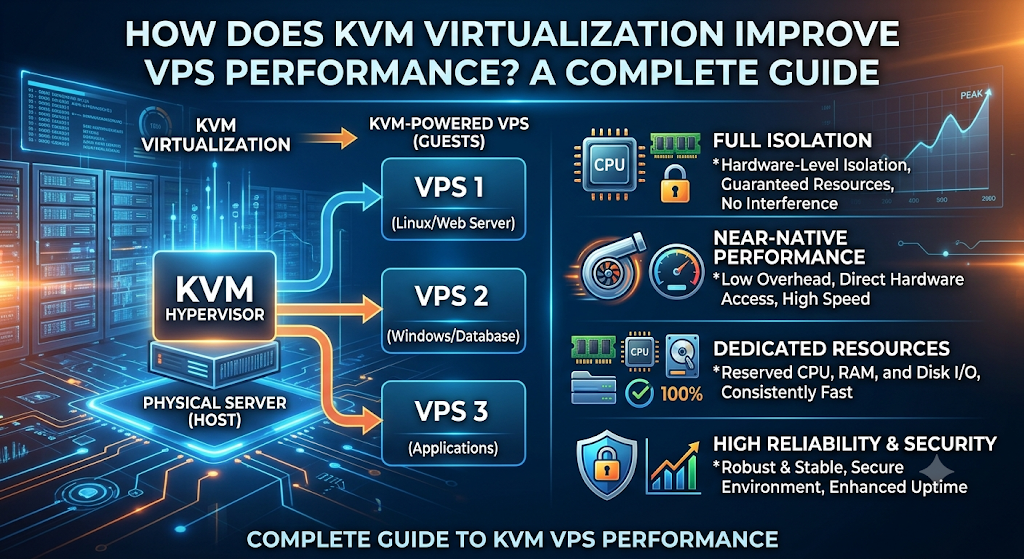
This is achieved by KVM turning the Linux kernel into a hypervisor. A hypervisor is a program that runs virtual machines, assigning the resources of the physical server to each one.
KVM leverages modern processors’ hardware virtualization extensions (Intel VT-x and AMD-V) to run virtual machines efficiently.
Each virtual machine receives virtual hardware, including:
- Virtual CPU (vCPU).
- Virtual RAM.
- Virtual storage.
- Virtual network interfaces.
- Virtual input and output devices.
The virtual machine has its own operating system and applications and does not impact any other virtual machines running on the same physical server.
Best KVM VPS hosting is usually used with QEMU, which handles device emulation and virtual machine management. Together, they help build and run entire virtual computing environments.
For instance, a physical server with 64 GB of RAM and multiple CPU cores can have its resources divided among multiple virtual machines, depending on how the hosting provider configures it.
This enables hosting providers to deploy multiple isolated VPS environments on one powerful physical server.
10 Ways KVM Virtualization Improves VPS Performance
KVM offers several advantages that can improve the overall performance of a VPS. Let’s explore the most important benefits.
1. Dedicated Resource Allocation
One of the most important advantages of KVM is the possibility to assign computing resources to each virtual machine.
With KVM VPS hosting, the host provider will allocate a certain amount of CPU, RAM, and storage for each virtual machine. These resources are independently controlled by the server configuration.
That way, one VPS cannot directly access the memory allocated to another VPS, nor can it interfere with their operating system.
For example, if your VPS plan has 4 GB RAM and 4 vCPU cores, those resources are assigned to your virtual machine.
However, the actual availability of CPU and performance still depends on the physical server capacity, CPU scheduling, and the resource allocation policies of the provider.
Why it improves performance:
- Provides predictable memory allocation.
- Helps maintain consistent application performance.
- Reduces resource conflicts between virtual machines.
- Supports resource-intensive applications.
- Makes server resource planning easier.
This makes KVM a suitable option for websites and applications that need dependable computing resources.
2. Better CPU Performance
The performance of the CPU has an impact on the speed of your website, application processing, database operations, and server responsiveness.
KVM leverages hardware virtualization features like Intel VT-x and AMD-V for efficient execution of virtual machine workloads.
This provides virtual CPUs that are scheduled onto the physical processor cores to VMs.
KVM is built into the Linux kernel and can therefore benefit from Linux scheduling and memory management features.
This can provide effective performance if the host is correctly configured for applications requiring regular processing power.
Benefits include:
- Efficient CPU scheduling.
- Support for multiple virtual CPU cores.
- Better handling of parallel workloads.
- Improved application processing.
- Suitable performance for business applications.
However, actual CPU performance depends on processor quality, workload, and how many virtual CPUs are competing for physical CPU time.
3. Improved RAM Management
Another major factor that affects VPS performance is RAM. Applications, databases, websites, and operating systems require memory to work properly.
KVM keeps virtual machines isolated by providing them with dedicated memory.
Each virtual machine has its own memory management and its own operating system.
For example, if you have an eCommerce website with a database and multiple applications, enough RAM can help reduce unnecessary disk swapping and improve responsiveness.
KVM also supports advanced memory management features like memory ballooning and huge pages depending on the host configuration.
How better memory management helps:
- Supports multiple applications.
- Improves database responsiveness.
- Helps reduce memory-related bottlenecks.
- Provides independent memory environments.
- Supports workloads with different memory requirements.
Choosing an appropriate RAM allocation is important for maintaining stable VPS performance.
4. Faster Storage and Disk I/O Performance
Storage speed impacts page loads, database queries, file uploads, and application response time.
KVM virtualization allows for multiple configurations of virtual disks and storage systems. The hosting company can utilize such technologies as NVMe SSD drives, SSD storage, and optimized storage systems to increase disk performance.
The KVM technology can also take advantage of paravirtualized storage devices such as VirtIO that minimize virtualization overhead in contrast to traditional emulated devices.
Thus, for instance, the VPS running a WordPress website with its active database requires numerous disk I/O operations. An improved storage system can assist in processing database requests and website file loading more effectively.
Storage performance benefits include:
- Faster file access with suitable storage hardware.
- Improved database operations.
- Efficient virtual disk management.
- Support for NVMe and SSD storage.
- Better handling of input/output operations.
It is important to remember that storage speed also depends on the physical drives, storage configuration, and the number of workloads sharing the storage system.
5. Stronger Resource Isolation
Resource isolation is one of the most important reasons businesses choose KVM VPS hosting.
In a virtualized environment, multiple customers may operate their VPS instances on the same physical server. Without proper isolation, the activity of one virtual machine could negatively affect another.
KVM uses separate virtual machine environments, helping isolate operating systems, memory, and virtual hardware.
For example, if one VPS runs a high-traffic website, other VPS environments remain separated at the virtualization level.
Although shared physical hardware can still create performance contention, proper isolation helps prevent direct interference between virtual machines.
Major advantages include:
- Independent virtual machine environments.
- Better separation of operating systems.
- Reduced risk of cross-VM interference.
- Improved workload management.
- More predictable resource usage.
This makes KVM a suitable virtualization technology for hosting multiple websites, applications, and business services.
6. Support for Multiple Operating Systems
Another major advantage of KVM is its ability to support different operating systems.
Since KVM provides hardware-level virtualization, each virtual machine can run its own compatible operating system.
For example, you can operate:
This flexibility makes KVM VPS hosting useful for developers, system administrators, and businesses that work with different software environments.
You can install the operating system that best suits your application without depending on the host server’s operating system environment.
Why this matters for performance:
Different applications have different operating system requirements. KVM allows users to select an appropriate environment for their workload, which can help improve compatibility and resource efficiency.
7. Improved Network Performance
The performance of the network is vital for sites, cloud applications, e-commerce platforms, APIs, and business communications.
KVM also allows virtual network cards that enable the virtual machine to connect with external networks and systems.
Using VirtIO network card drivers, the paravirtualization of networking on KVM virtual machines can help reduce overhead as compared to full emulation of the network card.
The hosting provider can also configure the network bandwidth, network routing, firewall, and network interfaces.
Network-related advantages include:
- Efficient virtual network communication.
- Support for high-speed network interfaces.
- Flexible network configuration.
- Better separation of virtual networks.
- Support for scalable hosting infrastructure.
Actual network performance depends on the provider’s bandwidth, hardware, routing, and network policies.
8. Better Security and Stability
The issues of security and stability should be considered in choosing the right VPS hosting solution.
KVM creates individual environments for each virtual machine, thus providing isolation between guest operating systems.
Each virtual machine is independent and it does not affect the operation of other virtual machines.
In this way, KVM also uses the security of Linux and the security of virtualization technologies.
This may be an added benefit for businesses that need to host sensitive applications and databases or customer data.
Security benefits include:
- Virtual machine isolation.
- Independent operating systems.
- Separate virtual disk environments.
- Support for virtual machine snapshots.
- Improved control over individual VPS environments.
However, KVM alone does not guarantee complete security. Proper server updates, firewall configuration, access controls, backups, and monitoring are also necessary.
9. Easy Scalability and Resource Management
With the growth of websites or applications, there might be a need to use more processing capabilities.
For instance, the beginning stage of a small website requires just 2 GB RAM and 2 vCPU cores. But as there is an increase in traffic, it will demand more CPU power, memory, and disk space.
The KVM technology allows hosting providers to configure their virtual machines depending on the hardware capacity of their servers.
This depends on the hosting infrastructure used by providers and the VPS package.
Scalability advantages include:
- Flexible resource allocation.
- Support for different VPS configurations.
- Easier infrastructure management.
- Ability to accommodate growing workloads.
- Suitable for changing business requirements.
This flexibility makes KVM a practical solution for startups, growing businesses, and developers.
10. Efficient Virtual Machine Management
KVM allows for the support of virtualization management software that helps hosting companies build and maintain their virtual machines.
Software like libvirt, QEMU, and virtualization management systems may help in the simplification of administrative activities.
Hosting companies may employ the above-mentioned software to handle virtual machine resources, networking configuration, make snapshots, and carry out maintenance work.
Proper management can minimize operational difficulties and increase the reliability of VPS hosting architecture.
From the customers’ point of view, this translates into a well-managed virtual server hosting environment where the hosting company has configured its virtualization environment correctly.
KVM VPS vs OpenVZ VPS: Which Offers Better Performance?
KVM and OpenVZ are two different virtualization technologies commonly used in VPS hosting.
KVM uses hardware-level virtualization, while OpenVZ uses operating-system-level virtualization based on containers.
The main difference is how each technology creates and manages virtual environments.
| Feature | KVM VPS | OpenVZ VPS |
| Virtualization type | Hardware-level | Container-based |
| Operating system | Independent guest OS | Shares host OS kernel |
| Resource isolation | Strong VM isolation | Container isolation |
| OS flexibility | Supports different compatible OSs | Generally Linux-based |
| Kernel control | Independent guest kernel | Shared host kernel |
| Windows support | Yes, with suitable configuration | No native Windows guest support |
| Resource management | Virtual machine allocation | Container-based allocation |
| Use cases | Business apps, development, hosting | Linux hosting and lightweight workloads |
Which One Should You Choose?
It is always preferable to use KVM Server when you require a separate OS, good virtualization isolation, or a Windows and Linux environment.
OpenVZ can be considered in the case of lightweight Linux applications where high container efficiency and low virtualization overheads matter.
This totally depends upon your needs, budget, and host setup.
Who Should Choose KVM VPS Hosting?
KVM VPS hosting is suitable for different types of users who need a flexible and independent server environment.
Here are some common use cases.
1. Website Owners
Website owners who experience increasing traffic may need more resources than shared hosting can provide.
KVM VPS hosting offers allocated resources and an independent environment for hosting websites, managing databases, and running applications.
2. Developers and Programmers
Developers often require different operating systems and software configurations for testing and development.
KVM makes it possible to create independent virtual machines for different development environments.
3. eCommerce Businesses
Online stores need reliable hosting to manage product pages, customer accounts, databases, and payment-related integrations.
A properly configured Cheap KVM VPS can provide the computing resources and flexibility required to operate an eCommerce platform.
4. Businesses Running Applications
Businesses using CRM software, ERP systems, internal applications, and business databases can benefit from the independent environment provided by KVM virtualization.
5. Agencies and Resellers
Web development agencies and hosting resellers may need separate environments for different customers and projects.
KVM VPS hosting can help them manage multiple websites and applications with greater flexibility.
How to Choose the Right KVM VPS Hosting Plan
Selecting the right KVM VPS hosting plan is important for getting consistent performance.
Before purchasing a VPS, consider the following factors.
1. CPU Cores
Choose a plan with enough vCPU cores to handle your website traffic, application processing, and background tasks.
2. RAM Allocation
Select sufficient RAM based on the number of applications, database requirements, and expected traffic.
3. NVMe or SSD Storage
Choose fast storage to improve file access, database operations, and overall server responsiveness.
4. Network Bandwidth
Check the available bandwidth and network speed to ensure your VPS can handle expected website visitors and application traffic.
5. Data Centre Location
Choose a server location close to your target audience when possible. A geographically closer server can help reduce network latency.
6. Security Features
Look for important security features such as firewall support, DDoS protection, backups, and SSL compatibility.
7. Technical Support
Reliable technical support can help resolve server configuration issues, network problems, and unexpected performance concerns.
8. Upgrade Options
Choose a hosting provider that offers flexible VPS upgrades so you can increase resources as your business grows.
Best Practices to Improve KVM VPS Performance
Although KVM Server offers several virtualization advantages, proper server optimization is still necessary to achieve good performance.
Here are some useful practices.
- Use an optimized operating system: Choose a lightweight and stable operating system suitable for your application.
- Install software updates: Keep your operating system, applications, and server packages updated.
- Monitor resource usage: Regularly check CPU, RAM, disk, and network consumption.
- Optimize databases: Configure database caching, indexing, and query optimization.
- Use a web server efficiently: Consider Nginx, Apache, or LiteSpeed according to your website requirements.
- Enable caching: Use application-level caching and suitable content delivery solutions.
- Choose fast storage: NVMe storage can improve disk performance for workloads that depend heavily on I/O.
- Configure security: Use firewalls, SSH key authentication, strong passwords, and regular security updates.
- Maintain backups: Schedule regular backups to protect important website and application data.
- Monitor server performance: Use monitoring tools to identify resource bottlenecks before they affect users.
Following these practices can help maintain a stable and efficient KVM VPS environment.
Common Applications That Benefit from KVM VPS Hosting
KVM virtualization is suitable for many applications because it supports independent operating systems and flexible resource configurations.
Some common examples include:
| Application | How KVM VPS Helps |
| WordPress websites | Provides an independent hosting environment |
| eCommerce stores | Supports databases and online store applications |
| Web applications | Offers flexible CPU and RAM allocation |
| Database servers | Supports dedicated virtual machine environments |
| Development environments | Allows different operating systems and configurations |
| Business software | Supports applications requiring specific OS environments |
| Game servers | Provides configurable computing resources |
| VPN servers | Supports independent server configurations |
The performance of these applications depends on the VPS resources, software configuration, and hosting provider’s infrastructure.
Frequently Asked Questions
1. What is a KVM VPS?
A KVM VPS is a virtual server created using hardware-level virtualization. It provides independent CPU, RAM, storage, and operating system resources.
2. Is a KVM VPS faster than OpenVZ?
KVM VPS often provides better resource isolation and consistent performance, while OpenVZ can offer lower virtualization overhead. Performance depends on server configuration.
3. How does KVM virtualization improve server performance?
KVM improves performance through efficient CPU scheduling, memory management, hardware virtualization, and optimized storage and networking.
4. Does KVM VPS provide dedicated resources?
Yes, KVM VPS plans provide allocated CPU, RAM, and storage, helping deliver more predictable performance.
5. Is KVM VPS good for hosting websites?
Yes, KVM VPS is suitable for business websites, WordPress sites, blogs, and eCommerce stores that need flexibility and reliable resources.
6. Why is KVM better for virtualization?
KVM offers hardware-level virtualization, independent operating systems, strong isolation, and flexible resource management.
7. Is KVM VPS suitable for high-traffic websites?
Yes, KVM VPS can handle high-traffic websites with sufficient CPU, RAM, NVMe storage, bandwidth, and proper server optimization.
Suggestions:
- https://mainvps.net/blog/lifetime-web-hosting-2026/
- https://mainvps.net/blog/windows-reseller-web-hosting/
- https://mainvps.net/blog/best-wordpress-hosting-providers/
- https://mainvps.net/blog/linux-vps-hosting-india/
- https://mainvps.net/blog/low-cost-windows-vps-hosting-in-india/
- https://mainvps.net/blog/cheap-dedicated-server-hosting-providers/
- https://mainvps.net/blog/windows-server-guide-dde-dns-tls-1-2-uptime/
- https://mainvps.net/blog/dedicated-server-hosting-netherlands/
- https://mainvps.net/blog/dedicated-server-low-price/
- https://mainvps.net/blog/vps-hosting-in-los-angeles-us/
- https://mainvps.net/blog/dedicated-server-in-nedzone-nl/
- https://mainvps.net/blog/buy-linux-vps-hosting/
- https://mainvps.net/blog/managed-windows-vps-hosting/
- https://mainvps.net/blog/what-is-wmi-provider-host-complete-guide/
- https://mainvps.net/blog/cloud-hosting-vs-vps-2026/
- https://mainvps.net/blog/vps-hosting-for-ecommerce-guide/
- https://mainvps.net/blog/vps-hosting-for-saas-applications/
- https://mainvps.net/blog/vps-reseller-hosting-in-netherlands/
- https://mainvps.net/blog/dedicated-server-hosting-in-us/
- https://mainvps.net/blog/linux-reseller-hosting/
- https://mainvps.net/blog/dedicated-server-with-nvme-us/
- https://mainvps.net/blog/dedicated-server-with-root-access-us/
- https://mainvps.net/blog/dedicated-server-with-cpanel-us/
- https://mainvps.net/blog/litespeed-vps-hosting-in-netherlands/
- https://mainvps.net/blog/cheap-windows-vps-hosting/
- https://mainvps.net/blog/affordable-dedicated-server-netherlands/
- https://mainvps.net/blog/us-windows-vps-hosting/
- https://mainvps.net/blog/dedicated-server-hosting-services-in-the-us/
- https://mainvps.net/blog/cloud-servers-for-small-business/
- https://mainvps.net/blog/low-cost-dedicated-server-usa/