In the era of technology, traffic is everything, as long as you have an infrastructure that can accommodate it. For high-traffic sites, the more traffic, the more leads, engagements, and profits you will make. However, without a proper hosting environment, more traffic equals slower speed, downtime, and customers who will end up leaving.
This is exactly why VPS hosting for high traffic websites has become the go-to solution for businesses that require nothing but the best in terms of reliability, speed, and scalability without the hefty price tag of dedicated server hosting in India.
This guide is not just meant to educate but to assist you in understanding the business case for upgrading to cheap VPS hosting, a decision that will have a direct impact on your business.
What is VPS Hosting, and Why Does It Matter for High Traffic?
VPS hosting India uses virtualization technology to divide a physical server into multiple independent environments. Each virtual server has its own resources, operating system, and configurations.
For high-traffic websites, this arrangement means the following:
- No resource sharing issues
- Consistent performance during peak hours
- Greater control over server optimization
- Enhanced reliability
Unlike shared hosting, where one website’s traffic spike can slow down others, MainVPS hosting ensures your performance remains stable regardless of external factors.
The Real Problem with High Traffic Websites
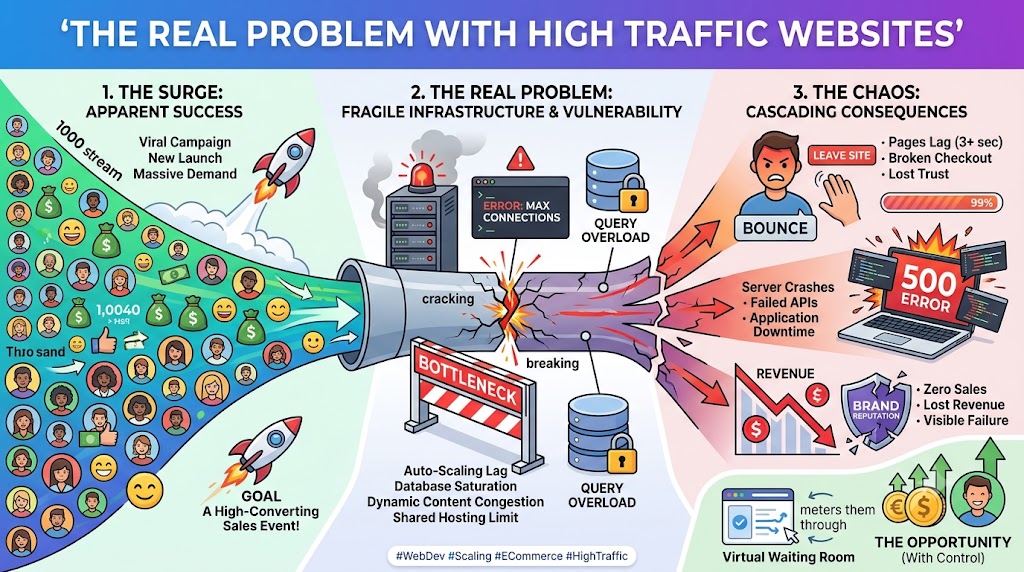
Before understanding the value of VPS hosting, it’s important to recognize the deeper challenges high-traffic websites face. As your audience grows, your infrastructure must evolve; otherwise, increased traffic can quickly turn into lost opportunities and technical failures.
1. Server Overload
When too many users access your website simultaneously, the server struggles to process requests efficiently, especially in shared hosting environments where resources are limited and shared among multiple users.
This leads to:
- Slow-loading pages
- Timeout errors
- Crashed servers
Deeper Impact
- CPU Bottlenecks: High concurrent requests overload processing power
- Memory Exhaustion: Insufficient RAM causes applications to fail
- Database Lag: Increased queries slow down response times
Business Consequences
- Interrupted user sessions
- Failed transactions during checkout
- Negative brand perception
For e-commerce or high-traffic platforms, even a few seconds of downtime can result in significant revenue loss.
2. Lost Revenue
Performance issues directly affect your bottom line. Every delay in loading time reduces the chances of conversion.
Studies consistently show that:
- Even a 1-second delay can reduce conversions
- Slow websites increase bounce rates
- Users abandon carts if checkout is slow
Hidden Revenue Loss Factors
- Cart Abandonment: Slow checkout leads to incomplete purchases
- Lower Engagement: Visitors leave before exploring products/services
- Reduced Ad ROI: Paid traffic is wasted if users don’t convert
Long-Term Impact
- Decreased customer lifetime value
- Lower repeat purchase rates
- Loss of competitive advantage
In high-traffic scenarios, these losses multiply rapidly, making performance a direct revenue driver.
3. Poor User Experience
User experience (UX) is one of the most critical factors in website success. VPS for high-traffic sites can negatively impact UX if your hosting environment cannot keep up.
Visitors expect:
- Instant page loading
- Smooth navigation
- Responsive interactions
If your site lags:
- Users leave within seconds
- Engagement drops significantly
- Trust in your brand decreases
UX Challenges Under High Traffic
- Delayed page rendering
- Broken elements or incomplete loading
- Slow search and filtering functions
SEO Impact
Search engines consider user experience signals such as:
- Bounce rate
- Time on site
- Page speed
Poor performance can lower your rankings, reducing organic traffic over time.
4. Security Risks
High-traffic websites are prime targets for cyberattacks because they offer greater visibility and potential rewards for attackers.
Common threats include:
- DDoS attacks
- Data breaches
- Malware injections
Expanded Security Challenges
- Brute Force Attacks: Attempting to gain unauthorized access
- Bot Traffic: Fake traffic that consumes server resources
- API Exploits: Targeting vulnerabilities in integrations
Impact on Business
- Loss of sensitive customer data
- Legal and compliance issues
- Damage to brand reputation
Without proper security measures, high traffic can expose vulnerabilities in your system.
5. Scalability Limitations
One of the greatest challenges with traditional hosting is the inability to scale quickly.
When traffic increases:
- Servers reach their limits
- Performance degrades
- Upgrades require downtime
Problems Caused by Poor Scalability
- Inability to handle sudden traffic spikes
- Missed opportunities during promotions or viral events
- Delayed business growth
High-traffic websites need infrastructure that grows with demand, not one that restricts it.
6. Database Performance Issues
Best VPS hosting for high traffic means more database requests, which can overwhelm poorly optimized systems.
Common issues include:
- Slow query execution
- Database lockups
- Increased latency
Impact
- Slow product searches
- Delayed content loading
- Failed transactions
Database performance directly impacts user experience and sales for VPS hosting for e-commerce websites.
7. Bandwidth and Network Bottlenecks
Traffic-heavy websites consume significant bandwidth. Limited network capacity can cause the following:
- Slow data transfer
- Increased latency
- Interrupted connections
Global Audience Challenges
- Users from different regions experience delays
- Content delivery becomes inconsistent
8. Maintenance and Management Challenges
As traffic grows, managing your hosting environment becomes more complex.
You may face:
- Frequent troubleshooting
- Performance monitoring issues
- Difficulty implementing updates without downtime
Operational Impact
- Increased workload for technical teams
- Higher maintenance costs
- Slower response to issues
Why VPS Hosting is the Best Solution for High-Traffic Websites
1. Dedicated Resources = Consistent Performance
With VPS hosting, your website gets:
- Guaranteed CPU power
- Reserved RAM
- Dedicated storage
This ensures your site runs smoothly even during heavy traffic.
2. Scalability That Supports Growth
Traffic is unpredictable. Scalable VPS hosting allows you to:
- Upgrade resources instantly
- Handle traffic spikes during campaigns
- Scale without downtime
This flexibility is essential for growing businesses.
3. Faster Loading Speeds
Speed directly impacts the following:
- SEO rankings
- User engagement
- Conversion rates
VPS hosting uses:
- NVMe/SSD storage
- Optimized server stacks
- Advanced caching
4. Enterprise-Level Security
VPS hosting offers:
- Isolated environments
- Firewall protection
- Secure access controls
- Regular updates
For high-traffic websites handling sensitive data, this level of security is crucial.
Key Features That Make VPS Hosting Ideal for High Traffic
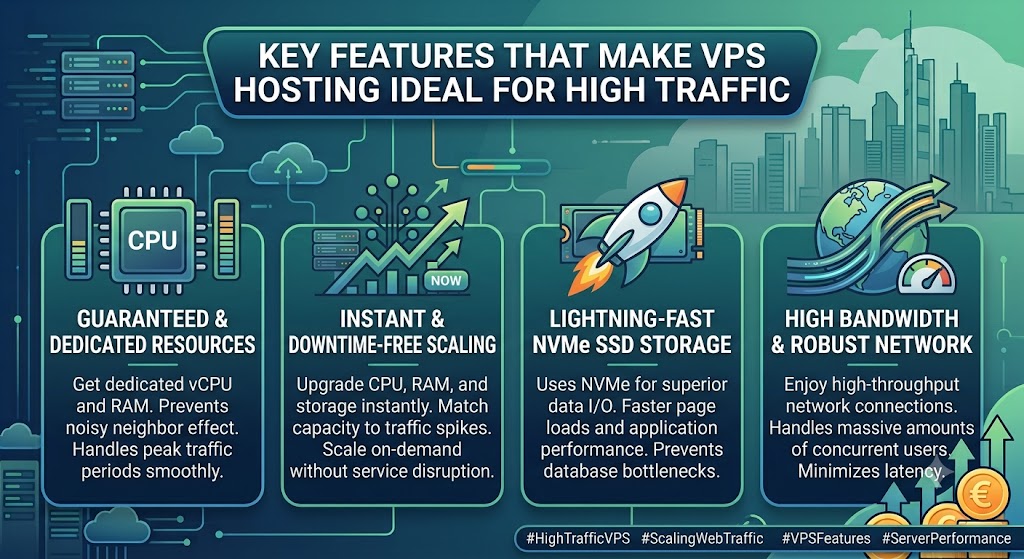
When managing a high-traffic website, the hosting environment must deliver consistent speed, reliability, and flexibility. VPS hosting stands out because of its powerful features designed to handle heavy workloads efficiently. Let’s explore these features in greater depth.
1. NVMe Storage for Maximum Speed
NVMe (Non-Volatile Memory Express) storage is a major upgrade over traditional SSDs, offering significantly faster data transfer speeds and lower latency.
How NVMe Enhances Performance
- Direct communication with the CPU via the PCIe interface
- Higher IOPS (Input/Output Operations Per Second)
- Faster read/write speeds compared to SATA SSDs
Key Benefits
- Reduced Load Times: Pages load almost instantly, even under heavy traffic
- Faster Database Queries: Improves performance for dynamic websites
- Better Application Response: Smooth user interactions
Impact on High-Traffic Websites
- Handles large volumes of simultaneous requests
- Prevents slowdowns during peak traffic
- Improves SEO rankings due to faster speed
2. Full Root Access for Custom Optimization
A full VPS Server with root access gives you complete control over your VPS server, allowing deep-level customization and optimization.
What You Can Do
- Install custom software and frameworks
- Configure web servers (Apache, Nginx, LiteSpeed)
- Optimize database settings (MySQL, MariaDB)
- Manage security protocols
Advanced Optimization Capabilities
- Adjust PHP settings for performance
- Configure caching systems (Redis, Memcached)
- Enable compression (GZIP, Brotli)
- Tune kernel and network parameters
Security Control
- Implement custom firewall rules
- Configure SSH access
- Install intrusion detection systems
Business Impact
- Tailor the server environment to your exact needs
- Improve performance for high-demand applications
- Gain full flexibility for scaling and innovation
3. High Bandwidth and Low Latency
High-traffic websites require fast and reliable network connectivity to deliver content efficiently to users across the globe.
Key Features
- High bandwidth allocation (unmetered or scalable)
- Low-latency network infrastructure
- High-speed uplinks (1Gbps or higher)
Benefits
- Faster Data Transfer: Quick delivery of website content
- Smooth User Experience: No lag during browsing or transactions
- Global Accessibility: Consistent performance for international users
Advanced Networking Enhancements
- CDN integration for global content delivery
- Load balancing to distribute traffic
- Optimized routing for reduced latency
Impact on High-Traffic Websites
- Prevents network congestion
- Ensures stable performance during traffic spikes
- Supports media-rich and content-heavy platforms
4. Backup and Disaster Recovery
Data protection is critical for high-traffic websites where even minor data loss can lead to major business disruptions.
Backup Types
- Automated Backups: Scheduled backups for continuous protection
- Snapshot Backups: Instant capture of server state
- Incremental Backups: Efficient storage by saving only changes
Recovery Features
- One-click restore functionality
- Rapid recovery from system failures
- Version rollback options
Disaster Recovery Benefits
- Business Continuity: Keep operations running even after failures
- Data Protection: Safeguard customer and transaction data
- Minimal Downtime: Quick restoration reduces impact
Advanced Capabilities
- Offsite backup storage
- Geo-redundant backup systems
- Automated failover mechanisms
E-commerce & High Traffic Impact
- Prevent loss of orders and customer data
- Ensure uninterrupted service during outages
- Maintain trust and reliability
Commercial Benefits: Why VPS Hosting Increases Revenue
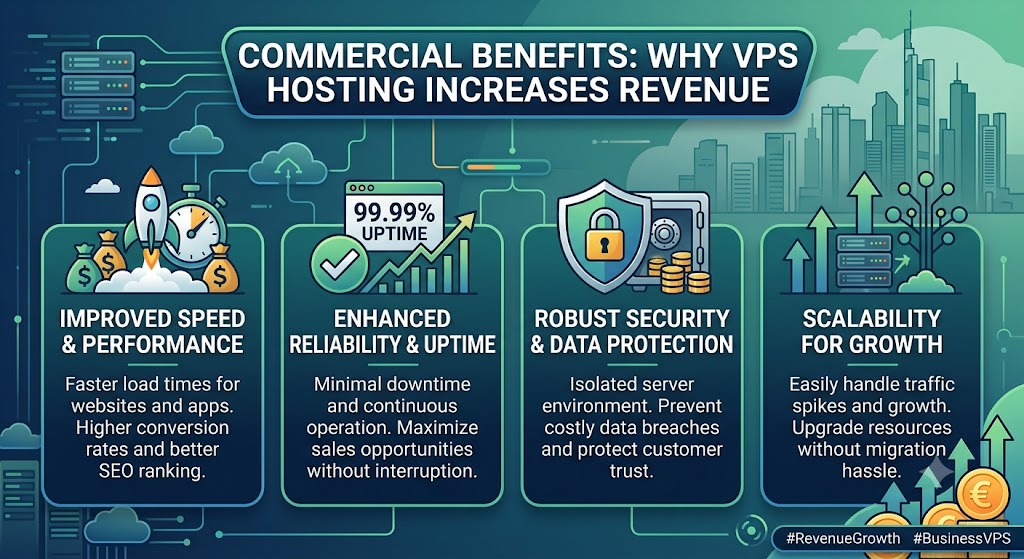
VPS hosting is not just a technical upgrade; it’s a direct driver of business growth and profitability. For high-traffic websites, every improvement in speed, uptime, and reliability translates into better user experience and higher revenue. Let’s explore these commercial benefits in more depth.
1. Higher Conversion Rates
Fast websites convert better. VPS hosting ensures:
- Quick page loads
- Smooth checkout processes
Why Speed Impacts Conversions
Users expect instant results. Even a slight delay can cause them to abandon your site before completing a purchase.
Extended Benefits
- Reduced Cart Abandonment: Faster checkout increases completed transactions
- Improved Mobile Conversions: Speed is critical for mobile users
- Seamless User Journey: From landing page to checkout, everything runs smoothly
Business Impact
- More sales per visitor
- Better ROI on marketing campaigns
- Increased revenue without increasing traffic
2. Improved SEO Rankings
Search engines prioritize:
- Fast-loading websites
- High uptime
How VPS Hosting Helps SEO
- Faster page speed improves Core Web Vitals
- Stable uptime ensures search engines can crawl your site consistently
- Better performance reduces bounce rates
Long-Term SEO Benefits
- Higher rankings on search engines
- Increased organic traffic
- Better visibility for competitive keywords
Business Impact
- Lower dependency on paid ads
- Continuous traffic growth
- Higher lead generation
3. Better Customer Retention
Users are more likely to return to:
- Fast websites
- Reliable platforms
Why Retention Matters
Acquiring new customers is more expensive than retaining existing ones. A smooth and reliable experience encourages repeat visits.
Extended Benefits
- Consistent Performance Builds Trust
- Faster Browsing Encourages Engagement
- Reliable Checkout Improves Customer Satisfaction
Customer Experience Enhancements
- Personalized content loads quickly
- No interruptions during browsing
- Secure and stable transactions
Business Impact
- Increased customer lifetime value (CLV)
- Higher repeat purchase rates
- Stronger brand loyalty
4. Competitive Advantage
A high-performing website helps you:
- Outrank competitors
- Deliver a better user experience
How VPS Hosting Gives You an Edge
- Faster than competitors using shared hosting
- More reliable during peak traffic
- Better handling of large-scale operations
Strategic Benefits
- Ability to run high-traffic campaigns without performance issues
- Faster deployment of new features
- Improved brand perception
Market Impact
- Capture more market share
- Stand out in competitive industries
- Build authority in your niche
Performance Optimization Strategies
To fully leverage VPS hosting, businesses must go beyond basic setup and implement advanced optimization techniques. These strategies ensure your high-traffic website delivers maximum speed, stability, and efficiency even under heavy load.
1. Content Delivery Network (CDN)
A CDN distributes your website content across multiple global servers, allowing users to access data from the nearest location.
How CDN Improves Performance
- Reduces physical distance between the user and server
- Delivers cached static content (images, CSS, JS)
- Offloads traffic from the origin VPS server
Key Benefits
- Faster Load Times Worldwide
- Reduced Server Load
- Improved Website Availability
Advanced CDN Features
- Edge caching for dynamic content
- DDoS protection
- Smart routing for optimized delivery
Impact on High Traffic Websites
- Handles global traffic efficiently
- Prevents server overload during spikes
- Improves user experience across regions
2. Caching Systems
Caching stores frequently accessed data in memory, reducing the need to repeatedly process requests from the server.
Popular Caching Tools
- Redis
- Memcached
Types of Caching
- Page Caching: Stores full HTML pages
- Object Caching: Stores database query results
- Opcode Caching (OPcache): Speeds up PHP execution
Benefits
- Faster response times
- Reduced CPU and database load
- Improved scalability
Advanced Caching Strategies
- Browser caching for client-side speed
- CDN caching integration
- Cache invalidation rules for dynamic content
Impact
- Handles thousands of concurrent users efficiently
- Reduces server workload significantly
3. Database Optimization
Databases are the backbone of dynamic websites. Poorly optimized databases can become a major bottleneck under high traffic VPS hosting.
Key Optimization Techniques
- Indexing: Speeds up data retrieval
- Query Optimization: Reduces execution time
- Database Cleanup: Removes unnecessary data
Advanced Techniques
- Database replication (Master-Slave setup)
- Partitioning large tables
- Using in-memory databases
Benefits
- Faster product searches
- Quick data retrieval
- Smooth transaction processing
Impact on High Traffic Websites
- Prevents database crashes
- Ensures fast response times during peak usage
4. Load Balancing
Load balancing distributes incoming traffic across multiple servers to prevent overload on a single server.
How It Works
- Incoming requests are distributed evenly
- Prevents server bottlenecks
- Ensures high availability
Types of Load Balancing
- Round Robin: Equal distribution of requests
- Least Connections: Sends traffic to the least busy server
- IP Hash: Routes users based on IP
Benefits
- Improved performance
- Increased reliability
- Zero downtime during high traffic
Impact
- Handles large traffic volumes smoothly
- Prevents server crashes
- Ensures uninterrupted user experience
VPS Hosting vs Other Hosting Solutions
Shared Hosting
- Low cost
- Poor performance under load
Dedicated Servers
- High performance
- Expensive and less flexible
VPS Hosting
- Balanced solution
- High performance + affordability
When Should You Switch to VPS Hosting?
You should upgrade if:
- Your website is slowing down
- Traffic is increasing
- You experience downtime
- You need better security
- You want more control
Real Business Impact of VPS Hosting
Let’s look at what happens when you switch:
Before VPS
- Slow loading
- Lost customers
- Limited scalability
After VPS
- Faster performance
- Higher conversions
- Scalable growth
Choosing the Right VPS Hosting Provider
Look for:
- High uptime guarantee
- NVMe storage
- Scalable plans
- 24/7 support
- Strong security features
Future-Proofing Your Website with VPS
Modern VPS hosting supports:
Final Thoughts
VPS hosting for high traffic websites is not only about accommodating more visitors; it’s about converting that traffic into profits. Every second of speed gained, every moment saved, and every layer of security deployed is a direct contributor to the success of your business.
In a highly competitive online world, users want instant gratification in terms of access, ease of navigation, and security. If they don’t get it from you, they’ll get it from your competitors. VPS hosting ensures that doesn’t happen.
FAQs
1. What is VPS hosting, and why is it ideal for high-traffic websites?
VPS (Virtual Private Server) hosting provides dedicated resources like CPU, RAM, and storage in a virtualized environment. It is ideal for high-traffic websites because it ensures stable performance, faster load times, and better resource control compared to shared hosting.
2. How do I choose a VPS with a lot of RAM for my website?
Choose a VPS based on your website’s traffic, applications, database usage, and future growth. For resource-intensive websites, 4–8 GB RAM can provide enough capacity, while CPU, NVMe storage, bandwidth, and upgrade options should also be considered for reliable performance.
3. What are the best VPS providers offering high RAM options?
MainVPS offers high-RAM VPS hosting options for websites, databases, and resource-intensive applications, with scalable CPU, storage, and bandwidth. Other providers offering high-memory VPS plans include Hostinger, Contabo, Hetzner, DigitalOcean, Vultr, and Kamatera.
4. What are the best hosting providers for high-traffic WordPress sites?
For high-traffic WordPress websites, MainVPS offers VPS hosting with scalable resources such as RAM, CPU, NVMe storage, and bandwidth. Other options include Cloudways, Kinsta, WP Engine, Hostinger, and SiteGround, depending on your traffic, performance, and budget requirements.
5. Do I need technical knowledge to manage a VPS?
It depends on the type of VPS. Managed VPS hosting does not require technical expertise, as the provider handles maintenance. An unmanaged VPS requires knowledge of server configuration and management.
6. How secure is VPS hosting for high-traffic websites?
VPS hosting is highly secure. It offers isolated environments, firewall protection, DDoS mitigation, and advanced security configurations to protect your website and user data.
7. What types of websites should use VPS hosting?
Websites that experience high traffic, such as e-commerce stores, news portals, SaaS platforms, and content-heavy blogs, benefit the most from VPS hosting.
8. Can VPS hosting improve SEO rankings?
Yes, VPS hosting improves SEO by providing faster loading speeds, better uptime, and improved user experience, all of which are important ranking factors for search engines.
9. What is the difference between managed and unmanaged VPS hosting?
Managed VPS includes server maintenance, updates, and support handled by the provider. Unmanaged VPS gives full control to the user but requires technical skills to manage the server.
10. When should I upgrade to VPS hosting?
You should upgrade when your website experiences slow performance, increasing traffic, frequent downtime, or when you need better security and customization options.
Suggestions:
- https://mainvps.net/blog/linux-reseller-hosting/
- https://mainvps.net/blog/lifetime-web-hosting-2026/
- https://mainvps.net/blog/windows-reseller-web-hosting/
- https://mainvps.net/blog/best-wordpress-hosting-providers/
- https://mainvps.net/blog/linux-vps-hosting-india/
- https://mainvps.net/blog/low-cost-windows-vps-hosting-in-india/
- https://mainvps.net/blog/cheap-dedicated-server-hosting-providers/
- https://mainvps.net/blog/windows-server-guide-dde-dns-tls-1-2-uptime/
- https://mainvps.net/blog/dedicated-server-hosting-netherlands/
- https://mainvps.net/blog/dedicated-server-low-price/
- https://mainvps.net/blog/vps-hosting-in-los-angeles-us/
- https://mainvps.net/blog/dedicated-server-in-nedzone-nl/
- https://mainvps.net/blog/buy-linux-vps-hosting/
- https://mainvps.net/blog/managed-windows-vps-hosting/
- https://mainvps.net/blog/what-is-wmi-provider-host-complete-guide/
- https://mainvps.net/blog/vps-hosting-for-ecommerce-guide/
- https://mainvps.net/blog/vps-hosting-for-saas-applications/
- https://mainvps.net/blog/vps-reseller-hosting-in-netherlands/
- https://mainvps.net/blog/dedicated-server-hosting-in-us/
- https://mainvps.net/blog/vps-hosting-for-ecommerce-guide/
- https://mainvps.net/blog/vps-hosting-for-saas-applications/