
Finding the best web hosting solutions is essential in building a functional and effective website. Whether you are starting a blog, an e-commerce site, a business portfolio, or a personal website, a proper web hosting provider can help with performance, safety, and ease of use.
With different plans and offers by different service providers, picking the right web hosting could be daunting. Some web hosting services prioritize low prices, while others focus on providing more resources and high performance for growing businesses.
This article presents different kinds of affordable web hosting services, key factors to consider, and tips on choosing a web hosting provider.
What Are Web Hosting Solutions?
Web hosting refers to the services that enable companies as well as people to get their website up and running on the web. It is the hosting service that will hold all the components, such as databases, files, images, etc., on a web server and make it available for the audience to visit.
When an internet user types the domain of your website in a browser, the server will deliver the content on request.
A reliable hosting solution provides essential resources such as:
- Server storage and processing power.
- Website bandwidth and network connectivity.
- SSL certificates and security features.
- Database and email support.
- Website backups and recovery options.
- Technical support and server management.
Choosing the right hosting plan ensures your website has the resources needed to operate smoothly.
Types of Best Web Hosting Solutions
Different websites require different hosting environments. Understanding the available hosting types can help you make a better decision.
1. Shared Web Hosting
Shared hosting is an affordable option for beginners, bloggers, and small businesses. Multiple websites share the resources of a single physical server.
Key Features:
- Affordable hosting plans.
- Easy website management.
- User-friendly control panels.
- Basic security and backup features.
- Suitable for small websites and blogs.
Shared hosting is a good starting point for websites with low to moderate traffic.
2. VPS Hosting
Virtual Private Server (VPS) hosting provides dedicated virtual resources within a physical server. Unlike shared hosting, VPS hosting offers greater control over server configurations and resource allocation.
Key Features:
- Dedicated virtual CPU and RAM resources.
- Root or administrator access.
- Flexible server configurations.
- Better resource isolation.
- Scalable hosting environments.
VPS hosting is suitable for growing businesses, developers, applications, and websites that require more resources.
3. Dedicated Server Hosting
Dedicated server hosting provides an entire physical server for a single customer. It offers greater control, performance, and resource availability.
Key Features:
- Dedicated CPU, RAM, and storage.
- Complete server-level control.
- Custom operating system installation.
- Advanced security configurations.
- Suitable for high-traffic websites.
It is an excellent option for large businesses, enterprise applications, and resource-intensive websites.
4. Cloud Hosting
Cloud hosting uses multiple interconnected servers to provide hosting resources. Instead of depending on a single server, websites can use resources from a distributed infrastructure.
Key Features:
- Flexible resource allocation.
- Improved infrastructure redundancy.
- Easy scalability.
- Flexible pricing models.
- Support for growing workloads.
Cloud hosting is useful for businesses experiencing changing traffic levels and requiring flexible infrastructure.
5. WordPress Hosting
WordPress hosting is designed to support websites built using the WordPress content management system.
It typically includes server configurations and tools that simplify WordPress installation, management, and maintenance.
Key Features:
- WordPress installation support.
- Optimized server configurations.
- Website backup options.
- SSL security.
- WordPress-friendly management tools.
It is suitable for bloggers, content creators, businesses, and online publishers.
Essential Features to Look for in Reliable Web Hosting Solutions
Before purchasing a hosting plan, evaluate the features that directly affect your website’s performance and reliability.
1. Great Website Performance
The speed of your website is directly related to visitor satisfaction, user interaction, and search engine results. Make sure to choose hosting companies with up-to-date server hardware, SSD or NVMe storage, relevant software, and smart server configurations.
2. Dependable Uptime
Uptime shows how consistently your website is available on the Internet. Select a provider with a guaranteed uptime and proper setup that minimizes interruptions in service.
3. Strong Security Protection
Website security is essential for protecting business information, customer data, and website files.
Look for hosting features such as:
- Free SSL certificates.
- Firewall protection.
- DDoS protection.
- Malware scanning.
- Regular security updates.
- Automated backups.
4. Scalability and Flexibility
Hosting needs can change as one’s website grows; hence, ensuring that one has the capability to increase resources while avoiding unnecessary difficulties is important.
5. Technical Support
Reliable technical support is essential for resolving problems linked to malfunctioning servers, installation errors, and website failures. You should look for companies that offer professional help from their specialists through reliable channels of communication and specify the timings for support services.
6. Easy Website Management
A user-friendly control panel makes website administration easier. Features such as cPanel, one-click installations, file management, and database management can simplify daily tasks.
How to Choose the Right Web Hosting for Your Website
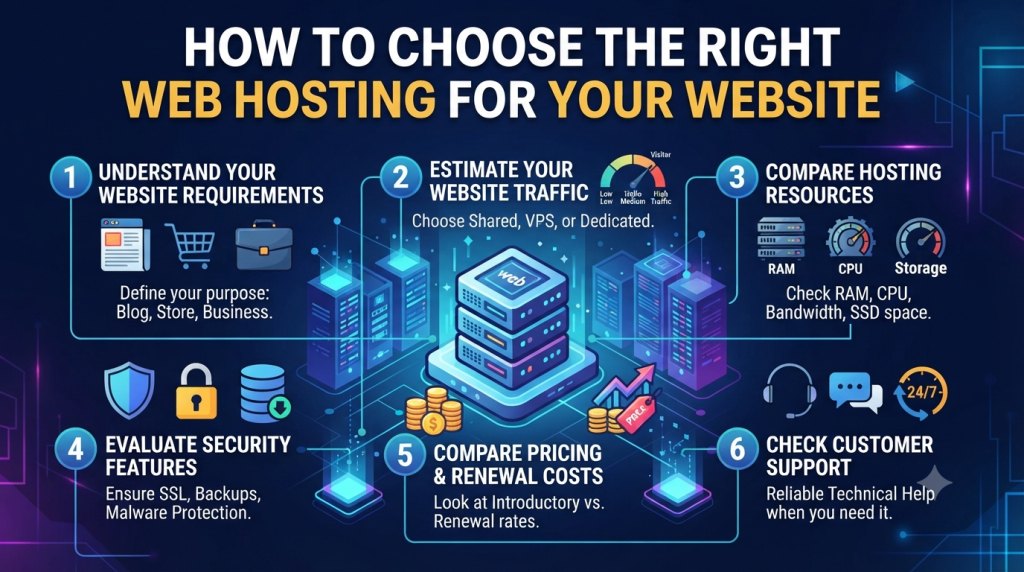
Selecting the right hosting solution depends on your website’s purpose, expected traffic, technical requirements, and budget.
Consider these factors before making a decision.
Step 1: Understand Your Website Requirements
Identify whether you are creating a blog, business website, online store, portfolio, or web application. Each website type requires different server resources.
Step 2: Estimate Your Website Traffic
Small websites may work well with shared hosting, while high-traffic websites may require VPS or dedicated server hosting.
Step 3: Compare Hosting Resources
Check the available RAM, CPU cores, storage capacity, bandwidth, and server configurations before selecting a plan.
Step 4: Evaluate Security Features
Ensure the provider offers essential security tools, SSL support, backups, and server protection.
Step 5: Compare Pricing and Renewal Costs
Check the initial subscription price, renewal charges, upgrade costs, and additional service fees.
Step 6: Check Customer Support
Choose a hosting provider that offers reliable technical assistance to help resolve issues whenever they occur.
Best Web Hosting Solutions for Different Website Requirements
Not every hosting plan is suitable for every website. Here is a simple comparison to help you identify the right option.
| Website Type | Recommended Hosting |
| Personal Blog | Shared Hosting |
| Small Business Website | Shared or VPS Hosting |
| WordPress Website | WordPress Hosting |
| E-commerce Website | VPS or Cloud Hosting |
| High-Traffic Website | Dedicated Server |
| Web Applications | VPS or Cloud Hosting |
| Enterprise Website | Dedicated or Cloud Hosting |
The best choice depends on your expected traffic, performance requirements, security needs, and available budget.
Common Web Hosting Mistakes to Avoid
Choosing the wrong hosting provider can create performance and management problems. Avoid these common mistakes:
- Choosing Only Based on Price: Cheap hosting may not provide the resources your website requires.
- Ignoring Renewal Costs: Always review renewal pricing before purchasing a plan.
- Overlooking Security: Insufficient security protection can expose websites to potential threats.
- Ignoring Scalability: Select hosting that can support future website growth.
- Not Checking Support Quality: Poor technical assistance can make troubleshooting difficult.
- Selecting the Wrong Hosting Type: Understand your website requirements before choosing a hosting environment.
Benefits of Choosing the Best Web Hosting Solutions
There are multiple benefits involved with selecting the right website hosting solution for one’s business or website. With a trusted hosting environment, the website can continue performing excellently and remain secure.
Here are some important benefits:
- Improved Website Speed: High-performance servers and modern storage technologies help reduce website loading times.
- Better Website Security: Security features such as SSL certificates, firewalls, and malware scanning help protect websites from online threats.
- Increased Website Availability: Reliable server infrastructure helps keep your website accessible to visitors.
- Better User Experience: Fast-loading pages and fewer interruptions help visitors navigate your website smoothly.
- Business Growth: Scalable hosting resources allow businesses to manage increasing traffic and website requirements.
- Data Protection: Regular backups help website owners recover important information if unexpected issues occur.
Investing in a suitable hosting plan can help establish a strong foundation for long-term website growth.
Managed vs Unmanaged Web Hosting: Which Is Better?
When comparing the best website hosting solutions, you should also understand the difference between managed and unmanaged hosting.
Both options provide server resources, but they differ in how server maintenance and administration are handled.
| Feature | Managed Hosting | Unmanaged Hosting |
| Server Management | Provider handles supported tasks | Customer manages the server |
| Technical Knowledge | Less technical knowledge required | Advanced knowledge recommended |
| Maintenance | Provider handles agreed maintenance | Customer handles maintenance |
| Software Updates | Managed according to the plan | Customer responsibility |
| Customization | Depends on provider policies | Greater administrative control |
| Best For | Businesses and beginners | Developers and system administrators |
Which should you choose?
Managed hosting is suitable for businesses that want assistance with server administration and maintenance. Unmanaged hosting is better for experienced users who prefer complete administrative control and customized configurations.
Factors That Affect Website Hosting Performance
Website performance depends on several technical factors. Understanding these elements helps you select a hosting solution that can support your website efficiently.
Server Hardware
The processor, RAM, and storage technology determine how effectively a server handles website requests. Modern CPUs and sufficient memory help manage multiple processes and visitors.
Storage Technology
NVMe and SSD storage generally provide faster data access than traditional HDD storage. This can improve database operations and website response times.
Server Location
The physical location of your hosting server can influence latency. Choosing a server location closer to your primary audience may help reduce network response times.
Bandwidth and Network Connectivity
Bandwidth and network capacity affect how much website data can be transferred between your server and visitors. Websites with high traffic or large media files may require greater network capacity.
Website Optimization
Hosting performance also depends on website optimization. Caching, image compression, optimized databases, and lightweight themes can improve loading speed.
Web Hosting Solutions for Small Businesses
Small businesses need hosting services that balance affordability, performance, and security. A business website should remain accessible, load efficiently, and provide a professional experience to potential customers.
The right hosting solution depends on the size and requirements of the business.
- New Businesses: Shared hosting can provide an affordable starting point.
- Growing Businesses: VPS hosting offers more resources and flexibility.
- Online Stores: VPS or cloud hosting can support demanding e-commerce applications.
- Large Businesses: Dedicated servers provide greater control over computing resources.
Before selecting a plan, consider your expected website traffic, email requirements, database usage, and future expansion.
How Does Web Hosting Impact Website Security?
Website security is one of the most important considerations when selecting a hosting provider. A secure hosting environment helps protect website files, customer information, and business operations.
Some important hosting security features include:
- SSL/TLS Encryption: Protects information exchanged between visitors and websites.
- Firewall Protection: Helps filter unauthorized or potentially harmful network traffic.
- DDoS Protection: Helps reduce the impact of distributed denial-of-service attacks.
- Malware Scanning: Helps identify suspicious files and malicious code.
- Automated Backups: Provides recovery options when website data is lost or damaged.
- Regular Updates: Helps address known vulnerabilities in server software.
Website owners should also use strong passwords, update applications regularly, and enable multi-factor authentication wherever available.
How to Migrate Your Website to a New Hosting Provider
Moving a website means transferring the internet files, databases, and configuration of that website from one hosting provider to another.
Website migration becomes necessary when the current hosting provider is slow, unreliable, or unable to meet the growing requirements.
Follow these steps:
- Choose a New Hosting Plan: Select a hosting environment based on your website’s resource requirements.
- Create a Complete Backup: Back up your website files, databases, emails, and important configurations.
- Transfer Website Files: Move your website data to the new hosting server.
- Import Databases: Restore databases and update application connection settings.
- Test Your Website: Check website pages, forms, images, databases, and other important functions.
- Update DNS Records: Point your domain to the new hosting server when testing is complete.
- Monitor Website Performance: Check website availability and functionality after migration.
Proper planning helps minimize downtime and reduces the risk of data loss during migration.
What Is the Difference Between Hosting and a Domain Name?
Many beginners confuse web hosting with domain registration. Although both are necessary for establishing a website, they perform different functions.
| Web Hosting | Domain Name |
| Stores website files and databases | Provides the website’s online address |
| Uses server resources | Uses a registered domain name |
| Makes website content accessible | Helps visitors find the website |
| Requires a hosting plan | Requires domain registration |
For example, when someone visits your domain name, the domain’s DNS records direct their browser to the appropriate hosting server, which delivers the website content.
Why Choose MainVPS for Reliable Web Hosting?
MainVPS provides hosting and server options that cater to various website and business demands. When starting a new website, or when running a reputable online business, it is crucial to select the best hosting option with the right allocation of resources and management systems for the business.
MainVPS hosting features include:
- NVMe Storage: Supports fast storage operations.
- LiteSpeed Technology: Helps optimize website performance.
- SSL Certificates: Support encrypted website connections.
- Daily Backups: Helps protect website data.
- DDoS Protection: Adds protection against distributed denial-of-service attacks.
- cPanel: Simplifies website and hosting management on supported plans.
- 24/7 Expert Support: Provides technical assistance.
- Free Website Migration: Helps simplify the process of moving an existing website.
Conclusion
To get the best web hosting services, it is necessary to know the needs, potential traffic to your website, its security requirements, and your budget. Shared hosting is the perfect type of hosting for those starting, VPS hosting is good for business growth, and dedicated server hosting is the best option for demanding websites.
Before choosing the hosting provider, you need to analyze such factors as the performance of the server, uptime, security level, scalability, price, and technical support.
Once you have found the right hosting platform, you will be able to create a secure, stable, and fast website that would help you to prosper in the online world for a long time.
Frequently Asked Questions
1. What should I consider when choosing the best web hosting service?
Consider website speed, server uptime, security features, storage, bandwidth, scalability, pricing, backup options, and technical support before choosing a web hosting service.
2. Are there any reliable free web hosting options?
Yes, some platforms offer free hosting for beginners, testing, and small projects. However, free hosting often has limited storage, bandwidth, performance, and support. Paid hosting is generally better for professional business websites.
3. What are the most popular web hosting types used by small businesses?
Small businesses commonly use shared hosting, VPS hosting, cloud hosting, and WordPress hosting. Shared hosting is suitable for startups, while VPS and cloud hosting offer more resources for growing businesses.
4. Which hosting providers are most recommended for WordPress sites?
Popular WordPress hosting providers include Bluehost, SiteGround, Hostinger, DreamHost, and WP Engine. Compare their performance, security, backup options, pricing, and support before selecting a provider.
5. What are the best web hosting providers for small businesses?
Some popular web hosting providers for small businesses include MainVPS, Hostinger, Bluehost, SiteGround, MilesWeb, and Cloudways. These providers offer different hosting solutions based on business requirements, budget, website performance, and technical support.
MainVPS: Offers web hosting solutions with NVMe storage, LiteSpeed technology, SSL, daily backups, security features, and 24/7 expert support.
Hostinger: Suitable for small businesses looking for affordable hosting and easy website management.
Bluehost: A popular option for WordPress-based business websites.
SiteGround: Suitable for businesses prioritizing managed hosting, performance, and customer support.
MilesWeb: An option for businesses looking for hosting services from an India-based provider.
Cloudways: Suitable for growing businesses that need flexible cloud hosting resources.
Before selecting a provider, compare hosting prices, renewal costs, server resources, uptime, security, backup options, scalability, and technical support. Choose a hosting solution that matches your website’s requirements and future business growth.
Suggestions:
- https://mainvps.net/blog/lifetime-web-hosting-2026/
- https://mainvps.net/blog/windows-reseller-web-hosting/
- https://mainvps.net/blog/best-wordpress-hosting-providers/
- https://mainvps.net/blog/linux-vps-hosting-india/
- https://mainvps.net/blog/low-cost-windows-vps-hosting-in-india/
- https://mainvps.net/blog/cheap-dedicated-server-hosting-providers/
- https://mainvps.net/blog/windows-server-guide-dde-dns-tls-1-2-uptime/
- https://mainvps.net/blog/dedicated-server-hosting-netherlands/
- https://mainvps.net/blog/dedicated-server-low-price/
- https://mainvps.net/blog/vps-hosting-in-los-angeles-us/
- https://mainvps.net/blog/dedicated-server-in-nedzone-nl/
- https://mainvps.net/blog/buy-linux-vps-hosting/
- https://mainvps.net/blog/managed-windows-vps-hosting/
- https://mainvps.net/blog/what-is-wmi-provider-host-complete-guide/
- https://mainvps.net/blog/cloud-hosting-vs-vps-2026/
- https://mainvps.net/blog/vps-hosting-for-ecommerce-guide/
- https://mainvps.net/blog/vps-hosting-for-saas-applications/
- https://mainvps.net/blog/vps-reseller-hosting-in-netherlands/
- https://mainvps.net/blog/dedicated-server-hosting-in-us/
- https://mainvps.net/blog/linux-reseller-hosting/
- https://mainvps.net/blog/dedicated-server-with-nvme-us/
- https://mainvps.net/blog/dedicated-server-with-root-access-us/
- https://mainvps.net/blog/dedicated-server-with-cpanel-us/
- https://mainvps.net/blog/litespeed-vps-hosting-in-netherlands/
- https://mainvps.net/blog/cheap-windows-vps-hosting/
- https://mainvps.net/blog/affordable-dedicated-server-netherlands/
- https://mainvps.net/blog/us-windows-vps-hosting/
- https://mainvps.net/blog/dedicated-server-hosting-services-in-the-us/
- https://mainvps.net/blog/cloud-servers-for-small-business/
- https://mainvps.net/blog/low-cost-dedicated-server-usa/
- https://mainvps.net/blog/debian-server-vs-ubuntu-server/