

When it comes to selecting a dedicated server hosting service, it is certainly a big decision for any site or app. After you decide to own your own dedicated server, it’s a good time to think about the next big question: who will manage your dedicated server? And therein lies one of the most important elements in the debate regarding managed vs unmanaged dedicated server hosting. The answer can be significant in allowing you to figure out what kind of budget you need, what workload you will have, your level of security, and how secure you will be.
What Is a Dedicated Server?
An affordable dedicated hosting server is a kind of physical server that is entirely rented to a specific client. There is no sharing of CPU, RAM, storage, and bandwidth like in VPS or shared hosting. However, the prices for dedicated servers are much higher.
Dedicated servers are commonly used for:
- High-traffic websites and online stores
- SaaS platforms and web applications
- Game servers
- Large databases and data processing
- Streaming, media hosting, and file delivery
- Workloads with strict compliance or data isolation requirements
But a low-cost dedicated server still needs setup, updates, monitoring, and security. How much of that you handle yourself is what separates managed from unmanaged hosting.
What Is Managed Dedicated Server Hosting?
Dedicated hosting managed services basically mean that the provider does all the technical work for you, which includes hardware and a technical team that manages everything instead of hiring your own IT.
Typical services include:
- Initial setup and configuration of the OS, control panel, and web stack
- Operating system and software updates with regular security patching
- 24/7 monitoring with proactive alerts and incident response
- Firewall configuration and malware protection, including DDoS mitigation
- Regular backups and disaster recovery assistance
- Performance tuning for web servers, databases, and caching layers
- Technical support by phone, chat, or ticket, often with guaranteed response times
- Migration assistance when moving from your old host
Pros of Managed Hosting
- Saves time and removes the need for in-house server expertise
- Better uptime thanks to proactive monitoring and fast incident response
- Stronger security through professional patching and hardening
- Predictable support and a single point of contact when something breaks
- Lets you focus on your business or application, not the infrastructure
Cons of Managed Hosting
- Higher monthly cost
- Less flexibility, since some providers limit root access, software choices, or custom configurations
- Quality varies by provider, so support levels differ widely
- Some dependence on the provider’s schedule for maintenance windows
What Is Unmanaged Dedicated Server Hosting?
When it comes to unmanaged dedicated hosting services, the provider gives you just the basic hardware, network connectivity, and electricity. You will be granted root access, and you will be responsible for the rest.
You are typically responsible for:
- Installing and configuring the operating system
- Installing software, control panels, and applications
- Applying security patches and updates
- Setting up firewalls, intrusion detection, and monitoring
- Creating, storing, and testing backups
- Diagnosing and fixing software and configuration problems
- Planning for capacity, failover, and disaster recovery
Pros of Unmanaged Hosting
- Lower cost, since you’re paying mainly for hardware and bandwidth
- Total control over software, configuration, and security policies
- Freedom to build highly customized or unusual setups
- No restrictions on what you install or how you configure it
Cons of Unmanaged Hosting
- Requires real sysadmin skills
- Time-consuming, because maintenance falls on you or your team
- Higher risk, since a missed patch or misconfiguration can lead to downtime or breaches
- Support is usually limited to hardware and network issues
- Problems at 3 a.m. are yours to solve
Managed vs Unmanaged Dedicated Server Hosting: Side-by-Side Comparison
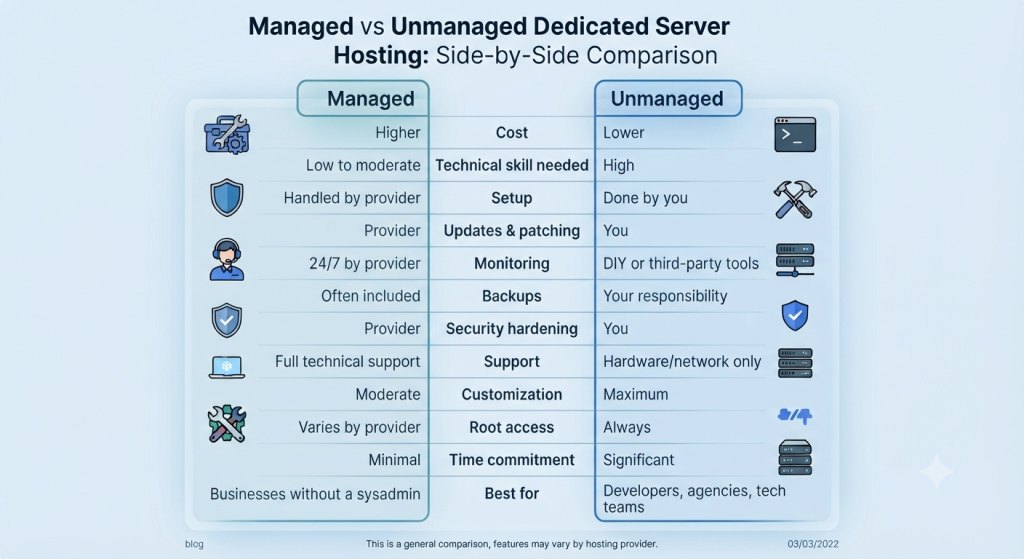
| Factor | Managed | Unmanaged |
| Cost | Higher | Lower |
| Technical skill needed | Low to moderate | High |
| Setup | Handled by provider | Done by you |
| Updates & patching | Provider | You |
| Monitoring | 24/7 by provider | DIY or third-party tools |
| Backups | Often included | Your responsibility |
| Security hardening | Provider | You |
| Support | Full technical support | Hardware/network only |
| Customization | Moderate | Maximum |
| Root access | Varies by provider | Always |
| Time commitment | Minimal | Significant |
| Best for | Businesses without a sysadmin | Developers, agencies, tech teams |
The True Cost of Each Option
Price tags can be misleading. The monthly fee is only part of the picture.
Managed Hosting Costs
You pay a premium that usually bundles in:
- Server hardware and bandwidth
- Management and support labor
- Monitoring tools and backup storage
- Security software and licenses (control panel, OS, antivirus)
The price is higher, but it’s predictable, and you can budget for it easily.
Unmanaged Hosting Costs
The base price is lower, but the real cost includes:
- Your time or your team’s time. Every hour spent patching or troubleshooting is an hour not spent on your product.
- Tools and licenses. Monitoring, backup, and security tools often cost extra, as do control panels such as cPanel or Plesk.
- Staffing. If you need to hire or contract a system administrator, that salary can easily exceed the price difference between managed and unmanaged plans.
- Downtime risk. If an outage lasts hours because nobody was on call, the lost revenue can dwarf any hosting savings.
A Simple Way to Compare
Add up the following for each option over 12 months:
- Hosting fees
- Software and license costs
- Backup and monitoring costs
- Estimated staff or contractor time (hours multiplied by hourly rate)
- Estimated cost of downtime
Many businesses find that once these are included, the gap between managed and unmanaged shrinks or reverses.
Security: Who Is Responsible for What?
Security is one of the biggest differences between the two models, and it’s often underestimated.
Under Managed Hosting
The provider typically handles:
- Timely OS and software patching
- Firewall rules and intrusion prevention
- Malware scanning and removal
- DDoS protection
- Security monitoring and alerts
- Often, assistance with SSL certificates and basic hardening
You are usually still responsible for your own application code, user accounts, passwords, and content.
Under Unmanaged Hosting
Everything above falls to you. Key tasks include:
- Disabling root login over SSH and using key-based authentication
- Changing default ports where appropriate
- Configuring a firewall (such as iptables, nftables, or UFW)
- Installing tools like Fail2ban to block brute-force attempts
- Keeping every package up to date
- Auditing logs regularly
- Encrypting backups and testing restores
A well-run unmanaged server can be extremely secure, but one missed update can leave a known vulnerability open to attackers. Neglected servers are among the most common targets for automated attacks.
The Shared Responsibility Principle
Shared security exists even in managed hosting. The provider is responsible for securing the server and infrastructure while you secure the applications, credentials, and data. Always ensure that you understand the scope of security in your contract.
Performance and Uptime
Managed Hosting
Optimizing performance is commonly included in the service by managed providers, for example, through the configuration of caching, tuning Apache, Nginx, or MySQL, or resource allocation. By keeping an eye on things proactively, issues like a full disk or a runaway process can be solved before downtime occurs. Many managed plans come with uptime guarantees that are legally binding according to the SLA and are usually about 99.9% or sometimes even higher.
Unmanaged Hosting
The raw performance of hardware is identical because the machine is just as capable. What varies is how it has been set up and maintained. Performance may be outstanding on an unmanaged server, but a poorly configured server will not be as effective as a smaller managed one. Uptime is based on the way you monitor it, how fast you respond, and how ready you are.
Scalability and Flexibility
Growth changes your needs, so think ahead.
- Managed hosting often makes it easy to add resources, upgrade hardware, or add servers with the provider’s help. Some providers offer load balancing and clustering as managed services.
- Unmanaged hosting gives you the freedom to design any architecture you want, such as custom clusters, container orchestration with Kubernetes, or specialized database replication. However, you’re also the one building and maintaining it.
If you expect rapid growth or complex infrastructure needs, consider whether you’ll have the in-house expertise to scale unmanaged servers when the time comes.
Real-World Scenarios
Scenario 1: The Growing Online Store
A small e-commerce business with a two-person team runs a store that earns most of its revenue during sales events. They have no system administrator. Best choice: Managed. Downtime during a sale is costly, and they need expert support and security without hiring staff.
Scenario 2: The Development Agency
A web agency with a senior DevOps engineer hosts dozens of client sites and wants a standardized, automated deployment pipeline. Best choice: Unmanaged (or semi-managed). They have the skills, want full control, and can save money at scale.
Scenario 3: The SaaS Startup
A startup has two developers focused on shipping features. They need reliability but can’t afford a full-time ops hire yet. Best choice: Managed. They can switch to unmanaged later when the team grows.
Scenario 4: The Game Server Operator
A hobbyist with Linux experience runs community game servers and enjoys tinkering. Best choice: Unmanaged. Cost matters, the stakes are lower, and learning is part of the fun.
Scenario 5: The Healthcare or Finance Application
A company handling sensitive data must meet strict compliance rules. Best choice: Managed, with a provider experienced in compliance, or unmanaged only if there’s a skilled internal security team.
How to Choose: Key Questions to Ask Yourself
1. Do you have in-house technical expertise?
If you have an experienced system administrator or DevOps team, unmanaged hosting can be cost-effective. If not, managed hosting is the safer choice.
2. What is your real budget?
Unmanaged looks cheaper on paper, but factor in the cost of your own time, monitoring tools, backup solutions, and the price of downtime.
3. How critical is uptime?
For e-commerce stores, SaaS platforms, and business-critical applications, proactive monitoring and rapid incident response can be worth the premium.
4. Do you need custom configurations?
If your project demands specialized software stacks, kernel tweaks, or unusual security setups, unmanaged gives you unrestricted freedom.
5. What about compliance and security requirements?
Industries with strict standards may benefit from a managed provider with experience in compliance and hardening. That said, an expert team can also meet these requirements on an unmanaged server.
6. How much time can you realistically dedicate?
Even if you have the skills, ask whether you’ll have the time. Server maintenance is ongoing, not a one-time task.
A Middle Path: Semi-Managed Hosting
Many providers also offer semi-managed plans. These typically cover core tasks such as OS updates, basic monitoring, and hardware replacement, while leaving application-level work, such as your website, database, and custom software, to you.
Semi-managed hosting is a practical compromise if:
- You have some technical skill but not a full operations team
- You want a safety net for critical tasks like patching and monitoring
- You’d like to keep root access without handling every detail
Always ask the provider to list exactly which tasks are included, since “semi-managed” has no universal definition.
Common Mistakes to Avoid
- Choosing unmanaged to save money without the skills. The savings disappear fast after the first serious incident.
- Assuming “managed” means everything is covered. Providers differ widely. Some only handle the OS, while others also manage applications and databases.
- Ignoring backups. Whether managed or unmanaged, confirm backups exist, are stored off-server, and have been tested for restoration.
- Skipping the SLA. An uptime guarantee is only meaningful if you understand the compensation and exclusions.
- Forgetting about growth. A server that fits you today may not in a year. Check upgrade paths and migration options.
- Overlooking support quality. Read reviews, test the pre-sales support, and check response times before committing.
- Neglecting monitoring on unmanaged servers. If nobody is watching, outages can go unnoticed for hours.
What to Ask a Hosting Provider Before Signing Up
Use this checklist to compare providers:
- What exactly does your “managed” plan include and exclude?
- Do I get full root access?
- What is your guaranteed uptime, and how are SLA breaches compensated?
- What is your average support response time, and is support available 24/7?
- Are backups included, how often are they taken, and where are they stored?
- How are security patches handled, and how quickly are critical vulnerabilities fixed?
- Is DDoS protection included?
- What is the hardware replacement time if a component fails?
- Can I upgrade, downgrade, or switch management levels later?
- Are there setup fees, migration fees, or long-term contract requirements?
- Where are your data centers located, and what certifications do they hold?
Migrating Between Managed and Unmanaged
Your needs may change over time, so it helps to know the switch is possible.
Moving from unmanaged to managed is usually straightforward. Many providers will upgrade your plan, audit your configuration, and take over maintenance. Expect an initial review and possibly some reconfiguration to match their standards.
Moving from managed to unmanaged requires more preparation. Before you take over, make sure you have documentation of the current setup, full access credentials, a tested backup, and a clear plan for monitoring and patching.
In either case, schedule changes during low-traffic periods and keep a rollback plan ready.
Final Thoughts
The managed vs unmanaged dedicated server hosting decision comes down to a trade-off between cost and control on one side and convenience and security on the other.
- Choose managed if you want reliability, expert support, and freedom from server maintenance.
- Choose unmanaged if you have the skills, time, and need for full control.
- Consider semi-managed if you want a balance between the two.
Prior to signing up, ensure that you investigate service-level agreements and compare support response times, as well as the precise definition of what “managed” means in different companies. Making the right choice will save both money and time when your project reaches scale.
Frequently Asked Questions (FAQs)
1. What should I consider when choosing a dedicated server hosting provider?
When choosing a dedicated server hosting provider, consider server performance, processor specifications, RAM, NVMe or SSD storage, bandwidth, uptime, security features, technical support, scalability, and pricing. Also, check whether the provider offers managed or unmanaged server hosting based on your technical requirements.
2. Can you recommend some reliable providers for managed dedicated servers?
Some popular providers offering managed or server-management services include MainVPS, Liquid Web, InMotion Hosting, HostGator, and OVHcloud. Compare their server configurations, management services, security features, support availability, and pricing before selecting a provider.
3. What is Linux dedicated server web hosting?
Linux dedicated server web hosting is a hosting solution where an entire physical server runs a Linux-based operating system and provides dedicated resources to a single customer. It offers flexibility, root access, software customization, and compatibility with technologies such as PHP, MySQL, Apache, and Nginx.
4. Which are the best dedicated server hosting providers?
Some well-known dedicated server hosting providers include MainVPS, Liquid Web, OVHcloud, InMotion Hosting, and HostGator. The best provider depends on your budget, hardware requirements, server location, management options, security, and technical support.
5. What is the difference between unmanaged VPS and dedicated server hosting?
Unmanaged VPS hosting provides a virtualized server environment with allocated resources, while unmanaged dedicated server hosting provides an entire physical server exclusively to one customer. Both require users to manage server configuration, security, software installation, updates, and maintenance. VPS hosting is generally more affordable and suitable for smaller workloads, whereas dedicated servers offer exclusive hardware resources and greater performance for demanding applications.
Suggestions:
- https://mainvps.net/blog/lifetime-web-hosting-2026/
- https://mainvps.net/blog/windows-reseller-web-hosting/
- https://mainvps.net/blog/best-wordpress-hosting-providers/
- https://mainvps.net/blog/linux-vps-hosting-india/
- https://mainvps.net/blog/low-cost-windows-vps-hosting-in-india/
- https://mainvps.net/blog/cheap-dedicated-server-hosting-providers/
- https://mainvps.net/blog/windows-server-guide-dde-dns-tls-1-2-uptime/
- https://mainvps.net/blog/dedicated-server-hosting-netherlands/
- https://mainvps.net/blog/dedicated-server-low-price/
- https://mainvps.net/blog/vps-hosting-in-los-angeles-us/
- https://mainvps.net/blog/dedicated-server-in-nedzone-nl/
- https://mainvps.net/blog/buy-linux-vps-hosting/
- https://mainvps.net/blog/managed-windows-vps-hosting/
- https://mainvps.net/blog/what-is-wmi-provider-host-complete-guide/
- https://mainvps.net/blog/cloud-hosting-vs-vps-2026/
- https://mainvps.net/blog/vps-hosting-for-ecommerce-guide/
- https://mainvps.net/blog/vps-hosting-for-saas-applications/
- https://mainvps.net/blog/vps-reseller-hosting-in-netherlands/
- https://mainvps.net/blog/dedicated-server-hosting-in-us/
- https://mainvps.net/blog/linux-reseller-hosting/
- https://mainvps.net/blog/dedicated-server-with-nvme-us/
- https://mainvps.net/blog/dedicated-server-with-root-access-us/
- https://mainvps.net/blog/dedicated-server-with-cpanel-us/
- https://mainvps.net/blog/litespeed-vps-hosting-in-netherlands/
- https://mainvps.net/blog/cheap-windows-vps-hosting/
- https://mainvps.net/blog/affordable-dedicated-server-netherlands/
- https://mainvps.net/blog/us-windows-vps-hosting/
- https://mainvps.net/blog/dedicated-server-hosting-services-in-the-us/
- https://mainvps.net/blog/cloud-servers-for-small-business/
- https://mainvps.net/blog/low-cost-dedicated-server-usa/