

When you are ready to build a website, it is essential to choose the best web hosting service to guarantee that your venture is successful. Internet use has grown exponentially. When creating an individual blog, an e-commerce site, a company website, or developing an app, it is safe to say that you cannot disregard Affordable web hosting.
The choice of the best website hosting services is vast. There are hundreds of companies offering different kinds of hosting. Some focus on shared hosting, while others deal with VPS hosting, dedicated servers, and advanced solutions for business. Making the wrong choice can lead to many pitfalls such as sluggish website loading, downtime issues, and additional costs. Hence, before you embark on the journey of comparing hosts, make sure that you know exactly what your needs are.
What Does a Web Hosting Service Actually Do?
The best web hosting providers provide all the equipment necessary to store your website. Your web pages, images, databases, etc. are stored on a computer known as a server. This computer is connected to the internet all the time. When your customers type your domain name into their browser, the server will serve your content to them. When choosing a hosting service, you should take into account its reliability, resource locations, speed, etc.
The Main Types of Web Hosting
Before comparing brands, understand the categories. The Reliable website hosting service for a personal blog is rarely the best one for an online store.
Shared Hosting
When you go for shared hosting, your site functions on a server where many different sites are hosted and share the resources with them. This is the most economical and easiest option, making it well suited for new blogs, simple portfolios, or small business sites not having much traffic. The negative side of shared hosting is that heavy traffic from your neighbors may slow you down sometimes.
VPS Hosting
VPS is a hosting type, which means you get a part of a server and work with what is provided to you. In this case, you might have to be skilled in technical stuff or order a managed type of VPS hosting because this is geared to the demands of websites that gain more traffic and expand their activity online fast.
Dedicated Hosting
This option involves renting the complete physical server, which guarantees high performance and control. It is the costlier option and needs a certain level of technical know-how, making it applicable for sites that have a lot of visitors and need special requirements.
Cloud Hosting
This option enables your website to work with a network of servers so that at times of peak demand, your resources can be expanded considerably and scaled back during lower traffic days. It is a great choice for websites with unpredictable traffic or organizations that cherish uptime and flexibility.
Managed WordPress Hosting
These plans are tuned specifically for WordPress, with automatic updates, built-in caching, security hardening, and expert support. You pay more than for basic shared hosting, but you save time and avoid many common headaches.
Static and Jamstack Hosting
If your site is built with a static generator or a modern front-end framework, platforms such as Netlify, Vercel, and Cloudflare Pages can host it quickly, often with generous free tiers and a global content delivery network included.
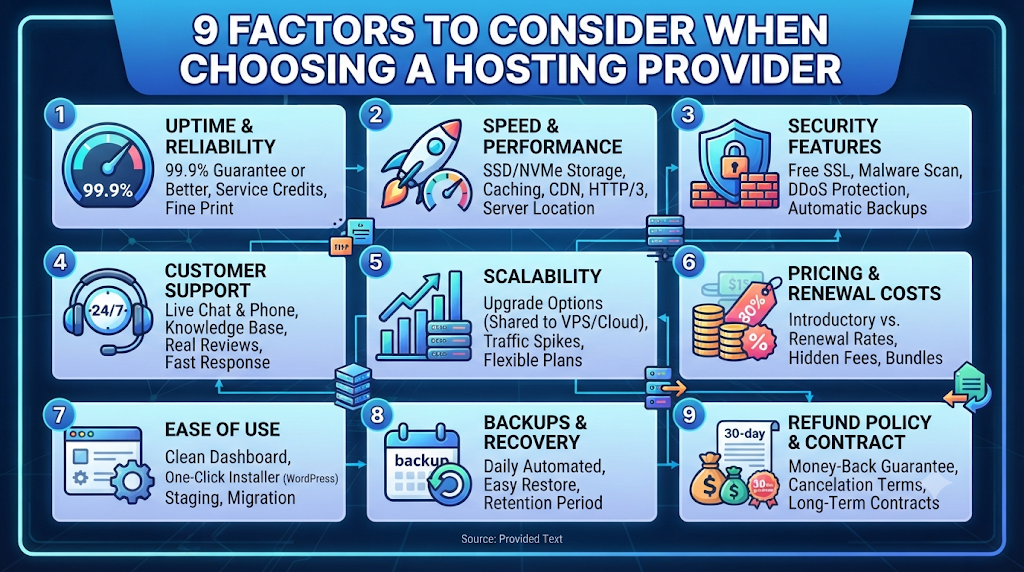
9 Factors to Consider When Choosing a Hosting Provider
1. Uptime and Reliability
Look for providers that offer an uptime guarantee of 99.9% or better, and check whether they back it with service credits. Remember that 99.9% still allows almost nine hours of downtime per year, so read the fine print and check independent monitoring reviews rather than relying on marketing claims alone.
2. Speed and Performance
Page speed affects user experience, conversions, and search rankings. Check whether the host uses SSD or NVMe storage, offers built-in caching, supports modern PHP and HTTP/3, and includes a CDN. Server location matters too: choose a data center close to most of your visitors, or use a CDN to close the distance.
3. Security Features
A good host should include free SSL certificates, firewalls, malware scanning, DDoS protection, and automatic backups. For stores or sites handling personal data, these are not optional extras. Ask how quickly the provider can restore your site if something goes wrong.
4. Customer Support
You will not appreciate support until the day your site goes down at midnight. Look for 24/7 live chat or phone support, a solid knowledge base, and real user reviews describing actual response times. Test their pre-sales chat before you buy; it is a decent preview of what you’ll get later.
5. Scalability
Your hosting needs today are not your needs in two years. Make sure you can upgrade from shared to VPS or cloud without migrating your entire site, and check whether the plan can handle traffic spikes from a viral post or a seasonal sale.
6. Pricing and Renewal Costs
Introductory prices are often heavily discounted for the first term, with much higher renewal rates afterward. Always compare the renewal price, not just the sign-up price. Also check for charges on add-ons such as backups, SSL, email, and domain privacy that may be bundled elsewhere.
7. Ease of Use
A clean control panel (cPanel or a custom dashboard), one-click installers for WordPress and other platforms, a staging environment, and free migration help can save hours. If you are not technical, these features matter more than raw specs.
8. Backups and Recovery
Daily automatic backups with easy one-click restores are a lifesaver. Confirm how long backups are stored, whether they’re included in the price, and whether you can download copies to keep independently.
9. Refund Policy and Contract Terms
A money-back guarantee of 30 days or more lets you test a provider with low risk. Check cancellation terms, and be wary of long lock-in contracts when you haven’t yet tried the service.
Which Type of Hosting Fits Your Project?
| Your situation | Good starting point |
| New blog or personal site | Shared hosting |
| WordPress business site | Managed WordPress hosting |
| Growing online store | VPS or cloud hosting |
| High-traffic site or large app | Cloud or dedicated hosting |
| Static site or front-end project | Static/Jamstack platform |
| Developer wanting full control | VPS or cloud infrastructure |
Popular Hosting Providers Worth Evaluating
Providers change their plans and prices often, so treat this as a starting shortlist and verify current details on each company’s website.
- Hostinger: Known for budget-friendly shared and VPS plans and a beginner-friendly panel.
- Bluehost: A long-standing option officially recommended by WordPress.org, often chosen by first-time site owners.
- SiteGround: Popular for strong performance and support on shared and managed WordPress plans.
- Cloudways: Managed cloud hosting that lets you run sites on top of major cloud infrastructure without heavy server administration.
- Kinsta and WP Engine: Premium managed WordPress hosts aimed at businesses that want speed, security, and expert support.
- DigitalOcean: A developer-friendly cloud platform with flexible virtual servers.
- Netlify, Vercel, Cloudflare Pages: Strong choices for static sites and modern front-end frameworks.
Common Mistakes to Avoid
- Choosing on price alone. The cheapest plan can cost you more in lost traffic and lost sales.
- Ignoring renewal pricing. Your real cost is what you’ll pay in year two and beyond.
- Believing “unlimited” means unlimited. Most unlimited plans have fair-use limits on CPU, inodes, or bandwidth.
- Skipping backups. Never rely on a single copy of your site.
- Not planning for growth. Pick a host with a clear upgrade path.
- Forgetting data center location. Distance adds latency for your visitors.
A Simple Step-by-Step Way to Decide
- Define your site. Is it a blog, store, portfolio, or web app? What platform will it use?
- Estimate your traffic. Be realistic now, and think about where you want to be in 12 to 24 months.
- Set a budget that includes renewal prices and add-ons.
- Shortlist three providers that fit your type of site.
- Compare uptime, speed, security, support, and backups using independent reviews.
- Test the support with a few pre-sales questions.
- Start with a refund-friendly plan, then monitor performance for the first month.
Hosting Terms Explained in Plain English
Hosting plans are full of jargon, and some of it hides real limits. Knowing these terms makes plan comparisons far easier.
- Bandwidth: The amount of data your site can send to visitors in a month. Heavy images and videos use it up quickly, so check what happens when you exceed it.
- Inodes: The maximum number of files and folders on your account. Large WordPress sites with many plugins, images, and cached files can hit this limit on cheaper plans.
- Uptime: The percentage of time your server is online. Even small differences add up to hours of downtime over a year.
- CDN (Content Delivery Network): A network of servers around the world that stores copies of your static files, so visitors load them from a nearby location.
- Staging site: A private copy of your website where you can test updates or design changes before making them live.
- SSL certificate: A digital certificate used to authenticate your website’s identity and enable HTTPS connections. The TLS protocol encrypts data exchanged between visitors and your website hosting services
. - Resource limits: Caps on CPU, RAM, and simultaneous processes. These matter more than the word “unlimited” on the pricing page.
Questions to Ask a Hosting Provider Before You Buy
A few direct questions, sent to sales or support, reveal more than any feature table. Vague or evasive answers are a warning sign.
- What is the renewal price for this plan, and for how long is the current discount valid?
- Where are your data centers, and can I choose the location for my site?
- What exactly counts toward “unlimited” storage or bandwidth, and what are the fair-use limits?
- How often are backups taken, where are they stored, and can I restore them myself?
- Do you offer free site migration, and how long does it usually take?
- What is your average support response time, and which channels are available around the clock?
- What happens if my site gets a sudden traffic spike or is hit by an attack?
- Can I upgrade or downgrade my plan at any time without downtime?
Keep the answers in writing. If a provider is clear and consistent now, that is a good sign for how they will treat you as a customer.
What to Do in the First Week After Signing Up
Choosing a host is only the first step. A little setup work in the first week protects your site and shows early whether the provider lives up to its promises.
- Secure your account. Turn on two-factor authentication and use a strong, unique password for your hosting dashboard.
- Enable SSL and force HTTPS. Make sure every page loads securely and redirects correctly.
- Set up automatic backups. Confirm they are running, and download a copy to store somewhere independent of your host.
- Turn on caching and a CDN. These are often the quickest performance wins.
- Install uptime monitoring. Free tools can alert you by email or phone if your site goes down.
- Test your speed. Run a few page-speed tests and note the results, so you can compare after future changes.
- Try support once. Ask a simple question and see how quickly and clearly they respond, while the refund window is still open.
Final Thoughts
There is no single best website hosting services for everyone. The right provider is the one that matches your site’s type, your traffic, your technical comfort, and your budget, while staying reliable, fast, and secure as you grow. Focus on uptime, speed, security, support, and honest pricing, and you will avoid most of the pitfalls that catch first-time site owners.
Take your time, read recent reviews, and take advantage of money-back guarantees. A little research now can save you a lot of stress later.
Frequently Asked Questions
1. What are the main differences between various hosting providers?
Hosting providers differ in pricing, server performance, security, uptime, customer support, and hosting resources. Compare these features to find a provider that meets your website’s needs.
2. What are the common issues faced with hosting services and how to fix them?
Common hosting issues include slow loading, downtime, security threats, and database errors. Address these issues through website optimization, regular software updates, appropriate security measures, and resource upgrades where necessary. Maintain regular backups to restore your website and recover data in case of accidental deletion, corruption, or other failures.
3. How do I choose the best hosting service for my website?
Choose a hosting service based on your budget, website traffic, performance, security, uptime, and support requirements. Select a hosting plan that also offers room for future growth.
4. Can you recommend reliable hosting providers for small businesses?
Some reliable hosting providers worth considering for small businesses include:
MainVPS: Offers shared web hosting, WordPress hosting, VPS hosting, and dedicated server solutions with features such as NVMe storage, daily backups, security protection, and technical support.
Hostinger: Suitable for beginners and small businesses looking for affordable hosting and easy website management.
Bluehost: A popular option for WordPress websites and small business websites.
MilesWeb: Provides hosting solutions for businesses looking for India-focused hosting services.
Cloudways: Suitable for growing businesses that need managed cloud hosting and flexible resources.
GoDaddy: Offers domain registration and website hosting solutions.
Before selecting a provider, compare pricing, server resources, uptime, security features, scalability, and customer support to find the right hosting solution for your business.
5. What is the difference between a domain name and web hosting?
A domain name is your website’s address, such as yourbrand.com, while hosting is the server space where your site’s files live. You need both, and they can be bought from the same company or from different ones.
6. How much traffic can shared hosting handle?
The amount of traffic shared hosting can handle depends on the hosting provider, plan specifications, website optimization, and resource usage. Factors such as CPU usage, RAM allocation, storage performance, caching, and the number of simultaneous visitors affect hosting capacity. Websites experiencing consistent traffic growth or exceeding their allocated resource limits may need to upgrade to VPS or cloud hosting.
7. Does my hosting location affect SEO?
Indirectly. Search engines care about page speed and user experience, and a server closer to your visitors usually responds faster. A CDN can reduce the impact of distance if your audience is global.
8. Do I need to buy hosting and a website builder separately?
Not always. Some providers bundle a drag-and-drop builder with hosting, while others expect you to install WordPress or another platform yourself. Choose based on how much control and flexibility you want.
Suggestions:
- https://mainvps.net/blog/lifetime-web-hosting-2026/
- https://mainvps.net/blog/windows-reseller-web-hosting/
- https://mainvps.net/blog/best-wordpress-hosting-providers/
- https://mainvps.net/blog/linux-vps-hosting-india/
- https://mainvps.net/blog/low-cost-windows-vps-hosting-in-india/
- https://mainvps.net/blog/cheap-dedicated-server-hosting-providers/
- https://mainvps.net/blog/windows-server-guide-dde-dns-tls-1-2-uptime/
- https://mainvps.net/blog/dedicated-server-hosting-netherlands/
- https://mainvps.net/blog/dedicated-server-low-price/
- https://mainvps.net/blog/vps-hosting-in-los-angeles-us/
- https://mainvps.net/blog/dedicated-server-in-nedzone-nl/
- https://mainvps.net/blog/buy-linux-vps-hosting/
- https://mainvps.net/blog/managed-windows-vps-hosting/
- https://mainvps.net/blog/what-is-wmi-provider-host-complete-guide/
- https://mainvps.net/blog/cloud-hosting-vs-vps-2026/
- https://mainvps.net/blog/vps-hosting-for-ecommerce-guide/
- https://mainvps.net/blog/vps-hosting-for-saas-applications/
- https://mainvps.net/blog/vps-reseller-hosting-in-netherlands/
- https://mainvps.net/blog/dedicated-server-hosting-in-us/
- https://mainvps.net/blog/linux-reseller-hosting/
- https://mainvps.net/blog/dedicated-server-with-nvme-us/
- https://mainvps.net/blog/dedicated-server-with-root-access-us/
- https://mainvps.net/blog/dedicated-server-with-cpanel-us/
- https://mainvps.net/blog/litespeed-vps-hosting-in-netherlands/
- https://mainvps.net/blog/cheap-windows-vps-hosting/
- https://mainvps.net/blog/affordable-dedicated-server-netherlands/
- https://mainvps.net/blog/us-windows-vps-hosting/
- https://mainvps.net/blog/dedicated-server-hosting-services-in-the-us/
- https://mainvps.net/blog/cloud-servers-for-small-business/
- https://mainvps.net/blog/low-cost-dedicated-server-usa/