

So, if you’ve been around computers as long as I have, chances are that you’ve participated in the age-old Windows vs Linux showdown of 2026 at least once. I’ve had the pleasure of being on both sides of this debate. My journey with operating systems began with Windows VPS, which I used on most of the computers I worked with. It felt familiar and comfortable. However, as I became more involved in development, Linux gradually became my preferred operating system. It just worked, and it felt comfortable and familiar. However, as my foray into development escalated, Linux gradually became my OS of choice. It just seemed faster, lighter, and, bluntly speaking, much more under my control. This experience made me understand the Windows vs Linux debate not so much as right versus wrong, but as an understanding of one’s evolving needs and which OS can serve those needs the best at a given time.
Jump ahead to 2026, and here’s the kicker: I’m still using both. Windows remains a strong choice for gaming, desktop applications, and broad hardware and software compatibility. Linux is widely used for development, server infrastructure, and workloads that benefit from its flexibility and command-line tools. Each one has its own strengths as well as a few frustrations in between. Rather than give you a dry litany of features here, this is my experience with Windows vs. Linux in 2026: where they excel, where they’ll try your patience, or who would be well-suited to one over the other. By then, you’ll have a sense of which one of these operating systems is worth your while.
Windows vs Linux: The Cost Reality
I remember the time I did my first Linux installation; it was, honestly, unbelievable. I remember installing Linux for the first time and being surprised that I could download and use many distributions without paying a licence fee. By comparison, Windows licensing costs can vary depending on the edition and how the licence is purchased.
Windows may already be included with the price of a new computer, so users do not always need to purchase a separate licence. However, building a PC or acquiring Windows separately can involve an additional licensing cost. Software expenses also depend on the applications you need, as many commercial tools require a paid licence or subscription.
Linux, on the other hand, gives you an altogether different experience. Popular flavors of Linux, such as Ubuntu, Fedora, Debian, and Mint, cost absolutely nothing. Many popular Linux distributions, including Ubuntu, Fedora, Debian, and Linux Mint, are available free of charge. They also provide access to a wide range of free applications for browsing, office tasks, media playback, and software development. However, some commercial applications, enterprise services, and professional support options may involve additional costs. In short, the only cost here would be your time, mainly in the initial stages as you learn the way things work.
Indeed, I can install and test Linux on an old laptop, dual-boot it with Windows, or reinstall it ten times and never worry about money being wasted.
Ease of Use: Plug-and-Play vs the Learning Curve
Here’s the truth from someone who’s used both for years.
Windows feels like home. Almost everyone has touched it at some point in school, the office, cyber cafés, you name it. Installing software on Windows is often straightforward, and Windows Update can automatically install many drivers. Most common hardware works with minimal setup, although some devices may require additional drivers or configuration. You rarely have to think about how things work in the background. That familiarity makes Windows comfortable for many desktop users. Its graphical interface helps users complete everyday tasks without needing to understand every detail of how the system works. It’s designed to stay out of your way and let you get things done quickly.
Linux, on the other hand, makes you think differently. The first time I installed Ubuntu, I’ll admit I was confused. Simple things felt unfamiliar, and the terminal looked intimidating. But once I understood package managers, basic commands, and how the system is structured, it all started to click. It wasn’t harder than Windows; it was just a new way of doing things. And once you get used to it, many tasks actually feel faster and more logical.
Linux desktop environments have become more user-friendly over the years. Distributions such as Ubuntu, Linux Mint, Zorin OS, and Pop!_OS offer graphical interfaces, software management tools, and update utilities that make everyday tasks easier. Users who are new to Linux can often browse the web, manage files, and install applications without relying on the terminal for every task.
Still, Linux rewards curiosity and a willingness to learn. You may occasionally need to consult documentation, search online forums, or use terminal commands to troubleshoot an issue or configure a feature. Windows users encounter similar situations when dealing with driver problems, software errors, or advanced system settings. The main difference lies in the tools and approaches each operating system provides. Linux offers extensive command-line control and customization, while Windows provides a combination of graphical interfaces and command-line utilities to manage the system.
Gaming: Still a Windows Stronghold (But Linux Is Catching Up)
I’m a gamer at heart, so this one hits close to home.
Windows remains a popular choice for PC gaming because many games are designed for it and receive native support. Platforms such as Steam make downloading and updating games straightforward, while GPU drivers and game launchers provide broad compatibility. However, performance and compatibility can still vary depending on the game, hardware, drivers, and anti-cheat requirements.
However, Linux gaming has improved significantly, particularly through Steam Play and Proton, which help many Windows games run on Linux. Compatibility and performance vary by title, however, and some games, especially those with unsupported anti-cheat systems, may not work properly. Many titles still resist Linux to this day, and they work great, sometimes better than they do on Windows. But it’s not all sunshine and rainbows. Some games may require additional troubleshooting or launch-option changes before they run correctly. Now, I know that some popular AAA games may still be unavailable or have compatibility limitations on Linux, particularly when they rely on anti-cheat systems that do not support it. and those that use anti-cheat solutions.
For casual gaming, indie titles, emulators, and older games, Linux is more than capable now. If that’s your style, you’ll be happy. But if you’re into big-budget AAA releases, multiplayer shooters, or games you just want to install and play without thinking, Windows still clearly leads.
Security & Privacy: Who Do You Trust?
Windows 11 collects diagnostic and usage-related data according to its privacy settings and configuration. Users can review available privacy controls to manage certain types of data collection, although not every system or diagnostic component can necessarily be disabled.
Linux, on the other hand, offers greater transparency through its open-source ecosystem, allowing developers and security researchers to inspect the source code of many system components. However, open-source software does not automatically guarantee complete privacy or security. I’ve run Linux servers for years without installing traditional antivirus software, but that doesn’t mean Linux systems are immune to malware or other security threats. Proper security still depends on regular updates, access controls, firewall rules, secure configurations, and monitoring.
Windows = Built-in security tools, regular security updates, and configurable privacy settings.
Linux = Open-source transparency, flexible security controls, and regular updates to protect against vulnerabilities.
If privacy and security are priorities, compare the default settings, available controls, update practices, and software you use on each operating system. Both Windows and Linux can be configured to meet different security needs.
Customization: Freedom vs Restrictions
- Windows: Offers theme, wallpaper, layout, accessibility, and other customization options, although some deeper system-level changes may require additional tools or configuration.
- Linux: Many distributions let users choose different desktop environments and customize layouts, themes, panels, and system behavior in considerable detail.
When I first customized my Linux desktop to look exactly like macOS, I realized just how much freedom you really get.
If you love tweaking, Linux is your playground. Windows will always feel locked down.
Performance: Heavy vs Lightweight
I once installed Linux Mint on an old laptop with 2GB RAM, and it ran smoother than Windows 10 ever did.
- Windows: Needs more RAM and CPU. Great on modern hardware, sluggish on old PCs.
- Linux: Can run on almost anything. There are even “lightweight” distros built specifically for reviving old machines.
If you’ve got an aging computer, Linux will breathe new life into it.
Windows vs Linux for Work & Business
I’ve worked in both startup and enterprise environments, and here’s what I’ve seen:
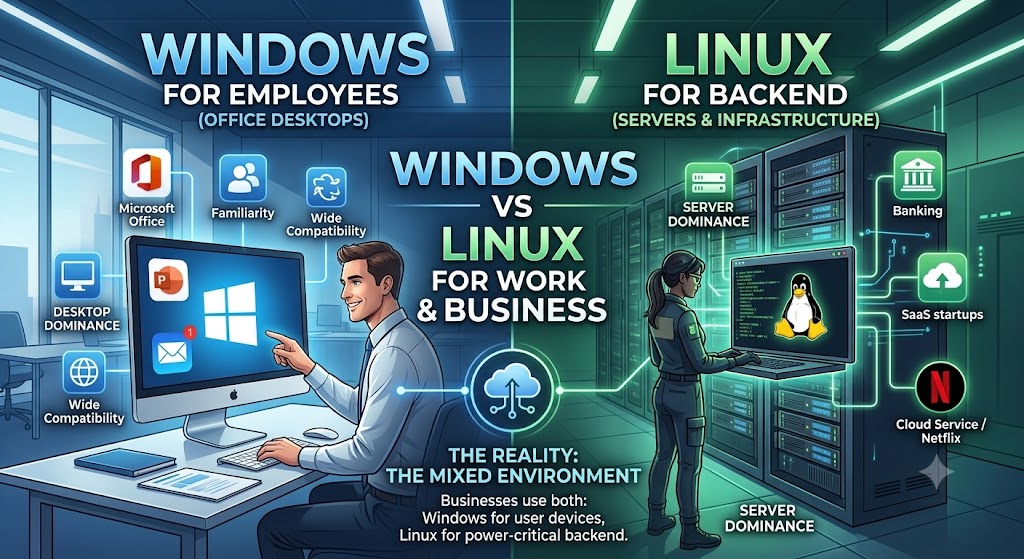
- Windows desktops dominate offices. Why? Microsoft Office, compatibility, and familiarity.
- Linux dominates servers. Businesses use different operating systems and architectures. Netflix uses Linux in some infrastructure, but its Open Connect content-delivery appliances use FreeBSD. It is inaccurate to imply every business runs Linux servers.
Businesses often run a mix: Windows for employees, Linux for backend infrastructure.
Windows vs Linux for Developers
As a developer, switching to Linux was a game-changer for me.
- Windows: Great for .NET, C#, and Visual Studio.
- Linux: Perfect for Python, PHP, Node.js, Docker, Kubernetes, DevOps, and basically anything cloud-related.
If you’re serious about coding, DevOps, or system admin work, Linux feels natural.
So, Which Should You Choose?
Here’s my honest breakdown from experience:
- Pick Windows if
- You’re a gamer
- You want plug-and-play simplicity
- You rely on Microsoft Office, Adobe Suite, or Windows-only software
- Pick Linux if
- You want a free, secure OS
- You’re a developer, sysadmin, or tech enthusiast
- You want full control and customization
- You want to revive an old PC
And remember: you don’t have to choose. Many people (including me) dual-boot Windows or Linux, getting the best of both worlds.
Final Thoughts:
The debate between Windows vs Linux performance is not about declaring a winner; it’s about picking what works best for you. Windows remains the safe, familiar option that offers wide compatibility and ease of use, while Linux rules for the freedom-loving, performance-ensuring, security-conscious user. For me, Linux remains the first choice for servers and daily work because of its stability and flexibility, but Windows still makes more sense when it comes to gaming and specific applications. And the best part? You no longer have to live with just one operating system for all eternity; jumping back and forth between Linux vs Windows depending on your needs today is perfectly fine. My advice is simple: once, install Linux and use it for a week. Even if you return to Windows afterward, the idea is that you will look at things from a new perspective, having rediscovered what a modern OS should feel like.
FAQs
Q1: Can Linux replace Windows for everyday use?
Yes, for many people it can. If your daily tasks include browsing the web, emailing, watching videos, office work, or coding, Linux works very well. However, some specialized or industry-specific software may still require Windows.
Q2: Is Linux really harder to use than Windows?
Not anymore. Modern Linux distributions like Ubuntu, Linux Mint, and Zorin OS are very beginner-friendly. If you’re comfortable using a smartphone or Android device, you can learn Linux without much trouble.
Q3: Which operating system is better for businesses?
Windows is still common on office desktops due to software compatibility and user familiarity. Linux, however, powers most web servers, cloud platforms, and enterprise infrastructure because of its stability, security, and scalability.
Q4: Can I run Windows applications on Linux?
Yes, many Windows apps can run on Linux using tools like Wine or Proton. That said, not every application works perfectly, and performance can vary depending on the software.
Q5: Is Linux completely free to use?
Most Linux distributions are free and open source. Some enterprise versions, such as Red Hat Enterprise Linux, charge for professional support, updates, and services.
Q6: Which is better for gaming, Windows or Linux?
Windows is still the best option for gaming servers due to native game support and drivers. Linux gaming has improved significantly thanks to Steam and Proton, but Windows remains more reliable for most gamers.
Q7: Is Linux more secure than Windows?
Linux is generally considered more secure because of its permission system, open-source nature, and fewer malware targets. However, security also depends on how well the system is configured and maintained.
Q8: Can I use both Windows and Linux on the same computer?
Yes, you can dual-boot or use virtual machines to run both operating systems on one device. This allows you to switch based on your needs.
Q9: Which OS is better for developers and programmers?
Linux is often preferred by developers because of its powerful command line, native support for programming tools, and server-like environment. Windows is also improving, especially with WSL (Windows Subsystem for Linux).
Q10: Should I try Linux even if I’m a Windows user?
Absolutely. Trying Linux even for a short time can help you understand how operating systems work and give you more control over your computer. You can always switch back if it’s not for you.
Suggestions:
- https://mainvps.net/blog/lifetime-web-hosting-2026/
- https://mainvps.net/blog/windows-reseller-web-hosting/
- https://mainvps.net/blog/best-wordpress-hosting-providers/
- https://mainvps.net/blog/linux-vps-hosting-india/
- https://mainvps.net/blog/low-cost-windows-vps-hosting-in-india/
- https://mainvps.net/blog/cheap-dedicated-server-hosting-providers/
- https://mainvps.net/blog/windows-server-guide-dde-dns-tls-1-2-uptime/
- https://mainvps.net/blog/dedicated-server-hosting-netherlands/
- https://mainvps.net/blog/dedicated-server-low-price/
- https://mainvps.net/blog/vps-hosting-in-los-angeles-us/
- https://mainvps.net/blog/dedicated-server-in-nedzone-nl/
- https://mainvps.net/blog/buy-linux-vps-hosting/
- https://mainvps.net/blog/managed-windows-vps-hosting/
- https://mainvps.net/blog/what-is-wmi-provider-host-complete-guide/
- https://mainvps.net/blog/cloud-hosting-vs-vps-2026/
- https://mainvps.net/blog/vps-hosting-for-ecommerce-guide/
- https://mainvps.net/blog/vps-hosting-for-saas-applications/
- https://mainvps.net/blog/vps-reseller-hosting-in-netherlands/
- https://mainvps.net/blog/dedicated-server-hosting-in-us/
- https://mainvps.net/blog/linux-reseller-hosting/
- https://mainvps.net/blog/dedicated-server-with-nvme-us/
- https://mainvps.net/blog/dedicated-server-with-root-access-us/
- https://mainvps.net/blog/dedicated-server-with-cpanel-us/
- https://mainvps.net/blog/litespeed-vps-hosting-in-netherlands/
- https://mainvps.net/blog/cheap-windows-vps-hosting/
- https://mainvps.net/blog/affordable-dedicated-server-netherlands/
- https://mainvps.net/blog/us-windows-vps-hosting/
- https://mainvps.net/blog/dedicated-server-hosting-services-in-the-us/
- https://mainvps.net/blog/cloud-servers-for-small-business/
- https://mainvps.net/blog/low-cost-dedicated-server-usa/



