As more Indian companies move their websites, applications, databases, and other online services to the cloud, having an effective hosting environment has become more important than ever. Though shared hosting might be sufficient for small websites, the need for increased computing power, security, and more control over the server environment is required as the business grows.
This is where Linux dedicated server India makes a huge difference.
With Best Dedicated Hosting Service in India, you get access to the entire physical server and won’t share CPU, RAM, hard drive space, or network with other websites. With Linux as the operating system, you have a great combination of power, flexibility, and economy in a hosting environment for any business, developer, eCommerce store, application, or high-traffic website.
In this guide, we will look at what a Linux dedicated server is, its advantages, who needs to use it, features that need to be considered, and how to find the right server for you.
What Is a Linux Dedicated Server?
A Linux Dedicated Server India, as the name implies, is a dedicated physical machine available only to you. The best dedicated server in India means no splitting of CPU cycles, memory usage, disk operations, and bandwidth. Coupling hardware resources with the Linux operating system (the most popular being Ubuntu, CentOS, AlmaLinux, Debian, and Rocky Linux) yields a highly reliable, affordable, customizable, and secure environment.
There are quite a few reasons why Linux became a de facto standard for dedicated servers:
- It’s open-source software and therefore doesn’t incur licensing costs compared to proprietary software such as Windows VPS server India.
- It’s reliable. High uptime for weeks and even months is typical of Linux servers.
- It’s versatile. If you need a LAMP stack, a Node.js application, Kubernetes, or a mail server, Linux will handle all of them.
- It’s secure by nature. Linux vps hosting india provides granular access controls, an iptables/nftables firewall, and a small attack surface.
For businesses that need full root access, custom kernel configurations, or specific software stacks that shared hosting simply won’t allow, a dedicated Linux hosting India box is often the only real option.
Why Choose a Dedicated Server Located in India
You could technically host with a provider in the US, Singapore, or Europe and still serve Indian users, but latency, compliance, and cost considerations usually make a strong case for choosing a data center on Indian soil.
1. Lower Latency for Indian and South Asian Users
Physics does not make exceptions based on convenience. The further away your server is from your users, the longer it takes for every single request to travel there. If your traffic primarily originates from India, Bangladesh, Sri Lanka, or South Asia in general, then a server located in Mumbai, Delhi NCR, or Bangalore will reliably perform better than one located in Virginia or Frankfurt, shaving your round-trip times from 200-300ms down to below 30ms.
This is critical if you have:
- Online stores where every 100ms of latency will negatively impact conversion rates
- Real-time applications such as games, trading platforms, or video conference services
- SEO, as Google takes into account page load speed and Core Web Vitals in its ranking algorithm, and local hosting benefits both
2. Data Residency and Compliance
India is now stricter in its data protection requirements. Under the Digital Personal Data Protection Act (DPDP Act) and other industry-specific laws (especially fintech, health care, and government-adjacent industries), more types of personal data need to be processed or stored within India’s jurisdiction. Having your website hosted on a Linux Dedicated Server India will help tremendously in having fewer worries about data compliance and any potential risks.
3. Cost Efficiency
Dedicated servers in India have become incredibly cost-effective recently. Since their operational costs are much lower compared to US and Western European countries (less expensive real estate, energy consumption, and personnel), you can get a similar level of specifications, including the same Intel Xeon and AMD EPYC chips, along with RAM and NVMe SSDs for less than those offered internationally.
4. Local Support in Your Time Zone
Everyone who has been stuck at 2 AM calling a foreign data center to wait for someone to come and physically inspect the server knows the significance of localized support. With India-specific providers, you get quicker responses during normal working hours, along with no time zone differences that come when operating a system remotely.
5. Improved Reliability for Indian ISPs and CDNs
Peering arrangements matter. When your server sits within India’s network infrastructure, it typically connects more directly with major Indian ISPs (Jio, Airtel, BSNL) and reduces the number of network hops your data has to make, which translates to fewer bottlenecks during peak traffic hours.
Who Actually Needs a Dedicated Server?
Not every website needs one. Here’s a realistic breakdown of who benefits:
You probably need a dedicated server india if:
- You’re deploying an application with unpredictable/peak traffic (flash sale, ticket release, viral content)
- You are processing confidential data that requires total segregation of financials, health information, or business logic
- You have heavy workloads such as video conversion, AI inference, large databases, or gaming servers
- You require complete root access for installing custom software and kernel modules
- Your existing VPS or shared hosting is bottlenecking your app performance
You probably don’t need one yet if:
- You’re running a small blog or brochure website with modest traffic
- Your application scales horizontally well on cloud instances and doesn’t need dedicated hardware
- Budget constraints make a well-configured VPS hosting provider a more sensible interim step
Who Actually Needs a Dedicated Server?
Not every website needs one. Here’s a realistic breakdown of who benefits:
You probably need a dedicated server if:
- Your application requires sudden traffic spikes (e.g., flash sales, ticket launches, virality of your content)
- You have critical data for which the complete isolation of financial information, patient data, or business logic is required
- You have resource-heavy loads, like video processing, machine learning tasks, heavy databases, or gaming services
- Root access is needed for installation of additional software, kernel modifications, or security settings
- Your current hosting, be it shared or VPS, is experiencing performance bottlenecks
You probably don’t need one yet if:
- You’re running a small blog or brochure website with modest traffic
- Your application scales horizontally well on cloud instances and doesn’t need dedicated hardware
- Budget constraints make a well-configured VPS a more sensible interim step
Choosing the Right Configuration
Once you’ve decided that dedicated hosting India makes sense, the next step is picking specs that actually match your workload rather than over- or under-provisioning.
CPU
For most web applications, a mid-range Intel Xeon or AMD EPYC processor with 8-16 cores handles the job comfortably. Database-heavy or computation-heavy workloads (analytics, ML inference) benefit from higher core counts and clock speeds.
RAM
- 8-16 GB: Small to mid-sized websites, low-traffic applications
- 32-64 GB: E-commerce platforms, medium databases, multiple concurrent applications
- 128 GB+: Large databases, caching layers (Redis/Memcached at scale), enterprise applications
Storage
NVMe SSDs have become the standard for good reason: they offer dramatically faster read/write speeds than traditional SATA SSDs or spinning HDDs, which matters enormously for database performance and application responsiveness. Consider RAID configurations (RAID 1 or RAID 10) for redundancy if data loss would be catastrophic for your business.
Bandwidth and Network
Check whether your provider offers unmetered bandwidth or a data cap, and confirm the port speed (1 Gbps vs 10 Gbps). If you’re serving media-heavy content or handling large file transfers, bandwidth limitations can become an unexpected bottleneck.
Choice of Linux Distribution
- Ubuntu Server — beginner-friendly, huge community support, frequent updates
- AlmaLinux / Rocky Linux — RHEL-compatible, popular for enterprise stability after CentOS’s shift
- Debian — extremely stable, conservative update cycle, favored for production servers that need to “just work”
- CentOS Stream — rolling release, useful for those tracking upstream RHEL developments
Your choice often comes down to what your team is already comfortable managing and what your application stack officially supports.
Managed vs. Unmanaged Dedicated Servers
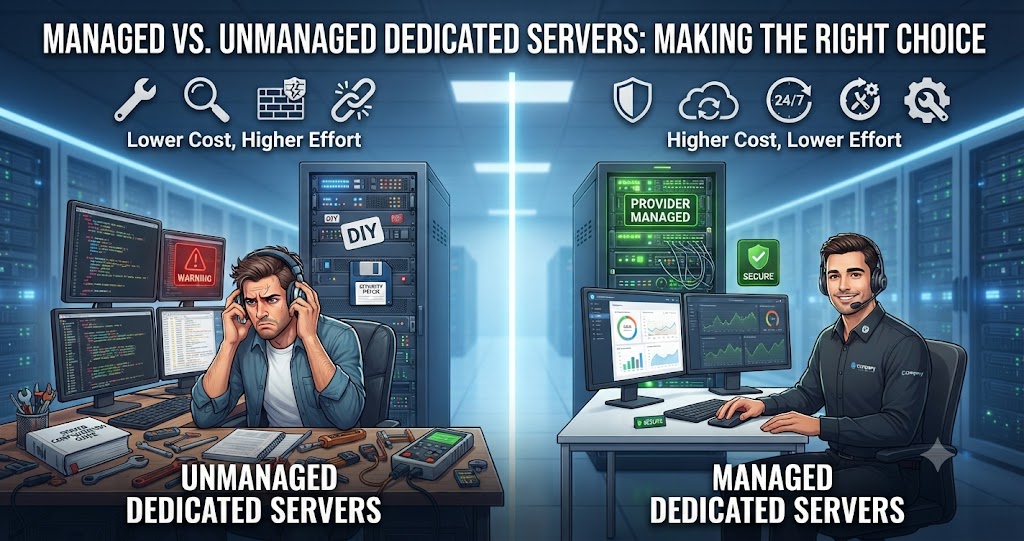
The difference here is both in price and effort.
“Unmanaged” implies that you get your hardware and OS installed, while everything else, like patching for security reasons, configuring firewalls, backing up, monitoring, and troubleshooting, is your own responsibility or of your team’s. The cost is lower, but it assumes that you have the necessary skills and knowledge about server management.
In “managed” hosting, your provider takes care of OS updates and security enhancements, backs up your data, and monitors the work 24/7. In case of any problems, they’ll help you fix them.
If you don’t have a dedicated system administrator on your payroll, then you should definitely pay extra for managed hosting, since even one second of downtime or a possible security problem will cost you much more than additional expenses for management per month.
Security Considerations You Shouldn’t Skip
Full control comes with full responsibility as well. Some must-haves:
- Prohibit root login via SSH; implement key-based authentication instead of password-based authentication
- Implement the firewall (ufw, firewalld, or iptables) and allow only necessary ports
- Enable fail2ban or something similar for blocking brute-force login attempts
- Install system updates regularly (implementing automated updates is recommended)
- Obtain SSL/TLS certificates for all external services (Let’s Encrypt provides this service automatically and free of charge)
- Back up your data on a regular basis (and keep it in a different place than your server, if possible)
- Do not just monitor your logs, but monitor them actively
- Think about implementing a Web Application Firewall (WAF) in case if you run some public applications that process confidential transactions
Common Use Cases in the Indian Market
Dedicated Linux servers hosted in India are increasingly popular among:
- E-commerce businesses needing consistent performance during high-traffic sales events
- Fintech and payment platforms that need to keep transaction data within Indian jurisdiction
- SaaS companies serving a primarily domestic customer base
- Gaming studios hosting multiplayer game servers where latency directly affects user experience
- Digital agencies managing multiple client websites that need isolated, high-performance environments
- Educational platforms that saw enormous growth in server demand following India’s shift toward online learning
Questions to Ask Before Signing Up
Before committing to a provider, it’s worth getting clear answers on:
- Where exactly is the data center located, and is it Tier III or Tier IV certified?
- What’s the guaranteed uptime SLA, and what compensation applies if it’s breached?
- Is support available 24/7, and through what channels (ticket, phone, live chat)?
- What’s the process and cost for scaling up RAM, storage, or bandwidth later?
- Are backups included, and how frequently do they run?
- What DDoS protection measures are in place?
- Is there a clear, itemized breakdown of what’s included versus billed as an add-on?
Reading the fine print here saves a lot of frustration three months into a contract when you discover “unlimited bandwidth” actually meant something else entirely.
Final Thoughts
There are several reasons why a Linux dedicated server India is a logical choice for those businesses whose target audience is predominantly domestic, who have data residency obligations, or who feel that their business has grown too big for shared or virtual servers. The advantages of lower latency for local users, more competitive price level, and the availability of support in Indian time zones mean that this can really be a great alternative rather than a compromise when compared to foreign hosting.
The secret lies in configuring the server properly, taking into account your real needs, not overestimating them from fear of possible troubles or underestimating them to save a couple of thousand rupees a month.
Frequently Asked Questions
1. What is a Linux dedicated server in India?
A Linux dedicated server India is a physical server exclusively allocated to one customer and hosted in an Indian data center. It runs a Linux operating system and provides dedicated CPU, RAM, storage, and network resources.
2. Who should use a Linux dedicated server in India?
It is suitable for high-traffic websites, eCommerce stores, business applications, databases, SaaS platforms, developers, and organizations that need dedicated resources and greater server control.
3. Can you recommend reliable web hosting companies in India?
Yes. Reliable options include MainVPS, Hostinger, MilesWeb, BigRock, and HostingRaja. Compare uptime, server performance, security, customer support, and pricing to choose a hosting plan that fits your website’s needs.
4. How does the pricing of dedicated servers in India compare across different companies?
Dedicated server pricing in India varies based on CPU, RAM, storage, bandwidth, and management options. Compare plans from providers such as MainVPS and other hosting companies to find pricing that matches your performance and resource requirements.
5. What features should I look for in the best dedicated server in India?
Look for powerful CPUs, sufficient RAM, NVMe/SSD storage, high bandwidth, reliable uptime, strong security, DDoS protection, and 24/7 technical support. Also consider scalability and flexible server management options.
6. Is a Linux dedicated server secure?
Linux dedicated servers can provide a secure hosting environment when properly configured. Regular security updates, strong authentication, firewalls, access controls, monitoring, and reliable backups are important for maintaining server security.
7. How much RAM do I need for a Linux dedicated server?
The amount of RAM depends on your workload. A small application may need only a modest amount, while large databases, eCommerce websites, virtualization, and resource-intensive applications may require significantly more RAM.
8. Can I host multiple websites on a Linux dedicated server?
Yes. A dedicated server can host multiple websites and applications, provided the available CPU, RAM, storage, bandwidth, and server configuration are sufficient for the combined workload.
9. Should I choose managed or unmanaged Linux dedicated hosting?
Managed hosting is generally better for businesses that want technical assistance with server administration, updates, security, and troubleshooting. Unmanaged hosting can be suitable for experienced developers or system administrators who prefer complete control.
10. How do I choose the best Linux dedicated server in India?
Consider your CPU, RAM, storage, bandwidth, network connectivity, data center location, security features, backup options, technical support, operating system choices, and overall budget before selecting a dedicated server.
Suggestions:
- https://mainvps.net/blog/lifetime-web-hosting-2026/
- https://mainvps.net/blog/windows-reseller-web-hosting/
- https://mainvps.net/blog/best-wordpress-hosting-providers/
- https://mainvps.net/blog/linux-vps-hosting-india/
- https://mainvps.net/blog/low-cost-windows-vps-hosting-in-india/
- https://mainvps.net/blog/cheap-dedicated-server-hosting-providers/
- https://mainvps.net/blog/windows-server-guide-dde-dns-tls-1-2-uptime/
- https://mainvps.net/blog/dedicated-server-hosting-netherlands/
- https://mainvps.net/blog/dedicated-server-low-price/
- https://mainvps.net/blog/vps-hosting-in-los-angeles-us/
- https://mainvps.net/blog/dedicated-server-in-nedzone-nl/
- https://mainvps.net/blog/buy-linux-vps-hosting/
- https://mainvps.net/blog/managed-windows-vps-hosting/
- https://mainvps.net/blog/what-is-wmi-provider-host-complete-guide/
- https://mainvps.net/blog/cloud-hosting-vs-vps-2026/
- https://mainvps.net/blog/vps-hosting-for-ecommerce-guide/
- https://mainvps.net/blog/vps-hosting-for-saas-applications/
- https://mainvps.net/blog/vps-reseller-hosting-in-netherlands/
- https://mainvps.net/blog/dedicated-server-hosting-in-us/
- https://mainvps.net/blog/linux-reseller-hosting/
- https://mainvps.net/blog/dedicated-server-with-nvme-us/
- https://mainvps.net/blog/dedicated-server-with-root-access-us/
- https://mainvps.net/blog/dedicated-server-with-cpanel-us/
- https://mainvps.net/blog/litespeed-vps-hosting-in-netherlands/
- https://mainvps.net/blog/cheap-windows-vps-hosting/
- https://mainvps.net/blog/affordable-dedicated-server-netherlands/
- https://mainvps.net/blog/us-windows-vps-hosting/
- https://mainvps.net/blog/dedicated-server-hosting-services-in-the-us/
- https://mainvps.net/blog/cloud-servers-for-small-business/
- https://mainvps.net/blog/low-cost-dedicated-server-usa/