Windows VPS vs Linux VPS represents one of the most popular choices when it comes to deciding on a Virtual Private Server (VPS). The two operating systems offer you dedicated hardware, improved security, better performance, and better management tools than shared hosting solutions; however, they were designed for different purposes.
Such aspects as price, performance, software availability, security, and management become important when picking the best choice for you. A Windows VPS hosting is the right choice for companies using Microsoft technology solutions such as ASP.NET, MSSQL, and IIS, whereas managed Linux hosting offers you the most affordable solution for running such open-source software as WordPress, PHP, Python, and Node.js.
What Is a VPS?
Cheap VPS hosting in India is a virtual computer that is created on a physical computer via virtualization software. In contrast to shared hosting, the best VPS hosting India has dedicated resources, including CPU, RAM, disk space, and bandwidth.
These are:
- Better performance
- Enhanced security
- Root or admin rights
- More customization options
- Better scalability
The major factor is the OS of the VPS, either Windows or Linux.
What Is Windows VPS?
A Windows VPS is a virtual server that runs Microsoft Windows Server operating systems, such as
- Windows Server 2019
- Windows Server 2022
- Windows Server 2025
It provides a familiar graphical interface similar to Windows VPS hosting India desktops and supports Microsoft technologies, including:
- ASP.NET
- MSSQL
- IIS Web Server
- Remote Desktop (RDP)
- Microsoft Exchange
Windows VPS is ideal for businesses already using Microsoft software.
What Is Linux VPS?
A Linux VPS is based on any one of the Linux distributions, which can be:
Linux is an open-source platform, and it is stable and lightweight in nature, and is mostly used to host websites and applications.
The majority of websites nowadays are hosted on Linux servers.
like the following: Linux VPS allows you to use technologies like the following:
Windows VPS vs Linux VPS: Quick Comparison
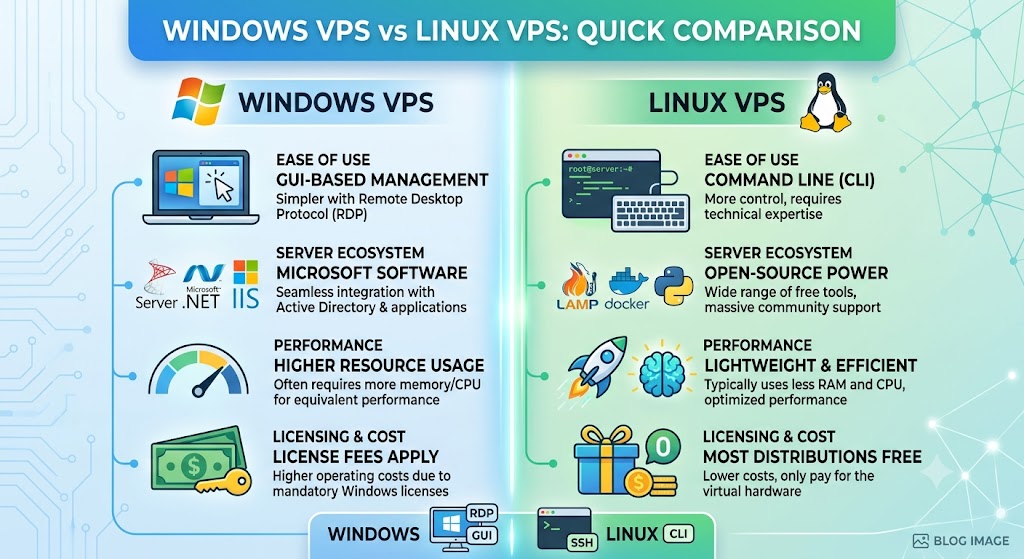
| Feature | Windows VPS | Linux VPS |
|---|---|---|
| Cost | Higher | Lower |
| License | Paid Microsoft License | Free Open Source |
| User Interface | GUI | Command Line (GUI optional) |
| Performance | Good | Excellent |
| Security | Strong | Very Strong |
| Resource Usage | Higher | Lower |
| Customization | Moderate | Extensive |
| Web Server | IIS | Apache/Nginx |
| Database | MSSQL | MySQL/PostgreSQL |
| Ideal For | Microsoft Applications | Websites & Developers |
Windows VPS vs Linux VPS: Detailed Comparison
1. Operating System
Perhaps the greatest difference lies in the operating systems.
Windows VPS
Ran using Windows Server OS.
Provides:
- Desktop-like experience
- Remote desktop access
- Ease of navigation
- Compatibility with the Microsoft environment
Linux VPS
Uses Linux-based open-source operating systems.
Usually managed through:
- SSH
- Terminal
- Web hosting panels
- Command line
Linux gives administrators greater flexibility and control.
Winner: Depends on user preference.
2. Cost
Pricing is one of the biggest deciding factors.
Windows VPS
Windows requires Microsoft licensing.
That licensing cost is included in monthly hosting fees.
As a result:
- More expensive
- Higher renewal costs
Linux VPS
Linux distributions are free.
Hosting providers don’t pay operating system licensing fees.
Benefits:
- Lower monthly cost
- Better value
- Affordable upgrades
Winner: Linux VPS
3. Performance
Performance affects website speed and application responsiveness.
Windows VPS
Windows consumes more system resources.
The graphical interface also requires additional memory.
Performance remains excellent when properly configured.
Linux VPS
Linux is lightweight.
Advantages include:
- Faster boot times
- Lower RAM usage
- Efficient CPU utilization
- Better multitasking
For identical hardware, Linux generally delivers better performance.
Winner: Linux VPS
4. Ease of Use
Windows VPS
Ideal for beginners.
Advantages:
- Familiar interface
- Point-and-click management
- Easy file management
- Remote Desktop support
Anyone familiar with Windows can start quickly.
Linux VPS
Linux often requires command-line knowledge.
Tasks include:
- Package installation
- Service management
- File permissions
- Server configuration
Although control panels simplify management, learning Linux takes time.
Winner: Windows VPS
5. Security
Security is essential for hosting.
Windows VPS
Windows Server includes:
- Windows Defender
- Firewall
- BitLocker
- Active Directory integration
Regular updates help maintain security.
Linux VPS
Linux has earned a strong reputation for security.
Advantages include:
- Smaller attack surface
- Permission-based architecture
- Open-source security audits
- Fast vulnerability patches
Proper server configuration is important regardless of the operating system.
Winner: Linux VPS
6. Resource Usage
Windows VPS
Requires:
- More RAM
- More storage
- More CPU resources
The graphical environment increases resource consumption.
Linux VPS
Linux is highly optimized.
It performs well even on low-resource VPS plans.
Many businesses host multiple websites on a small Linux VPS.
Winner: Linux VPS
7. Software Compatibility
Different operating systems support different software.
Windows VPS Support
- ASP.NET
- ASP.NET Core
- MSSQL
- IIS
- Microsoft Access
- Exchange Server
- SharePoint
Linux VPS Support
- PHP
- Python
- Ruby
- Node.js
- Java
- Perl
- Laravel
- WordPress
- Magento
- Joomla
- Drupal
Winner: Depends on application requirements.
8. Control Panels
Windows VPS
Popular control panels:
- Plesk
- WebsitePanel
- SolidCP
Linux VPS
Popular choices include:
- cPanel
- WHM
- DirectAdmin
- CyberPanel
- Webmin
- Virtualmin
- Plesk
Linux offers a wider range of hosting control panels.
Winner: Linux VPS
9. Website Hosting
Windows VPS
Best suited for:
- ASP.NET websites
- IIS applications
- Microsoft SQL Server
- Enterprise business software
Linux VPS
Perfect for:
- WordPress
- WooCommerce
- Joomla
- Magento
- OpenCart
- PHP applications
- Laravel projects
Over 70% of websites worldwide run on Linux servers.
Winner: Linux VPS
10. Developer Experience
Windows VPS
Great for:
- Visual Studio
- .NET development
- Azure integrations
- Windows APIs
Linux VPS
Excellent for:
- Docker
- Kubernetes
- Git
- Python
- Node.js
- PHP
- Java
- DevOps workflows
Linux dominates modern cloud development.
Winner: Linux VPS
11. Scalability
Both operating systems scale well.
You can upgrade:
- RAM
- CPU
- Storage
- Bandwidth
However, Linux scales more efficiently because it uses fewer resources.
Winner: Linux VPS
12. Stability
Linux servers are famous for running continuously without reboots.
Windows often requires restarts after updates.
Linux generally delivers longer uptime.
Winner: Linux VPS
Advantages of Windows VPS
They include:
- Graphical User Interface
- Remote Desktop Connection
- Windows software compatibility
- ASP.NET
- MSSQL Database Support
- Active Directory Compatibility
- Known Operating System to Windows users
Advantages of Linux VPS
Linux VPS provides:
- Lower hosting costs
- High performance
- Better resource efficiency
- Excellent security
- Massive software ecosystem
- Open-source flexibility
- Faster server performance
- Wide community support
Disadvantages of Windows VPS
Some limitations include the following:
- Higher licensing costs
- Greater resource consumption
- More frequent reboots after updates
- Limited control panel options
- Smaller open-source software ecosystem
Disadvantages of Linux VPS
Linux also has some drawbacks:
- Command-line learning curve
- Less suitable for Microsoft applications
- May require technical knowledge
- Beginners may find server management challenging
Which One Is Better for WordPress?
A Linux VPS is the preferred choice for WordPress hosting because it offers:
- Apache or Nginx support
- PHP compatibility
- MySQL databases
- Faster performance
- Lower costs
- Better optimization for WordPress
Unless you specifically require Windows-based software, a Linux VPS is the better option.
Which One Is Better for Developers?
Choose Windows VPS if you develop:
- ASP.NET applications
- C#
- Microsoft technologies
- Windows desktop software
Choose Linux VPS if you work with:
- PHP
- Python
- JavaScript
- Node.js
- Laravel
- Django
- Ruby on Rails
- Docker
- Kubernetes
Which One Is Better for Businesses?
Choose Windows VPS if your business uses:
- Microsoft Office Server
- Exchange
- MSSQL
- SharePoint
- Windows-only applications
Choose a Linux VPS if you need:
- Company website
- eCommerce store
- Business portal
- CRM
- CMS
- Email hosting
- Custom web applications
Windows VPS vs Linux VPS: Which Is More Secure?
Both operating systems can be highly secure when managed correctly.
Linux often has an advantage due to the following:
- Open-source transparency
- Faster security updates
- Smaller attack surface
- Strong file permission system
Windows, however, integrates well with enterprise security tools and Microsoft ecosystems.
Security depends more on server configuration, timely updates, strong passwords, firewalls, and regular monitoring than on the operating system alone.
Who Should Choose Windows VPS?
The Windows Virtual Private Server is ideal for:
- Firms working with Microsoft products
- Programmers developing .NET programs
- Organizations employing Microsoft SQL Server
- Individuals requiring a graphic interface
- Organizations using Active Directory
Who Should Choose a Linux VPS?
A Linux VPS is ideal for:
- Bloggers
- Small businesses
- eCommerce websites
- Web developers
- Digital agencies
- Startups
- SaaS providers
- WordPress users
- Reseller hosting businesses
Final Verdict: Windows VPS vs Linux VPS
When talking about Windows VPS vs Linux VPS, one should understand that there is no general winner; it all depends on your needs.
If you need to use such products from Microsoft as ASP.NET, MSSQL, or the Windows operating system interface, then Windows VPS is the way to go. It is perfectly compatible with enterprise applications and easy to manage for those who are used to Windows.
Nevertheless, if you care about lower prices, higher performance, flexibility, and compatibility with the latest web technologies, then a Linux VPS is the better choice. Light, safe, and software-compatible, a Linux VPS is the optimal variant for website hosting.
For most companies, blogs, developers, and online shops, a Linux VPS is the best solution available. Think carefully about your needs.
Frequently Asked Questions (FAQs)
1. Which is better, Windows VPS or Linux VPS?
Linux VPS is generally better for most websites because it is faster, more affordable, and supports popular technologies like PHP, MySQL, WordPress, and Node.js. Windows VPS is better for applications that require Microsoft technologies such as ASP.NET and Microsoft SQL Server.
2. Is Linux VPS cheaper than Windows VPS?
Yes. Linux VPS is usually more affordable because Linux is open-source and does not require licensing fees. Windows VPS includes Microsoft licensing costs, making it more expensive.
3. Can I host WordPress on a Windows VPS?
Yes, WordPress can run on a Windows VPS using IIS and PHP. However, Linux VPS is the recommended option because WordPress is optimized for Linux environments with Apache or Nginx.
4. Which VPS is easier for beginners?
Windows VPS is generally easier for beginners due to its graphical user interface (GUI) and Remote Desktop (RDP) access. Linux VPS often requires familiarity with the command line, though control panels can simplify management.
5. Is Linux VPS more secure than Windows VPS?
Linux is widely regarded as more secure because of its permission-based architecture, open-source development, and lower exposure to common malware. That said, both platforms can be highly secure when properly configured and maintained.
6. Can I switch from Windows VPS to Linux VPS later?
Yes, but switching requires migrating your files, databases, and applications. Applications designed specifically for Windows may need to be replaced or modified to run on Linux.
7. Which VPS is better for developers?
It depends on the development stack. Windows VPS is ideal for .NET and Microsoft technologies, while Linux VPS is better for PHP, Python, Node.js, Java, Docker, and most open-source development frameworks.
8. Does Windows VPS support Remote Desktop?
Yes. Windows VPS typically includes Remote Desktop Protocol (RDP), allowing users to manage the server through a familiar desktop interface from anywhere.
9. Which VPS offers better performance?
On the same hardware, Linux VPS generally delivers better performance because it consumes fewer system resources, resulting in faster processing and more efficient resource utilization.
10. How do I choose between Windows VPS and Linux VPS?
Choose Windows VPS if your applications depend on Microsoft technologies or you prefer a Windows interface. Choose Linux VPS if you need a cost-effective, high-performance solution for websites, web applications, WordPress, or open-source development.
Suggestions:
- https://mainvps.net/blog/lifetime-web-hosting-2026/
- https://mainvps.net/blog/windows-reseller-web-hosting/
- https://mainvps.net/blog/best-wordpress-hosting-providers/
- https://mainvps.net/blog/linux-vps-hosting-india/
- https://mainvps.net/blog/low-cost-windows-vps-hosting-in-india/
- https://mainvps.net/blog/cheap-dedicated-server-hosting-providers/
- https://mainvps.net/blog/windows-server-guide-dde-dns-tls-1-2-uptime/
- https://mainvps.net/blog/dedicated-server-hosting-netherlands/
- https://mainvps.net/blog/dedicated-server-low-price/
- https://mainvps.net/blog/vps-hosting-in-los-angeles-us/
- https://mainvps.net/blog/dedicated-server-in-nedzone-nl/
- https://mainvps.net/blog/buy-linux-vps-hosting/
- https://mainvps.net/blog/managed-windows-vps-hosting/
- https://mainvps.net/blog/what-is-wmi-provider-host-complete-guide/
- https://mainvps.net/blog/cloud-hosting-vs-vps-2026/
- https://mainvps.net/blog/vps-hosting-for-ecommerce-guide/
- https://mainvps.net/blog/vps-hosting-for-saas-applications/
- https://mainvps.net/blog/vps-reseller-hosting-in-netherlands/
- https://mainvps.net/blog/dedicated-server-hosting-in-us/
- https://mainvps.net/blog/linux-reseller-hosting/
- https://mainvps.net/blog/best-windows-vps-providers-in-the-usa/
- https://mainvps.net/blog/unmanaged-dedicated-server-hosting/
- https://mainvps.net/blog/bellwright-dedicated-server/
- https://mainvps.net/blog/ark-survival-ascended-dedicated-server/
- https://mainvps.net/blog/kvm-vps-netherlands/
- https://mainvps.net/blog/cheap-reseller-hosting-india/
- https://mainvps.net/blog/linux-kvm-vps-hosting/