Building a medieval town with your group of friends will require a lot of planning, and using a Bellwright dedicated server for your project would be the perfect choice. This is an online game that gives you an open world to survive in and construct your own kingdom. This requires gathering resources, recruiting villagers, constructing a settlement, and protecting your own area.
Hosting the game on a dedicated server is the ideal option since you get reliable performance, increased security, and seamless gameplay. It doesn’t matter whether you are playing on a small private world or a community server; dedicated hosting is perfect for everyone.
Why Choose a Dedicated Server for Bellwright?
1. Better Performance
Bellwright is a resource-intensive game for surviving and building a kingdom, which heavily utilizes the villagers controlled by AI, weather conditions, crafting systems, and large settlements. The more your world expands, and the more players participate in it, the greater the strain it puts on the server’s resources. Having a dedicated server grants you exclusive access to strong hardware, so your game will run without any interruptions from the usage of other players’ resources.
Dedicated servers typically include:
- High-frequency CPUs for faster game processing
- NVMe SSD storage for rapid world loading and save operations
- High-speed DDR4/DDR5 RAM for efficient multitasking
- Premium network connectivity with low latency
With dedicated resources, players can enjoy consistent performance, fewer lag spikes, and a stable gaming environment even during large-scale building projects or intense combat.
2. 24/7 Availability
The first great thing about having a Bellwright dedicated server is its constant availability. Contrary to local hosting, during which the world of the game can be accessed only when the host is online, a dedicated server functions on its own, being situated in a professional data center. This implies that your server will operate 24/7, enabling access from various time zones.
With a 24/7 online server, players can:
- Build and expand settlements at any time
- Gather valuable resources without interruption
- Continue crafting weapons, tools, and structures
- Explore new regions whenever they choose
- Progress independently even when the server owner is offline
This uninterrupted access creates a more immersive and collaborative multiplayer experience for everyone.
3. Low Latency
Network quality plays an important role in enabling smooth gameplay among the players in the game. Hosting companies provide dedicated servers that have fast connections and are available in various locations all over the world. In this way, you get to select a server that is closer to your location.
The benefits of low-latency hosting include:
- Faster response times during combat and exploration
- Lower ping for smoother player interactions
- Reduced lag and rubber-banding
- Stable multiplayer synchronization
- Improved performance for players across different regions
A low-latency, best-managed dedicated server hosting ensures that every action, from constructing buildings to fighting enemies, feels responsive and seamless.
4. Full Administrative Control
Having your own Bellwright dedicated server enables you to have total control over all elements of the gaming environment. Dedicated servers give administrators the freedom to set up their servers according to the preferences of their communities. It can be either a private world you want to create for your friends or a huge public server in either case, full control of the server is easy to manage.
Administrators can configure:
- Maximum player slots
- Password-protected private servers
- Automatic and manual backups
- Save file management
- Server updates and maintenance
- Mod support (when available)
- Performance optimization settings
- Gameplay rules and server preferences
Having complete control allows you to create a customized multiplayer experience while maintaining optimal server performance.
5. Improved Security
Your Bellwright server hosting needs protection, and that’s particularly true in multiplayer games where the users spend hours creating settlements and gathering resources. Professional hosting service providers use advanced security tools to keep your game server safe from any form of cyber attack and unauthorized access.
Security features commonly include:
- Enterprise-grade firewall protection
- Advanced DDoS attack mitigation
- Continuous server monitoring
- Automatic backup systems
- Secure network infrastructure
- Regular software and security updates
These security measures help keep your game world safe, minimize downtime, and ensure that player progress is protected, allowing your community to enjoy a reliable and secure multiplayer experience.
Bellwright Dedicated Server System Requirements
The exact requirements depend on the number of players and world size.
Small Server (5–10 Players)
- Quad-Core CPU
- 8 GB RAM
- 50 GB NVMe SSD
- 100 Mbps Network
Medium Community (10–25 Players)
- 6-Core Processor
- 16 GB RAM
- 100 GB NVMe SSD
- 1 Gbps Network
Large Community (25+ Players)
- 8-Core or Higher CPU
- 32 GB RAM
- 200 GB NVMe SSD
- Premium DDoS Protection
- High-speed bandwidth
Benefits of Professional Bellwright Dedicated Server Hosting
Reliable Uptime
Availability of a good server is necessary for having a fun time playing Bellwright multiplayer games. Professional server hosting services generally offer an uptime rate of 99.9%, meaning that your game world will always be available without any disturbances. Using high-availability servers, redundant network systems, and server monitoring can ensure continuous operation of your server, enabling you to play all the time. No matter whether your game world is busy during the day or night, you will always have it online.
Automatic Backups
Building a thriving settlement in Bellwright Multiplayer Server requires countless hours of exploration, crafting, and construction. Losing that progress due to hardware failure, accidental deletion, or server crashes can be frustrating. Professional hosting providers include automated backup systems that regularly save your server data, making it easy to restore your world whenever necessary.
Automatic backups help protect:
- Player progress and inventories
- Buildings and settlements
- World save files
- Server configuration files
- Custom game settings
With scheduled backups, you can quickly recover from unexpected issues and continue playing without starting over from scratch.
Easy Server Management
Running Bellwright’s server hosting does not necessarily require one to be tech-savvy because most professional hosting companies provide an easy-to-use web interface for managing the servers. All of these functions can be done from a single platform without even needing command-line access.
A user-friendly control panel allows you to:
- Restart or stop the server instantly
- Monitor CPU, RAM, and storage usage
- Install game updates with ease
- Modify server settings and gameplay options
- Access server logs for troubleshooting
- Upload or restore world save files
- Schedule automatic restarts and backups
These management tools make it easy to keep your server optimized while spending more time enjoying the game.
Scalable Resources
As your Bellwright population grows, your server will have to cope with more players, bigger cities, and greater demand for resources. High-performance dedicated server hosting gives you the chance to easily increase the amount of hardware resources you have available without having to move your game world.
You can easily increase the following:
- RAM for improved multitasking and larger worlds
- Storage capacity for additional save files and game data
- CPU resources to support more players and AI activity
- Maximum player slots as your community grows
- Network bandwidth for smoother multiplayer performance
Scalable hosting ensures your Bellwright dedicated hosting continues to deliver excellent performance, whether you’re hosting a small group of friends or a large multiplayer community.
How to Set Up a Bellwright Dedicated Server
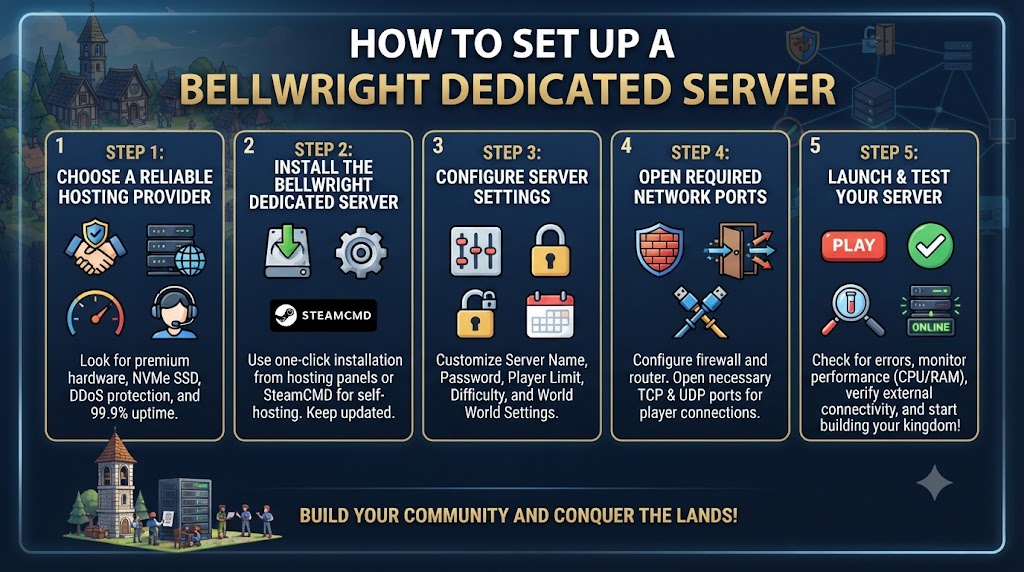
Getting started on building your own Bellwright server is a relatively easy task once you have the proper host and server setup. This way, you will be able to make use of an online environment that will provide high-quality service and round-the-clock availability for your community members.
Step 1: Choose a Reliable Hosting Provider
The initial task to accomplish is choosing a reliable host that provides the best possible infrastructure to be used for running your online multiplayer game. The choice of the hosting provider determines performance, speed, and gaming experience in general. When choosing the host, consider the hardware and network features of the host.
Look for features such as:
- Modern AMD Ryzen or Intel Xeon processors
- High-speed NVMe SSD storage
- Built-in DDoS protection
- Multiple global data center locations
- 24/7 technical support
- 99.9% uptime guarantee
- Easy-to-use server management panel
Choosing a provider with premium hardware ensures your Bellwright server can handle larger worlds, AI-controlled villagers, and multiple players without performance issues.
Step 2: Install the Bellwright Dedicated Server
Once you have chosen your hosting package, install the Bellwright Dedicated Server application. Most game hosting services provide one-click installation from within their hosting control panels, and for self-hosted servers, SteamCMD can be used for this purpose.
During installation, make sure to:
- Download the latest server version
- Select the correct installation directory
- Verify all required game files
- Keep the server updated to the latest release
Running the latest version helps maintain compatibility with the game client and provides access to new features, bug fixes, and security improvements.
Step 3: Configure Server Settings
When the server is up and running, adjust its settings according to your gaming preference. Correct server settings allow the creation of a balanced multiplayer environment while allowing administrators to have complete control over the game.
Configure settings such as:
- Server name
- Server password (for private worlds)
- Maximum player limit
- Automatic save intervals
- Difficulty level
- Gameplay rules and world settings
- Administrator permissions
Take time to review each setting carefully before launching the server to ensure the best possible experience for your players.
Step 4: Open Required Network Ports
In order for the players to connect, the required port numbers need to be open either from your firewall or your host environment. When you are hosting the server from your computer or a VPS, you will have to open the required Bellwright server port numbers in your firewall and router settings.
Be sure to:
- Open the required TCP and UDP ports
- Configure firewall rules correctly
- Verify port forwarding if hosting from home
- Test external connectivity before inviting players
Proper network configuration helps prevent connection errors and ensures players can join your server without interruptions.
Step 5: Launch and Test Your Server
After completing the installation and configuration, start your Bellwright Dedicated Server with root access and verify that everything is working correctly. Before inviting other players, perform a few basic tests to confirm server stability and connectivity.
During testing:
- Start the server and check for startup errors
- Verify that the server appears in the multiplayer list (if applicable)
- Test player connections from different locations
- Monitor CPU, RAM, and network usage
- Confirm that automatic saves are functioning properly
Once everything is running smoothly, share the server details with your friends or community members and begin building your medieval kingdom together. Regularly monitor server performance and install updates to ensure a stable and enjoyable multiplayer experience over the long term.
Tips to Optimize Bellwright Dedicated Server Performance
Optimizing your Bellwright dedicated server is essential for delivering smooth gameplay, fast loading times, and a stable multiplayer experience. As your settlement grows and more players join, proper server maintenance becomes increasingly important. By following these optimization tips, you can maximize performance, reduce lag, and ensure your server remains reliable for everyone.
Keep the Server Updated
One of the easiest methods to ensure that you have maximum efficiency from your Bellwright dedicated server is by updating it regularly. Developers continuously update their games with new bug and security fixes and performance boosts. This ensures that you do not have any problems with server-client compatibility and have a much more stable multiplayer experience.
Benefits of regular updates include:
- Improved server stability
- Enhanced security against vulnerabilities
- Better compatibility with the latest game version
- Performance optimizations and bug fixes
- Access to new features and gameplay improvements
Before applying updates, it’s always a good idea to create a backup of your server files to protect your game world.
Monitor Resource Usage
Regularly monitoring server resources helps you identify performance bottlenecks before they affect gameplay. As more players join and your world becomes larger, CPU, memory, and storage demands naturally increase. Using your hosting provider’s monitoring tools allows you to keep track of system performance and determine when it’s time to upgrade server resources.
Monitor key metrics such as:
- CPU utilization
- Memory (RAM) consumption
- Storage usage
- Network traffic and bandwidth
By analyzing these metrics, you can proactively address resource limitations, ensuring consistent performance and minimizing lag during peak player activity.
Schedule Automatic Restarts
Even in the highest-quality dedicated servers, there can be instances of memory accumulation or processes that cause instability in the future. Setting up automatic reboots at times when the site sees very little activity refreshes the system resources and clears the memory cache.
Regular scheduled restarts help:
- Free up unused system memory
- Improve long-term server stability
- Reduce the risk of performance degradation
- Apply updates more efficiently
- Minimize unexpected crashes
Choosing a restart schedule that avoids your community’s busiest gaming hours helps maintain a seamless player experience.
Use High-Speed NVMe Storage
Storage performance plays a significant role in how quickly Bellwright loads world data and saves player progress. NVMe SSDs deliver much faster read and write speeds than traditional SATA SSDs or hard drives, resulting in noticeable improvements in overall server responsiveness.
High-speed NVMe storage improves:
- World loading times
- Save and auto-save performance
- Asset streaming efficiency
- Server responsiveness during gameplay
- Overall multiplayer stability
Investing in NVMe storage is especially beneficial for servers with large worlds, frequent saves, or active multiplayer communities.
Limit Unnecessary Background Processes
Each application on your server uses up your server’s CPU, memory, and hard drive resources. The removal or deactivation of unneeded background programs will allow Bellwright to maximize your hardware resources, thus providing a better gaming experience.
To optimize resource allocation:
- Run only essential server services
- Disable unused applications and startup programs
- Close unnecessary background tasks
- Monitor resource-heavy processes
- Keep the operating system clean and optimized
A streamlined server environment reduces resource contention, helping your Bellwright dedicated server deliver faster response times, lower latency, and a more reliable multiplayer experience for all connected players.
Dedicated Server vs Local Hosting
| Feature | Dedicated Server | Local Hosting |
|---|---|---|
| 24/7 Availability | ✓ | ✗ |
| Better Performance | ✓ | ✗ |
| Lower Ping | ✓ | Depends on the Host’s Internet Connection |
| Full Administrative Control | ✓ | Basic |
| Data Protection | ✓ | ✗ |
| Easy Resource Scalability | ✓ | ✗ |
| Supports Large Communities | ✓ | ✗ |
| Dedicated Hardware Resources | ✓ | ✗ |
| Professional DDoS Protection | ✓ | ✗ |
| Automatic Backups | ✓ | Manual Setup Required |
| High-Speed NVMe Storage | ✓ | Depends on Local Hardware |
| Reliable Uptime | ✓ | ✗ |
| 24/7 Technical Support | ✓ | ✗ |
| Suitable for Public Servers | ✓ | ✗ |
| Best for Long-Term Multiplayer Worlds | ✓ | ✗ |
Who Should Use a Bellwright Dedicated Server?
Dedicated hosting is recommended for:
- Gaming communities
- Content creators
- Streamers
- Clan leaders
- Friends playing long-term campaigns
- Public multiplayer servers
- Large survival worlds
Why NVMe Storage Matters
Bellwright continuously loads world data, player information, AI behavior, and building assets.
NVMe SSDs provide:
- Faster loading speeds
- Reduced save times
- Improved responsiveness
- Better server stability
This creates a smoother experience for every connected player.
Choosing the Right Bellwright Dedicated Server Provider
Before purchasing, consider these factors:
- High-performance CPUs
- NVMe SSD storage
- Global data center locations
- DDoS protection
- Instant server deployment
- 99.9% uptime guarantee
- Full root or admin access
- Automatic backups
- Easy scalability
- 24/7 technical support
Conclusion
Bellwright Dedicated Server – The Perfect Fit for Multiplayer Game Enthusiasts
If you want to be assured of playing fast-paced and high-performing multiplayer games, then the Bellwright Dedicated Server with cPanel is your best bet. With dedicated servers, 24/7 uptime, advanced security, and full administrator control, you can create and maintain a vibrant kingdom with no worries about performance issues whatsoever.
Whether you are running a personal or a public server, choosing a dedicated server will provide smooth gameplay and greater scalability.
Frequently Asked Questions
Is a Bellwright dedicated server better than hosting from my PC?
Yes. Dedicated servers provide better performance, 24/7 uptime, and lower latency and allow players to join even when the owner is offline.
How much RAM does a Bellwright dedicated server need?
For small groups, 8 GB RAM is generally sufficient. Medium communities benefit from 16 GB, while larger servers should use 32 GB or more.
Can I upgrade my Bellwright server later?
Yes. Most hosting providers allow resource upgrades, including additional RAM, storage, and CPU capacity, without rebuilding the server.
Does a dedicated server reduce lag?
Yes. Dedicated servers use enterprise-grade hardware and premium networks, resulting in lower latency, smoother gameplay, and improved stability.
Is NVMe storage important for Bellwright?
Absolutely. NVMe SSDs improve world loading, save performance, and improve overall server responsiveness compared to traditional SATA SSDs or HDDs.
Can you recommend reliable sources to find unique or custom servers?
Yes, you can find custom and unique server configurations through established dedicated-server and hosting providers. Compare customization options, hardware specifications, pricing, support, and data-center locations before choosing.
What are the best hosting providers for a dedicated server?
The best provider depends on your budget, performance requirements, location, and server workload. Look for providers offering reliable uptime, powerful hardware, fast networking, security, and 24/7 technical support.
Which hosting provider offers the best performance for Motor Town dedicated servers?
For Motor Town, choose a provider with a high-performance CPU, fast NVMe storage, low network latency, and reliable uptime. A server location close to your players and strong DDoS protection can also provide a smoother gaming experience.
Suggestions:
- https://mainvps.net/blog/lifetime-web-hosting-2026/
- https://mainvps.net/blog/windows-reseller-web-hosting/
- https://mainvps.net/blog/best-wordpress-hosting-providers/
- https://mainvps.net/blog/linux-vps-hosting-india/
- https://mainvps.net/blog/low-cost-windows-vps-hosting-in-india/
- https://mainvps.net/blog/cheap-dedicated-server-hosting-providers/
- https://mainvps.net/blog/windows-server-guide-dde-dns-tls-1-2-uptime/
- https://mainvps.net/blog/dedicated-server-hosting-netherlands/
- https://mainvps.net/blog/dedicated-server-low-price/
- https://mainvps.net/blog/vps-hosting-in-los-angeles-us/
- https://mainvps.net/blog/dedicated-server-in-nedzone-nl/
- https://mainvps.net/blog/buy-linux-vps-hosting/
- https://mainvps.net/blog/managed-windows-vps-hosting/
- https://mainvps.net/blog/what-is-wmi-provider-host-complete-guide/
- https://mainvps.net/blog/cloud-hosting-vs-vps-2026/
- https://mainvps.net/blog/vps-hosting-for-ecommerce-guide/
- https://mainvps.net/blog/vps-hosting-for-saas-applications/
- https://mainvps.net/blog/vps-reseller-hosting-in-netherlands/
- https://mainvps.net/blog/dedicated-server-hosting-in-us/
- https://mainvps.net/blog/linux-reseller-hosting/
- https://mainvps.net/blog/dedicated-server-with-nvme-us/
- https://mainvps.net/blog/dedicated-server-with-root-access-us/
- https://mainvps.net/blog/dedicated-server-with-cpanel-us/
- https://mainvps.net/blog/litespeed-vps-hosting-in-netherlands/
- https://mainvps.net/blog/cheap-windows-vps-hosting/