
When it’s time to build a website, selecting the appropriate web hosting provider is a vital step. The hosting provider you select affects the speed, security, uptime, and performance of your website, regardless of whether you’re creating a personal blog, a business website, an online store, or a portfolio website.
Choosing a provider might be challenging because of the wide variety of hosting companies that offer a lot of services for a reasonable price. You need to examine many different hosting companies by looking at their performance, prices, safety measures available, customer service, scalability, and the reliability of the services offered.
In this guide, we will explain how to compare web hosting providers so you can make an informed decision and choose a hosting solution that meets your website’s requirements.
1. Understand Your Website Hosting Requirements
Before comparing hosting providers, identify what your website needs. Different websites require different hosting resources.
For example:
- Personal Blogs: Basic shared hosting may be sufficient for websites with low traffic.
- Business Websites: Reliable hosting with strong security, fast loading speeds, and professional support is important.
- eCommerce Websites: Require better performance, SSL certificates, backups, and scalable resources.
- High-Traffic Websites: May need VPS hosting or dedicated server hosting for additional resources and control.
Understanding your requirements helps you avoid paying for unnecessary resources or choosing a hosting plan that cannot handle your website traffic.
2. Compare Hosting Performance and Speed
Website speed is one of the most important factors when it comes to comparing web hosting service providers. A slow website can harm the user experience, raise bounce rates, and lower the website’s search engine performance.
Look for hosting providers that offer:
- Use of NVMe/SSD storage for fast access to data.
- Utilization of LiteSpeed or an optimized web server.
- Adequate RAM and CPU resources.
- Use of CDN technology.
- Server infrastructure that boosts website performance.
Before purchasing, check whether the hosting provider offers performance features that match your website’s requirements.
3. Check Server Uptime and Reliability
The term ‘uptime’ encompasses the period during which a website can be accessed by users. When the servers are down too often, it can cause a loss of clients, thus lowering income and causing poor performance of the website.
When comparing web hosting providers, consider:
- An explicit commitment to uptime, like 99.9%.
- High reliability of the data center.
- Monitoring and maintenance of the servers.
- Backup services.
- Transparency of the information about uptime.
For example, a 99.9% uptime target allows approximately 8 hours and 46 minutes of downtime annually. Always review the provider’s uptime policy and service-level agreement before purchasing.
4. Compare Web Hosting Pricing and Renewal Costs
Pricing is another important consideration when selecting a web hosting provider. Many companies advertise attractive introductory prices, but renewal costs may be significantly higher.
Compare the following pricing details:
| Pricing Factor | What to Check |
| Initial Price | First-term hosting cost |
| Renewal Price | Cost after the initial subscription |
| Setup Fees | Additional installation charges |
| SSL Certificate | Whether SSL is included |
| Backup Cost | Free or paid backup services |
| Migration Cost | Whether website migration is free |
| Refund Policy | Money-back guarantee conditions |
Do not choose a hosting provider only because it offers the lowest price. Consider the overall value, included features, and long-term expenses.
5. Evaluate Security Features
Website security should never be ignored when purchasing hosting services. A reliable hosting provider should offer essential security features to protect your website and data.
Important security features include:
- Free SSL certificates.
- DDoS protection.
- Malware scanning.
- Firewall protection.
- Automatic backups.
- Regular server updates.
- Account isolation where supported.
These features help reduce security risks and protect websites from common online threats.
6. Check Customer Support Availability
Technical difficulties can occur at any given moment, making customer support an essential consideration when selecting a hosting provider.
Before buying, check whether the hosting company provides:
- Continuous (24/7) technical support
- Chat or ticket support
- Email help
- Knowledge bases and tutorials
- Help with migrating a website
- Support for server problems
You can also check customer reviews to understand how quickly the provider responds to technical problems.
7. Compare Hosting Plans and Scalability
Your website requirements may increase as your business grows. Therefore, select a hosting provider that offers flexible upgrade options.
Compare different hosting solutions:
| Hosting Type | Best For | Main Benefit |
| Shared Hosting | Beginners and small websites | Affordable pricing |
| WordPress Hosting | WordPress websites | WordPress-focused optimization |
| VPS Hosting | Growing websites and businesses | Dedicated virtual resources |
| Dedicated Server Hosting | Large websites and applications | Dedicated server resources |
| Cloud Hosting | Scalable websites and applications | Flexible infrastructure |
A good hosting provider should make it easier to upgrade your resources without unnecessary downtime or complicated migration procedures.
8. Check Control Panel and Ease of Use
A user-friendly control panel makes website management easier, especially for beginners.
Before purchasing a hosting plan, check whether the provider offers:
- cPanel or another user-friendly control panel.
- One-click application installation.
- Email account management.
- Database management.
- File manager access.
- Domain and DNS management.
A simple control panel helps you manage your website, databases, emails, and hosting settings without requiring advanced technical knowledge.
9. Read Customer Reviews and Reputation
Customer reviews can help you understand the actual experience of using a hosting provider.
Check reviews on independent platforms and look for feedback about:
- Server performance and uptime.
- Customer support quality.
- Billing transparency.
- Security and reliability.
- Website migration experience.
- Renewal pricing.
Do not depend entirely on testimonials published on a hosting company’s website. Compare feedback from multiple sources before making your decision.
10. Check Data Center Locations
The physical location of a hosting server has an effect on the loading speed of a website and the latency of the network.
If your targeted audience is primarily Indian, it is best to select a vendor offering hosting services in locations with the proper servers and connectivity.
Moreover, you must check if the hosting provider has multiple data centre locations, for example, in India, the USA, or Europe because this is important for websites addressing audiences worldwide.
The choice of the right server location can assist in providing a better experience for the targeted visitors of the website.
11. Compare Popular Web Hosting Providers
Before purchasing a hosting plan, compare multiple companies based on their services, features, pricing, and support.
Here are some of the best web hosting providers to consider:
MainVPS
MainVPS offers web hosting solutions designed for individuals, startups, and businesses. Its hosting features include NVMe storage, LiteSpeed technology, SSL certificates, daily backups, security features, and 24/7 expert support. It also offers hosting solutions with cPanel for easier website management.
Hostinger
Hostinger offers shared hosting, cloud hosting, VPS hosting, and WordPress hosting. It is known for its beginner-friendly hosting management tools and different pricing options.
Bluehost
Bluehost provides shared hosting, WordPress hosting, VPS hosting, and dedicated hosting solutions. It offers website management tools and hosting packages for individuals and businesses.
SiteGround
SiteGround provides managed WordPress hosting, shared hosting, and cloud hosting solutions. It focuses on website performance, security, and managed hosting features.
MilesWeb
MilesWeb offers web hosting, WordPress hosting, VPS hosting, and dedicated server solutions. It provides hosting options for individuals, startups, and businesses.
Note: Features, prices, and service availability vary by provider and hosting plan. Always verify the latest details on official websites.
12. Use a Comparison Checklist Before Buying
Before finalizing your hosting provider, compare all important features side by side.
| Comparison Factor | Recommended Consideration |
| Performance | SSD/NVMe storage and optimized servers |
| Uptime | 99.9% uptime target or better |
| Security | SSL, backups, malware scanning |
| Pricing | Transparent initial and renewal costs |
| Support | 24/7 technical assistance |
| Scalability | Easy hosting upgrades |
| Control Panel | cPanel or user-friendly alternatives |
| Migration | Free or affordable migration |
| Data Centers | Locations suitable for your audience |
| Refund Policy | Clear money-back terms |
This checklist makes it easier to identify which hosting provider offers the best overall value for your website.
13. Understand the Difference Between Managed and Unmanaged Hosting
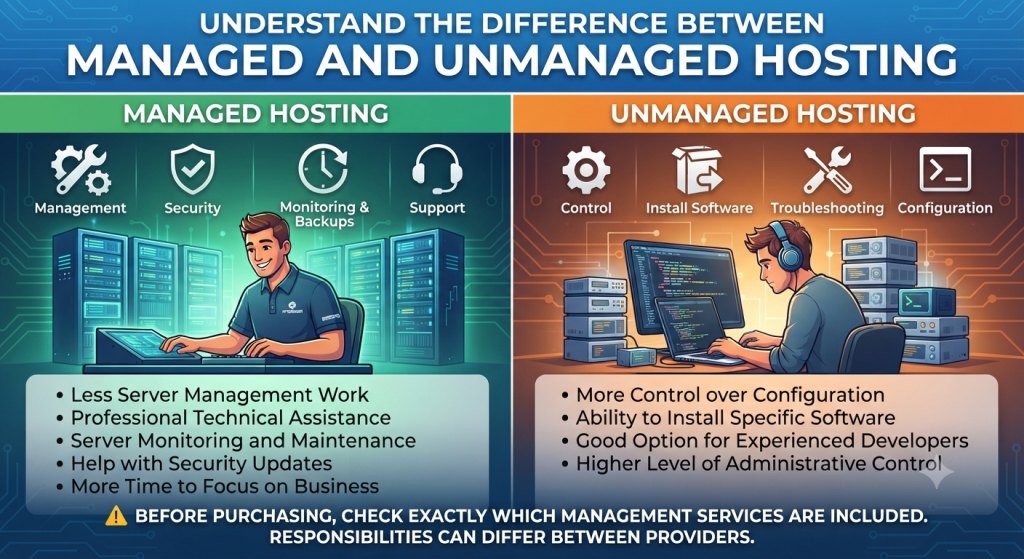
Moreover, when assessing web hosts, you need to find out if the host provider offers a managed or unmanaged hosting service. These two types of hosting services offer different degrees of assistance in managing the server.
Managed Hosting
Managed hosting is a good solution for those who always want their hosting provider to do a lot of technical work related to the management of the server. The services may encompass monitoring the server, upgrading software, maintaining security and backups, as well as providing tech support.
Benefits include:
- Less server management work.
- Professional technical assistance.
- Server monitoring and maintenance.
- Help with security updates.
- More time to focus on business operations.
Unmanaged Hosting
Unmanaged hosting offers users more control over setting up and maintaining the server environment. Customers will usually take on the responsibility of installing the required software, managing updates, and setting up security features, as well as troubleshooting issues arising on the server.
Benefits include:
- More control over the configuration of the server.
- Ability to install specific software.
- A good option for experienced developers.
- Higher level of control over the server’s administration.
Before purchasing, check exactly which management services are included because the responsibilities can differ between providers.
14. Check Backup and Data Recovery Options
Website information is crucial for any business, and online shops and websites often post new content. When a business faces loss of significant files or databases, it may have severe consequences. Hence, the first thing you need to do is examine the backup and recovery solutions of the hosting company.
Important backup features include:
- Automated daily and weekly backups.
- Backing up website files and databases.
- Retention period for backups.
- Possibilities for easy restoration.
- Off-site storage of backups.
- Backup services offered for an additional fee if needed.
You should also understand whether backups are included in the hosting price or available as a paid add-on.
A reliable backup system helps you recover website data in case of accidental deletion, technical problems, or security incidents.
15. Review Storage, Bandwidth, RAM, and CPU Limits
Hosting resources directly affect how your website performs. Before buying a hosting plan, carefully review the technical specifications rather than focusing only on the advertised storage space.
Here are the main resources to compare:
Storage: Determines how much space is available for website files, databases, images, videos, and emails.
Bandwidth: Represents the data transferred between your website and visitors. Check whether the plan has a bandwidth limit or an acceptable-use policy.
RAM: Helps your website and applications handle processes efficiently. More memory may be required for resource-intensive websites.
CPU: Handles website processing tasks, database operations, and application requests. Sufficient CPU resources are important for websites with higher workloads.
Inodes: Represent the number of files and directories stored in your hosting account. This limit can matter for websites containing many small files.
Always compare the actual resource limits and fair-use policies before selecting a hosting package.
16. Check Website Migration Services
If you already have a website hosted with another company, migration support can make switching providers easier.
Some hosting providers offer free website migration, while others charge additional fees depending on website size and complexity.
Before choosing a provider, check:
- Whether free migration is available.
- Whether website files and databases are transferred.
- Whether email accounts can also be migrated.
- Whether the provider helps with DNS changes.
- Whether migration causes expected downtime.
- Whether technical assistance is available during migration.
A properly planned migration helps reduce disruption and protects important website data.
17. Look for Developer-Friendly Hosting Features
If you are a developer, agency, or business managing multiple websites, developer-friendly tools can make hosting management easier.
Consider checking whether the hosting provider supports:
- PHP version selection.
- MySQL or MariaDB databases.
- SSH access, where available.
- Git integration.
- Cron jobs.
- Multiple domains and subdomains.
- Staging environments.
- Custom configuration options.
These features are particularly useful for developers who manage WordPress websites, custom applications, and multiple client projects.
18. Understand the Hosting Provider’s Refund and Cancellation Policy
Before making a payment, read the provider’s refund and cancellation policy carefully. A hosting company may offer a money-back guarantee, but certain services or payment terms may have exclusions.
Check these points:
- How many days are available for requesting a refund?
- Are domain registration fees refundable?
- Are setup or migration charges refundable?
- What is the cancellation procedure?
- How long does the refund process take?
- Are promotional plans covered by the refund policy?
Understanding these conditions helps you avoid unexpected problems if the hosting service does not meet your expectations.
19. Avoid Common Mistakes When Comparing Web Hosting Providers
Many website owners choose hosting based only on discounts or advertisements. This can result in poor performance, unexpected expenses, and limited technical support.
Avoid these common mistakes:
| Common Mistake | What You Should Do |
| Choosing the cheapest plan | Compare features and long-term value |
| Ignoring renewal prices | Check the full subscription cost |
| Not checking uptime | Review uptime commitments |
| Ignoring security | Check SSL, backups, and protection |
| Overlooking support | Test support availability and responsiveness |
| Ignoring resource limits | Compare RAM, CPU, storage, and bandwidth |
| Not checking scalability | Choose a provider with upgrade options |
| Ignoring customer reviews | Read independent user feedback |
Making an informed decision can help you select a hosting provider that supports your website’s future requirements.
20. How to Test a Web Hosting Provider Before Making a Long-Term Commitment
Before purchasing an annual or multi-year hosting subscription, check whether the provider offers a monthly plan, trial, demo, or money-back guarantee.
You can evaluate the hosting service using the following methods:
- Test Website Loading Speed: Use tools such as Google PageSpeed Insights and GTmetrix to evaluate website performance.
- Check Server Response Time: Review how quickly the server responds to requests.
- Test Customer Support: Ask technical questions before purchasing to evaluate response quality.
- Review the Control Panel: Check whether hosting management tools are easy to use.
- Check Backup Restoration: Understand how the provider handles data recovery.
- Review Documentation: Look for setup guides, tutorials, and troubleshooting resources.
Testing these areas helps you understand the actual service experience instead of relying only on marketing claims.
21. Which Web Hosting Provider Offers the Best Value for Money?
Do not assume that the best-value hosting provider is the same as the cheapest. The best-value hosting provider is the one that has a good balance of performance, security, resources, support, and pricing.
For example:
- Beginners may prioritize affordable shared hosting with an easy control panel.
- Small businesses may prefer reliable hosting with SSL, backups, and technical support.
- Growing websites may need VPS hosting with flexible CPU and RAM resources.
- Developers may require SSH access, custom configurations, and greater server control.
- Large businesses may benefit from dedicated server hosting and advanced infrastructure.
Always compare hosting plans according to your website’s actual requirements. This approach helps you avoid paying for unnecessary features while ensuring that your website has enough resources to operate smoothly.
Why Choose MainVPS for Your Web Hosting Needs?
If you need trustworthy yet inexpensive web hosting, MainVPS could be a suitable choice for you.
This service offers hosting services, covering both minor personal websites and bigger corporate websites, blogs, and developing projects.
Key features include:
- NVMe Storage: Helps deliver faster data access and website performance.
- LiteSpeed Technology: Supports optimized website loading.
- Free SSL Certificates: Helps secure communication between websites and visitors.
- Daily Backups: Helps protect website data.
- Advanced Security: Includes features such as DDoS protection and malware scanning.
- cPanel: Makes website and hosting management easier.
- 24/7 Expert Support: Provides assistance with hosting-related issues.
- Global Data Centres: Hosting infrastructure options in India, the USA, and the Netherlands.
Conclusion
When selecting a suitable hosting company, it is necessary to look beyond price in a web hosting comparison. Evaluate performance, uptime, security, customer support, and scalability, along with the locations of their servers and the cost of renewal packages.
Understanding how to compare web hosting providers before buying helps you avoid unnecessary expenses and select a hosting solution that supports your website’s long-term growth.
Take time to make comparisons between hosting companies, study their plans, and look at the services and features offered by each package. Good stability, safety, and usability of a website depend on the choice of a hosting service.
Frequently Asked Questions (FAQs)
1. What are the common issues faced with hosting services, and how can you fix them?
Common web hosting issues include slow website loading, server downtime, security vulnerabilities, database errors, and email delivery problems. You can fix these issues by optimizing website performance, updating software, enabling security features, maintaining regular backups, and contacting your hosting provider’s technical support.
2. What should I consider when choosing a free web hosting service?
When choosing free web hosting services, consider storage space, bandwidth limits, uptime, security, customer support, advertisements, and upgrade options. Free hosting may be suitable for testing or small personal projects, but business websites generally benefit from more reliable paid hosting services.
3. How do I choose the best hosting service for my website?
To choose the best hosting service, evaluate your website requirements, expected traffic, server performance, storage, bandwidth, security features, pricing, and technical support. Also, compare hosting types such as shared hosting, WordPress hosting, VPS hosting, and dedicated server hosting before making a decision.
4. Can you recommend reliable hosting providers for small businesses?
Some hosting providers to consider for small businesses include MainVPS, Hostinger, Bluehost, SiteGround, and MilesWeb. Compare their hosting plans based on performance, uptime, security, customer support, scalability, and pricing to find the right solution for your business.
5. What are the main differences between various hosting providers?
Different hosting providers vary in server performance, storage technology, uptime commitments, security features, pricing, customer support, data centre locations, and scalability. Some specialize in affordable shared hosting, while others offer VPS, cloud, WordPress, and dedicated server hosting solutions. Comparing these features helps you select a provider that matches your website requirements.
6. Why should I check hosting renewal prices before buying?
Some providers offer discounted introductory prices that increase when the subscription renews. Checking renewal costs helps you understand the long-term hosting expenses and avoid unexpected charges.
7. Does server location affect website speed?
Yes. Server location can affect network latency and loading times. Choosing a data centre closer to your target audience can help reduce latency and improve website responsiveness.
8. What questions should I ask a web hosting provider before buying?
Ask about uptime commitments, server locations, storage limits, bandwidth, renewal pricing, backup policies, security features, migration services, and technical support availability.
9. Can I change my web hosting provider later?
Ask about uptime commitments, server locations, storage limits, bandwidth, renewal pricing, backup policies, security features, migration services, and technical support availability.
10. What is the difference between SSD and NVMe hosting?
SSD and NVMe are storage technologies. Traditional SATA SSDs use the SATA interface, while NVMe drives communicate through PCIe and generally provide higher storage performance and lower latency.
Suggestions:
- https://mainvps.net/blog/lifetime-web-hosting-2026/
- https://mainvps.net/blog/windows-reseller-web-hosting/
- https://mainvps.net/blog/best-wordpress-hosting-providers/
- https://mainvps.net/blog/linux-vps-hosting-india/
- https://mainvps.net/blog/low-cost-windows-vps-hosting-in-india/
- https://mainvps.net/blog/cheap-dedicated-server-hosting-providers/
- https://mainvps.net/blog/windows-server-guide-dde-dns-tls-1-2-uptime/
- https://mainvps.net/blog/dedicated-server-hosting-netherlands/
- https://mainvps.net/blog/dedicated-server-low-price/
- https://mainvps.net/blog/vps-hosting-in-los-angeles-us/
- https://mainvps.net/blog/dedicated-server-in-nedzone-nl/
- https://mainvps.net/blog/buy-linux-vps-hosting/
- https://mainvps.net/blog/managed-windows-vps-hosting/
- https://mainvps.net/blog/what-is-wmi-provider-host-complete-guide/
- https://mainvps.net/blog/cloud-hosting-vs-vps-2026/
- https://mainvps.net/blog/vps-hosting-for-ecommerce-guide/
- https://mainvps.net/blog/vps-hosting-for-saas-applications/
- https://mainvps.net/blog/vps-reseller-hosting-in-netherlands/
- https://mainvps.net/blog/dedicated-server-hosting-in-us/
- https://mainvps.net/blog/linux-reseller-hosting/
- https://mainvps.net/blog/dedicated-server-with-nvme-us/
- https://mainvps.net/blog/dedicated-server-with-root-access-us/
- https://mainvps.net/blog/dedicated-server-with-cpanel-us/
- https://mainvps.net/blog/litespeed-vps-hosting-in-netherlands/
- https://mainvps.net/blog/cheap-windows-vps-hosting/