This decision is quite likely if you have been looking for Windows-based hosting: whether to get a Windows VPS or invest in a dedicated Windows server. Both options look almost the same at first sight because they offer you the same type of operating system and the possibility to manage applications, and they offer you administrator access as well. However, there is a significant difference under the hood of both solutions that will be revealed only when you choose the wrong one, because you will either squander your money or face performance problems in the future.
I have dealt with both of the solutions described above through my experience in hosting. I used them for my personal purposes and for working with customers who need hosting services for their small businessesor big enterprises and their ERP systems, for example. Here I am going to explain the real difference between these options, their strengths, and how to find out which one you need.
First, What Are We Actually Talking About?
First of all, let’s start from the very beginning, as many people make mistakes there.
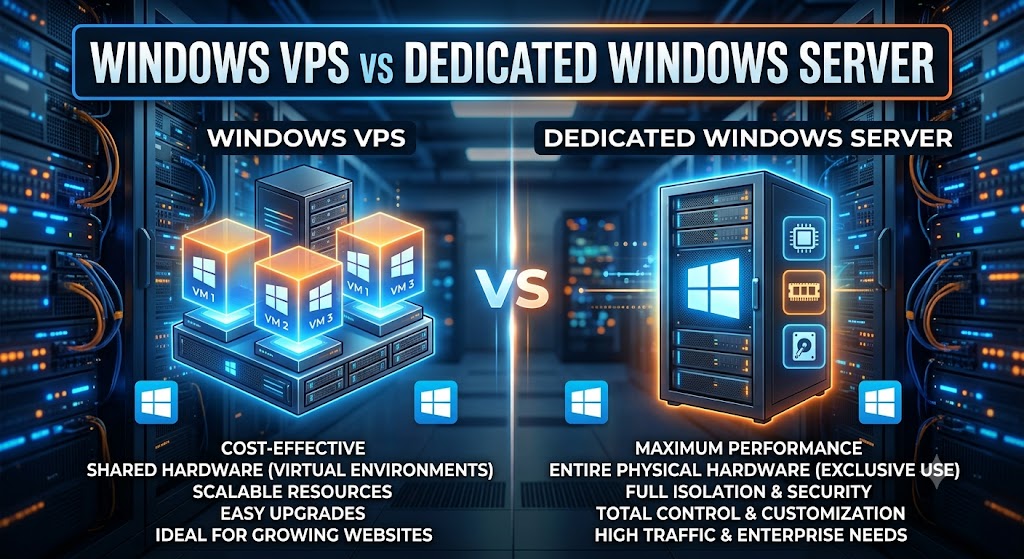
Windows VPS (Virtual Private Server) is a virtual machine existing on a large physical server that is shared by several customers. In order to create such virtual machines, the hosting company uses virtualization software, which slices one large powerful computer into several isolated virtual environments. Thus, you will have your own environment provided with dedicated computing resources (CPU cores, memory, and disk space) and your own copy of Windows Server installed.
Dedicated Windows Server represents a whole physical server reserved only for you. There is no virtualization layer, no one sharing resources with you, and no one else existing in the same box.
The difference between the two solutions is very much like the difference between renting an apartment and renting a house. In the case of a VPS, you will receive your own isolated private apartment in the host’s house, while a dedicated server represents the whole house, where you are the only resident.
The Real Difference: Performance and Resource Isolation
This is where people usually make their choices.
If we talk about a VPS, then while your resources are guaranteed to be allocated solely to you, you will still share some resources with other users. Yes, good hosts guarantee enough resource separation, and you will never be influenced by the “noisy neighbor,” but some level of sharing will still be there: hardware-level network bandwidth will be shared, the disk I/O controller will be shared, and so on. Usually, it will not affect anything at all, but if you need databases with guaranteed performance or some low-latency application, this sharing can cause slight variations in the process.
When we talk about dedicated servers, then there will be absolutely nothing like that. The fact of full ownership of your hardware guarantees that your performance is dependent only on your workload. So if you have purchased 64GB of RAM and 16 CPU cores, you will get just that.
On the other hand, “better performance” does not mean that it is always “the better decision.” Many small to mid-sized applications lack some characteristics that would force you to choose a dedicated server.
Cost: The Gap Is Bigger Than You’d Think
This is usually the deciding factor for most businesses, so let’s talk numbers in general terms.
In most cases, a VPS is much less expensive than a dedicated server due to the price difference of 3 to 10 times. This is explained by the fact that the provider allocates costs related to the operation of one physical machine among several users. Moreover, you can choose a huge range of different VPS plans, starting from a minimalistic and inexpensive plan that would be enough for one website, like a WordPress blog, up to the powerful VPS plans with tens of gigabytes of RAM, which could compete in specifications with smaller dedicated servers.
The cost of a dedicated server will be substantially higher, as you need to pay for a full rental of the whole physical machine along with the costs related to the data center, including its electricity, etc. Apart from the rent itself, there may be extra setup charges and costs related to the implementation of any kind of redundancy (RAID arrays, etc.).
For a small business running a website, an internal tool, or a light application, a VPS often makes financial sense from day one. For a company running a resource-intensive application, handling large amounts of sensitive data, or serving thousands of concurrent users, the extra cost of a dedicated server can be justified pretty quickly by the performance and reliability gains.
Scalability: Where VPS Usually Wins
Another important point that is worth considering about Managed Windows VPS hosting is the speed of scalability of the virtual server. Because it is virtual, most providers allow you to easily change its configuration (add memory, processing power, etc.) with one click. For some providers, it is even possible to change the configuration without any downtime, while for others you only have to reboot the server once. All these benefits are especially useful for rapidly growing or seasonally variable businesses and startups that still do not know the exact resource requirements at the moment of launching their projects.
It is quite hard to scale dedicated servers because if you find that your project requires additional hardware power, you usually should move to another server. Dedicated servers hosting also have burstable options available, but in general, scalability of such solutions is less convenient than that of virtual servers.
In case your workloads are not stable or in case you are a startup company that does not know what your traffic will be like in 6 months, you will certainly appreciate such an option.
Security and Control
However, both solutions provide administrators access to their own Windows environment, which means that there will be little difference from the perspective of installing, configuring, and managing applications and other components. Both dedicated and virtual private servers allow running of users’ applications and software, firewall configuration, and user account management.
The advantage of a dedicated server becomes clear when it comes to issues of isolation. In this case, one does not need to share physical hardware with somebody and thus does not have to risk a security breach because of some problems in the virtualization software or a misconfigured neighbor. For companies working in the financial, health care, and government contracting spheres, isolation becomes a necessity dictated by the compliance framework.
In the case of a VPS, the isolation becomes a virtual rather than physical one, provided by the hypervisor software. Modern virtualization technology is reliable and secure, and for the vast majority of cases, the solution is sufficient. However, in the case when isolation at the physical hardware level is necessary for regulatory purposes or for whatever reason becomes unacceptable for some organization, a dedicated server solves the problem.
Reliability and Uptime
Reliability depends heavily on the quality of your hosting provider, but there are some structural differences worth mentioning.
In the case of a VPS, the hardware failure of the physical host affects every virtual machine hosted by this physical server. However, this issue is addressed by reliable providers through live migration of virtual machines on healthy hardware and failover technologies. In fact, some reliable VPS providers boast impressively high uptime thanks to such redundancy capabilities of the platform.
A dedicated server, as a physical server, does not provide any redundancy options in its default configuration. The only way to achieve redundancy on this type of server is to use additional components such as RAID disks, redundant power supply units, or even a second backup server to be used in case of hardware failure. Otherwise, downtime on the dedicated server may last longer than downtime on the VPS server.
Therefore, unexpectedly, a well-organized VPS platform may sometimes ensure higher uptime compared to a regular dedicated server if the latter does not use any redundancy solutions.
Management Overhead
One thing to keep in mind: dedicated servers tend to be more difficult to manage. You’ll need to handle a lot more of the underlying hardware and software stack yourself, and in case something happens on the hardware level, you will need help from your service provider’s support team, who will actually have to fix it physically, as opposed to just moving your VM elsewhere.
Managing VPS environments is easier because the hosting company takes care of the physical hardware and the hypervisor itself. They also have automation features such as automated backup and snapshotting that many VPS providers offer and that are offered by some dedicated server providers too, but at a much higher cost.
This aspect of managing servers should not be overlooked if you lack an IT department or a system administrator.
So, Which One Should You Choose?
Here’s how I’d break it down based on common scenarios:
Choose a Windows VPS if:
- You’re running a small- to medium-sized website, application, or internal tool
- Your budget is limited, or you’re just starting out
- Your traffic or resource needs are unpredictable, and you want easy scaling
- You don’t have strict compliance requirements for physical hardware isolation
- You want a good balance of performance, cost, and flexibility
Choose a dedicated Windows Server if:
- You’re running resource-intensive applications like large databases, ERP systems, or high-traffic platforms
- You need guaranteed, consistent performance with zero resource sharing
- Your industry has compliance requirements demanding physical hardware isolation
- You have the budget and, ideally, the technical staff to manage it
- You’re hosting sensitive data where physical isolation is non-negotiable
Windows VPS vs Dedicated Windows Server: Quick Comparison
| Feature | Windows VPS | Dedicated Windows Server |
|---|---|---|
| Infrastructure | Virtual server | Physical server |
| Hardware | Shared physical machine | The entire machine is yours. |
| Cost | Generally lower | Generally higher |
| Performance | Very good for moderate workloads | Excellent for demanding workloads |
| Scalability | Usually easy to upgrade | Hardware upgrades may require planning. |
| Customization | High | Very high |
| Resource availability | Allocated resources | Full physical resources |
| Best for | Small businesses, developers, websites | Enterprises and resource-intensive workloads |
| Management | Depends on provider | Depends on provider |
Final Thoughts
Neither one can be considered “better,” as it all depends on your particular case. Many companies immediately switch to a dedicated solution, as it seems more prestigious, but then realize they do not use the capacity that they paid for. Others attempt to stretch their limited budget VPS to the limit and then become disappointed in the lack of resources that could be easily provided by a dedicated solution.
A rational way to act is always to start with being honest about your needs. If you have no idea what exactly you will need, start with a Windows VPS vs dedicated server; you can always switch to a dedicated server after you get more accurate data about the amount of resources you use. Unneeded hardware means idle money, and unnecessary limitations can be ignored until you actually face them.
It is crucial to choose the right hosting provider regardless of your decision, as the VPS vs. dedicated discussion is never a one-time issue; it will have to be repeated in the future.
Frequently Asked Questions
1. What is the main difference between a Windows VPS and a dedicated Windows server?
A Windows VPS is a virtual machine running on shared physical hardware, giving you dedicated resources within a larger server. A Dedicated Windows Server is an entire physical machine reserved exclusively for you, with no sharing of hardware at all.
2. Is a Windows VPS powerful enough for a business website?
For most small to medium business websites, a Windows VPS offers more than enough power. It’s only when you’re dealing with heavy traffic, large databases, or resource-intensive applications that a dedicated server starts to make more sense.
3. Which is cheaper, Windows VPS or Dedicated Windows Server?
A Windows VPS is almost always cheaper, often by several times, since the cost of the physical hardware is shared among multiple customers. A dedicated server costs more because you’re paying for the entire machine yourself.
4. Can I upgrade from a Windows VPS to a dedicated Windows server later?
Yes, and it’s a common path. Many businesses start on a VPS and migrate to a dedicated server once their traffic or resource needs grow beyond what a VPS can comfortably handle.
5. Is a dedicated Windows Server more secure than a VPS?
A dedicated server offers physical hardware isolation, which some compliance frameworks require. However, a properly configured Windows VPS is still very secure for the vast majority of businesses, since virtualization technology provides strong isolation between tenants.
6. Does a Windows VPS share resources with other users?
Yes, in the sense that a VPS runs on physical hardware shared with other virtual machines. However, your allocated CPU, RAM, and storage are reserved specifically for you and aren’t taken by other tenants.
7. Which option offers better uptime, VPS or dedicated?
It depends on the provider. A well-managed VPS platform with automatic failover can sometimes offer better real-world uptime than a basic dedicated server, unless that dedicated server includes redundant hardware like RAID and backup power.
8. Do I need technical expertise to manage a dedicated Windows Server?
It helps significantly. Dedicated servers generally require more hands-on management than a VPS, especially if something goes wrong at the hardware level. Many providers offer managed dedicated server plans if you don’t have in-house IT staff.
9. Can I run multiple applications on a single Windows VPS?
Yes, as long as your VPS has enough RAM and CPU resources to handle them. Many businesses run several applications, databases, or websites on one VPS without any issues.
10. How do I decide which one is right for my business?
Start by being honest about your current traffic, application demands, and budget. If you’re unsure or just starting out, a Windows VPS is the safer, more flexible choice; you can always scale up to a dedicated server once your usage data shows you actually need it.
Suggestions:
- https://mainvps.net/blog/lifetime-web-hosting-2026/
- https://mainvps.net/blog/windows-reseller-web-hosting/
- https://mainvps.net/blog/best-wordpress-hosting-providers/
- https://mainvps.net/blog/linux-vps-hosting-india/
- https://mainvps.net/blog/low-cost-windows-vps-hosting-in-india/
- https://mainvps.net/blog/cheap-dedicated-server-hosting-providers/
- https://mainvps.net/blog/windows-server-guide-dde-dns-tls-1-2-uptime/
- https://mainvps.net/blog/dedicated-server-hosting-netherlands/
- https://mainvps.net/blog/dedicated-server-low-price/
- https://mainvps.net/blog/vps-hosting-in-los-angeles-us/
- https://mainvps.net/blog/dedicated-server-in-nedzone-nl/
- https://mainvps.net/blog/buy-linux-vps-hosting/
- https://mainvps.net/blog/managed-windows-vps-hosting/
- https://mainvps.net/blog/what-is-wmi-provider-host-complete-guide/
- https://mainvps.net/blog/cloud-hosting-vs-vps-2026/
- https://mainvps.net/blog/vps-hosting-for-ecommerce-guide/
- https://mainvps.net/blog/vps-hosting-for-saas-applications/
- https://mainvps.net/blog/vps-reseller-hosting-in-netherlands/
- https://mainvps.net/blog/dedicated-server-hosting-in-us/
- https://mainvps.net/blog/linux-reseller-hosting/
- https://mainvps.net/blog/dedicated-server-with-nvme-us/
- https://mainvps.net/blog/dedicated-server-with-root-access-us/
- https://mainvps.net/blog/dedicated-server-with-cpanel-us/
- https://mainvps.net/blog/litespeed-vps-hosting-in-netherlands/
- https://mainvps.net/blog/cheap-windows-vps-hosting/
- https://mainvps.net/blog/affordable-dedicated-server-netherlands/
- https://mainvps.net/blog/us-windows-vps-hosting/
- https://mainvps.net/blog/dedicated-server-hosting-services-in-the-us/
- https://mainvps.net/blog/cloud-servers-for-small-business/
- https://mainvps.net/blog/low-cost-dedicated-server-usa/