
Choosing the right web server can have a major impact on website performance, security, scalability, and ease of management. Three of the most popular options today are Nginx, Apache, and Caddy. Each server has its own strengths, and the best choice depends on your website, technical requirements, traffic levels, and hosting environment.
In this guide, we’ll compare Nginx vs Apache vs Caddy across performance, security, configuration, SSL, resource usage, compatibility, and ease of use. By the end, you’ll have a clearer idea of which web server is right for your project.
What Is a Web Server?
Web servers are applications that receive requests from users’ browsers and provide them with website content in the form of HTML pages, CSS files, JavaScript, images, and other resources.
When you enter a website URL in your browser, your browser makes a request to the server. This web server processes the request and sends the required response back.
Popular web servers include:
- Nginx
- Apache HTTP Server
- Caddy
- LiteSpeed
- Microsoft IIS
Among these, Nginx and Apache have been widely used for many years, while Caddy has gained attention because of its simple configuration and automatic HTTPS.
Nginx vs Apache vs Caddy: Quick Comparison
Before looking at each server in detail, here is a quick comparison:
| Feature | Nginx | Apache | Caddy |
|---|---|---|---|
| Performance | Excellent | Very Good | Excellent |
| Static content | Excellent | Very Good | Excellent |
| Dynamic applications | Excellent | Excellent | Very Good |
| Configuration | Moderate | More complex | Very Easy |
| Automatic HTTPS | No by default | No by default | Yes |
| Reverse proxy | Excellent | Very Good | Excellent |
| Resource efficiency | Excellent | Good | Excellent |
.htaccess support | No | Yes | No |
| Beginner friendly | Moderate | Moderate | Excellent |
| Community & ecosystem | Very Large | Very Large | Growing |
| Best for | High-performance sites | Compatibility & flexibility | Simplicity & modern deployments |
There is no universal winner. This is really a question of matching the server to your specific requirements.
What Is Nginx?
Nginx is a highly scalable, open-source HTTP web server designed specifically to be able to manage a huge number of parallel connections at one time.
This web server is often employed for hosting static websites, working as a reverse proxy, load balancing, caching, and managing traffic on the front-end of application servers.
The greatest strength of Nginx lies in its event-driven architecture; rather than creating a new process/thread for every connection, it operates under the asynchronous event-driven architecture paradigm.
Key Features of Nginx
- High-performance hosting
- Efficient resource usage
- Excellent reverse proxy capabilities
- Load balancing
- HTTP caching
- SSL/TLS support
- Fast static file delivery
- Support for modern web applications
- Easy integration with application servers
Nginx is particularly popular on VPS and cloud servers where performance and resource efficiency are important.
Advantages of Nginx
The biggest strength of Nginx is its efficient way of handling high traffic. The web server works very effectively while handling static content and a high number of concurrent connections.
Nginx is also frequently employed as a reverse proxy for applications written using PHP, Python, Node.js, and other back-end systems.
Disadvantages of Nginx
The Nginx server may be a bit more challenging to handle for beginners since its configuration syntax needs some getting used to. Moreover, Nginx does not have any compatibility with the .htaccess file found on Apache.
In case one wants to move their Apache website using the .htaccess file, there will need to be extra configuration.
What Is Apache?
Apache HTTP Server is one of the oldest and most mature web servers that exist. It has been around for many years and is still very popular among website hosts.
The Apache web server is characterized by great flexibility, numerous modules, and compatibility with various web applications.
A good feature of Apache is the .htaccess file. It allows website administrators to manage some aspects of the server configuration without having to edit the main configuration file.
Key Features of Apache
- Flexible configuration
- Large module ecosystem
.htaccesssupport- Strong compatibility
- Virtual hosting
- SSL/TLS support
- Authentication options
- Extensive documentation
- Wide hosting-provider support
Advantages of Apache
Flexibility is the most important feature of Apache. Being flexible, Apache permits administrators to turn certain features on and off depending on needs.
Moreover, it is often used in shared hosting since each website is able to use an htaccess file without any need to access the main server configuration.
The most important thing is that Apache works perfectly with classic PHP-based websites and applications.
Disadvantages of Apache
Under some conditions of concurrency, Apache is able to use more resources than Nginx.
The configuration of Apache may also get very complex in big installations because of a lot of modules used and custom rules set up.
What Is Caddy?
Caddy is an open-source and modern web server that was developed based on simplicity and security.
The key feature of Caddy is its ability to provide auto HTTPS. Caddy can automatically fetch and update the TLS certificates for the configured domains, thus decreasing the need for manual SSL configuration.
Caddy utilizes a special configuration file named Caddyfile that is meant to be easy to use and easy to read.
Caddy can be the right choice for web developers and administrators who want to deploy the website quickly and easily.
Key Features of Caddy
- Automatic HTTPS
- Simple configuration
- Reverse proxy support
- HTTP/2 and HTTP/3 support
- Static file serving
- TLS automation
- Modern security defaults
- Easy application proxying
Advantages of Caddy
The most notable feature of Caddy is simplicity.
For instance, to set up a simple website and implement the HTTPS protocol, it might take a lot fewer configurations compared to doing everything manually.
Caddy would be ideal for programmers, small organizations, APIs, personal projects, and even new-generation apps that need rapid deployment.
Disadvantages of Caddy
The ecosystem and communities for Caddy are also small compared to those of Apache and Nginx. Although usage is continuously rising, the administrators who have invested many years using Apache or Nginx might face challenges applying what they know.
Caddy also does not use Apache’s .htaccess system.
Nginx vs Caddy vs Apache: Performance
Performance is one of the most important considerations when selecting a web server.
Nginx Performance
The web server is famous for its ability to deal with numerous simultaneous connections. Its event-based nature makes it an efficient solution for sites that have many visitors and for those that use API, reverse proxies, and content-heavy applications.
It works especially well for serving static content like images, CSS, and JavaScript files.
Apache Performance
Apache can perform admirably well if configured correctly. Current versions of Apache have made huge improvements, and its performance is indeed great for most of the conventional sites.
But, in some cases, where large number of connections are involved, Nginx may hold a slight edge over Apache.
Caddy Performance
Caddy provides good performance without being complicated in the configuration process. It is able to serve static files and act as a reverse proxy for modern software.
For the majority of the websites of small to medium size, performance differences between Nginx, Apache, and Caddy, if the software is properly configured, can be insignificant.
Winner for high-concurrency workloads: Nginx
Winner for simple modern deployments: Caddy
Winner for traditional application compatibility: Apache
Nginx vs Apache vs Caddy: Ease of Configuration
Configuration is another major difference between these three servers.
Nginx uses configuration files with a structured syntax. Once you understand directives and server blocks, managing websites becomes relatively straightforward.
Apache provides extensive configuration options but can become complex because of its modules, virtual hosts, and .htaccess rules.
Caddy takes a different approach. Its Caddyfile is designed to be easy to read and write.
For example, a simple Caddy configuration can look like:
example.com {
    reverse_proxy localhost:3000
}
This makes Caddy particularly attractive for developers who want to deploy a web application quickly.
Winner for simplicity: Caddy
Nginx vs Caddy vs Apache: SSL and HTTPS
HTTPS is essential for modern websites because it encrypts communication between visitors and the server.
Nginx and Apache both support SSL/TLS, but administrators typically need to configure certificates and renewals using additional tools or automation.
Caddy stands out because automatic HTTPS is built into the server.
When a domain is configured correctly, Caddy can automatically obtain and renew TLS certificates.
This significantly reduces manual maintenance.
Winner for automatic HTTPS: Caddy
Nginx vs Caddy vs Apache: Security
All three web servers are capable of being secured. Security largely relies on server settings, software updates, application security, firewall settings, permission settings, and security practices.
Nginx has a small and efficient system architecture that is usually used as a reverse proxy for backend applications.
Apache offers a wide range of security modules and configuration settings.
Caddy relies much on default security settings and HTTPS availability.
Regardless of your choice, you should:
- Keep the operating system updated
- Update the web server regularly
- Use HTTPS
- Configure a firewall
- Disable unnecessary services
- Use strong authentication
- Protect administrative interfaces
- Monitor server logs
- Maintain regular backups
Nginx vs Caddy vs Apache: Resource Usage
Resource availability is crucial, especially in cases when using a VPS with restricted amounts of CPU and RAM.
The efficiency of Nginx is based on its optimal memory usage, which makes it capable of processing many connections without using excessive system resources.
The performance of Apache will largely depend on the multi-processing module used and its configuration settings. The latter can be efficient and resourceful depending on their optimization.
Like Nginx, Caddy was designed with efficiency in mind; however, in comparison to a basic version of Nginx, it can consume more memory.
In case of a small VPS environment, server optimization matters more than the server itself.
Which Web Server Is Best for WordPress?
WordPress can run successfully on Nginx, Apache, or Caddy.
Apache has traditionally been very popular with WordPress because of its .htaccess support. Many WordPress configurations and hosting tutorials are written with Apache in mind.
Nginx is also an excellent choice for WordPress hosting, particularly for websites that need high performance and efficient resource usage.
Caddy can work well with WordPress too, especially for users who want simple configuration and automatic HTTPS.
Our recommendation
- Apache: Good for beginners and traditional WordPress hosting
- Nginx: Excellent for performance-focused WordPress sites
- Caddy: Excellent for simple modern deployments
Which Is Best for a VPS?
If you’re running a VPS, your choice depends on what you’re hosting.
For a high-traffic website or application, Nginx is a strong choice because of its performance and reverse proxy capabilities.
Apache is a good option when your application depends on .htaccess or Apache-specific modules.
Caddy is ideal if you want a simple configuration and automatic HTTPS without spending significant time managing certificates.
For many modern VPS applications, Nginx and Caddy are excellent choices.
Which Is Best for Developers?
Developers often prioritize fast deployment, simple configuration, and easy integration with application frameworks.
Caddy can be particularly attractive because a reverse proxy can be configured with only a few lines.
Nginx is also extremely popular among developers because it works well as a reverse proxy for Node.js, Python, PHP, and other applications.
Apache remains useful when working with applications specifically designed around Apache modules or .htaccess.
For simplicity, Caddy has an advantage. For flexibility and widespread adoption, Nginx remains a strong choice.
Nginx vs Apache vs Caddy for High-Traffic Websites
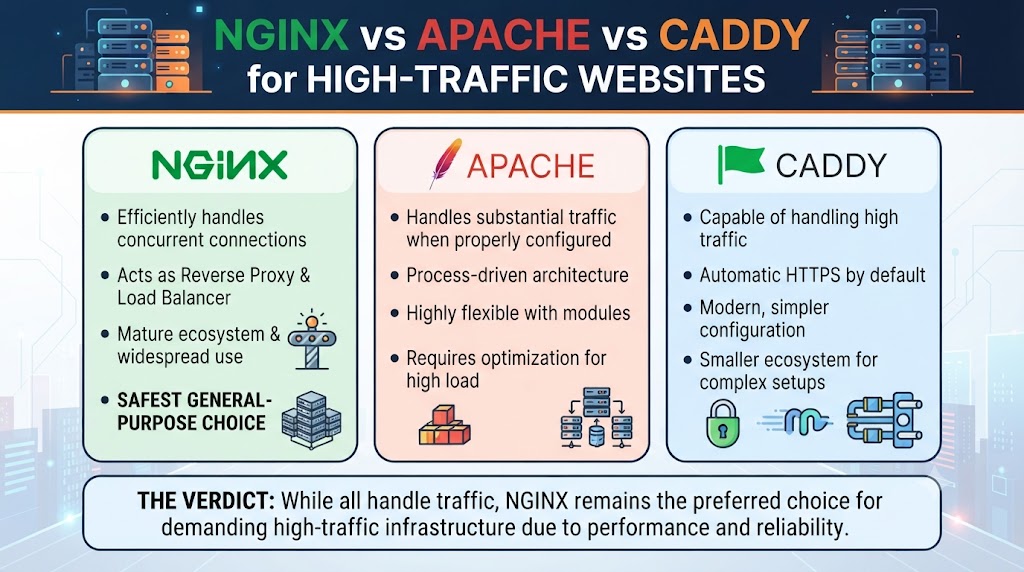
High-traffic websites need to handle many simultaneous requests while keeping response times low.
Nginx is frequently used in these environments because it can efficiently handle concurrent connections and act as a reverse proxy or load balancer.
Apache can also handle substantial traffic when properly configured and deployed across multiple servers.
Caddy is capable of handling high traffic, but organizations with complex infrastructure may prefer Nginx because of its mature ecosystem and widespread use in large deployments.
For high-traffic infrastructure, Nginx is often the safest general-purpose choice.
Nginx vs Caddy vs Apache: Which One Should You Choose?
There is no single web server that is perfect for every situation.
Choose Nginx if:
- You need high performance
- You expect many concurrent connections
- You want an efficient reverse proxy
- You need load balancing
- You are running a performance-focused VPS
- You want strong caching capabilities
Choose Apache if:
- You need
.htaccess - Your application depends on Apache modules
- You want extensive compatibility
- You are managing traditional PHP applications
- Your hosting environment already uses Apache
Choose Caddy if:
- You want simple configuration
- Automatic HTTPS is important
- You are deploying modern applications
- You want a straightforward reverse proxy
- You prefer minimal server configuration
Conclusion
There is no absolute winner in the Nginx vs Apache vs Caddy comparison since each of these web servers addresses a somewhat unique problem.
Nginx can be used when there is a need to focus on performance and scalability, Apache when there is a need to focus on flexibility, and Caddy when there is a need to facilitate modern web hosting with easy configurations and automatic HTTPS.
Before choosing any of the above web servers, think about the traffic to your website, application requirements, available resources on your server, your level of technical skills, and future plans.
Frequently Asked Questions
1. Is Nginx better than Apache?
Nginx can be better for high-concurrency workloads, static content, reverse proxying, and resource efficiency. Apache may be preferable when you need .htaccess or specific Apache modules.
2. Is Caddy better than Nginx?
Caddy is easier to configure and provides automatic HTTPS, while Nginx offers a mature ecosystem and extensive control over performance and reverse proxy configurations.
3. Which is faster, Nginx or Apache?
Nginx is generally known for excellent performance under high concurrency, particularly for static content and reverse proxy workloads. Actual performance depends on configuration and workload.
4. Is Caddy good for production websites?
Yes. Caddy can be used for production websites, APIs, reverse proxies, and applications. Its automatic HTTPS makes secure deployment easier.
5. Can Nginx and Apache run together?
Yes. They can be deployed together, with one server commonly acting as a reverse proxy in front of the other. However, this adds configuration complexity.
6. Does Caddy support reverse proxying?
Yes. Reverse proxying is one of Caddy’s useful features and can be configured with a relatively simple Caddyfile.
7. Which web server is best for WordPress?
Apache is convenient for WordPress sites that rely on .htaccess, while Nginx is excellent for performance. Caddy is a good option when simple configuration and automatic HTTPS are priorities.
8. Which web server uses the least resources?
Nginx is widely recognized for efficient resource usage, particularly when handling many concurrent connections. Actual resource consumption depends on configuration and workload.
9. Should I use Nginx or Caddy for a VPS?
Nginx is a strong choice for performance, scalability, and advanced reverse proxy requirements. Caddy is better suited to users who prioritize simple configuration and automatic HTTPS.
10. Can I switch from Apache to Nginx or Caddy?
Yes, but migration requires reviewing virtual hosts, rewrite rules, SSL configuration, application requirements, and .htaccess rules before switching servers.
Suggestions:
- https://mainvps.net/blog/lifetime-web-hosting-2026/
- https://mainvps.net/blog/windows-reseller-web-hosting/
- https://mainvps.net/blog/best-wordpress-hosting-providers/
- https://mainvps.net/blog/linux-vps-hosting-india/
- https://mainvps.net/blog/low-cost-windows-vps-hosting-in-india/
- https://mainvps.net/blog/cheap-dedicated-server-hosting-providers/
- https://mainvps.net/blog/windows-server-guide-dde-dns-tls-1-2-uptime/
- https://mainvps.net/blog/dedicated-server-hosting-netherlands/
- https://mainvps.net/blog/dedicated-server-low-price/
- https://mainvps.net/blog/vps-hosting-in-los-angeles-us/
- https://mainvps.net/blog/dedicated-server-in-nedzone-nl/
- https://mainvps.net/blog/buy-linux-vps-hosting/
- https://mainvps.net/blog/managed-windows-vps-hosting/
- https://mainvps.net/blog/what-is-wmi-provider-host-complete-guide/
- https://mainvps.net/blog/cloud-hosting-vs-vps-2026/
- https://mainvps.net/blog/vps-hosting-for-ecommerce-guide/
- https://mainvps.net/blog/vps-hosting-for-saas-applications/
- https://mainvps.net/blog/vps-reseller-hosting-in-netherlands/
- https://mainvps.net/blog/dedicated-server-hosting-in-us/
- https://mainvps.net/blog/linux-reseller-hosting/
- https://mainvps.net/blog/dedicated-server-with-nvme-us/
- https://mainvps.net/blog/dedicated-server-with-root-access-us/
- https://mainvps.net/blog/dedicated-server-with-cpanel-us/
- https://mainvps.net/blog/litespeed-vps-hosting-in-netherlands/
- https://mainvps.net/blog/cheap-windows-vps-hosting/
- https://mainvps.net/blog/affordable-dedicated-server-netherlands/
- https://mainvps.net/blog/us-windows-vps-hosting/
- https://mainvps.net/blog/dedicated-server-hosting-services-in-the-us/
- https://mainvps.net/blog/cloud-servers-for-small-business/
- https://mainvps.net/blog/low-cost-dedicated-server-usa/