As your company progresses in its development and success, there will be an increased need for hosting services. Both shared hosting and VPS services can meet the requirements in the initial phases but will face difficulties when it comes to dealing with applications that demand resources, big databases, and heavy traffic.
Windows Dedicated Server is designed for those enterprises that want their website and applications to perform efficiently and securely. In contrast to shared hosting, in which resources are shared by several users, in dedicated hosting you have exclusive access to the whole machine.
Hosting of enterprise software applications, ASP.NET applications, MS SQL Server database, Remote Desktop Services, and websites with high traffic is what Windows Dedicated Hosting is made for.
In this guide, you will get to know everything there is to know about dedicated hosting and its advantages, use cases, features, and how to select the right provider.
What Is a Windows Dedicated Server?
It is a physical server exclusively assigned to a single customer and powered by Microsoft Windows Server operating systems such as
- Windows Server 2019
- Windows Server 2022
- Windows Server 2025
Unlike shared hosting or VPS hosting, all hardware resources, including CPU, RAM, storage, and bandwidth, are dedicated entirely to your workloads.
This provides:
- Maximum performance
- Enhanced security
- Full administrator access
- Better reliability
- Greater customization
Businesses relying on Microsoft technologies often choose Windows dedicated hosting because it integrates seamlessly with the Windows ecosystem.
How Does a Windows Dedicated Server Work?
With dedicated hosting, your provider installs Windows Server hosting on a physical machine and assigns the server exclusively to your organization.
You receive:
- Administrator (RDP) access
- Full server customization
- Dedicated hardware
- Private networking
- Choice of software installations
You can install virtually any compatible Windows application, configure the IIS web server, deploy databases, and manage security policies without affecting other users.
Benefits of a Windows Dedicated Server
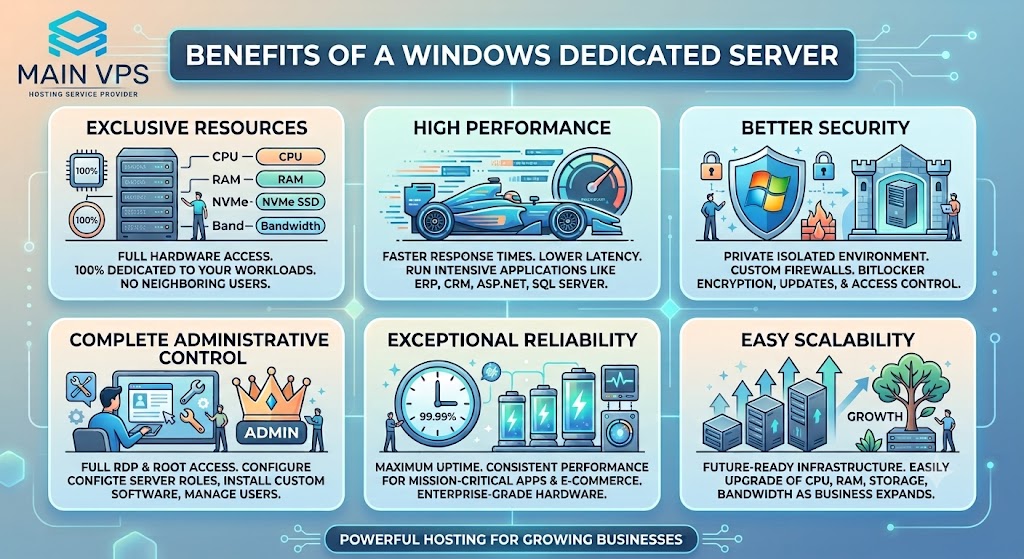
1. Exclusive Resources
It ensures optimal performance, security, and flexibility in providing hosting services to businesses. As the user, you will have exclusive access to the hardware resources available in the server, and thus, your application will have enough capacity to perform without being interrupted by other applications. This is an important way to boost your business.
Unlike VPS hosting, where physical resources are shared through virtualization, it gives you 100% dedicated hardware resources. This means your CPU, memory, storage, and network bandwidth are reserved exclusively for your workloads, ensuring consistent performance at all times.
With dedicated resources, you can confidently run resource-intensive applications without worrying about neighboring users consuming server capacity.
You get dedicated access to:
- CPU cores
- RAM
- NVMe SSD or SSD storage
- Network bandwidth
This ensures stable performance, faster processing, and minimal slowdowns even during peak traffic periods or demanding workloads.
2. High Performance
Performance is among the key factors motivating firms to opt for dedicated hosting, because the entire infrastructure of the server is at your disposal, offering better speeds and efficiency.
Applications that need great processing capabilities can be hosted, including:
- ERP software
- CRM systems
- ASP.NET applications
- Microsoft SQL databases
- RDS
- Gaming servers
- Enterprise applications
The powerful processors of Intel or AMD, along with the NVMe SSDs, provide fast application loading, effective database processing, and a good user experience.
3. Better Security
Security is crucial, especially in situations where the data is sensitive and has to remain confidential, such as financial data. By using it, the business has an option of securing the server since there will be no sharing of the hardware with other customers.
The following are some more of the benefits related to security:
- Isolation of the server
- Firewall customization
- Windows security policies
- Antivirus and antimalware protection
- BitLocker Drive Encryption
- Secure RDP access
- Windows security updates
- Access control
Since it is a dedicated server for your business, you can control all security settings.
4. Complete Administrative Control
The greatest advantage of having a dedicated Windows Server hosting is the administrator privilege. This gives users complete freedom to set up the server according to the needs of their organization.
Some of the things that users can do using administrator privileges include:
- Install customized software
- Configure Windows server roles
- Create and manage user accounts
- Set up Active Directory
- Configure IIS web server
- Change firewall settings
- Install third-party applications
- Manage tasks and services
- Optimize server performance
This makes Windows Dedicated Hosting suitable for organizations with specific software needs.
5. Exceptional Reliability
The reliability of dedicated servers is much higher because these servers use exclusive hardware and there are no other users using the same hardware. This way, you will have a consistently high-performing environment with no slowdown issues.
Dedicated servers with Windows operating systems are great for companies needing the highest possible uptime in the following sectors:
- High-traffic sites
- Online retail sites
- Financial applications
- Healthcare applications
- SaaS applications
- Government websites
- Enterprise applications
- Corporate Intranets
It is worth noting that most quality web hosting services also offer enterprise-class hardware, redundancy options, RAID configuration, and monitoring to maximize reliability.
6. Easy Scalability
As your company grows, your requirements for hosting services will also grow. Hosting your website using a Windows dedicated server allows you to grow your capacity without having to change to another system altogether.
Depending on your service provider, you may be able to increase:
- RAM
- Processor (CPU)
- Storage using NVMe SSD or HDD
- RAID configuration
- Bandwidth
- Backup storage
- IP addresses
In addition, using a Low Cost Dedicated Server USA will ensure that your server performs optimally even as your web traffic and applications grow.
Windows Dedicated Server vs VPS vs Shared Hosting
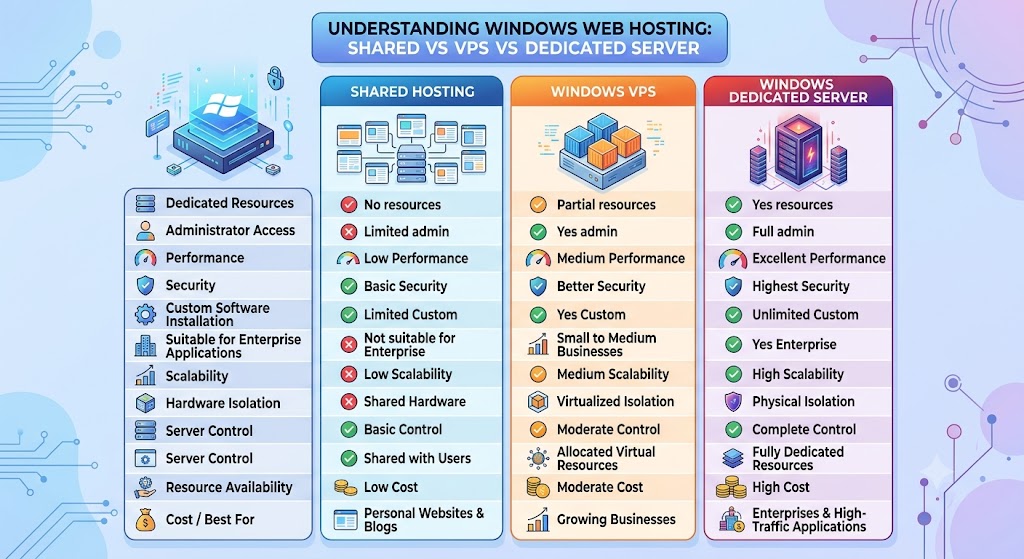
| Feature | Shared Hosting | Windows VPS | Windows Dedicated Server |
|---|---|---|---|
| Dedicated Resources | No | Partial | Yes |
| Administrator Access | Limited | Yes | Full |
| Performance | Low | Medium | Excellent |
| Security | Basic | Better | Highest |
| Custom Software Installation | Limited | Yes | Unlimited |
| Suitable for Enterprise Applications | No | Small to Medium Businesses | Yes |
| Scalability | Low | Medium | High |
| Hardware Isolation | Shared | Virtualized | Physical |
| Server Control | Basic | Moderate | Complete |
| Resource Availability | Shared with Other Users | Allocated Virtual Resources | Fully Dedicated Resources |
| Best For | Personal Websites & Blogs | Growing Businesses | Enterprises & High-Traffic Applications |
| Cost | Low | Moderate | High |
Why Choose a Windows Dedicated Server?
It is an excellent choice if your business depends on Microsoft technologies and requires high performance.
Ideal for:
- ASP.NET websites
- Microsoft SQL Server
- Remote Desktop Services
- Windows applications
- Enterprise software
- Corporate websites
- CRM platforms
- ERP systems
Key Features to Look For
| Feature | Why It Matters |
|---|---|
| NVMe SSD Storage | Faster application loading |
| Latest Intel/AMD CPUs | Better processing power |
| Windows Server 2022/2025 | Improved security and features |
| Remote Desktop Access | Easy remote management |
| DDoS Protection | Prevents cyber attacks |
| Daily Backups | Data protection |
| RAID Storage | Redundancy and reliability |
| High Bandwidth | Supports heavy traffic |
| 24/7 Technical Support | Faster issue resolution |
| Multiple Data Centers | Lower latency worldwide |
Common Use Cases
1. ASP.NET Hosting
Windows servers are optimized for ASP.NET applications.
Benefits include:
- IIS support
- .NET Framework compatibility
- Visual Studio integration
- Fast deployment
2. Microsoft SQL Server Hosting
Windows dedicated hosting provides excellent performance for:
- MSSQL databases
- Enterprise applications
- Reporting systems
- Analytics platforms
3. Remote Desktop Services (RDP)
Businesses use dedicated server providers to secure remote desktops for employees.
Advantages:
- Centralized management
- Secure access
- Better collaboration
- Improved productivity
4. Enterprise Applications
Large organizations deploy:
- ERP
- CRM
- Inventory software
- HR systems
on due to their stability and performance.
5. Gaming Servers
Many multiplayer games support Windows hosting.
Dedicated hardware provides:
- Low latency
- Stable performance
- Better player experience
6. Web Hosting
Businesses hosting multiple websites benefit from:
- Faster loading speeds
- Dedicated IP addresses
- Better SEO performance
- Improved uptime
Advantages Over Cloud Hosting
Although cloud hosting is highly scalable, Dedicated Server Hosting in the US offers several unique benefits.
| Windows Dedicated Server | Cloud Hosting |
|---|---|
| Predictable performance | Performance varies |
| Dedicated hardware | Shared infrastructure |
| Fixed monthly pricing | Usage-based pricing |
| Lower latency | Depends on architecture |
| Better hardware control | Limited hardware customization |
Who Needs a Windows Dedicated Server?
Windows dedicated hosting is suitable for:
- Large businesses
- Software companies
- SaaS providers
- Government organizations
- Educational institutions
- Healthcare providers
- Financial companies
- E-commerce stores
- Digital agencies
- Hosting resellers
How to Choose the Best Windows Dedicated Server
Before buying a Windows dedicated server, there are several crucial elements that must be considered to ensure that the purchased solution satisfies all the needs of your company both currently and in the future.
Processor
The processor (CPU) is one of the most vital parts of a dedicated server since it affects the speed and multitasking capacity of your server. Make sure that you choose a contemporary Intel Xeon or AMD EPYC CPU to get top-notch performance. These enterprise-level CPUs are made to process complex tasks, including databases, virtualization, business software, and heavy-traffic websites.
RAM
This parameter shows the capacity of your server to work with different programs and numerous users at once. A sufficient amount of memory ensures smooth operation of your server.
Minimum recommendations:
| Workload | Recommended RAM |
|---|---|
| Small Website | 16 GB |
| Business Applications | 32 GB |
| SQL Server | 64 GB |
| Enterprise Software | 128 GB or More |
Selecting a server with upgradeable RAM is also beneficial if you expect your business to grow.
Storage
Storage is an integral part of how fast your server performs. NVMe SSDs should be used because they are much faster at reading and writing files than standard hard disks. It improves application performance and makes data retrieval much more efficient.
Benefits of using NVMe SSDs as a storage solution are:
- Fast boot times
- Database performance
- Lower latency
- Greater reliability
Bandwidth
Having a fast network connection ensures that your websites and applications will stay accessible under any load. Before purchasing a hosting service, make sure that it provides enough bandwidth and a good network infrastructure.
Your hosting solution must provide:
- Network speed
- Unlimited bandwidth (where possible)
- Multiple network providers
- DDoS protection
Support
Reliable technical support is essential for minimizing downtime and resolving issues quickly. Whether you’re managing the server yourself or choosing a managed Windows Dedicated Server hosting plan, responsive support can make a significant difference in maintaining business continuity.
Look for providers offering:
- 24/7 technical support
- Managed services
- Hardware replacement
- OS installation
- Server monitoring
Why Businesses Choose MainVPS Windows Dedicated Servers
MainVPS is an online service provider that specializes in offering powerful Windows dedicated servers for enterprises to ensure maximum performance, security, and reliability.
Features of MainVPS Dedicated Servers
- High-performance Intel Xeon & AMD EPYC CPUs
- Windows Server 2019, 2022, and 2025 operating systems
- Ultra-fast NVMe SSD storage
- Exclusive IP addresses
- Full Administrator (RDP) access
- DDoS protection
- 99.9% uptime guarantee
- 24/7 customer support
- Upgrades flexibility
- Multiple worldwide data centers
With various plans and quality infrastructure, MainVPS enables companies to establish secure Windows systems that scale with their requirements.
Conclusion
Windows dedicated servers are the perfect hosting option for those who need to have top-notch performance, increased security, and total control over the hosting environment. With a Dedicated Server with Root Access US, one does not share hardware resources, thus having steady speed, reliability, and scalability for their applications.
With a dedicated server, one can benefit from having fast and secure hosting regardless of whether one hosts websites using ASP.NET, SQL databases, RDS, enterprise-level software, or any other application.
In case one is searching for a quality host, then one should consider MainVPS, as it offers business-class hosting with modern hardware and support for Windows Server 2022/2025, NVMe SSD storage, DDoS protection, and 24/7 technical support.
Frequently Asked Questions
1. What is a Windows dedicated server?
A Windows dedicated server is a physical server running Microsoft Windows Server that is exclusively assigned to one customer.
2. Is Windows dedicated hosting better than VPS?
For high-performance applications, dedicated hosting offers better speed, security, and reliability because resources aren’t shared.
3. Can I install my own software?
Yes. Full Administrator access allows you to install compatible Windows applications and customize the server environment.
4. Which Windows Server version should I choose?
Windows Server 2022 and Windows Server 2025 are recommended for improved security, performance, and long-term support.
5. Can I host ASP.NET websites?
Absolutely. Windows dedicated servers are ideal for hosting ASP.NET applications with IIS.
6. Is Microsoft SQL Server supported?
Yes. Windows dedicated servers provide excellent compatibility and performance for Microsoft SQL Server.
7. Can I upgrade server resources later?
Most providers allow upgrades for RAM, storage, and other hardware components as your requirements grow.
8. Do I get Remote Desktop access?
Yes. Full Remote Desktop Protocol (RDP) access is typically included for server management.
9. Is a Windows dedicated server secure?
Yes. Dedicated servers offer enhanced security through isolated hardware, customizable firewalls, access controls, and security updates.
10. Who should use a Windows dedicated server?
Businesses running enterprise applications, high-traffic websites, ASP.NET projects, Microsoft SQL Server databases, Remote Desktop Services, and other resource-intensive workloads benefit the most.
Suggestions:
- https://mainvps.net/blog/lifetime-web-hosting-2026/
- https://mainvps.net/blog/windows-reseller-web-hosting/
- https://mainvps.net/blog/best-wordpress-hosting-providers/
- https://mainvps.net/blog/linux-vps-hosting-india/
- https://mainvps.net/blog/low-cost-windows-vps-hosting-in-india/
- https://mainvps.net/blog/cheap-dedicated-server-hosting-providers/
- https://mainvps.net/blog/windows-server-guide-dde-dns-tls-1-2-uptime/
- https://mainvps.net/blog/dedicated-server-hosting-netherlands/
- https://mainvps.net/blog/dedicated-server-low-price/
- https://mainvps.net/blog/vps-hosting-in-los-angeles-us/
- https://mainvps.net/blog/dedicated-server-in-nedzone-nl/
- https://mainvps.net/blog/buy-linux-vps-hosting/
- https://mainvps.net/blog/managed-windows-vps-hosting/
- https://mainvps.net/blog/what-is-wmi-provider-host-complete-guide/
- https://mainvps.net/blog/cloud-hosting-vs-vps-2026/
- https://mainvps.net/blog/vps-hosting-for-ecommerce-guide/
- https://mainvps.net/blog/vps-hosting-for-saas-applications/
- https://mainvps.net/blog/vps-reseller-hosting-in-netherlands/
- https://mainvps.net/blog/dedicated-server-hosting-in-us/
- https://mainvps.net/blog/linux-reseller-hosting/
- https://mainvps.net/blog/dedicated-server-with-nvme-us/
- https://mainvps.net/blog/dedicated-server-with-root-access-us/
- https://mainvps.net/blog/dedicated-server-with-cpanel-us/
- https://mainvps.net/blog/litespeed-vps-hosting-in-netherlands/
- https://mainvps.net/blog/cheap-windows-vps-hosting/