
The right hosting option is one of the most critical decisions that you will have to make regarding your site. Whether you want to launch a website for a business, an eCommerce site, client application hosting, or a growing SaaS platform, your choice of hosting directly affects the website performance, availability, security, and user experience.
A good hosting service guarantees the availability of your website at all times, offering fast page loading speeds and a great user experience. As your company grows and more visitors come to your website, the hosting service must also grow to accommodate such growth without affecting performance. That is why picking the right hosting service is a business decision that could affect the success of your business online.
There are many people searching for cloud hosting vs web hosting who believe they are looking for two entirely different kinds of hosting services. Well, cloud hosting is actually a form of web hosting, but when people talk about web hosting, they mostly refer to shared hosting.
What Is Web Hosting?
Web hosting is a service that stores your website files and makes them accessible over the internet.
There is no website without a server. When you type your domain name in your browser, your website’s content will be delivered to you by the server.
The most common web hosting options include:
Cloud hosting vs web hosting refers to cloud hosting vs shared hosting.
In shared hosting, several websites operate on one physical server that shares CPU, RAM, storage space, and bandwidth with them.
As a result of sharing the resources, the costs remain low, and it becomes a great option for newbies and small websites.
What Is Cloud Hosting?
Cloud hosting technology uses a number of interconnected servers as opposed to a physical server.
Resources for your website are hosted in the cloud system. In case any of the servers fail, another server jumps in, reducing downtime.
Your website does not need to use one server but rather a network of servers.
This technology has the following advantages:
- High availability
- Increased performance
- Automatic scaling
- Redundancy
- Flexibility
Cloud hosting has become the choice for companies that are growing.
Cloud Hosting vs Web Hosting: Quick Comparison
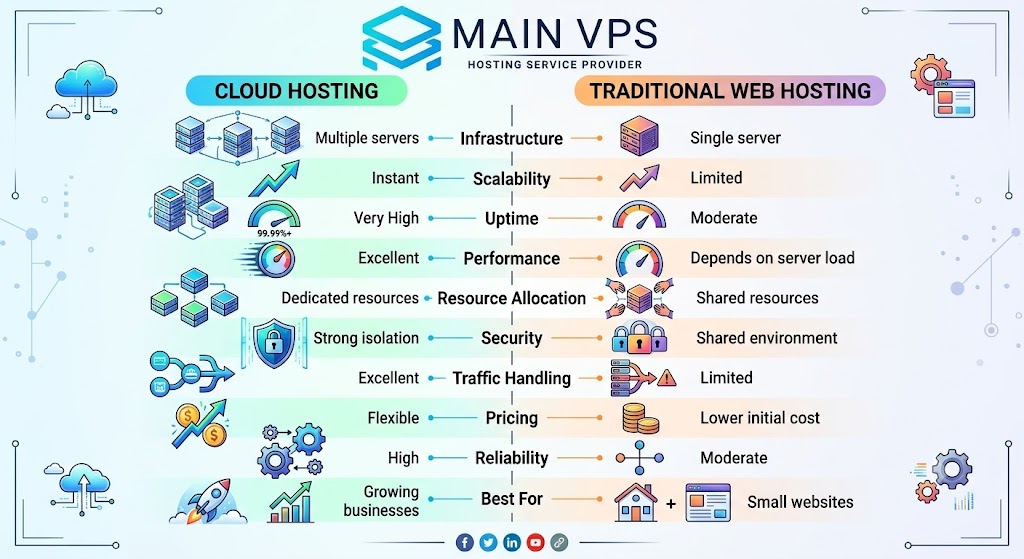
| Feature | Cloud Hosting | Traditional Web Hosting |
|---|---|---|
| Infrastructure | Multiple servers | Single server |
| Scalability | Instant | Limited |
| Uptime | Very High | Moderate |
| Performance | Excellent | Depends on server load |
| Resource Allocation | Dedicated resources | Shared resources |
| Security | Strong isolation | Shared environment |
| Traffic Handling | Excellent | Limited |
| Pricing | Flexible | Lower initial cost |
| Reliability | High | Moderate |
| Best For | Growing businesses | Small websites |
Understanding the Biggest Difference
The core difference lies in how resources are allocated.
Traditional Web Hosting
With shared web hosting, your website will be hosted on just one physical server. All the requests made to the website will be handled by this single server only, thus making this service a very easy and affordable option for individuals and small businesses.
But due to limitations on available resources, the performance might be affected when the server gets more load. In case the server gets overloaded:
- Website loading time slows down
- The chances of downtime increase
- Overall performance reduces
- Heavy traffic might result in temporary interruptions in services
The next limitation of shared web hosting is the “noisy neighbor” problem. As multiple websites get hosted on the same server in shared hosting, high resource usage by one of the websites can adversely affect the performance of other websites using that server.
Cloud Hosting
Cloud hosting uses a completely opposite principle that distributes your website among various connected servers. Unlike web hosting, which is based on a single computer, cloud hosting uses automatic load balancing and resource allocation from all available sources.
In case your website receives an unexpected traffic influx because of any marketing campaign or seasonal sales, the following resources will be immediately allocated by cloud hosting:
- Additional CPU power;
- Additional RAM;
- Extra disk space;
- Increased bandwidth.
All these resources may be instantly distributed without any additional actions or server migration. In case traffic decreases, the resources can be scaled accordingly in order to save costs and maintain good performance.
Such a flexible resource distribution system makes cloud hosting much more resistant to traffic spikes. Even if one server faces some technical problems, your website will be served by another server in the network. Thus, downtime will be minimized, and your visitors will have a trouble-free experience.
Therefore, cloud hosting can be the most preferable choice for those who value website availability, fast loading, and scalability.
Performance Comparison
Website performance is one of the key factors that need to be considered while selecting hosting services. Website performance not only helps improve user experience but also leads to increased search engine ranking and business success. It could be noted that even a slight delay in the loading of the website may cause users to abandon the website.
Performance affects:
- SEO ranking
- Bounce rate
- Conversion rate
- User experience
- Customer satisfaction
- Website engagement
It is important to know the difference between cloud hosting and web hosting when analyzing their performance under varying load levels.
Traditional Hosting Performance
The performance of traditional web hosting relies on certain aspects, such as the reputation of the hosting company and resources on the server. Because of the presence of shared hosting, all websites will be located on one physical server, and they will have to compete for resources like CPU, RAM, storage space, and bandwidth.
Performance relies on:
- Number of users using the server
- Hardware
- Hosting provider
- Resource limits
- Optimization of the website
In case some other website on that server receives a spike in traffic or uses an excessive amount of CPU and memory, then your website will start running slower, even though you won’t have any changes in the amount of traffic.
Cloud Hosting Performance
Cloud hosting is meant to provide consistent performance through the process of load balancing, where the workload is spread out between several servers that are connected rather than focusing on just one server.
The key performance benefits of cloud hosting are
- Faster page loading
- Load balancing capability
- Dedicated or scalable resources
- Low latency
- Better management of traffic bursts
- Increased server response time
In case of server overload, the cloud will transfer the workload to other available servers. It is useful for ensuring stable performance during traffic peaks such as launching a new product, running a campaign, or holiday shopping seasons.
Scalability: The Biggest Advantage of Cloud Hosting
Businesses grow.
Traffic changes.
Marketing campaigns generate sudden visitors.
Cloud hosting is designed for these situations.
You can upgrade:
- CPU
- RAM
- Storage
- Bandwidth
without migrating to another server.
Traditional hosting often requires:
- Manual upgrades
- Server migration
- Downtime
- Additional configuration
If your website is expected to grow, scalability becomes a major deciding factor.
Reliability and Uptime
On any website, it is imperative that you do not compromise on its availability as much as you do on its speed. Customers expect your website to be up at all times when they use it for shopping, reading information, or other purposes.
Consequences of having a website downtime include:
- Losses in revenue
- Poor user experience
- Decrease in customer trust
- Low search engine rankings
- Damage to brand reputation
There are several factors that distinguish cloud hosting from web hosting, and one of the most important of those is the factor of uptime.
Traditional Hosting
Conventional website hosting makes use of a single server to ensure that your website stays live. As long as the server operates without any problems, your website will always be available. Since there is just one server taking care of all the requests, a problem with either the hardware or the software can negatively impact your website.
Some other issues that can affect your uptime include:
- Server maintenance time
- Unforeseen hardware malfunction
- Resource overload due to other websites
- Network problems
- Server software problems
Despite the efforts of good hosting companies to limit downtime as much as possible, a single-server set-up inherently has higher risks since there is no backup server to replace the existing one.
Cloud Hosting
Reliability is a feature that is inherent in cloud hosting through the use of a collection of interconnected computers, not a single computer.
In case of failure of one computer:
- Another computer takes over the task of serving your site.
- There is traffic redirection with minimal or no disruption at all.
- Your applications will continue to run without any further input from you.
The failover process helps avoid any sort of unexpected downtime on your site.
Security Comparison
Security on the website is one of the key factors in the choice of hosting provider. The emergence of cyber threats like malware, ransomware, DDoS attacks, brute force login attacks, and data theft has become a common occurrence nowadays. With a secure hosting environment, you will be able to ensure the safety of your website and customers’ information.
In terms of web hosting versus cloud hosting, both can offer a secure environment depending on the hosting architecture and management thereof.
Traditional Hosting
With regard to shared web hosting, many websites share the same server. Even though reliable hosting companies employ account isolation in order to ensure that the websites cannot access each other, there are still some potential risks regarding the security of shared environments in case the server is not well taken care of.
Some of the possible security issues involve:
- A shared server environment
- An increased risk caused by any hacked neighboring websites
- Limited server-level configuration possibilities
- Delayed software updates in case of unmanaged servers
- Greater reliance on the security procedures of the hosting company
While hosting companies offer account isolation, the presence of neighbors in such an environment might still pose some risks for the website in question.
Cloud Hosting
Cloud hosting solutions are developed in such a way that there are multiple security levels available for protection of applications and information in the distributed infrastructure. As website hosting takes place using several interconnected servers rather than a single server, cloud-based hosting services tend to be much safer from hardware crashes and hacking.
There are usually the following features included in cloud-based services:
- Network isolation
- Firewalls
- Automatic backups
- DDoS protection
- Monitoring
- Storage redundancy
- Safe infrastructure
- Data encryption
- Multi-factor authentication
- Security updates
Also, the majority of cloud hosting services manage all the server maintenance, system updates, and security monitoring themselves.
Resource Allocation
One of the biggest differences in the cloud hosting vs web hosting comparison is how server resources are allocated. Resource allocation directly impacts your website’s speed, stability, and ability to handle traffic.
Shared Web Hosting
In shared web hosting, multiple websites use the same physical server and share its resources. This makes it an affordable option for small websites and blogs, but performance can vary depending on server usage.
Shared resources include:
If another website on the same server experiences heavy traffic or uses excessive resources, your website may load slower or experience reduced performance. This is why shared hosting is best suited for websites with low to moderate traffic.
Cloud Hosting
Cloud hosting distributes your website across multiple interconnected servers, providing dedicated or scalable resources based on your hosting plan.
Key advantages include:
- Dedicated or scalable CPU and RAM
- Consistent website performance
- Automatic resource scaling
- Better handling of traffic spikes
Because resources can be allocated as needed, cloud hosting delivers more stable performance even during periods of high traffic. This makes it an ideal choice for growing businesses, eCommerce stores, and websites that require reliable performance.
Cost Comparison
In most cases, the cost consideration can make the greatest impact for many website developers when it comes to selecting the best hosting option. Even though the conventional method of hosting is cheaper compared to cloud hosting, the latter is relatively more valuable due to the benefits it provides.
Traditional Hosting
Traditional hosting is one of the most budget-friendly options available, making it ideal for individuals and small businesses that are just getting started.
Pros:
- Very affordable
- Great for beginners
- Predictable monthly pricing
- Easy to manage
Ideal for:
- Personal blogs
- Portfolio websites
- Small business sites
- Startup websites with low traffic
If your website has limited traffic and basic hosting needs, traditional hosting provides a cost-effective solution without requiring a large investment.
Cloud Hosting
It is also true that cloud hosting is expensive due to the reason that you will be paying more for an advanced hosting facility.
The advantages include:
- Improved hardware
- Increased reliability
- Exclusive resources
- Scalability
- Improved infrastructure
- Uptime and security improvements
While it is more expensive every month, cloud hosting proves itself worth spending on by improving the uptime, website speed, and business growth in the long run. For websites earning leads or generating sales or facing increased traffic, the extra expense can bring a lot of return on investment.
Which Hosting Is Better for SEO?
Google considers several factors, including:
- Website speed
- Core Web Vitals
- Uptime
- Mobile experience
Cloud hosting helps improve these metrics by delivering faster page loads and greater stability.
While hosting alone won’t guarantee higher rankings, better infrastructure contributes to improved SEO performance.
Traffic Handling
Imagine your website receives:
- Viral social media traffic
- Black Friday visitors
- Holiday shopping spikes
- Product launch traffic
Traditional hosting may struggle under sudden demand.
Cloud hosting automatically distributes incoming traffic across multiple servers, maintaining stability even during heavy usage.
Backup and Disaster Recovery
Backups protect your business from:
- Human error
- Malware
- Server failure
- Software issues
Many managed cloud hosting providers include automated backups, snapshots, and rapid disaster recovery features.
Traditional hosting often requires manual backup management unless included in your hosting package.
Ease of Management
Not every business has an in-house system administrator.
Shared Hosting
Usually includes:
- cPanel
- One-click installers
- Email hosting
- File manager
Very beginner-friendly.
Managed Cloud Hosting
Provides:
- Server monitoring
- Security updates
- Automatic maintenance
- Performance optimization
- Technical support
This allows businesses to enjoy cloud infrastructure without needing advanced server administration skills.
Best Use Cases
Choose Traditional Web Hosting If You Have:
- Personal blog
- Portfolio website
- Small informational website
- Startup with limited budget
- Low monthly traffic
Choose Cloud Hosting If You Have:
- Business website
- eCommerce store
- SaaS application
- Enterprise portal
- High-traffic blog
- Growing startup
- Web application
- Agency hosting multiple client websites
Cloud Hosting vs Web Hosting for Businesses
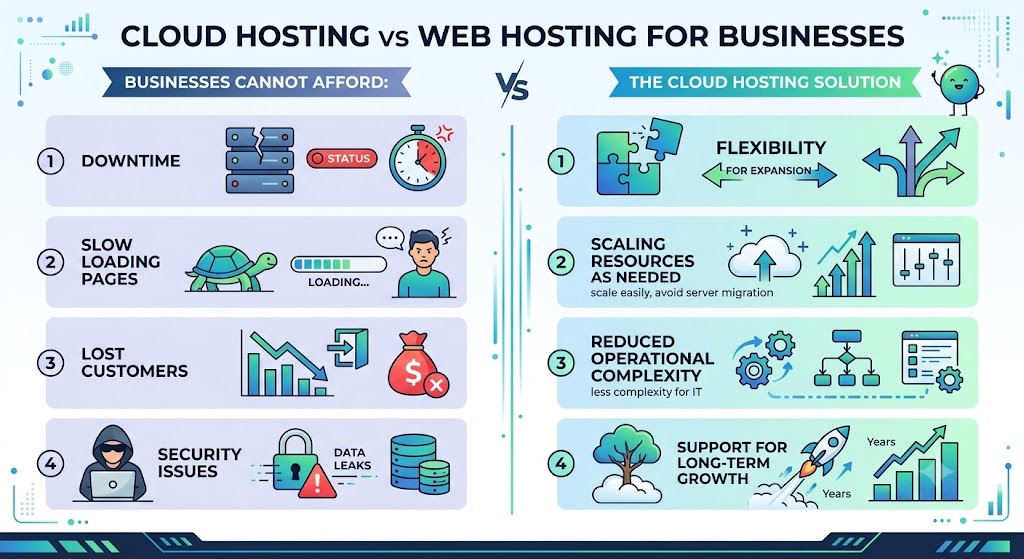
Businesses cannot afford:
- Downtime
- Slow-loading pages
- Lost customers
- Security issues
Cloud hosting provides the flexibility businesses need as they expand.
Instead of migrating servers every time traffic increases, businesses can simply scale resources as needed.
This reduces operational complexity while supporting long-term growth.
Common Myths About Cloud Hosting
Myth 1: Cloud Hosting Is Only for Large Companies
False.
Many small businesses use cloud hosting because it provides excellent performance without requiring enterprise-level budgets.
Myth 2: Cloud Hosting Is Too Expensive
Not necessarily.
The additional cost often pays for itself through:
- Better uptime
- Faster websites
- Increased conversions
- Improved customer experience
Myth 3: Shared Hosting Is Always Slow
Not true.
A quality hosting provider with optimized servers can deliver excellent performance for smaller websites.
The issue arises when websites outgrow shared resources.
Myth 4: Cloud Hosting Requires Technical Knowledge
Managed cloud hosting removes much of the complexity.
Your hosting provider handles:
- Updates
- Monitoring
- Security
- Maintenance
allowing you to focus on your business.
How to Decide Between Cloud Hosting and Web Hosting
Ask yourself these questions:
- Is my website growing?
- Do I expect traffic spikes?
- Is downtime unacceptable?
- Do I need better security?
- Will I scale over the next year?
If you answered “yes” to most of these questions, cloud hosting is likely the better investment.
If you’re running a simple website with low traffic and a limited budget, traditional web hosting remains a practical and cost-effective option.
Why Businesses Are Moving to Cloud Hosting
The digital world has undergone quite a lot of transformation in the recent past. Today’s websites are more than just static pages. They run online stores, customer portals, SaaS apps, and APIs and are content-heavy.
Cloud hosting is preferred by companies as it gives them the ability to scale their websites without overhauling the underlying architecture. No matter whether you are running a new marketing campaign, launching new locations, or expect to have high traffic spikes due to seasonality, cloud hosting gives you the ability to scale with your website.
More reasons why companies choose cloud hosting services are:
- Speedier deployment of new applications
- More reliable disaster recovery strategy
- Superior global performance due to distributed infrastructure
- No chance of any single server failure
- Simpler integration with current development practices
For many organizations that depend on their websites for lead generation, transaction processing, or customer service, it often makes sense despite its higher monthly price tag.
Final Verdict: Cloud Hosting vs Web Hosting
Neither traditional nor cloud web hosting is automatically a good solution since there is no one-size-fits-all solution. The proper choice depends on your specific situation with a website.
The cost-effective, user-friendly, and convenient traditional web hosting is perfect for a website that doesn’t require high performance or reliability and has predictable traffic. It is a great choice for personal websites, portfolios, and small businesses.
Scalable, reliable, and secure cloud web hosting is designed to ensure maximum speed, reliability, and security for a website that is supposed to grow. If your website is vital for your business or e-commerce project, then cloud web hosting will be the best choice for it.
Frequently Asked Questions
1. What is the main difference between cloud hosting and web hosting?
Cloud hosting uses multiple interconnected servers to host your website, while traditional web hosting typically relies on a single server. This makes cloud hosting more scalable and reliable.
2. Is cloud hosting faster than traditional web hosting?
Yes. Cloud hosting generally offers better performance because resources are distributed across multiple servers, reducing bottlenecks and improving load times.
3. Which is better for a small business website?
A small business with low traffic can start with traditional web hosting. If the business expects growth, cloud hosting is a better long-term investment.
4. Does cloud hosting improve SEO?
Cloud hosting can contribute to better SEO by improving website speed, uptime, and user experience factors that search engines consider when ranking websites.
5. Is cloud hosting more secure?
Cloud hosting often includes advanced security features such as network isolation, automated backups, firewalls, and DDoS protection, making it more secure than many shared hosting environments.
6. Can I upgrade from web hosting to cloud hosting later?
Yes. Most hosting providers offer migration services that allow you to move from traditional hosting to cloud hosting as your website grows.
7. Is cloud hosting more expensive?
Cloud hosting usually costs more than shared web hosting, but it provides better performance, scalability, and reliability, which can justify the additional investment.
8. Which hosting is best for eCommerce websites?
Cloud hosting is generally the better choice for eCommerce because it can handle high traffic, secure customer data, and maintain fast page load speeds during peak shopping periods.
9. Who should use traditional web hosting?
Traditional web hosting is ideal for personal blogs, portfolio sites, startup websites, and small businesses with predictable traffic and limited budgets.
10. Why are businesses switching to cloud hosting?
Businesses choose cloud hosting for its flexibility, higher uptime, better performance, stronger security, and ability to scale resources without disrupting operations.
Suggestions:
- https://mainvps.net/blog/lifetime-web-hosting-2026/
- https://mainvps.net/blog/windows-reseller-web-hosting/
- https://mainvps.net/blog/best-wordpress-hosting-providers/
- https://mainvps.net/blog/linux-vps-hosting-india/
- https://mainvps.net/blog/low-cost-windows-vps-hosting-in-india/
- https://mainvps.net/blog/cheap-dedicated-server-hosting-providers/
- https://mainvps.net/blog/windows-server-guide-dde-dns-tls-1-2-uptime/
- https://mainvps.net/blog/dedicated-server-hosting-netherlands/
- https://mainvps.net/blog/dedicated-server-low-price/
- https://mainvps.net/blog/vps-hosting-in-los-angeles-us/
- https://mainvps.net/blog/dedicated-server-in-nedzone-nl/
- https://mainvps.net/blog/buy-linux-vps-hosting/
- https://mainvps.net/blog/managed-windows-vps-hosting/
- https://mainvps.net/blog/what-is-wmi-provider-host-complete-guide/
- https://mainvps.net/blog/cloud-hosting-vs-vps-2026/
- https://mainvps.net/blog/vps-hosting-for-ecommerce-guide/
- https://mainvps.net/blog/vps-hosting-for-saas-applications/
- https://mainvps.net/blog/vps-reseller-hosting-in-netherlands/
- https://mainvps.net/blog/dedicated-server-hosting-in-us/
- https://mainvps.net/blog/linux-reseller-hosting/
- https://mainvps.net/blog/best-windows-vps-providers-in-the-usa/
- https://mainvps.net/blog/unmanaged-dedicated-server-hosting/
- https://mainvps.net/blog/bellwright-dedicated-server/
- https://mainvps.net/blog/ark-survival-ascended-dedicated-server/
- https://mainvps.net/blog/kvm-vps-netherlands/
- https://mainvps.net/blog/cheap-reseller-hosting-india/
- https://mainvps.net/blog/linux-kvm-vps-hosting/