If you have any experience researching remote computing options, you must have come across these two terms being tossed about in the same sentence: RDP server vs VPS. On a surface level, these might sound like two sides of the same coin. They give you access to a remote system. They are hosted in some data center facility. They offer the promise of better computing performance than your computer itself does. But why would anyone keep wondering which one is “better”?
The point is that RDP and VPS are not actually competing with each other. They are solutions to two different problems, although both occur in the same context often. This blog will explain what these two acronyms stand for, how they are different from each other, and when you might prefer one over the other.
What Is a VPS?
A virtual private server, or VPS, is a piece of a physical server that has been divided into many independent, isolated systems with the help of virtualization software. The isolated environment works like a separate dedicated computer with its own operating system, storage, memory allocation, and processing power, despite the fact that it technically shares the physical server resources with the other virtual private servers that belong to the same host.
You may imagine a VPS as a flat in a big building where you have your own place, your own door with a key, and are free to make any changes in the interior you wish. However, the building itself, including its infrastructure like plumbing and electricity, is shared between all units of the building.
Using a VPS, you get full administrator/root access to your own virtual computer, where you can install any software, configure the operating system, and launch websites, applications, databases, or anything else as if it were a separate physical server. VPS servers are highly appreciated by programmers, small businesses, and website owners, as they provide way more functionality and better performance at significantly reduced costs compared todedicated servers.
Common VPS use cases include:
- Hosting websites and web applications
- Running game servers
- Setting up development and testing environments
- Hosting email servers
- Running backend services, APIs, or databases
- Deploying trading bots or automation scripts that need to run 24/7
VPS plans typically run on Linux or Windows, and most providers let you choose your OS during setup.
What Is an RDP Server?
An abbreviation for Remote Desktop Protocol is a technology created by Microsoft that helps users gain remote control over the graphical user interface of their machines. By saying “RDP server,” we normally mean a remote machine, whether it is a VPS or a dedicated server, which has been prepared to enable users to connect to it and remotely operate a desktop-like interface using a mouse and keyboard and even have a Windows-based environment, which is similar to that of a traditional local PC.
Thus, it is important to note that RDP is not a kind of server itself; it is a protocol that enables users to connect to the remote computer’s desktop and use it as if they were sitting in front of the local one. The thing is that the RDP protocol is mostly used in connection with Windows-based virtual servers, and thus, RDP server became the term in the sphere of web hosting, meaning a remote Windows machine that can be used as a desktop.
It is vital to know about it because it plays a huge role in making comparisons between RDP servers and VPS servers.
Typical use cases for RDP servers include:
- Running Windows-only software remotely (accounting tools, CAD programs, legacy business apps)
- Providing remote access for employees working from different locations
- Running multiple browser sessions or automation tools that need a full graphical interface
- Testing software across different environments
- Giving a team shared access to one machine and one set of installed applications
- Running resource-heavy design or editing software from a lightweight device like a Chromebook or tablet
The Core Difference: Protocol vs. Infrastructure
The shortest answer is VPS is the real server where you have your own hardware-backed VM with its own resources. RDP is the way you can access the server’s desktop environment. It is possible to have a VPS and not use RDP at all (as is mostly the case when people work with Linux VPS; in such cases, most operations are done using the command-line interface through SSH). It is also possible to use RDP and not work with a VPS Server; e.g., you can have remote access to a dedicated server or your own office computer configured to be accessible remotely.
When Server providers offer an “RDP server” service, they offer basically a VPS or shared server where everything is configured for Windows OS installation and enabling RDP access, and that is designed for customers who need remote desktop access to their server.
So the opposition is actually not between “RDP Server vs VPS.” The correct statement would be: each RDP server is based on certain VPS (or even dedicated) infrastructure, but not each VPS is configured to work as an RDP server.
Access Method: Command Line vs. Graphical Desktop
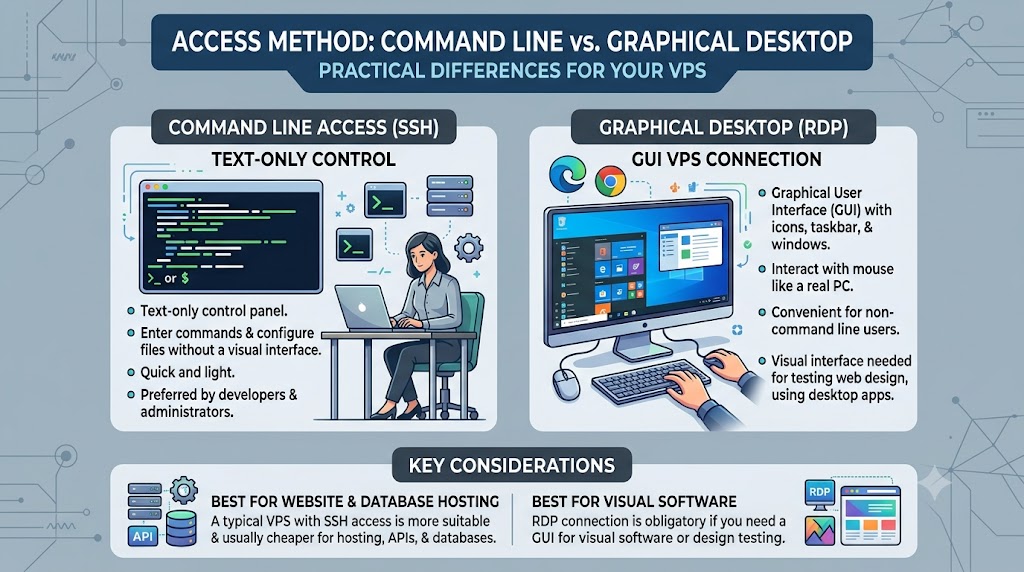
Here, the practical differences show up clearly.
A typical Linux-based VPS can be controlled through SSH, which is a text-only command-line control panel. You enter commands and configure files and services without ever looking at the graphical interface. This is quick and light and preferred by developers and admins who can use a terminal environment.
The RDP-based VPS provides you with the graphical user interface (GUI), showing you icons, a taskbar, and open windows. You can interact with this machine with the help of the mouse as you would do it on a real PC. It is more convenient for those who cannot work with the command line or for situations when the visual interface is needed, for instance, testing the design of your website, browsing through your website in multiple browsers, and using desktop applications that have not been created for headless environments.
If you need a GUI for your visual software, an RDP connection is obligatory. If you host your website on the server and run a database or an API, a typical VPS with SSH access will be more suitable and cheaper in most cases.
Performance and Resource Allocation
Since most RDP servers are hosted on VPS technology, they share the same performance parameters in terms of core usage, memory capacity, storage type (SSD or NVMe), and allocated bandwidth. The difference in performance between an “RDP Server” and a “VPS” boils down to how the specific plan is hosted rather than its performance capabilities.
However, having a graphical desktop environment means that there is some additional overhead involved when compared to a plain Linux command-line VPS. For instance, the OS (Windows), RDP sessions, and any GUI software you use require more RAM and CPU resources than their equivalent hosted on a Linux server using terminal commands. That’s why most RDP-specific plans have higher amounts of base RAM at lower pricing brackets, since it takes more resources to be responsive.
Operating System Considerations
There is much flexibility when it comes to the choice of an operating system on a VPS.
An RDP server is typically based on a Windows operating system, as the RDP protocol is developed by Microsoft and is included in Windows systems by default. However, it is possible to enable remote desktop access on a Linux operating system using special software (xrdp). But in that case, the experience will definitely be inferior to Windows’ native solution and will involve some additional effort to set up. In case your main concern is remote desktop access, the decision leans towards Windows-based services, but VPS provides more freedom.
Pricing Differences
Pricing is one of the more noticeable practical differences between the two. Standard Linux VPS plans tend to be the cheapest option on the market because they don’t require Windows licensing costs and don’t need extra resources dedicated to running a graphical interface.
RDP servers, especially Windows-based ones, usually cost more for a few reasons:
- Windows Server licensing fees get baked into the price.
- Extra RAM and CPU allocation needed to keep the desktop environment responsive.
- Specialized configuration for smooth remote desktop performance, especially for tasks like multiple simultaneous RDP sessions.
If budget is your main concern and you don’t need a graphical interface, a Linux VPS will almost always be the more cost-effective route.
Security Considerations
Security for both Linux servers and RDP servers should be provided; however, the latter should be protected more rigorously because it has always been a known method of access that was widely used for launching brute-force attacks and distributing ransomware. Therefore, it is essential to consider some key security measures when working with RDP servers, including the use of unique passwords, two-factor authentication, IP whitelisting, changing the default RDP port number, and keeping Windows up to date.
Also, there are several recommendations related to the configuration of the usual Linux VPS accessed through SSH, namely disabling password authentication and using SSH keys instead, firewall configuration, and software updates. There is no better or worse solution here; both options are equally safe or unsafe depending on how they are managed.
Which One Should You Choose?
The right choice really depends on what you’re trying to accomplish.
Choose a standard VPS if:
- You’re hosting a website, web app, or API
- You’re comfortable with (or want to learn) command-line management
- You want the most cost-effective option
- You need flexibility in choosing your operating system
- Your workload doesn’t require a graphical interface
Choose an RDP server if:
- You need to run Windows-specific desktop software remotely
- You want a point-and-click experience instead of the command line
- Your team needs shared access to one consistent desktop environment
- You’re running visual tasks like design work, browser automation, or software testing
- You want to access a powerful remote machine from a low-spec local device
For a lot of users, especially freelancers, remote teams, and small businesses, the decision isn’t really “RDP vs VPS”; it’s “do I need graphical desktop access, or is command-line server management enough for what I’m building?” Once you answer that question, the rest of the decision tends to fall into place.
Final Thoughts
All things considered, RDP and VPS are not competing solutions for the same application. Instead, the two concepts belong to different stages of the same general solution, which implies renting computing resources located remotely instead of using just local resources on your machine. In this sense, a VPS is just the core virtual server, while RDP is only one way to interact with it in case you require a full graphical desktop instead of a command line.
The difference between RDP and VPS: the two concepts will allow you to select the appropriate server plan on your very first attempt without buying unnecessary options or ignoring some crucial graphical capabilities you actually require. In essence, the only correct choice is the one corresponding to your particular work style, whether it is a lightweight Linux VPS controlled via SSH or a full-fledged Windows RDP server with a graphical desktop.
FAQs
1. Is RDP a type of VPS?
Not exactly. RDP is a protocol used to remotely access a desktop interface, while a VPS is the actual virtual server. Most “RDP servers” are really just VPS plans configured with Windows and RDP access enabled.
2. Can I use RDP on a Linux VPS?
Yes, using third-party tools like xrdp, but it’s less common and not as smooth as native Windows RDP, since RDP was built by Microsoft specifically for Windows.
3. Which is cheaper, RDP or VPS?
A standard Linux VPS is usually cheaper because it doesn’t require Windows licensing fees or the extra RAM/CPU needed to run a graphical desktop environment.
4. Do I need technical skills to use a VPS?
Basic command-line knowledge helps, since most Linux VPS management happens via SSH. An RDP server is more beginner-friendly since it offers a familiar point-and-click desktop.
5. Is an RDP server good for hosting a website?
It’s possible, but not ideal. Standard VPS hosting (usually Linux-based) is more efficient and cost-effective for websites, APIs, and backend services.
6. Can multiple people use the same RDP server?
Yes, many RDP plans support multiple simultaneous user sessions, making them useful for teams that need shared access to the same applications and environment.
7. Is RDP secure?
It can be, but exposed RDP ports are a common target for brute-force attacks. Security depends on using strong passwords, two-factor authentication, IP whitelisting, and keeping Windows updated.
8. What operating systems can I choose with a VPS?
9. Why do RDP servers need more RAM than a typical VPS?
Running a full graphical desktop environment plus GUI applications consumes more resources than a lightweight command-line Linux server doing the same job.
10. How do I decide between RDP and VPS?
Ask yourself whether you need a visual, point-and-click interface for desktop software (choose RDP) or you’re comfortable managing a server via command line for hosting, APIs, or backend work (choose a standard VPS).
Suggestions:
- https://mainvps.net/blog/lifetime-web-hosting-2026/
- https://mainvps.net/blog/windows-reseller-web-hosting/
- https://mainvps.net/blog/best-wordpress-hosting-providers/
- https://mainvps.net/blog/linux-vps-hosting-india/
- https://mainvps.net/blog/low-cost-windows-vps-hosting-in-india/
- https://mainvps.net/blog/cheap-dedicated-server-hosting-providers/
- https://mainvps.net/blog/windows-server-guide-dde-dns-tls-1-2-uptime/
- https://mainvps.net/blog/dedicated-server-hosting-netherlands/
- https://mainvps.net/blog/dedicated-server-low-price/
- https://mainvps.net/blog/vps-hosting-in-los-angeles-us/
- https://mainvps.net/blog/dedicated-server-in-nedzone-nl/
- https://mainvps.net/blog/buy-linux-vps-hosting/
- https://mainvps.net/blog/managed-windows-vps-hosting/
- https://mainvps.net/blog/what-is-wmi-provider-host-complete-guide/
- https://mainvps.net/blog/cloud-hosting-vs-vps-2026/
- https://mainvps.net/blog/vps-hosting-for-ecommerce-guide/
- https://mainvps.net/blog/vps-hosting-for-saas-applications/
- https://mainvps.net/blog/vps-reseller-hosting-in-netherlands/
- https://mainvps.net/blog/dedicated-server-hosting-in-us/
- https://mainvps.net/blog/linux-reseller-hosting/
- https://mainvps.net/blog/dedicated-server-with-nvme-us/
- https://mainvps.net/blog/dedicated-server-with-root-access-us/
- https://mainvps.net/blog/dedicated-server-with-cpanel-us/
- https://mainvps.net/blog/litespeed-vps-hosting-in-netherlands/
- https://mainvps.net/blog/cheap-windows-vps-hosting/
- https://mainvps.net/blog/affordable-dedicated-server-netherlands/
- https://mainvps.net/blog/us-windows-vps-hosting/
- https://mainvps.net/blog/dedicated-server-hosting-services-in-the-us/
- https://mainvps.net/blog/cloud-servers-for-small-business/
- https://mainvps.net/blog/low-cost-dedicated-server-usa/