
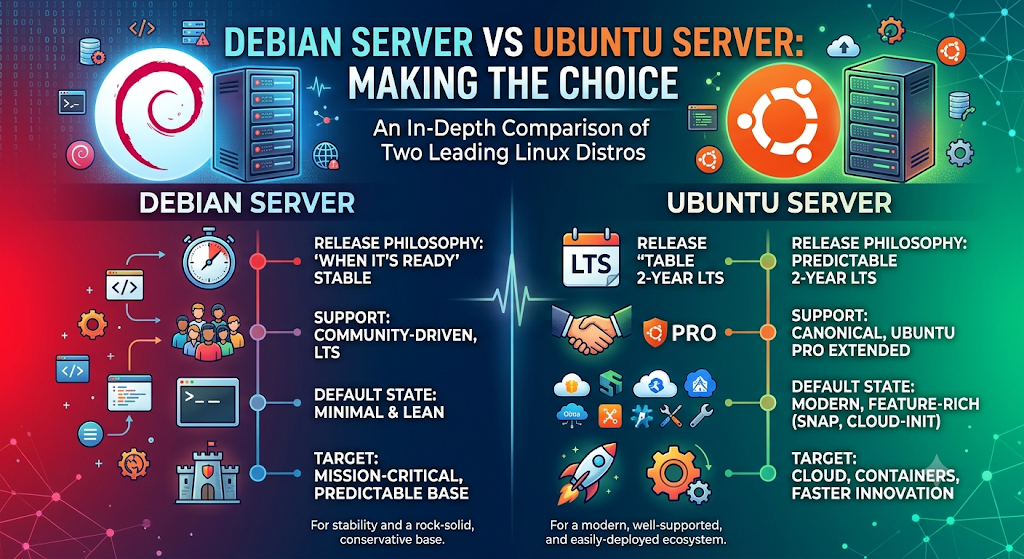
Choosing the right operating system is one of the most important decisions when setting up a server. A server operating system affects performance, security, stability, software compatibility, maintenance, and overall management. Among the many Linux distributions available today, Debian Server vs Ubuntu Server are two of the most popular choices for businesses, developers, system administrators, and hosting providers.
Both of these operating systems are free to use, stable, and popular for hosting websites, application development, cloud computing, database management, and enterprise applications. Both operating systems have several features in common due to the fact that Ubuntu is derived from Debian. But these OSs also differ in terms of software updates, releases, requirements, configurations, and support.
If you plan to set up a VPS, dedicated, cloud, or web hosting environment, these distinctions are very important to know.
What Is Debian Server?
A Debian server is a physical or virtual server that has the Debian Linux operating system installed on it. It uses Debian as its underlying operating system to manage hardware resources, applications, processes, storage, networking, and system services.
Debian is a free and open-source Linux distribution developed and maintained by the Debian Project. It is known for its stability, security, reliability, and extensive software repository.
A Debian server can be configured to provide different services and resources to other computers (clients) over a network. Depending on its requirements, administrators can install and configure various server applications and services.
Common Uses of Debian Server
– Web Hosting: Hosting websites and web applications using Apache or Nginx.
– Database Hosting: Running database management systems such as MySQL and PostgreSQL.
– DNS Server: Managing domain name resolution using BIND.
– Mail Server: Handling email communication using services such as Postfix and Dovecot.
– File Server: Providing centralized file storage and sharing over a network.
– Virtualization and Containers: Running virtual machines and containers using technologies such as KVM and Docker.
– Application Hosting: Deploying and managing business applications and backend services.
What Is Ubuntu Server?
An Ubuntu Server is a physical or virtual server that has the Ubuntu Server operating system installed on it. It uses Ubuntu as its underlying operating system to manage hardware resources, applications, processes, storage, networking, and system services.
Ubuntu is a free and open-source Linux distribution developed by Canonical. It is based on Debian and is known for its ease of use, extensive software repositories, strong community support, and compatibility with modern cloud and development technologies.
An Ubuntu Server can be configured to provide different services and resources to other computers (clients) over a network. Administrators can install and configure various server applications depending on their infrastructure requirements.
Common Uses of Ubuntu Server
Web Hosting: Hosting websites and web applications using Apache or Nginx.
Cloud Infrastructure: Running cloud-based workloads and virtual machines.
Containerization and Orchestration: Managing containers using Docker and Kubernetes.
Database Hosting: Running MySQL, PostgreSQL, and other database systems.
Enterprise Applications: Hosting business applications and backend services.
Software Development and Testing: Providing development, staging, and testing environments.
AI and Machine Learning: Running AI workloads, machine learning applications, and GPU-based computing.
DevOps and Automation: Managing CI/CD pipelines, infrastructure automation, and deployment workflows.
Debian Server vs Ubuntu Server: Quick Comparison
Before exploring each factor in detail, let’s look at the major differences between these two Linux distributions.
| Feature | Debian Server | Ubuntu Server |
| Developer | Debian Project | Canonical |
| Based on | Independent Linux distribution | Debian |
| Package format | DEB | DEB |
| Package manager | APT | APT |
| Release approach | Stable releases | Regular and LTS releases |
| Software versions | Generally conservative | Generally newer |
| Stability | Excellent | Excellent |
| Security | Strong | Strong |
| Resource usage | Often lightweight | Depends on installation |
| Ease of use | More technical in some areas | Beginner-friendly |
| Community support | Large community | Large community |
| Commercial support | Third-party providers | Canonical support available |
| Best suited for | Stability-focused workloads | Cloud and modern applications |
Both operating systems are capable of handling demanding server workloads. The better choice depends on your technical requirements and management preferences.
1. Performance: Debian Server vs Ubuntu Server
Performance is an important consideration when choosing a server operating system. A server should handle requests efficiently, manage system resources properly, and provide consistent performance under different workloads.
Debian Server Performance
The lightweight nature of Debian is well known, especially when Debian is installed using a minimum number of packages. The administrator has control over which services and applications to install, allowing him to save up on resource usage.
Debian running a minimum number of packages works well with limited resources such as RAM and CPU. This makes Debian a good choice for use in small VPS, light web server, DNS, and database environment.
The predictable behavior that Debian offers by selecting only stable packages may prove to be helpful in production servers that run all the time.
Ubuntu Server Performance
The Ubuntu server is also good in terms of performance and is able to work under heavy load. The operating system offers new software and good cloud support as well.
There might be other software installed by default in Ubuntu, but the administrator can easily remove all the unnecessary services from the system.
If you need to work with newer versions of software, Ubuntu will offer you all the advantages of using the latest one.
Which Performs Better?
It is difficult to say which one performs better, Debian or Ubuntu, as performance is not only dependent on the operating system but also on hardware capabilities, software settings, and other factors.
For creating a customized lightweight server, Debian seems like a good option. Ubuntu seems a great option for applications in a contemporary setting.
2. Stability and Reliability
Server stability is essential because downtime can affect websites, applications, customers, and business operations.
Debian Server Stability
One of the most significant benefits of using Debian is its stability. Its Stable distribution is based on thoroughly checked software packages, rather than making any significant changes.
Prior to releasing a package as a part of a stable distribution, it is thoroughly developed and tested.
Debian is particularly suitable for:
- Production web servers.
- Database hosting.
- Business applications.
- Long-running server environments.
- Infrastructure requiring predictable updates.
However, its conservative approach means some software packages may not be the newest available versions.
Ubuntu Server Stability
Ubuntu Server is also a good OS to use for a production environment. The LTS version of Ubuntu is highly preferred by many businesses due to its extended support period.
Ubuntu LTS versions are updated regularly regarding security and maintenance. They are appropriate to be used on servers for long periods.
Which Is More Reliable?
They are both reliable provided that they are properly installed and configured.
Debian can be considered a reliable choice when software uniformity is important. Ubuntu LTS should be considered a reliable choice when LTS support and an up-to-date software ecosystem are equally important.
3. Security: Which Server Is More Secure?
The security of a server should never be neglected. If the operating system is insecure, it may open the door to attacks on the business, customers, applications, and websites.
Debian and Ubuntu both have security teams that detect and fix vulnerabilities.
Debian Server Security
Debian follows a security-focused development approach. Its security team publishes updates for supported stable releases to address known vulnerabilities.
Administrators can use tools such as:
- UFW or iptables for firewall management.
- AppArmor for application security.
- Fail2ban for protection against repeated authentication attempts.
- SSH key authentication for secure remote access.
- APT security updates for package maintenance.
Debian also provides security advisories that help administrators understand important vulnerabilities and available fixes.
Ubuntu Server Security
Ubuntu provides several security features designed for modern server environments.
Some important security technologies include:
- AppArmor for mandatory access control.
- UFW for firewall management.
- Livepatch for supported kernel security updates without a reboot.
- Regular security patches.
- Secure Boot support on compatible hardware.
- Ubuntu Pro security maintenance options.
Ubuntu Pro provides additional security maintenance for eligible packages and supported releases, depending on the subscription and coverage.
Which Is Better for Security?
Both OSs are able to ensure a safe server environment.
The exact degree of security will depend on the implementation of patches, firewalls, passwords, SSH encryption, access control, software updates, and monitoring.
In case a business wants additional paid security support, there is Ubuntu Pro available for Ubuntu. Debian is a great choice for those users who like self-maintained systems.
4. Software Package Management
Application package management dictates the ease of installation, updating, and maintenance of applications in a server environment.
The similarities between Debian and Ubuntu lie in their package management systems, making them familiar for people using either one.
Debian Package Management
Debian uses the APT package manager and DEB package format.
Common commands include:
- sudo apt update – Refreshes package information.
- sudo apt upgrade – Installs available package updates.
- sudo apt install nginx – Installs the Nginx web server.
- sudo apt remove nginx – Removes a package.
- sudo apt autoremove – Removes unused dependencies.
Debian’s Stable repositories generally prioritize tested software versions. Administrators who need newer versions can explore backports or other carefully managed repositories.
Ubuntu Package Management
Ubuntu also uses APT and DEB packages, so many commands are identical.
For example:
- sudo apt update
- sudo apt upgrade
- sudo apt install apache2
- sudo apt remove apache2
Ubuntu additionally supports Snap packages, which allow applications to be distributed with their dependencies.
Snap can be useful when an application requires a newer version than the one available in the traditional package repositories.
Which Has Better Package Management?
Package management is well-handled in both cases.
The Debian distribution is well-suited for those administrators who like a more conventional way to handle packages. The Ubuntu distro has an advantage because of its Snap ecosystem.
5. Software Availability and Updates
Software availability is another important factor when selecting a Linux server distribution.
Debian Server Software Updates
The Debian Stable distribution is more reliable than offering the latest software releases.
Therefore, some applications, programming languages, and libraries will be older than those in other distributions.
This is advantageous to many production servers since one can have a stable software environment.
On the other hand, if you are a developer, you might need further packages that contain the latest tools for your framework or programming language.
Ubuntu Server Software Updates
Ubuntu normally provides up-to-date versions of software packages in its usual releases.
The LTS version of Ubuntu ensures that there is a compromise between stability and new software packages. The intermediate releases have new software packages released regularly.
Another advantage of Ubuntu is the numerous repositories both from the community and third parties.
A lot of developers have released installation guidelines for Ubuntu.
Which Is Better?
If you prefer thoroughly tested software and predictable updates, Debian Stable is a strong option.
If you need newer packages, modern development tools, and broader vendor-specific installation support, Ubuntu Server may be more convenient.
6. Ease of Use and Server Administration
Not every server administrator has the same experience level. Some users are familiar with Linux commands, while others are setting up their first VPS.
Debian Server Ease of Use
Installation of Debian is clear and flexible. At the installation stage, users will be able to choose the needed components and create a server with minimal configuration.
Some setups might need extra effort from the user’s side, especially for installing particular applications or more recent software versions.
Debian suits users who would like to know everything about the configuration of their server.
Ubuntu Server Ease of Use
Ubuntu Server is often considered beginner-friendly because of its extensive documentation, installation guides, and large support community.
It provides convenient tools and configurations for common server tasks.
Many tutorials explain how to install popular applications on Ubuntu, including:
- Apache and Nginx.
- MySQL and PostgreSQL.
- Docker.
- WordPress.
- PHP.
- Python.
- Node.js.
This makes Ubuntu a practical starting point for users who are new to Linux server administration.
Which Is Easier?
Ubuntu Server is generally easier for beginners because of its documentation and broad application support.
Debian is also manageable, but it may require more hands-on configuration depending on the task.
7. Hardware Compatibility and System Requirements
Hardware compatibility determines whether an operating system can run efficiently on your server.
Both Debian and Ubuntu support several processor architectures, including x86-64 and ARM64, with additional architecture support depending on the release.
Debian Hardware Support
Debian is compatible with numerous hardware configurations and offers installation media for multiple architectures.
Due to its lightweight installation options, Debian can be used on old machines and resource-constrained servers.
Nonetheless, some of the new hardware components might need a newer firmware version or kernel version.
Ubuntu Hardware Support
Ubuntu also offers support for a wide variety of server hardware. It is extensively employed on cloud computing platforms, virtualization, and current-generation physical servers.
Newer releases of Ubuntu may prove beneficial for hardware requiring support to recent kernels and drivers.
Compatibility issues are dependent on the particular server hardware model, firmware, architecture, and operating system version.
Which Is Better?
Debian is suitable for lightweight and established server hardware. Ubuntu can be more convenient when working with newer hardware or cloud infrastructure.
Before installing either distribution, always check the hardware compatibility requirements.
8. Cloud Computing and Virtualization Support
Cloud computing has become an important part of modern IT infrastructure. Businesses use cloud servers to host applications, store information, run databases, and manage online services.
Both Debian and Ubuntu work well in virtualized and cloud environments.
Debian for Cloud Servers
Debian is commonly used in VPS environments because of its stability, flexibility, and minimal installation options.
It can be deployed on virtual machines and used for:
- Web hosting.
- Application servers.
- Private cloud infrastructure.
- Database environments.
- Development servers.
Debian’s lightweight configuration can help administrators optimize resource usage.
Ubuntu for Cloud Servers
Ubuntu Server has a strong presence in public and private cloud environments.
It is widely supported by major cloud providers and works with technologies such as Docker, Kubernetes, OpenStack, and various infrastructure automation tools.
Ubuntu also provides cloud-specific images that simplify deployment.
Which Is Better for Cloud Hosting?
Both are capable cloud operating systems.
Ubuntu is particularly attractive for cloud-native applications and modern DevOps environments. Debian is a strong choice for stable VPS deployments and customized infrastructure.
9. Web Hosting: Linux Debian vs Ubuntu Server
Web hosting is one of the most common uses of Linux server operating systems.
Whether you are hosting a personal blog, business website, eCommerce store, or web application, both Debian and Ubuntu can provide a dependable hosting environment.
Debian for Web Hosting
Debian supports popular web hosting technologies such as:
- Apache.
- Nginx.
- PHP.
- MariaDB.
- MySQL.
- PostgreSQL.
- WordPress.
Its stable packages and lightweight installation options make it useful for production websites.
Administrators can configure Debian according to their website requirements without installing unnecessary applications.
Ubuntu for Web Hosting
Various types of web hosting are supported by Ubuntu server.
These include WordPress sites, PHP applications, eCommerce sites, and many more.
Many documents can be found regarding Ubuntu that help in solving various web hosting issues.
One of the other areas where Ubuntu is widely used for hosting is the Docker-based one.
Which Is Better for Web Hosting?
For traditional hosting, Debian and Ubuntu make great choices.
While Debian fits well with those administrators who appreciate simplicity and consistency in their environment, Ubuntu is an excellent choice for end users thanks to its documentation and modern development tools.
As far as performance in hosting is concerned, it depends on server configuration, cache, database, web server, and network settings more than on the OS itself.
10. Long-Term Support and Release Cycle
Understanding the release cycle is important when selecting an operating system for long-term production use.
Debian Release Cycle
There is no set timeline for Debian releases. The stable releases are released whenever they are ready.
Debian Stable releases are offered support on an ongoing basis until they enter the Long Term Support (LTS) period.
The LTS period usually involves extending support beyond the normal support period, except for certain architectural or packaging constraints.
This ensures that administrators can manage servers without having to upgrade to a new major release regularly.
Ubuntu Release Cycle
Ubuntu has a more predictable pattern of releasing updates.
Generally, there is a new release every six months, but the LTS release comes every two years.
The LTS releases of Ubuntu are offered support for five years within the default repositories. More support could be added to those who use Ubuntu Pro.
It helps businesses have a strategy for upgrading and maintaining systems.
Which Has Better Long-Term Support?
Both provide long-term maintenance options.
Debian is attractive for administrators who prefer its stable release model. Ubuntu LTS is suitable for organizations that want predictable releases and clearly defined support periods.
11. Community Support and Documentation
Community support is extremely helpful when managing a Linux server. Administrators regularly face issues involving software installation, network configuration, security, and system updates.
Debian Community Support
Debian has a large international community of developers and system administrators.
Users can find support through:
- Official Debian documentation.
- Debian mailing lists.
- Community forums.
- Online technical discussions.
- Debian bug tracking systems.
Because Debian has been available for many years, a large amount of technical documentation is available online.
Ubuntu Community Support
Ubuntu also has an extensive community and documentation ecosystem.
Users can access:
- Official Ubuntu documentation.
- Ask Ubuntu.
- Ubuntu community forums.
- Tutorials and technical blogs.
- Canonical support services.
Ubuntu’s popularity among developers and cloud users means that installation guides for many modern applications are readily available.
Which Has Better Support?
Communities surrounding both distributions are equally vibrant.
Ubuntu is easier to understand due to the abundance of application-specific tutorials. Debian is also quite helpful for more advanced users who need more documentation and help from the community.
Debian Server vs Ubuntu Server: Advantages and Disadvantages
Understanding the advantages and disadvantages of each distribution can make the final decision easier.
Advantages of Debian Server
- High Stability: Debian Stable prioritizes tested packages and predictable system behavior.
- Lightweight Installation: Users can install only the necessary packages and services.
- Strong Security: Regular security updates help protect supported systems.
- Customization: Administrators have considerable control over system configuration.
- Open-Source Ecosystem: Debian is maintained by a large community.
- Resource Efficiency: Minimal installations can work well on systems with limited resources.
- Reliable Package Management: APT provides a convenient way to manage software.
Disadvantages of Debian Server
- Older Software Packages: Stable releases may not include the latest application versions.
- More Manual Configuration: Certain tasks may require additional technical knowledge.
- Hardware Compatibility: Very new hardware may require additional firmware or newer kernels.
- Learning Curve: Beginners may need time to become comfortable with administration.
- Release Timing: Debian does not follow a fixed release schedule.
Advantages of Ubuntu Server
- Beginner-Friendly: Extensive documentation makes it easier to get started.
- Modern Software: Regular releases provide access to newer software versions.
- LTS Support: Long-term support releases are suitable for production environments.
- Cloud Compatibility: Strong support for popular cloud platforms and technologies.
- Large Community: Many users and developers share tutorials and troubleshooting advice.
- Commercial Support: Canonical offers enterprise support and Ubuntu Pro options.
- Development Tools: Convenient access to modern application development environments.
Disadvantages of Ubuntu Server
- Additional Components: Some installations may include services that are unnecessary for particular workloads.
- Snap Preferences: Some administrators prefer traditional package formats over Snap.
- Frequent Release Options: Users must understand the differences between LTS and interim releases.
- Resource Usage: Resource consumption depends on installed packages and services.
- Commercial Features: Some extended enterprise support options require a subscription.
Which Server Should You Choose: Debian or Ubuntu?
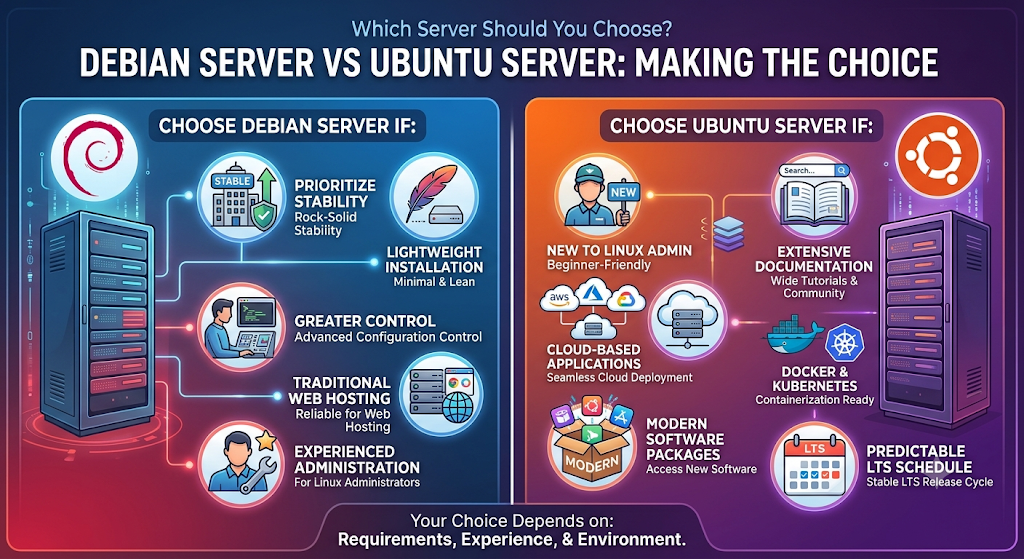
The right operating system depends on your server requirements, technical experience, and application environment.
Here are some practical recommendations.
Choose Debian Server If:
- You prioritize stability and predictable software behavior.
- You want a lightweight server installation.
- You prefer greater control over system configuration.
- You are managing traditional web hosting environments.
- You have experience with Linux server administration.
- Your applications work well with the software versions available in Debian Stable.
Choose Ubuntu Server If:
- You are new to Linux server administration.
- You need extensive documentation and tutorials.
- You are deploying cloud-based applications.
- You work with Docker and Kubernetes.
- You need access to modern software packages.
- You want a predictable LTS release schedule.
- You need access to Canonical’s commercial support options.
Can You Run WordPress on Debian and Ubuntu?
Yes. Both Debian and Ubuntu support WordPress hosting.
WordPress requires a web server, PHP, and a compatible database such as MySQL or MariaDB.
You can install Apache or Nginx on either operating system and configure PHP and the database according to your website’s requirements.
For a WordPress website, the most important performance factors include:
- SSD or NVMe storage.
- Sufficient RAM and CPU resources.
- Proper PHP configuration.
- Database optimization.
- Caching and CDN integration.
- Regular backups.
- Security updates.
The choice between Debian and Ubuntu should depend on your preferred management environment and software compatibility.
Which Is Better: Debian Server or Ubuntu Server?
Debian Server is recommended if you are looking for a lightweight OS that has a well-scheduled update policy and can be highly customized. Ubuntu Server is recommended if you want an operating system that has more recent software packages.
Both operating systems are efficient in handling websites, databases, and applications.
Is Debian Server Faster Than Ubuntu Server?
It is incorrect to say that Debian Server will always be faster than Ubuntu Server. Both distributions can perform very well when properly configured.
A bare-bones Debian installation could use fewer system resources since it allows installing just the necessary services.
Server performance mainly depends on:
- CPU and RAM allocation.
- SSD or NVMe storage.
- Network bandwidth and latency.
- Web server configuration.
- Database optimization.
- Installed background services.
- Application workload.
For a small VPS with limited resources, a minimal installation of either distribution can be a suitable option.
Why Do Businesses Choose Debian Server?
Debian Server is chosen by organizations due to its stability, flexibility, and ability to run programs reliably.
Debian has a stable version which contains tested software packages and therefore can be used in situations where changing software unexpectedly may cause issues.
Common Debian Server applications include:
- Website and WordPress hosting.
- MySQL and MariaDB databases.
- Nginx and Apache web servers.
- DNS and mail servers.
- File storage and backup systems.
- Business applications.
Debian is particularly useful when administrators want to control installed packages and maintain a consistent server environment.
Why Is Ubuntu Server Popular for Cloud Hosting?
Ubuntu Server is well-liked as a cloud host due to its broad compatibility with cloud systems, development tools, and container applications.
These include Docker, Kubernetes, OpenStack, and other DevOps automation tools.
Businesses commonly use Ubuntu Server for:
- Cloud application deployment.
- Virtual machines.
- Container management.
- Web application hosting.
- Software development.
- AI and machine learning environments.
Its LTS releases also make it suitable for organizations that require a predictable operating system maintenance schedule.
Final Verdict: Ubuntu vs Debian
When comparing Ubuntu Server vs Debian, there is no single winner for every situation. Both are powerful Linux distributions that can support websites, databases, applications, cloud infrastructure, and enterprise workloads.
Debian Server is an excellent choice for users who value stability, lightweight installations, customization, and predictable software environments. Its conservative package management approach makes it particularly useful for long-running production servers.
Ubuntu Server is a strong choice for beginners, developers, and businesses that need modern software, extensive documentation, cloud compatibility, and long-term support options.
Frequently Asked Questions
1. Is Debian better than Ubuntu for servers?
Debian is an excellent option for servers that require stability, lightweight installations, and predictable software updates. Ubuntu is suitable for cloud applications, modern development environments, and users who prefer extensive documentation.
2. Which Linux operating system is best for VPS hosting?
Debian and Ubuntu are both suitable for VPS hosting. Debian is popular for lightweight server environments, while Ubuntu offers broad application compatibility and cloud support.
3. Is Ubuntu Server based on Debian?
Yes. Ubuntu Server is based on Debian. However, it has its own software repositories, release schedule, default configurations, and support options.
4. Which is easier to manage, Debian or Ubuntu?
Ubuntu Server is generally easier for beginners because of its extensive tutorials and community resources. Debian is also straightforward for administrators familiar with Linux commands.
5. Does Debian use fewer resources than Ubuntu?
A minimal Debian installation can use fewer resources depending on the installed packages and services. However, both distributions can be optimized for low-resource server environments.
6. Can I install WordPress on Debian and Ubuntu?
Yes. Both operating systems support WordPress through popular web servers such as Apache and Nginx, along with PHP and MySQL or MariaDB.
7. Which server operating system receives more frequent updates?
Ubuntu follows a regular release schedule, with new versions generally released every six months. Debian releases stable versions when they are ready, prioritizing testing and reliability.
8. Is Debian suitable for business hosting?
Yes. Debian is suitable for business hosting, including websites, databases, applications, and other production workloads, provided the system is properly configured and maintained.
9. Should beginners use Debian or Ubuntu Server?
Ubuntu Server is generally a good starting point for beginners because of its documentation and broad software ecosystem. Debian is another good option for users who want to learn Linux administration in depth.
10. Can Debian and Ubuntu run on dedicated servers?
Yes. Both support dedicated server environments and can be used for web hosting, database management, application deployment, and enterprise infrastructure.
Suggestions:
- https://mainvps.net/blog/lifetime-web-hosting-2026/
- https://mainvps.net/blog/windows-reseller-web-hosting/
- https://mainvps.net/blog/best-wordpress-hosting-providers/
- https://mainvps.net/blog/linux-vps-hosting-india/
- https://mainvps.net/blog/low-cost-windows-vps-hosting-in-india/
- https://mainvps.net/blog/cheap-dedicated-server-hosting-providers/
- https://mainvps.net/blog/windows-server-guide-dde-dns-tls-1-2-uptime/
- https://mainvps.net/blog/dedicated-server-hosting-netherlands/
- https://mainvps.net/blog/dedicated-server-low-price/
- https://mainvps.net/blog/vps-hosting-in-los-angeles-us/
- https://mainvps.net/blog/dedicated-server-in-nedzone-nl/
- https://mainvps.net/blog/buy-linux-vps-hosting/
- https://mainvps.net/blog/managed-windows-vps-hosting/
- https://mainvps.net/blog/what-is-wmi-provider-host-complete-guide/
- https://mainvps.net/blog/cloud-hosting-vs-vps-2026/
- https://mainvps.net/blog/vps-hosting-for-ecommerce-guide/
- https://mainvps.net/blog/vps-hosting-for-saas-applications/
- https://mainvps.net/blog/vps-reseller-hosting-in-netherlands/
- https://mainvps.net/blog/dedicated-server-hosting-in-us/
- https://mainvps.net/blog/linux-reseller-hosting/
- https://mainvps.net/blog/dedicated-server-with-nvme-us/
- https://mainvps.net/blog/dedicated-server-with-root-access-us/
- https://mainvps.net/blog/dedicated-server-with-cpanel-us/
- https://mainvps.net/blog/litespeed-vps-hosting-in-netherlands/
- https://mainvps.net/blog/cheap-windows-vps-hosting/
- https://mainvps.net/blog/affordable-dedicated-server-netherlands/
- https://mainvps.net/blog/us-windows-vps-hosting/
- https://mainvps.net/blog/dedicated-server-hosting-services-in-the-us/
- https://mainvps.net/blog/cloud-servers-for-small-business/
- https://mainvps.net/blog/low-cost-dedicated-server-usa/