No modern business can do without advanced technologies nowadays. Be it an e-store, customer information management, website hosting, application development, or other digital services, all of these will have their own server system, which determines the efficiency and success of the work done by the company.
Conventional hosting can hardly meet the requirements of today’s business needs. The poor performance, non-scalability, and downtimes may cause loss of customers and a drop in revenue.
This is why more and more companies are turning to cloud servers for small business. Such a solution guarantees enterprise-level performance and reliability of the work for a price much lower than that of a regular enterprise.
One does not need to spend several thousand dollars on purchasing physical servers but can use virtual cloud servers instead.
What Are Cloud Servers for Small Businesses?
Cloud servers refer to virtual servers that run through a network of physical servers and not a single machine.
Unlike conventional hosting services, cloud hosting involves distributing the workload through several servers, and in case any of them has problems, there is always another one to take over its duties.
The advantages of this service to small businesses include:
- Higher performance of websites
- Increased reliability
- Improved security
- Flexibility in allocating resources
- Cost savings for the infrastructure
- Ease of scalability
The businesses don’t have to purchase expensive hardware but will be charged only for what they use.
Why Small Businesses Are Moving to Cloud Hosting
Technology that has adaptability, reliability, and scalability has become an essential requirement in the current competitive business world. The conventional hosting options may find it difficult to cope with the ever-changing needs of today’s businesses, particularly as the level of traffic, workload, or user expectations rises.
The benefits of cloud hosting include having scalable resources, high availability, and enterprise-level security without having to make any investment in costly hardware. Therefore, increasing numbers of startups and local businesses opt for cloud servers for small business to operate their websites or applications.
Below are the key reasons why cloud hosting has become the preferred choice.
Better Business Continuity
Hardware malfunction, loss of power, or other such mishaps may disturb your business processes and cause losses. Conventional servers normally depend upon a single piece of hardware, which makes them prone to disruption due to the failure of that hardware.
The cloud servers ensure that you don’t have to worry about any such disruptions, as your workloads get divided among a number of interconnected servers, and in case of a breakdown of a particular server, another server takes up its place.
It keeps you productive and lets you satisfy your customers without any problem.
Lower IT Costs
Setting up and maintaining an in-house server infrastructure demands considerable monetary spending. Companies need to buy equipment, find room for their servers, pay for power usage, install air conditioning systems, and regularly renew old equipment.
Some of the expenses include:
- Purchases of equipment
- Server maintenance
- Electricity usage
- Air conditioning systems
- Software licenses
- Upgrading the servers
- Replacing equipment
Staff for maintenance and troubleshooting
Cloud hosting takes away almost all of these expenses by providing companies with a way to rent computing power rather than having physical equipment. Monthly payments with no initial investments make it possible for small businesses to manage their budgets effectively.
This cost-effective approach allows companies to invest more resources into marketing, product development, and customer service rather than expensive IT infrastructure.
Easy Scalability
The growth of a business is unpredictable most of the time. Marketing activities, promotions, or just the release of a product can lead to a sudden influx of traffic and app use.
Traditional servers require that businesses invest in new hardware to increase resources.
However, cloud hosting makes it possible to increase resources immediately. If you require extra CPU, RAM, storage, or bandwidth, you can upgrade your resources within minutes.
Advantages of cloud scalability:
- Upgrade server resources as you need.
- Manage traffic spikes without impacting performance.
- Only pay for the amount of resources you actually use.
- Scale down when you have less activity and save money.
- Avoid hardware replacements and migration issues.
Remote Accessibility
Modern companies are not confined to only one office anymore. Work-from-home facilities and remote access to business resources are becoming increasingly common nowadays. Cloud-based servers give authorized personnel the ability to access company applications and resources from any place as long as there is an internet connection available.
The main benefits of this include:
- Employees working from home.
- A team distributed over several places.
- Field workers using company applications when on the road.
- Collaboration between international teams.
- Company owner overseeing all company processes from any place.
Thus, cloud-based hosting allows for better collaboration and increased productivity.
Improved Security
However, as cybersecurity threats keep changing, protecting data becomes one of the top priorities for businesses. Many small business cloud hosting providers become targets for cyberattacks due to a lack of financial resources to deploy proper security technologies themselves.
Most of the best cloud hosting companies invest considerable amounts in enterprise-grade security technologies capable of providing protection for customers’ data and infrastructure at all times.
The most common security technologies include:
- Advanced firewalls to prevent any unauthorized access.
- DDoS security solutions to defend against traffic attacks.
- Encryption of all information that is being stored and transmitted.
- Multi-factor authentication for safe logins into accounts.
- Automated backups for fast recovery after any disasters.
- Continuous monitoring and threat detection.
- Periodic software and security updates.
- Access controls for limiting unauthorized access by users.
All these security technologies are much better than anything that can be deployed for an on-premises server by most small businesses.
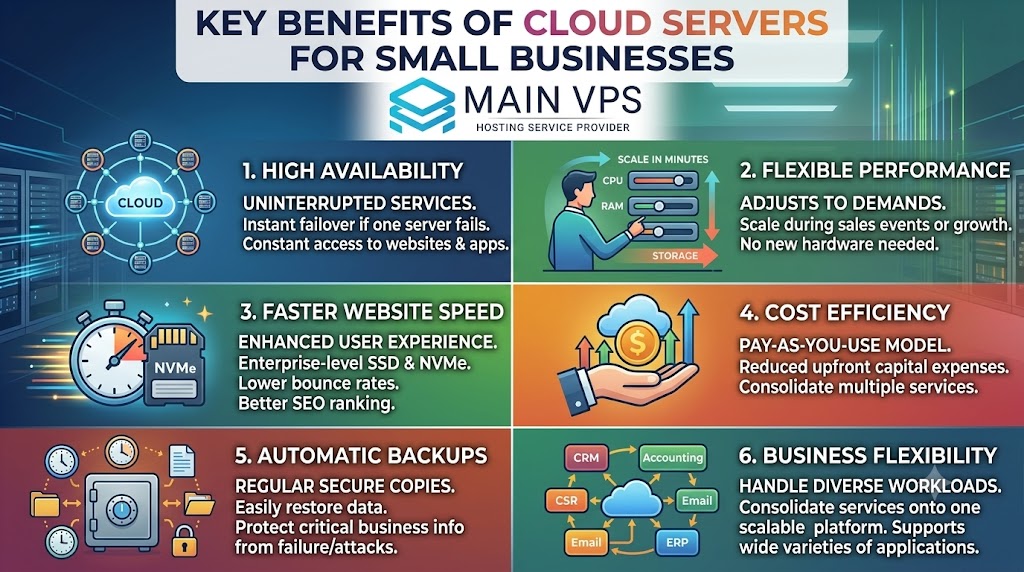
Key Benefits of Cloud Servers for Small Businesses
High Availability
High availability is perhaps one of the key benefits of cloud servers for small enterprises. In contrast to conventional servers that depend on a physical unit, cloud servers are composed of multiple servers connected to each other. Whenever one server fails or undergoes maintenance, the other servers will take over the work instantly without causing any interruption to your services.
Through high availability, you can make sure that your business websites, apps, and services will always be available to your clients without experiencing downtimes. High availability plays an important role, especially in businesses where sales are conducted online through your website or apps.
Flexible Performance
The demands in business may be quite unpredictable. In times of promotions or sales events, marketing campaigns, product launches, or fast-growing periods, you may need to deal with sudden peaks of visitors on your website or app.
It is possible to scale your CPU, RAM, storage, and bandwidth capacity on cloud servers within minutes. There is no need to buy new hardware or move to a more powerful server you can simply adjust your current plan according to your needs.
In this way, you will provide high performance under conditions of high traffic but will also have the opportunity to cut your expenses when traffic drops.
Faster Website Speed
NVMe speed on websites is crucial in providing an enhanced user experience and increasing the SEO ranking of websites. Cloud servers have enterprise-level storage like SSD or NVMe storage, powerful processing capabilities, and fast networking, which enables them to provide fast response times.
The benefits that companies will enjoy by having a faster infrastructure include:
- Faster load times of websites, enhancing user experience and lowering bounce rates.
- Improved database performance, making it possible for applications to process queries faster.
- Fast response times from applications, ensuring that customers and employees have a great experience.
- Increased speed of file transfers; thus, backups and uploads/downloads will be done faster.
Having a faster website increases customer experience and can increase SEO results as well.
Cost Efficiency
For many small businesses, controlling operational costs is a top priority. Cloud hosting offers a cost-effective alternative to maintaining physical servers by using a pay-as-you-use or flexible monthly pricing model.
Instead of investing in expensive hardware, cooling systems, maintenance, and IT staff, businesses only pay for the resources they actually consume. This reduces upfront capital expenses while providing the flexibility to upgrade resources as needed.
As your business grows, your hosting environment can grow with it, eliminating the need for costly hardware replacements or complicated migrations.
Automatic Backups
Data is one of the most valuable assets for any business. Losing important files, customer information, or website data due to accidental deletion, cyberattacks, or hardware failures can have serious consequences.
Many cloud hosting providers include automated backup solutions that regularly create secure copies of your data. These backups make it easy to restore your server quickly if an unexpected issue occurs.
Automatic backups help businesses:
- Recover from accidental file deletion.
- Restore data after malware or ransomware attacks.
- Minimize downtime caused by system failures.
- Protect critical business information with minimal manual effort.
Having reliable backups provides peace of mind and ensures business continuity even during unexpected events.
Business Flexibility
Cloud servers are designed to support a wide variety of business workloads from a single platform. Whether you’re running a small website or managing multiple business applications, cloud infrastructure offers the flexibility to handle diverse requirements.
Common use cases include:
- Business websites for showcasing products and services.
- Customer Relationship Management (CRM) software to manage customer interactions and sales.
- Accounting systems for financial management and reporting.
- Business email hosting with secure and reliable communication.
- Databases for storing and processing business data.
- Enterprise Resource Planning (ERP) applications to streamline business operations.
- Development and testing environments for software projects and application deployment.
Because resources can be customized based on your workload, businesses can consolidate multiple services onto a single scalable cloud platform, simplifying infrastructure management while improving efficiency.
How Cloud Servers Work
Instead of hosting your applications on one physical computer, virtualization technology divides powerful hardware into multiple independent virtual servers.
Each cloud server receives its own:
- CPU allocation
- RAM
- Storage
- Operating system
- Network resources
Although multiple virtual servers share physical hardware, each operates independently.
This creates the experience of owning a dedicated server without the associated hardware costs.
Who Should Use Cloud Servers?
The cloud hosting option is very flexible and can serve businesses that operate in different sectors. It can be used by any firm, regardless of whether it needs to host its small business website or enterprise applications.
Since cloud hosting solutions can be enhanced as your business grows bigger, there is no need to worry that your business will outgrow your hosting service. Thus, cloud servers for small businesses are great for firms that experience growth and variable workloads.
The following are the businesses that greatly benefit from cloud hosting services.
Small Business Websites
Your company website is normally the very first point of contact between you and your clients. The slow speed of the site or its constant unavailability can harm your image and cause potential clients to turn to your competitors.
The cloud servers offer a solid base that will help you keep your website up and running all the time. The cloud servers will help you give your visitors a quality browsing experience as well as rank higher in the search engines thanks to the high uptime and speed.
Cloud hosting is best for:
- Company websites
- Websites of local businesses
- Service-oriented businesses
- Portfolios of businesses
- Landing pages for companies
- Business blogs
By ensuring consistent performance, cloud servers help businesses maintain credibility and improve customer satisfaction.
eCommerce Stores
Online stores usually encounter unexpected surges in traffic due to seasonal marketing campaigns and special events. Traditional hosting can fail to accommodate this traffic increase, which causes slow page loads and even websites going down.
Additional resources will be supplied by the cloud hosting whenever there is an increase in traffic, which keeps your online store speedy.
The importance of cloud hosting is particularly seen in:
- Seasonal sales
- Marketing campaigns during festivals
- Black Friday and Cyber Monday
- Special holiday sales
- New product launches
- Flash sales
- Marketing campaigns
This scalability helps online retailers deliver a seamless shopping experience, reduce cart abandonment, and maximize sales during peak traffic periods.
Software Companies
A software development team needs reliable environments for developing, testing, and deploying software applications. A cloud server hosting provides a developer with an environment that is highly flexible and can be customized based on the project’s needs.
Cloud-based environments facilitate activities such as
- Testing of software application
- Deployment of software application
- CI/CD pipelines
- Version Control System
- API hosting
- Containerization
- Database Management
- Development & Staging environments
Since resources can be allocated based on demand, a development team can deliver projects faster without additional burden of managing infrastructure.
Digital Agencies
Digital marketing agencies, web developers, and creative studios usually host websites and applications for many customers at once. Hosting that is reliable is vital to guarantee consistent performance of each client’s website.
Cloud hosting provides agencies with an opportunity to host several projects within a scalable infrastructure while streamlining server maintenance and ensuring high availability.
Advantages of cloud hosting for digital agencies include:
- Hosting of several customer websites
- Management of development and production environments
- Execution of client applications
- Resource allocation is convenient
- Website performance enhancement
- Streamlined server management
- Availability of business-critical projects
With an increasing number of clients, cloud servers will provide easy scaling of hosting capacity.
Startups
A startup requires infrastructure that should be cost-effective and scalable. It would be unnecessary for startups to invest money into expensive physical servers at the start of their business operations.
Cloud-based servers are the best choice for this type of situation due to the ability to use minimal hosting packages and gradually scale up with the increase of customers.
The benefits for startups from using cloud hosting include:
- Minimal initial cost
- Cost-effective monthly fees
- Scalability
- High performance level
- Quick installation
- Uptime
- Minimal maintenance of infrastructure
- Growing resources on demand
It provides startups with the opportunity to concentrate on their business and product growth, and not worry about expensive physical server upgrades.
Features to Look for in Cloud Servers for Small Businesses
Choosing the right cloud server involves more than comparing prices.
Look for features that directly improve performance, security, and scalability.
NVMe SSD Storage
NVMe drives provide significantly faster read and write speeds compared to traditional SSDs, improving website loading times and application responsiveness.
High Uptime Guarantee
Choose providers offering uptime guarantees of 99.9% or higher to minimize service interruptions.
Scalable Resources
Ensure you can upgrade:
- CPU cores
- Memory
- Storage
- Bandwidth
without migrating to a new server.
Daily Backups
Automated backups simplify disaster recovery and reduce the risk of permanent data loss.
Security Features
Look for providers that include:
- Firewall protection
- DDoS mitigation
- SSL support
- Malware scanning
- Secure access controls
24/7 Technical Support
Reliable customer support is essential when server issues arise.
Providers offering round-the-clock assistance can help minimize downtime.
Cloud Server vs. Shared Hosting
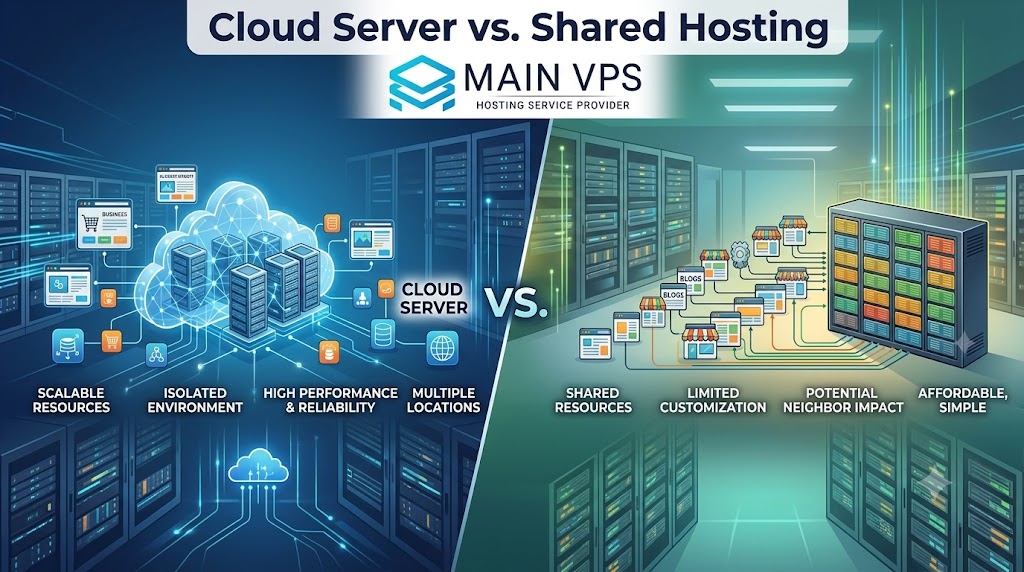
| Feature | Shared Hosting | Cloud Server |
|---|---|---|
| Performance | Shared resources | Dedicated virtual resources |
| Scalability | Limited | Instant upgrades |
| Security | Basic | Advanced protection |
| Customization | Limited | Full control |
| Reliability | Lower | High availability |
| Speed | Moderate | Excellent |
| Best For | Small blogs | Growing businesses |
If your business is expanding, cloud servers provide greater flexibility and performance than shared hosting.
Cloud Server vs. VPS Hosting
Many businesses compare cloud servers with VPS hosting.
While both use virtualization, there are important differences.
| Feature | VPS | Cloud Server |
|---|---|---|
| Infrastructure | Single server | Multiple servers |
| Downtime Risk | Higher | Lower |
| Resource Scaling | Limited | Easy |
| Availability | Moderate | High |
| Reliability | Good | Excellent |
Cloud hosting generally offers better redundancy and scalability.
Common Business Applications
Common Business Applications
Cloud servers can host various types of workloads.
These include:
- WordPress sites
- WooCommerce sites
- Customer relationship management (CRM)
- ERP systems
- Accounting applications
- Business email
- Remote desktop access
- File storage
- Database management systems
- API hosting
- SaaS applications
- Internal business software
Security Best Practices
Even with managed cloud hosting, businesses should follow good security practices.
Use Strong Passwords
Complex passwords reduce unauthorized access.
Enable Multi-Factor Authentication
MFA adds another layer of protection.
Install Security Updates
Regular updates close vulnerabilities before attackers exploit them.
Monitor Server Activity
Review logs to detect suspicious behavior early.
Perform Regular Backups
Maintain multiple backup copies stored securely.
Restrict User Permissions
Grant employees only the access they need.
How Much Do Cloud Servers Cost?
Pricing depends on several factors:
- CPU cores
- RAM
- Storage
- Data transfer
- Managed services
- Backup options
Entry-level cloud servers are often suitable for startups and small websites, while larger businesses may require additional resources for high-traffic applications.
Because cloud hosting scales on demand, businesses avoid paying for unnecessary capacity.
How to Choose the Best Cloud Server Provider
Not all providers offer the same level of performance or support.
Before making a decision, evaluate:
Infrastructure Quality
Look for enterprise-grade hardware with NVMe SSD storage and modern processors.
Network Reliability
Choose providers with redundant network connections and strong uptime records.
Scalability
Verify that upgrades can be completed without lengthy downtime.
Support Availability
24/7 expert support becomes invaluable during technical issues.
Data Center Locations
Hosting closer to your customers improves latency and website speed.
Transparent Pricing
Avoid providers with hidden fees or restrictive upgrade policies.
Why Managed Cloud Servers Are Worth Considering
Most small companies do not have IT staff for their servers.
Managed cloud servers simplify the process by providing services including:
- Server configuration
- Security patching
- Monitoring
- Backup services
- Performance optimization
- Software maintenance
This enables entrepreneurs to concentrate on expansion rather than server maintenance.
Why Choose MainVPS for Cloud Servers for Small Business?
MainVPS is your go-to solution if you want to find high-performing cloud infrastructure that can help you build a solid company.
MainVPS can offer you the following services:
- High-performing NVMe SSD storage
- Scalable cloud infrastructure
- High-performing CPUs
- Uptime
- Good security protection
- Resource upgrade capabilities
- Affordable prices
- Tech support 24/7
- Variety of operating systems
- Deployment convenience
MainVPS can provide you with cloud hosting solutions that will evolve along with your business.
Final Thoughts
Using the best cloud servers for a small business is arguably one of the wisest decisions you can ever make to ensure growth in the future.
Cloud hosting is unique in that it brings about performance, scalability, security, and cost-effectiveness in a way that cannot be matched by any other form of hosting. With cloud servers, you are able to host your sites and eCommerce platforms, among other business applications and databases.
As your business grows, you will require an infrastructure that grows alongside it. Choosing a cloud hosting company that offers you security, great uptime, scalability, and good support allows you to focus on growing your business.
For those looking for a future-proof and valuable infrastructure, cloud hosting servers are perfect for you.
Frequently Asked Questions
1. What are cloud servers for small businesses?
Cloud servers are virtual servers hosted on cloud infrastructure that provide scalable, secure, and reliable computing resources for websites, applications, databases, and business software.
2. Are cloud servers better than shared hosting?
Yes. Cloud servers offer dedicated resources, better security, higher uptime, improved performance, and easy scalability compared to shared hosting.
3. Can I upgrade my cloud server later?
Absolutely. Most cloud providers allow you to increase CPU, RAM, storage, and bandwidth as your business grows without migrating to a new server.
4. Are cloud servers secure?
Yes. Quality cloud hosting providers include firewalls, DDoS protection, data encryption, automated backups, and security monitoring to help protect your data.
5. Do I need technical knowledge to use a cloud server?
Not necessarily. Managed cloud server plans include setup, maintenance, updates, monitoring, and technical support, making them suitable for users without server administration experience.
6. Can I host multiple websites on one cloud server?
Yes. Depending on your server resources and control panel, you can host multiple websites and applications on a single cloud server.
7. Is cloud hosting suitable for eCommerce websites?
Yes. Cloud servers are ideal for eCommerce because they provide fast performance, scalability during traffic spikes, and strong security for customer transactions.
8. How much RAM does a small business cloud server need?
Most small business websites can start with 2–4 GB RAM, while larger applications or high-traffic websites may require 8 GB or more.
9. What operating systems are available on cloud servers?
Most providers offer Linux distributions such as Ubuntu, Debian, CentOS, AlmaLinux, Rocky Linux, as well as Windows Server options.
10. How do I choose the best cloud server for my business?
Evaluate factors such as performance, scalability, storage type (preferably NVMe SSD), uptime guarantee, security features, technical support, pricing, and managed services before selecting a provider.
Suggestions:
- https://mainvps.net/blog/linux-reseller-hosting/
- https://mainvps.net/blog/lifetime-web-hosting-2026/
- https://mainvps.net/blog/windows-reseller-web-hosting/
- https://mainvps.net/blog/best-wordpress-hosting-providers/
- https://mainvps.net/blog/linux-vps-hosting-india/
- https://mainvps.net/blog/low-cost-windows-vps-hosting-in-india/
- https://mainvps.net/blog/cheap-dedicated-server-hosting-providers/
- https://mainvps.net/blog/windows-server-guide-dde-dns-tls-1-2-uptime/
- https://mainvps.net/blog/dedicated-server-hosting-netherlands/
- https://mainvps.net/blog/dedicated-server-low-price/
- https://mainvps.net/blog/vps-hosting-in-los-angeles-us/
- https://mainvps.net/blog/dedicated-server-in-nedzone-nl/
- https://mainvps.net/blog/buy-linux-vps-hosting/
- https://mainvps.net/blog/managed-windows-vps-hosting/
- https://mainvps.net/blog/what-is-wmi-provider-host-complete-guide/
- https://mainvps.net/blog/cloud-hosting-vs-vps-2026/
- https://mainvps.net/blog/vps-hosting-for-ecommerce-guide/
- https://mainvps.net/blog/vps-hosting-for-saas-applications/
- https://mainvps.net/blog/us-dedicated-server-provider/
- https://mainvps.net/blog/dedicated-server-with-cpanel-us/
- https://mainvps.net/blog/dedicated-server-with-root-access-us/
- https://mainvps.net/blog/dedicated-server-with-nvme-us/