
Selecting an appropriate hosting service is one of the most critical decisions that one needs to make when building a website or web application. Today, there are two major types of hosting services that are most popular: dedicated server vs cloud hosting. While both offer highly efficient hosting services, they differ in many ways when it comes to performance, scalability, cost-effectiveness, security, and management.
Regardless of whether you’re developing a growing e-commerce site, corporate website, SaaS application, or high-traffic platform, knowing the differences between dedicated servers and cloud hosting can be very beneficial.
What Is a Dedicated Server?
A dedicated server is a physical server allocated to one specific client only. Unlike shared hosting and VPS hosting, in dedicated hosting, all the resources of the server, such as CPU, RAM, storage, and bandwidth, are solely dedicated to one single client.
It implies that you have full control over the server’s environment, its operating system, software installations, and security settings.
Key Features of Dedicated Servers
- Exclusive access to all the resources of the server
- Root-level or administrator access
- High performance and reliability
- Customizable hardware setup
- Increased security and privacy
- Ideal for resource-intensive applications
Dedicated servers are commonly used by enterprises, gaming platforms, financial organizations, and websites with consistently high traffic.
What Is Cloud Hosting?
In cloud hosting, servers are interconnected through networks to host sites and apps. The resources in cloud hosting are not dependent on any particular server since the resources are spread across several servers.
In case of any problem with one server, another server seamlessly takes the place of that server in order to ensure high availability.
Key Features of Cloud Hosting
- Dynamic resource management
- Maximum availability and redundancy
- Scalability
- Pay-per-use pricing model
- Failover capabilities
- Quick deployment
Cloud hosting is popular among startups, SaaS businesses, developers, and companies experiencing fluctuating traffic patterns.
Dedicated Server vs Cloud Hosting: Core Differences
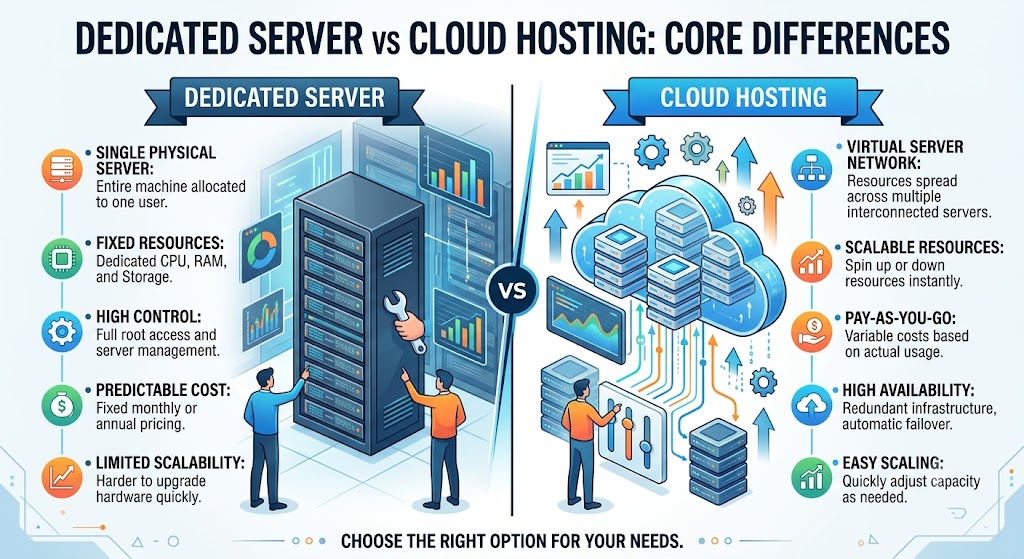
Understanding the fundamental differences between these hosting solutions is essential before making a decision.
| Feature | Dedicated Server | Cloud Hosting |
|---|---|---|
| Infrastructure | Single physical server | Multiple interconnected servers |
| Performance | Consistent and predictable | Flexible and scalable |
| Scalability | Limited by hardware | Virtually unlimited |
| Cost Structure | Fixed monthly pricing | Pay-as-you-use pricing |
| Security | Complete isolation | Shared cloud infrastructure |
| Uptime | Depends on hardware reliability | High redundancy and failover |
| Resource Availability | Dedicated resources | Shared cloud resources |
| Customization | Extensive customization | Limited by provider policies |
Performance Comparison
Performance affects user experience, ranking on search engines, and the efficiency of the applications. Companies using resource-intensive applications usually prefer a hosting environment that provides high speed and responsiveness. When comparing dedicated server hosting with cloud hosting, performance parameters like CPU performance, speed of hard disk, latency, and the ability to manage workloads have a considerable effect.
Dedicated Server Performance
With a dedicated server, all hardware resources belong to a single customer. There is no competition for CPU cycles, memory, or storage performance.
Benefits include:
- Stable performance
- Low latency
- High processing power
- Better handling of heavy workloads
- Consistent application behavior
Dedicated servers are particularly beneficial for high-traffic websites, large databases, streaming applications, and enterprise software that require uninterrupted performance.
Cloud Hosting Performance
Cloud hosting provides excellent performance by distributing workloads across multiple servers.
Advantages include:
- Dynamic resource allocation
- Load balancing
- Rapid scaling
- High availability
Cloud hosting is ideal for applications with fluctuating workloads because resources can be adjusted automatically as demand changes.
Scalability Comparison
As a company grows, the host environment needs to be ready to manage more traffic, bigger databases, and other requirements. Scalability means that your host environment will be prepared for any growth without having many problems.
Dedicated Server Scalability
If you need to scale your dedicated server, the following is needed:
- Upgrading hardware
- Adding new servers
- Moving data
- Possible downtime
Even though a high-performance dedicated server in the US can be scaled, this may involve some planning and certain skills.
Cloud Hosting Scalability
When it comes to scalability, cloud hosting is a great option.
Users can:
- Add more RAM
- Use more CPU power
- Get additional storage space
- Manage traffic peaks
This makes cloud hosting great for fast-growing companies.
Cost Comparison
Hosting costs vary depending on performance requirements, traffic levels, and resource usage. Understanding long-term expenses is essential before selecting a hosting solution.
Dedicated Server Costs
Dedicated servers usually involve fixed monthly charges.
Costs depend on:
- Hardware specifications
- Storage type
- Bandwidth allocation
- Managed or unmanaged services
Advantages:
- Fixed expenses
- No unexpected usage fees
- Better value for high-resource applications
Organizations with predictable workloads often prefer dedicated servers because budgeting becomes easier.
Cloud Hosting Costs
Cloud hosting commonly uses a pay-as-you-go model.
Pricing depends on:
- Resource consumption
- Data transfer
- Storage usage
- Compute time
Advantages:
- Lower initial investment
- Pay only for what you use
- Flexible budgeting
This model is especially beneficial for projects with seasonal traffic or changing resource requirements.
Security Comparison
Cybersecurity dangers only seem to rise, and therefore, hosting security becomes one of the main priorities for companies of any size. Control and protection levels provided by your hosting infrastructure may greatly influence data security.
Dedicated Server Security
Dedicated servers offer complete isolation.
Benefits include:
- No shared resources
- Control over the security policies
- Firewall customization
- Improved compliance
- No cross-tenant risks
Dedicated environments are often preferred by organizations that handle sensitive customer information.
Cloud Hosting Security
Cloud providers invest heavily in security technologies.
Features may include:
- DDoS protection
- Data encryption
- Security monitoring
- Automated backups
- Identity management tools
Cloud security has developed greatly in the past few years, making it a dependable choice for many firms.
Reliability and Uptime
Website downtime can lead to lost revenue, reduced customer trust, and lower search engine rankings. Reliability should be a major factor when comparing hosting solutions.
Dedicated Server Reliability
Dedicated servers provide reliable performance but rely on a single physical machine.
If hardware fails:
- Repairs may be required
- Downtime can occur
- Recovery may take time
Using backup systems and redundant hardware can improve overall reliability.
Cloud Hosting Reliability
Cloud hosting offers redundancy across multiple servers.
Benefits include:
- Automatic failover
- Distributed infrastructure
- Reduced downtime risks
- Improved disaster recovery
This architecture allows cloud-hosted applications to remain available even if one server experiences issues.
Customization and Control
Some businesses require complete control over their hosting environment to support specialized software, security configurations, or development requirements.
Dedicated Server Customization
Dedicated servers offer complete control.
Users can:
- Install custom operating systems
- Configure specialized applications
- Adjust server settings
- Implement custom security measures
This level of flexibility is especially useful for developers and enterprise IT teams.
Cloud Hosting Customization
Cloud hosting environments are customizable but often subject to provider limitations.
Some restrictions may apply regarding:
- Hardware selection
- Kernel modifications
- Network configurations
Despite these limitations, cloud platforms still offer extensive management options for most business applications.
Resource Allocation
Efficient resource allocation ensures applications receive the computing power they need to perform effectively.
Dedicated Servers
Resources are permanently allocated.
Benefits include:
- Guaranteed CPU performance
- Dedicated RAM
- Consistent storage speeds
- No noisy neighbors
This predictability is valuable for mission-critical applications.
Cloud Hosting
Resources are allocated dynamically.
Benefits include:
- Flexible scaling
- Temporary resource expansion
- Efficient utilization
Cloud environments are particularly effective for handling variable workloads without overprovisioning resources.
Disaster Recovery
A strong disaster recovery strategy helps businesses recover quickly from unexpected failures, cyberattacks, or data loss incidents.
Dedicated Servers
Recovery typically depends on:
- Backups
- Secondary servers
- Manual recovery procedures
Organizations often implement additional backup infrastructure to improve recovery times.
Cloud Hosting
Cloud infrastructure often includes:
- Geographic redundancy
- Automated backups
- Rapid failover systems
- Multi-region deployment options
These features make cloud hosting highly resilient and capable of maintaining business continuity during unexpected events.
When Should You Choose a Dedicated Server?
A US dedicated server provider is ideal when:
- You need maximum performance
- Security is a top priority
- Your traffic levels are predictable
- You require complete server control
- Compliance requirements are strict
- You run resource-intensive applications
Common Use Cases
- Enterprise websites
- Financial applications
- Gaming servers
- Streaming platforms
- Large databases
- High-traffic eCommerce stores
When Should You Choose Cloud Hosting?
Cloud hosting is the better choice when:
- Traffic fluctuates regularly
- Scalability is important
- You need rapid deployment
- High availability is critical
- Budget flexibility is required
- You want simplified infrastructure management
Common Use Cases
- SaaS platforms
- Startup applications
- Development environments
- Growing businesses
- Mobile applications
- Seasonal eCommerce websites
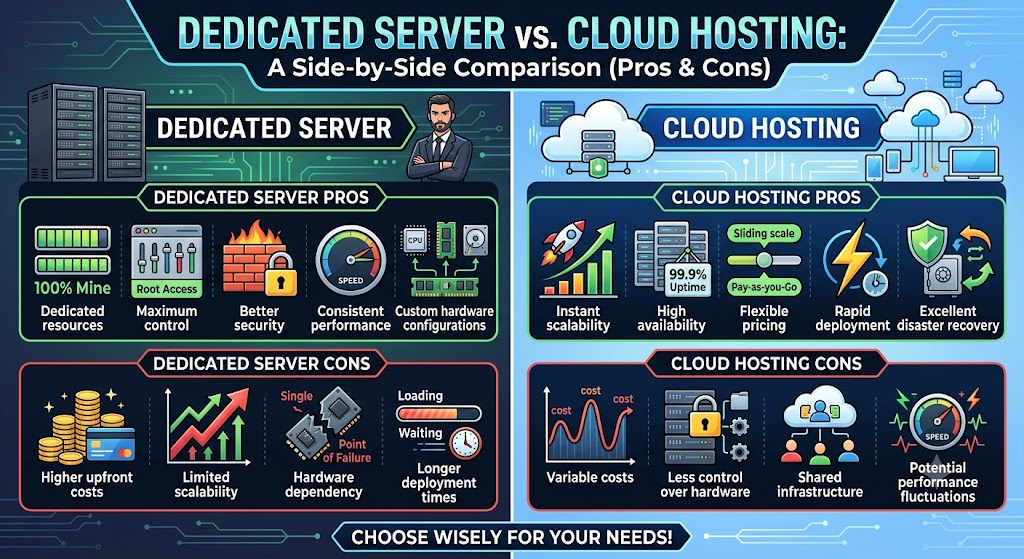
Dedicated Server vs Cloud Hosting: Pros and Cons
Dedicated Server Pros
- Dedicated resources
- Maximum control
- Better security
- Consistent performance
- Custom hardware configurations
Dedicated Server Cons
- Higher upfront costs
- Limited scalability
- Hardware dependency
- Longer deployment times
Cloud Hosting Pros
- Instant scalability
- High availability
- Flexible pricing
- Rapid deployment
- Excellent disaster recovery
Cloud Hosting Cons
- Variable costs
- Less control over hardware
- Shared infrastructure
- Potential performance fluctuations
Which Option Is Better for SEO?
Hosting quality can indirectly affect search engine rankings.
Factors influencing SEO include:
- Website speed
- Uptime
- Security
- User experience
Dedicated servers often provide faster and more consistent performance, while cloud hosting offers excellent uptime and scalability.
Both can support strong SEO performance when properly configured.
Future Trends in Hosting
The hosting sector keeps growing very fast.
Up-and-coming trends are:
- Hybrid cloud approach
- AI for infrastructure management
- Edge computing
- Cybersecurity systems
- Green hosting
Lots of companies use hybrid approaches to get all benefits of dedicated servers and cloud infrastructure.
Conclusion
Ultimately, the battle of choosing cloud hosting vs a dedicated server boils down to what your business needs, budget, and growth plans are.
In case you require optimum performance, security, customization, and dedicated resources, the option of a dedicated server comparison would suit you well. If, however, you prioritize flexibility, scalability, uptime, and cost efficiency, then cloud hosting might just be the solution for you.
It’s important that you take a moment to evaluate your current traffic, growth expectations, security needs, and budget before settling on a hosting solution. This could make a significant difference to the performance of your website.
FAQs
1. What is the difference between a dedicated server and cloud hosting?
A dedicated server uses one physical machine, while cloud hosting uses multiple connected servers.
2. Which is better for website performance?
Dedicated servers offer more consistent performance with dedicated resources.
3. Is cloud hosting more scalable?
Yes, cloud hosting allows quick and easy resource scaling.
4. Which hosting solution is more cost-effective?
Cloud hosting suits variable workloads, while dedicated servers are better for long-term heavy usage.
5. Is a dedicated server more secure?
Yes, dedicated servers provide greater control and resource isolation.
6. Which hosting option provides better uptime?
Cloud hosting generally offers higher uptime through built-in redundancy.
7. Who should choose a dedicated server?
Businesses that need high performance, security, and full server control.
8. Who should choose cloud hosting?
Businesses that need flexibility, scalability, and easy resource management.
9. Can cloud hosting handle traffic spikes?
Yes, cloud hosting can scale resources automatically during traffic surges.
10. Which is the better choice?
Choose dedicated servers for performance and cloud hosting for scalability.
Suggestions:
- https://mainvps.net/blog/lifetime-web-hosting-2026/
- https://mainvps.net/blog/windows-reseller-web-hosting/
- https://mainvps.net/blog/best-wordpress-hosting-providers/
- https://mainvps.net/blog/linux-vps-hosting-india/
- https://mainvps.net/blog/low-cost-windows-vps-hosting-in-india/
- https://mainvps.net/blog/cheap-dedicated-server-hosting-providers/
- https://mainvps.net/blog/windows-server-guide-dde-dns-tls-1-2-uptime/
- https://mainvps.net/blog/dedicated-server-hosting-netherlands/
- https://mainvps.net/blog/dedicated-server-low-price/
- https://mainvps.net/blog/vps-hosting-in-los-angeles-us/
- https://mainvps.net/blog/dedicated-server-in-nedzone-nl/
- https://mainvps.net/blog/buy-linux-vps-hosting/
- https://mainvps.net/blog/managed-windows-vps-hosting/
- https://mainvps.net/blog/what-is-wmi-provider-host-complete-guide/
- https://mainvps.net/blog/cloud-hosting-vs-vps-2026/
- https://mainvps.net/blog/vps-hosting-for-ecommerce-guide/
- https://mainvps.net/blog/vps-hosting-for-saas-applications/
- https://mainvps.net/blog/vps-reseller-hosting-in-netherlands/
- https://mainvps.net/blog/dedicated-server-hosting-in-us/
- https://mainvps.net/blog/linux-reseller-hosting/
- https://mainvps.net/blog/dedicated-server-with-nvme-us/
- https://mainvps.net/blog/dedicated-server-with-root-access-us/
- https://mainvps.net/blog/dedicated-server-with-cpanel-us/
- https://mainvps.net/blog/litespeed-vps-hosting-in-netherlands/
- https://mainvps.net/blog/cheap-windows-vps-hosting/