Running an online business requires you to be fully aware that the server where your site, application, or software runs defines everything: performance, stability, security, and, hence, revenue. Among a multitude of different hosting types offered today, a Windows VPS Server USA is definitely one of the most in-demand hosting types for those who are seeking the convenience of a dedicated server at affordable prices.
Here, in this article, we will cover all aspects related to using a Windows VPS hosting, from the definition to choosing the right service provider. If you are a developer, web agency, e-commerce store owner, or IT specialist of any enterprise, then this material will certainly prove useful to you.
What Is a Windows VPS Server?
The term “Windows VPS,” or “virtual private server,” refers to a virtual server that runs on the Windows VPS Server USA operating system and is located on real hardware but is isolated using virtualization technologies in separate units of resources. It should be mentioned that, contrary to shared hosting, where you have to share CPU, RAM, and hard drive space with lots of other users, Windows VPS gives you access to dedicated resources.
It resembles a personal flat in one building because while you are sharing the whole building, your flat is your own; nobody can meddle in your affairs there. That is the essence of a Windows VPS USA server.
The very idea that a USA VPS Windows Server serves as its foundation makes it a perfect solution for those who have to operate Windows-based applications, ASP.NET websites, MSSQL databases, RDP connections, or any other enterprise application that is either not working or just won’t work under a Linux operating system.
Why Choose a USA-Based Windows VPS?
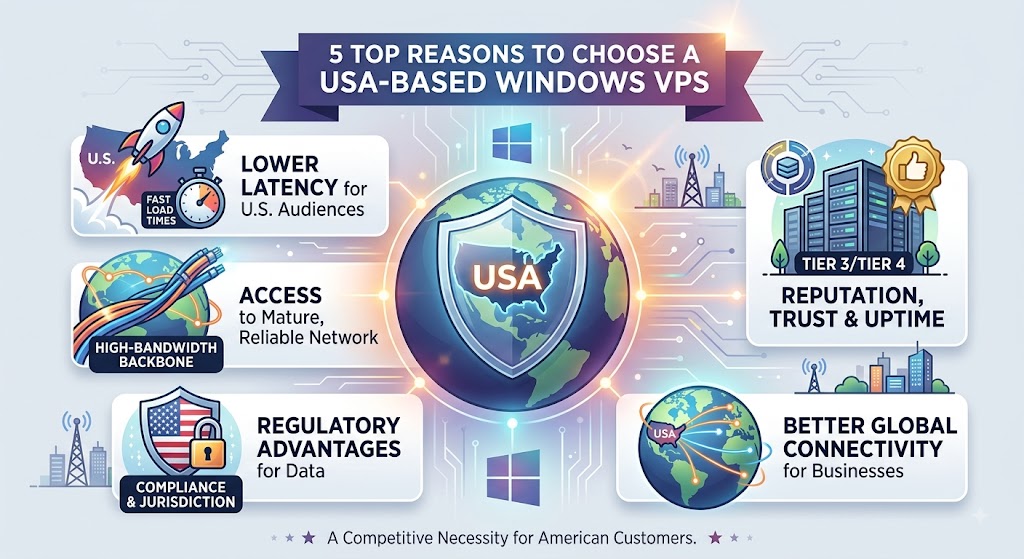
Location matters more than most people realize when it comes to hosting. Choosing a Windows VPS Server in the USA specifically means your server is physically located in a U.S.-based data center. Here’s why that matters:
- Lower latency for U.S. and North American audiences — If most of your traffic comes from the United States, hosting your server closer to your visitors dramatically reduces load times.
- Access to a mature, high-bandwidth internet backbone — U.S. data centers typically connect to some of the fastest and most reliable network infrastructure in the world.
- Regulatory and compliance advantages — Certain businesses, especially those handling U.S. customer data, prefer or are required to keep servers within U.S. jurisdiction.
- Better connectivity for global businesses — The U.S. sits at a major crossroads of global internet traffic, offering solid performance even for visitors outside North America.
- Reputation and trust — U.S.-based infrastructure is often associated with strong uptime guarantees and enterprise-grade data center standards (Tier 3 and Tier 4 facilities are common).
For businesses targeting American customers, a USA-based Windows VPS isn’t just a nice-to-have; it’s often a competitive necessity.
Key Benefits of Windows VPS Server USA
Let’s break down the core advantages that make Windows VPS hosting so appealing:
1. Full Root/Administrator Access
It allows you full administrative access to your server. Administrator access gives you the freedom to install applications, configure your server, create users, define your own security policies, and configure the applications that you may want to host on the server. It gives you much more flexibility compared to shared hosting.
You will be able to configure your server according to your own workload without relying on any external help from your hosting provider. Thus, a Windows VPS is a great solution for a custom hosting environment for your business.
2. Dedicated Resources
You will have access to the CPU cores, RAM, and storage space for your virtual server. You will be able to get better performance compared to the usual shared hosting. You do not have to worry about a noisy neighbor using excessive resources and hampering your application or website.
The dedicated resources are really useful for websites, databases, business applications, and software requiring stable computing power. You can choose your VPS according to your workload and upgrade your resources when your needs rise.
3. Windows-Native Compatibility
A VPS server that runs Windows is built to be fully compatible with all of the Microsoft products. It allows one to operate programs such as ASP.NET, .NET Core, MSSQL Server, MS Access, Classic ASP, IIS, and many others without any need to use a complicated compatibility layer.
Thus, a Windows VPS server would be especially useful for those developers and businesses that operate within the Microsoft environment. It would also be possible to use all the familiar interfaces and tools to control applications, databases, and server settings.
4. Remote Desktop Access
Most of the Windows VPS plans come with the possibility to connect to the server using the Remote Desktop Protocol (RDP). With this protocol, one could use a convenient graphical Windows interface to connect to a VPS server.
Thus, RDP allows users to control a server from a desktop computer, laptop, or any other compatible device. With an RDP connection, it would be possible to manage files, install applications, configure software, monitor resources, and do other server administration tasks.
5. Scalability
The business requirements may change rapidly, making it easy for you to scale resources based on workloads with the help of a Windows VPS. Based on the service provider and plans, you can add CPU cores, memory, storage space, and bandwidth without relocating your application to a different hosting environment.
It will be easy for businesses to begin with a proper configuration and scale gradually rather than purchasing too many resources right at the start. It can also help to accommodate growing websites, applications, databases, and other online services.
6. Enhanced Security
The Windows VPS gives you an isolated virtual environment, which means that you get more control over security configurations than with shared hosting. It is possible to configure firewalls, access permissions, Windows Defender, and other security settings as per your requirements.
Windows security and update patching will be very useful in protecting your server from the vulnerabilities that have been discovered previously. Other steps that you can take to improve your VPS security include strong passwords, network-level authentication, limiting administrator access, backups, and monitoring.
7. Predictable Performance
Because VPS resources are allocated to your virtual server, performance is generally more predictable than in a heavily shared hosting environment. Your applications can maintain more consistent access to CPU, RAM, and storage resources.
This is particularly valuable for e-commerce websites, business applications, SaaS platforms, databases, and other workloads where performance interruptions can affect productivity or revenue. A reliable Windows VPS environment can help businesses maintain smoother operations and provide a more consistent experience for users.
Windows VPS vs Shared Hosting vs Dedicated Server
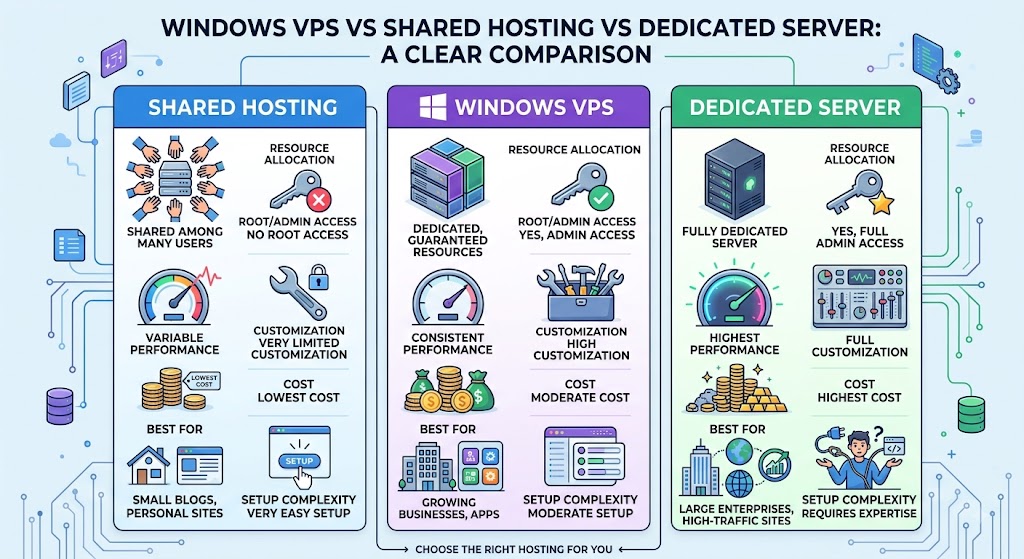
| Feature | Shared Hosting | Windows VPS | Dedicated Server |
|---|---|---|---|
| Resource Allocation | Shared among many users | Dedicated, guaranteed | Fully dedicated |
| Root/Admin Access | No | Yes | Yes |
| Performance | Variable | Consistent | Highest |
| Customization | Very limited | High | Full |
| Cost | Lowest | Moderate | Highest |
| Best For | Small blogs, personal sites | Growing businesses, apps | Large enterprises, high-traffic sites |
| Setup Complexity | Very easy | Moderate | Requires expertise |
Who Should Use a Windows VPS Server in the USA?
A Windows VPS isn’t for everyone, but it’s an excellent fit for:
- Developers building or testing .NET, ASP.NET, or MSSQL-based applications
- E-commerce businesses running platforms that require Windows-specific software
- Digital marketing agencies managing multiple client campaigns, tools, or automation software
- Forex and stock traders who need a stable, always-on environment to run trading bots (like MetaTrader Expert Advisors) without interruption
- Remote teams needing a shared, centralized Windows environment accessible from anywhere
- Software companies hosting proprietary Windows-based tools for clients
- Businesses running legacy Windows applications that can’t be migrated to Linux
If your workflow depends on the Microsoft ecosystem in any way, a Windows VPS Server USA is almost always the right call over a Linux-based alternative.
Essential Features to Look For
When evaluating Windows VPS providers, don’t just compare prices compare the value, reliability, and features included with each plan. A low-cost VPS may not always provide the performance, security, or support your business needs. Look for the following essential features:
- SSD/NVMe Storage — Fast SSD or NVMe storage can significantly improve read and write speeds, helping websites, databases, applications, and business software load and respond faster. NVMe storage is particularly useful for workloads that perform frequent data operations.
- Guaranteed Uptime SLA—Look for providers offering at least a 99.9% uptime guarantee backed by a clear Service Level Agreement (SLA). High uptime helps keep your website, applications, and remote services available to customers and employees with minimal interruptions.
- Full Administrator/RDP Access — Make sure the plan provides complete administrator access through Remote Desktop Protocol (RDP). Full access allows you to install software, configure Windows settings, manage users, customize security policies, and control your server environment according to your requirements.
- Scalable Resource Plans — Choose a provider that allows you to increase CPU, RAM, storage, and other resources as your workload grows. Easy upgrades let you handle increasing traffic and application requirements without the hassle of migrating your data to an entirely different server.
- Data Center Location Options — Data center location can affect network latency and connection quality. Providers with multiple U.S. locations, such as East Coast, West Coast, and Central regions, give you more flexibility to select a server closer to your target audience and business users.
- DDoS Protection — Distributed denial-of-service attacks can overwhelm a server with large amounts of unwanted traffic. Built-in DDoS protection can help detect and mitigate malicious traffic before it causes major service disruptions, making it an important feature for business websites and online applications.
- Automated Backups — Regular automated backups provide an additional layer of protection against accidental deletion, software problems, configuration errors, and hardware failures. Check how frequently backups are created, how long they are retained, and whether restoring data is simple and reliable.
- 24/7 Technical Support — Reliable technical support is valuable when dealing with Windows Server configuration, networking, RDP connectivity, software installation, or unexpected performance problems. Look for providers that offer support around the clock through multiple channels and have experience with Windows VPS environments.
- Licensed Windows Server OS — Always confirm that the provider supplies a properly licensed Windows Server operating system. Depending on the available plans, this may include versions such as Windows Server 2019 or Windows Server 2022. A legitimate license helps ensure that your server operates within Microsoft’s licensing requirements and receives appropriate updates and security support.
- High-Speed Network Connectivity — A fast and stable network connection is essential for applications that require frequent data transfers or remote access. Check the provider’s available network speeds, bandwidth allocation, and connectivity options to ensure they can support your expected workload.
- Strong Security Controls — Look for features such as firewalls, secure administrator access, network monitoring, and security updates. The ability to configure security settings yourself gives you greater control over protecting applications and sensitive business data.
- Easy Server Management — A good Windows VPS provider should make it simple to manage your server. Features such as a user-friendly control panel, VPS reboot options, resource monitoring, operating system management, and remote console access can make everyday administration easier.
Choosing a Windows VPS based on these features rather than price alone can help you build a more reliable, secure, and scalable hosting environment for your website, applications, and business operations.
Common Use Cases
A Windows VPS Server USA supports a wide variety of real-world applications, including:
- Website and application hosting for businesses requiring ASP.NET or IIS
- Database hosting for MSSQL Server-based applications
- Remote work environments where teams need a centralized Windows desktop accessible from anywhere
- Automated trading systems, particularly for forex traders running MetaTrader 4/5 bots around the clock
- Software testing and development environments that mirror production Windows systems
- VPN and proxy hosting for secure, private browsing or business networking
- Game server hosting for Windows-based multiplayer game servers
- Backup and disaster recovery systems that require an independent, always-available environment
How to Choose the Right Windows VPS Provider
With dozens of hosting companies offering Windows VPS USA plans, narrowing down the right provider can feel overwhelming. Instead of choosing a provider based only on price, evaluate its performance, infrastructure, support, security, and long-term value. Here’s a practical framework:
1. Define Your Resource Needs First
It is important to start by determining the resources that are required by your website, app, or business load. Calculate the necessary amount of CPU cores, RAM, storage, and bandwidth needed according to your actual consumption and expectations.
Thus, a small website can be operated using a typical VPS setup. Databases, development environments, trading apps, and business software require more CPU and RAM. Also, it would be wise to have some extra resources left for growth in order to avoid bottlenecks.
2. Check the Data Center Locations
The location of the data center is an important factor that influences response time and connectivity. So, if most of your customers live in the U.S. Eastern region, the choice of the data center should include locations like New York and Virginia. In case with West Coast residents, locations like Los Angeles and Seattle can be better for you.
If you serve customers across the entire USA, try to find a hosting company with several options of U.S. data centers.
3. Read the Fine Print on Uptime Guarantees
Although a 99.9% uptime SLA looks very attractive, you should know exactly what the guarantee includes before buying a hosting plan. See if the maintenance periods, network downtimes, or customer-related problems are excluded.
At the same time, you need to know what kind of compensation the provider will give you if their uptime guarantee is not fulfilled. This will help you decide if the uptime guarantee really gives any real benefits to your business.
4. Test Their Support Responsiveness
The role of technical support becomes very important when you encounter RDP connection problems, issues with Windows configuration, application problems, or network interruptions. You should send a pre-sales inquiry to the provider before making an order and see how fast and competently they will be.
See if the technical support staff gives you any practical information or only replies in general terms. Efficient pre-sales support often reflects the post-sales one.
5. Compare Licensing Terms
As the Windows Server license is essential, make sure to check how many licenses you get in your VPS plan. Make sure what Windows Server version comes with your package and whether the cost of a license is included in the quoted price.
An honest hosting provider will definitely provide information about its licensing conditions without waiting until you find out that you have to pay more.
6. Look for Transparent Pricing
The initial price for the monthly service is not all you should compare while shopping for Windows VPS hosting services. Make sure to consider the full pricing policy and all hidden costs, such as those related to setup, backups, additional IPs, bandwidth, etc.
Some hosting providers quote a great price initially but significantly raise it at the renewal period.
7. Check Reviews From Real Customers
It is always helpful to check real customer reviews as this can tell something about server performance, uptime, tech support, network quality, and billing policy. Try not to take for granted testimonials written on the provider’s official site but look for reviews written on independent platforms.
Do not trust one particular review that is either positive or negative. Instead, try to find out whether there are similar remarks in different reviews that have been left by various customers.
8. Evaluate Security Features
You need to analyze security features offered by the VPS providers too, as this aspect is very important. See whether the virtual private server offers any DDoS protection, security at the network level, firewalling, monitoring, and regular Windows updates.
Moreover, it will be useful to know what security-related duties are on you. Though the hosting provider takes care of its own network, there is still a lot to do on your own side.
Pricing: What Should You Expect to Pay?
Pricing for a Windows VPS Server USA typically depends on CPU cores, RAM, storage type, and bandwidth allowance. As a general guide:
- Entry-level plans (1-2 vCPU, 2-4GB RAM): Often affordable and suitable for small websites, testing environments, or light applications.
- Mid-tier plans (4 vCPU, 8-16GB RAM): Suited for growing businesses, moderate-traffic websites, and small databases.
- High-performance plans (8+ vCPU, 32GB+ RAM, NVMe storage): Designed for resource-intensive applications, high-traffic e-commerce, or multiple hosted services.
Keep in mind that Windows VPS plans are generally priced somewhat higher than Linux VPS equivalents, largely due to Windows Server licensing costs. However, the productivity and compatibility gains for Windows-dependent workloads usually justify the difference.
Windows VPS Security Best Practices
The ownership of a VPS also entails its protection. Here are some of the best practices:
- Change the default RDP port to minimize the chances of automated bot attacks.
- Activate a strong firewall and open only necessary ports.
- Always keep Windows Server patched with the latest security updates.
- Use complex and unique passwords; enable multi-factor authentication where possible.
- Install a reliable antivirus/anti-malware program.
- Ensure that there is automatic backup of your data.
- Check your login attempts and get alerts for anything unusual.
- Restrict access rights to administrator accounts only to authorized personnel.
Final Thoughts
Choosing a Windows VPS server in the USA may well be one of the most productive investments in infrastructure for a young company. This service offers the perfect combination of performance, control, and cost-effectiveness; the user gets both dedicated resources and full control over the environment, together with the benefits of a robust infrastructure of U.S. data centers at a modest price.
Regardless of whether it is an important application, an automated trading platform, or any other program based on Windows that will be deployed on the server, the chosen Windows VPS in the USA will become a good starting point for developing your business.
In order to choose the right provider of Windows VPS in the USA, it is necessary to consider the requirements and check the availability of support services of the provider.
Frequently Asked Questions
1. Is a Windows VPS Server USA better than a Linux VPS?
This depends on the software you are running. A Windows VPS is a better choice when you use .NET, ASP.NET, or MSSQL applications. Otherwise, in most cases, it will be cheaper and have all the needed features in a Linux environment.
2. Can I upgrade my Windows VPS account later?
Yes, usually all the good companies provide an option to increase CPU, RAM, and storage on your VPS as you need.
3. Do I need any technical knowledge to run a Windows VPS?
It is useful to know at least the basics of Windows Server management. But compared to the Linux command line, working with Windows via an RDP client is easier and less time-consuming.
4. Is a VPS in the USA suitable for an international audience?
Yes, especially if you combine it with a Content Delivery Network (CDN). In addition to the low latency provided by a VPS in the USA to US visitors, the content delivery network will speed up delivery of your content internationally.
5. What’s the difference between a Windows VPS and a Windows RDP?
Windows VPS stands for a server in its pure form, whereas Remote Desktop Protocol is just the method you use to get connected to it. All Windows VPSs come with RDP access, but not all RDP packages come with proper resource allocation and root control like a VPS does.
6. How much RAM and CPU do I need for my Windows VPS?
The answer depends on the specifics of your needs. If it’s a small website or some other light application, 2-4GB RAM and 1-2 vCPU cores are enough, but a database, trading bot, or some business application will definitely require 8GB RAM and 4+ cores at least. Don’t start with too much, as you can always scale up later.
7. Does the Windows Server license cost come with my VPS package?
Yes, with the majority of providers, the cost of a legal Windows Server license is included in the monthly or annual VPS price. Make sure to double-check it before purchasing, because some shady providers use illegal or improperly licensed products.
8. Is it possible to host a website on a Windows VPS?
Yes, a Windows VPS can host websites through IIS (Internet Information Services), ASP.NET or even using WordPress and other popular platforms, but for best performance, the use of a Linux VPS is preferable when it comes to WordPress and other PHP-based websites.
9. What is the security level of a Windows VPS server in the USA?
Windows VPS is much more secure than shared hosting because you will have an absolutely isolated environment. The level of security greatly depends on how you configure your server using firewalls, password protection, and other means, including virus scanners.
10. How long will it take me to install a Windows VPS?
The installation process of a Windows VPS is completely automatic and takes minutes up to several hours after purchase. You will get your RDP login information via email and can begin configuring your server right away.
Suggestions:
- https://mainvps.net/blog/lifetime-web-hosting-2026/
- https://mainvps.net/blog/windows-reseller-web-hosting/
- https://mainvps.net/blog/best-wordpress-hosting-providers/
- https://mainvps.net/blog/linux-vps-hosting-india/
- https://mainvps.net/blog/low-cost-windows-vps-hosting-in-india/
- https://mainvps.net/blog/cheap-dedicated-server-hosting-providers/
- https://mainvps.net/blog/windows-server-guide-dde-dns-tls-1-2-uptime/
- https://mainvps.net/blog/dedicated-server-hosting-netherlands/
- https://mainvps.net/blog/dedicated-server-low-price/
- https://mainvps.net/blog/vps-hosting-in-los-angeles-us/
- https://mainvps.net/blog/dedicated-server-in-nedzone-nl/
- https://mainvps.net/blog/buy-linux-vps-hosting/
- https://mainvps.net/blog/managed-windows-vps-hosting/
- https://mainvps.net/blog/what-is-wmi-provider-host-complete-guide/
- https://mainvps.net/blog/cloud-hosting-vs-vps-2026/
- https://mainvps.net/blog/vps-hosting-for-ecommerce-guide/
- https://mainvps.net/blog/vps-hosting-for-saas-applications/
- https://mainvps.net/blog/vps-reseller-hosting-in-netherlands/
- https://mainvps.net/blog/dedicated-server-hosting-in-us/
- https://mainvps.net/blog/linux-reseller-hosting/
- https://mainvps.net/blog/dedicated-server-with-nvme-us/
- https://mainvps.net/blog/dedicated-server-with-root-access-us/
- https://mainvps.net/blog/dedicated-server-with-cpanel-us/
- https://mainvps.net/blog/litespeed-vps-hosting-in-netherlands/
- https://mainvps.net/blog/cheap-windows-vps-hosting/